
1. Introduction
Thank you for choosing the Livofloral Narrow End Table with Charging Station. This manual provides detailed instructions for assembly, operation, maintenance, and troubleshooting to ensure safe and efficient use of your new furniture. Please read this manual thoroughly before assembly and retain it for future reference.
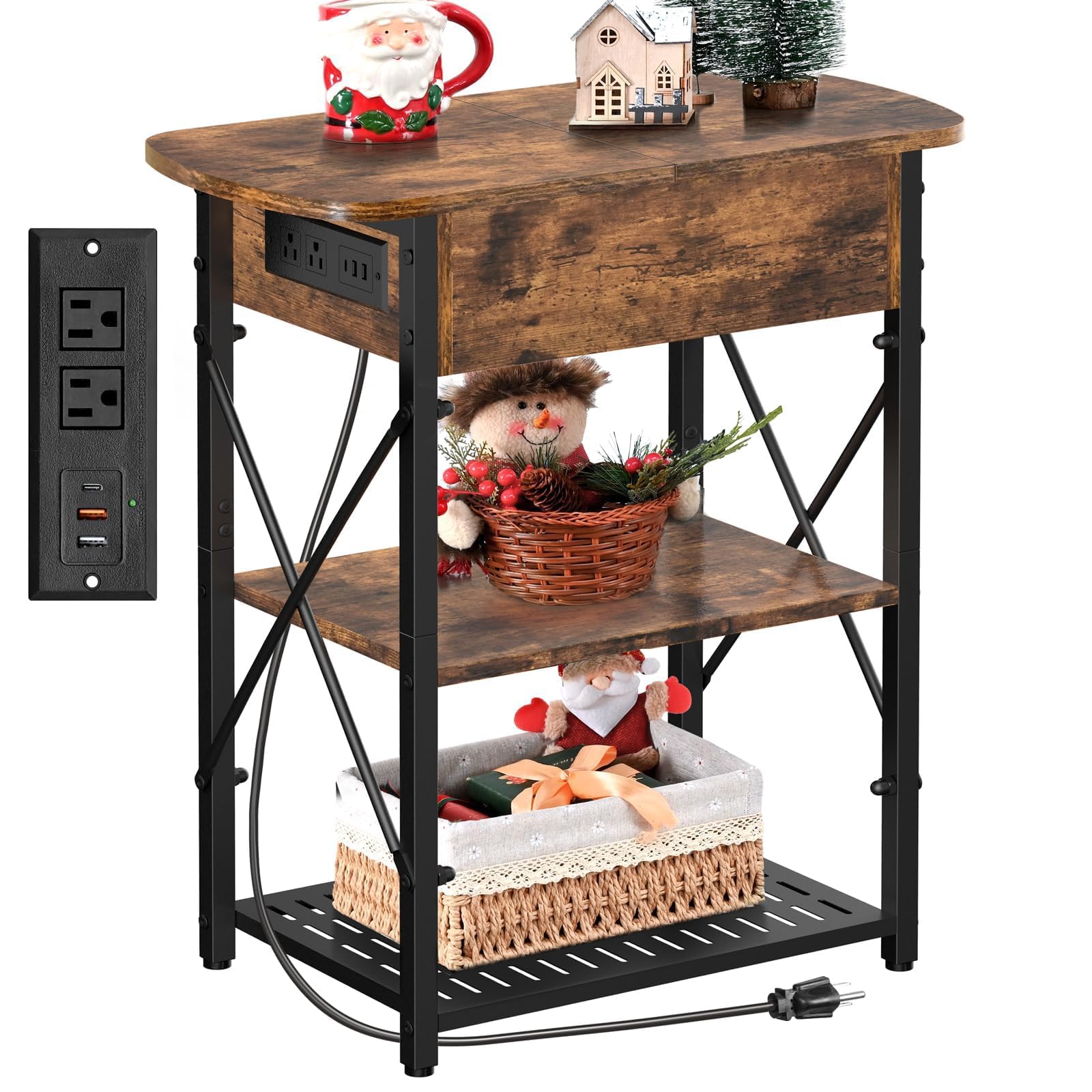
Image 1.1: The Livofloral Narrow End Table with Charging Station in a living room setting, showcasing its compact design and integrated charging capabilities.
2. Safety Information
Please observe the following safety precautions to prevent injury or damage to the product:
- Electrical Safety: Keep the charging station area free from liquids to avoid electrocution. Do not overload the electrical outlets. Ensure the power cord is not pinched or damaged.
- Assembly: Follow all assembly instructions carefully. Do not overtighten screws. Ensure all parts are securely fastened before use.
- Stability: Place the table on a flat, stable surface. The adjustable feet should be used to ensure the table is level and stable. Do not place excessively heavy items on the table or shelves. The maximum weight recommendation for the top surface is 110 pounds.
- Children: Keep small parts and packaging materials away from children. This product is not a toy.
3. Package Contents
Before beginning assembly, verify that all parts listed below are present and undamaged. If any parts are missing or damaged, please contact customer support.
3.1. Components
- Top Panel (1)
- Side Panels (2, 3, 4)
- Back Panel for Charging Station (5)
- Middle Shelf (6)
- Bottom Shelf (7)
- Drawer Divider (8)
- Metal Frame Legs (9, 11)
- Metal Mesh Shelf (10)
- X-Structure Support Bars (12)
- Charging Station Unit (H)
3.2. Hardware
- Screws (A, B, C, D, E, F, G, I, J, K)
- Screwdriver
- Installation Guide
4. Setup and Assembly
Assembly is straightforward and typically takes one person approximately 30 minutes. All necessary tools are included. Refer to the detailed assembly video for visual guidance.
4.1. Assembly Steps
- Attach side panels (2, 3, 4) to the top panel (1) using screws (A, B).
- Secure the back panel (5) for the charging station.
- Install the charging station unit (H) into the back panel (5) using screws (G).
- Attach the metal frame legs (9, 11) to the assembled top section using screws (C).
- Insert the middle shelf (6) and metal mesh shelf (10) into the frame, securing with screws (D, F).
- Attach the X-structure support bars (12) to the sides of the frame for enhanced stability, securing with screws (K).
- Attach the bottom shelf (7) to the frame.
- Install the flip-top hinges (J) to the top panel.
- Optionally, install the drawer divider (8) inside the flip-top compartment.
For a visual step-by-step guide, please watch the official assembly video:
Video 4.1: Official assembly instructions for the Livofloral End Table with Charging Station.

Image 4.2: Visual representation of the easy assembly process, highlighting key components and connections.
5. Operating Instructions
5.1. Charging Station
The integrated charging station is located on the side of the table, providing convenient access without occupying internal storage space. It includes:
- 2 AC Outlets (120V/12A)
- 2 USB Ports (5V/3A, 5V/2A)
- 1 Type-C Port (20W)
A 6.5-foot power cord is provided. Plug the table's power cord into a wall outlet to activate the charging ports. The charging station allows up to 5 devices to be charged simultaneously.

Image 5.1: The charging station with its various ports and power specifications.

Image 5.2: The external placement of the charging outlets prevents liquid spills from affecting stored items.
5.2. Flip-Top Storage
The table features a flip-top compartment for hidden storage. This area is ideal for organizing small essentials such as remote controls, books, or tablets. The internal divider helps separate the charging area from the storage space, enhancing safety and organization. The divider can be installed or removed based on your needs.

Image 5.3: The internal divider ensures safety by separating the charging components from the storage area.

Image 5.4: The ample storage space provided by the flip-top drawer, suitable for various items.
5.3. Stability Features
The table is designed with an X-structure on the sides and adjustable feet to ensure maximum stability. The adjustable feet allow you to level the table on uneven surfaces.

Image 5.5: The X-structure design provides robust support and stability.

Image 5.6: Adjustable feet allow for leveling on uneven floors, preventing wobbling.
Watch this video for a demonstration of the table's features:
Video 5.7: Demonstration of the Livofloral end table with charging station features.
6. Maintenance
To maintain the appearance and longevity of your end table, follow these simple guidelines:
- Cleaning: Wipe surfaces with a soft, damp cloth. Avoid harsh chemicals or abrasive cleaners, which can damage the finish.
- Spills: Promptly clean up any spills, especially near the charging station, to prevent damage and electrical hazards.
- Inspection: Periodically check all screws and connections to ensure they remain tight. Retighten if necessary.
- Environment: Avoid prolonged exposure to direct sunlight or extreme temperatures and humidity, which can cause warping or fading.
7. Troubleshooting
If you encounter any issues with your end table, refer to the following troubleshooting tips:
| Problem | Possible Cause | Solution |
|---|---|---|
| Table is wobbly | Uneven floor; loose connections | Adjust the leveling feet at the bottom of the legs. Check and tighten all assembly screws. |
| Charging ports not working | Power cord not plugged in; power outage; faulty device | Ensure the table's power cord is securely plugged into a working wall outlet. Check your device's charging cable and functionality. |
| Flip-top lid does not close properly | Obstruction in storage compartment; misaligned hinges | Remove any items obstructing the lid. Check if hinges are properly aligned and secured. |
8. Specifications
| Feature | Detail |
|---|---|
| Brand | Livofloral |
| Model Name | Narrow End Table |
| Product Dimensions (D x W x H) | 23.6" x 11.8" x 27.6" |
| Item Weight | 16.3 Pounds |
| Maximum Weight Recommendation | 110 Pounds |
| Frame Material | Metal |
| Top Material Type | Engineered Wood |
| Color | Brown |
| Charging Station | 2 AC Outlets, 2 USB Ports, 1 Type-C Port |
| Power Cord Length | 6.5 feet |
| Assembly Required | Yes |
| Indoor/Outdoor Usage | Indoor |
9. Warranty and Support
For warranty information or customer support, please contact Livofloral directly. You can visit the official Livofloral store for more information and contact options: