
VINGVO VINGVOagxiu0cf6o-12
VINGVO Portable Air Conditioner with Heater Combo User Manual
Model: VINGVOagxiu0cf6o-12
1. Introduction
Thank you for purchasing the VINGVO Portable Air Conditioner with Heater Combo. This versatile appliance is designed to provide both cooling (natural air circulation) and heating functions, offering comfort in various environments. It features a built-in battery, remote control operation, and intelligent timing for convenience. Please read this manual thoroughly before operation to ensure proper use, maintenance, and safety.
2. Safety Information
Always follow basic safety precautions when using electrical appliances to reduce the risk of fire, electric shock, and injury.
- Ensure the power supply voltage matches the appliance's requirements (110V US Plug).
- Do not operate the unit with a damaged cord or plug.
- Keep the unit away from water or other liquids.
- Do not block air inlets or outlets. Maintain adequate clearance around the unit for proper airflow.
- Unplug the unit before cleaning or performing any maintenance.
- This appliance is equipped with an overheat protection system. If the internal temperature becomes too high, the unit will automatically shut off to prevent damage and ensure safety.
- Do not attempt to repair or disassemble the unit yourself. Contact qualified service personnel for repairs.
- Keep out of reach of children and pets.
3. Product Overview
The VINGVO Portable Air Conditioner with Heater Combo is a compact, wall-mountable unit designed for efficient air circulation and heating. It features an intuitive control panel and comes with a remote control for convenient operation.

Image: The VINGVO unit showing its front panel, digital display, and buttons, along with the remote control and power cord. This image illustrates the primary components of the product.
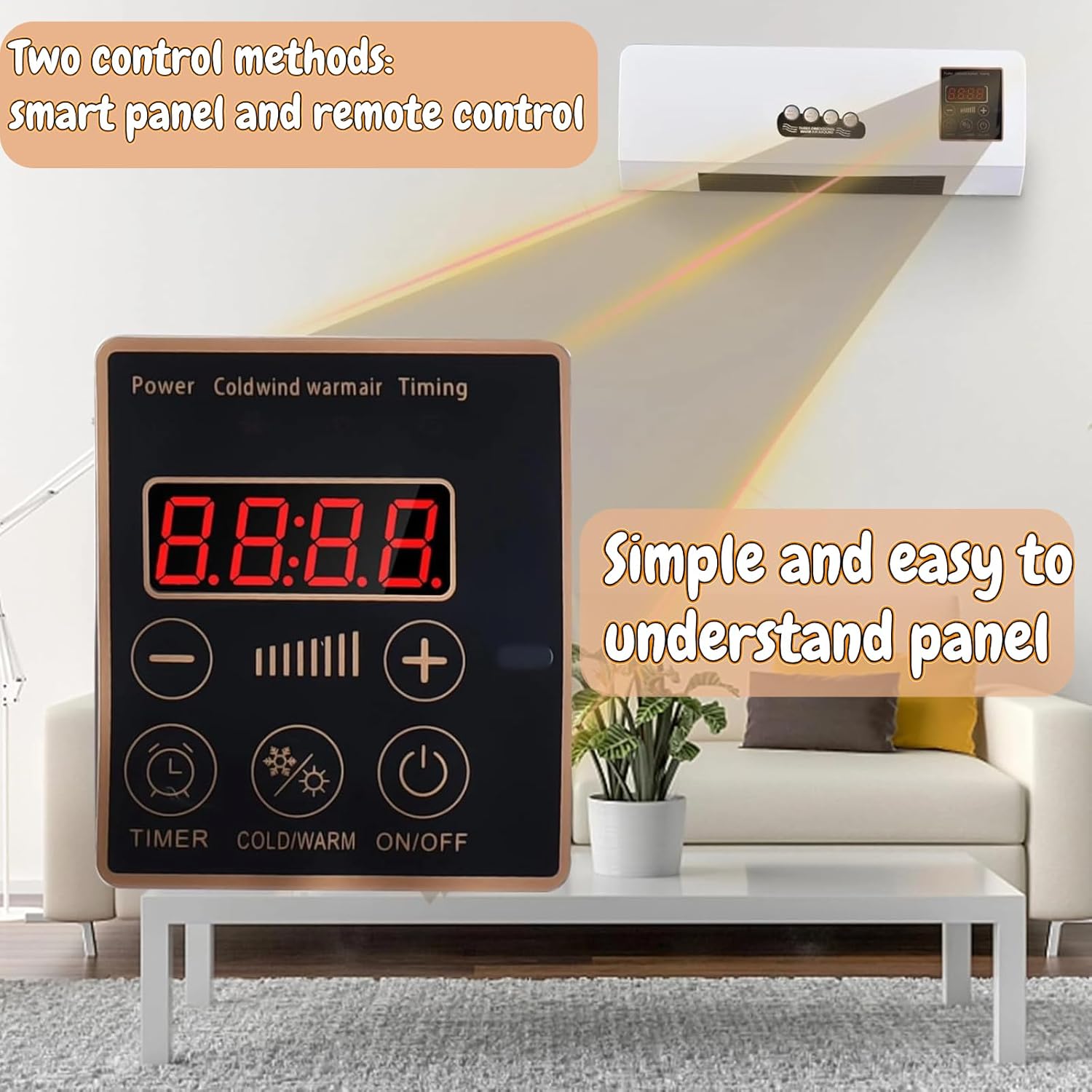
Image: A detailed view of the unit's smart panel and the remote control, highlighting the user interface for temperature and mode adjustments.
Components:
- Main Unit (with air inlet/outlet)
- Control Panel (Digital Display, Power, Mode, Timer, Temperature/Fan Speed buttons)
- Remote Control
- Power Cord (US Plug 110V)
- Mounting Hardware (screws, anchors - if included)
4. Setup and Installation
The VINGVO unit is designed for wall-mounted installation to save floor space. Ensure you choose a suitable location with a stable wall surface and access to a 110V power outlet.
Choosing a Location:
- Select a wall location that is clear of obstructions and allows for proper air circulation.
- Avoid placing the unit directly above heat sources or in direct sunlight.
- Ensure the wall can support the weight of the unit (approximately 4.66 pounds).
- Position the unit at a height that allows for optimal air distribution and easy access to controls.
Mounting Instructions:
- Carefully unpack the unit and all accessories.
- Identify the mounting points on the back of the unit.
- Using the unit as a template or by measuring the distance between mounting points, mark the desired drilling locations on the wall.
- Drill pilot holes at the marked locations. If mounting into drywall, insert wall anchors (if provided) into the pilot holes.
- Secure the unit to the wall using appropriate screws, ensuring it is level and firmly attached.
- Once mounted, plug the power cord into a standard 110V US electrical outlet.

Image: The rear of the VINGVO unit, illustrating the design for wall mounting and the location of the air intake vents.

Image: The VINGVO unit installed on a wall in a living room setting, demonstrating its intended use as a wall-mounted appliance.
5. Operating Instructions
The VINGVO unit can be operated using either the control panel on the unit itself or the included remote control.
Control Panel and Remote Control Functions:

Image: A detailed view of the unit's large touch panel, showing the digital display and various control buttons for easy operation.

Image: The VINGVO unit and its remote control, demonstrating the ability to switch between natural wind (for cooling effect) and hot air (heating) modes.
| Button/Indicator | Function |
|---|---|
| Power / ON/OFF | Turns the unit on or off. |
| Cold/Warm (Mode) | Switches between natural wind (cooling) mode and heating mode. Note: This product provides natural air circulation and heating; it does not have a compressor-based cooling function. |
| Timer | Sets the automatic shut-off timer (up to 8 hours). Press repeatedly to cycle through timer settings. |
| + / - (Temperature/Fan Speed) | Adjusts the desired temperature in heating mode or fan speed in natural wind mode. |
| Digital Display | Shows current settings, temperature, or timer remaining. |
General Operation:
- Power On: Press the Power button on the unit or remote control. The digital display will light up.
- Select Mode: Press the "Cold/Warm" or "Mode" button to switch between natural wind (indicated by a snowflake or fan icon) and heating (indicated by a sun or heat icon) modes.
- Adjust Settings:
- In heating mode, use the "+" and "-" buttons to set the desired temperature. The unit will heat rapidly (within 3 seconds) to reach the set temperature.
- In natural wind mode, use the "+" and "-" buttons to adjust the fan speed.
- Set Timer: Press the "Timer" button to activate the intelligent timing function. Each press will increase the timer duration (e.g., 1 hour, 2 hours, up to 8 hours). The unit will automatically shut off after the set time.
- Power Off: Press the Power button again to turn off the unit.

Image: The VINGVO unit demonstrating its dual functionality, providing both natural wind (for cooling effect) and rapid hot wind for heating.

Image: The VINGVO unit in a room, highlighting its intelligent timing feature and the automatic shut-off mechanism for safety when temperature is too high.

Image: A child sleeping, illustrating the low noise operation of the VINGVO unit, suitable for use during sleep.
6. Maintenance
Regular cleaning and maintenance will help ensure the longevity and efficient operation of your VINGVO unit.
Cleaning the Unit:
- Always unplug the unit from the power outlet before cleaning.
- Wipe the exterior surfaces of the unit with a soft, damp cloth. Do not use abrasive cleaners, waxes, or polishes.
- Use a vacuum cleaner with a brush attachment to gently remove dust from the air inlet and outlet grilles.
- Ensure no water or liquids enter the internal components of the unit.
- Allow the unit to dry completely before plugging it back in.
Storage:
If storing the unit for an extended period, unplug it, clean it thoroughly, and store it in a cool, dry place, preferably in its original packaging, away from direct sunlight and extreme temperatures.
7. Troubleshooting
If you encounter issues with your VINGVO unit, please refer to the following common problems and solutions before contacting customer support.
| Problem | Possible Cause | Solution |
|---|---|---|
| Unit does not turn on. | No power supply; Power cord not securely plugged in; Unit is off. | Check if the unit is plugged into a live 110V outlet. Ensure the power cord is firmly connected. Press the Power button on the unit or remote. |
| No heat or natural wind. | Incorrect mode selected; Air inlets/outlets blocked; Overheat protection activated. | Ensure the correct mode (heating or natural wind) is selected. Check for any obstructions around the air vents. If overheat protection activated, unplug the unit, allow it to cool for 30 minutes, then plug back in. |
| Remote control not working. | Batteries are dead or incorrectly inserted; Obstruction between remote and unit. | Replace batteries in the remote control. Ensure batteries are inserted with correct polarity. Remove any obstructions between the remote and the unit's sensor. |
| Unit makes unusual noise. | Loose components; Foreign object inside; Unit not mounted securely. | Turn off and unplug the unit. Check for any visible foreign objects. Ensure the unit is securely mounted to the wall. If noise persists, contact customer support. |
If the problem persists after trying these solutions, please contact VINGVO customer support for assistance.
8. Specifications
| Feature | Detail |
|---|---|
| Model Name | VINGVOagxiu0cf6o-12 |
| Brand | VINGVO |
| Type | Portable Air Conditioner with Heater Combo (Natural Wind & Heating) |
| Power Source | Corded Electric |
| Voltage | 110 Volts |
| Wattage | 44422 watts (for heating) |
| Control Method | Remote, Touch Panel |
| Installation Type | Wall Mounted |
| Item Weight | 4.66 pounds |
| Package Dimensions | 23.62 x 10.31 x 6.3 inches |
| Special Features | Remote Controlled, Portable, 8-Hour Intelligent Timing, Low Noise, Overheat Protection |
9. Warranty and Support
The VINGVO Portable Air Conditioner with Heater Combo comes with a limited warranty. For specific warranty terms and conditions, please refer to the warranty card included with your product or contact VINGVO customer support.
Customer Support:
If you have any questions, require technical assistance, or need to claim warranty service, please contact VINGVO customer support through the retailer where you purchased the product or visit the official VINGVO website for contact information.
- Model Number: VINGVOagxiu0cf6o-12
- ASIN: B0CJT4WSJX
- Brand Store: Visit the VINGVO Store on Amazon