
Introduction
Thank you for choosing the HanRongDa HRD-905 Emergency Weather Radio. This multi-functional device is designed to provide reliable communication and power in various situations, especially during emergencies. It features AM/FM/SW/NOAA weather band reception, multiple power sources including solar, hand crank, and internal rechargeable battery, a powerful flashlight, reading lamp, and a mobile phone charging function. Please read this manual thoroughly to understand its operation and ensure optimal performance.
Safety Precautions
- Do not expose the radio to extreme temperatures, direct sunlight for prolonged periods, or high humidity.
- Avoid dropping the radio or subjecting it to strong impacts.
- Keep the radio away from water and other liquids. If it gets wet, dry it thoroughly before use.
- Do not attempt to disassemble or modify the radio. This will void the warranty and may cause damage.
- When using the hand crank, ensure it is rotated smoothly and consistently.
- Dispose of batteries according to local regulations.
Package Contents
- HanRongDa HRD-905 Emergency Weather Radio
- USB Charging Cable
- Owner's Manual (this document)
- Wrist Strap
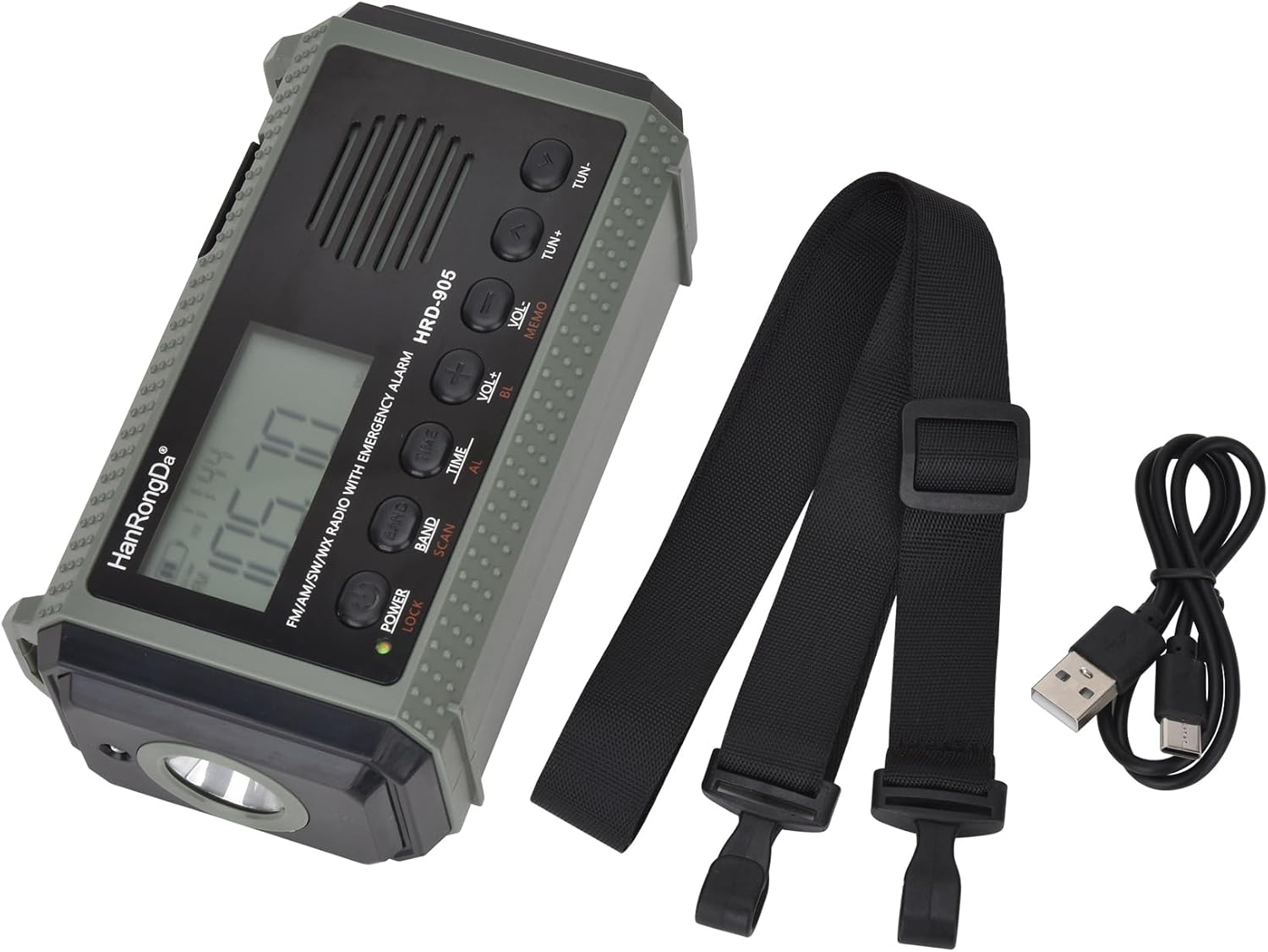
Image: HanRongDa HRD-905 radio, USB charging cable, and wrist strap.
Product Overview
Familiarize yourself with the various parts and controls of your HRD-905 radio.
Front Panel

Image: Front view of the HRD-905 radio, displaying the screen, speaker grille, and main control buttons.
- LCD Display: Shows frequency, time, battery level, and band.
- Speaker: Audio output.
- POWER/LOCK Button: Turns the radio on/off, or locks/unlocks controls.
- BAND/SCAN Button: Selects radio band (AM/FM/SW/NOAA) or initiates auto-scan.
- TIME/AL Button: Sets time or alarm.
- VOL+/BL Button: Increases volume or activates backlight.
- VOL-/MEMO Button: Decreases volume or saves/recalls memory stations.
- TUN+/TUN- Buttons: Tunes frequency up/down.
Side Panel (Flashlight & Ports)

Image: Side view of the HRD-905 radio, showing the flashlight on the left side.

Image: Right side view of the HRD-905 radio, detailing the SOS button, light control buttons, DC IN 5V port, and USB charging port.
- Flashlight: Integrated LED light for illumination.
- SOS Button: Activates emergency alarm and flashing light.
- Light Control Buttons: Activates flashlight and reading lamp.
- DC IN 5V Port: For charging the internal battery via USB cable.
- USB Charging Port (5V 1A): For charging external devices.
- Headphone Jack: For private listening.
Top & Back Panel

Image: Top view of the HRD-905 radio, highlighting the solar panel and telescopic antenna.
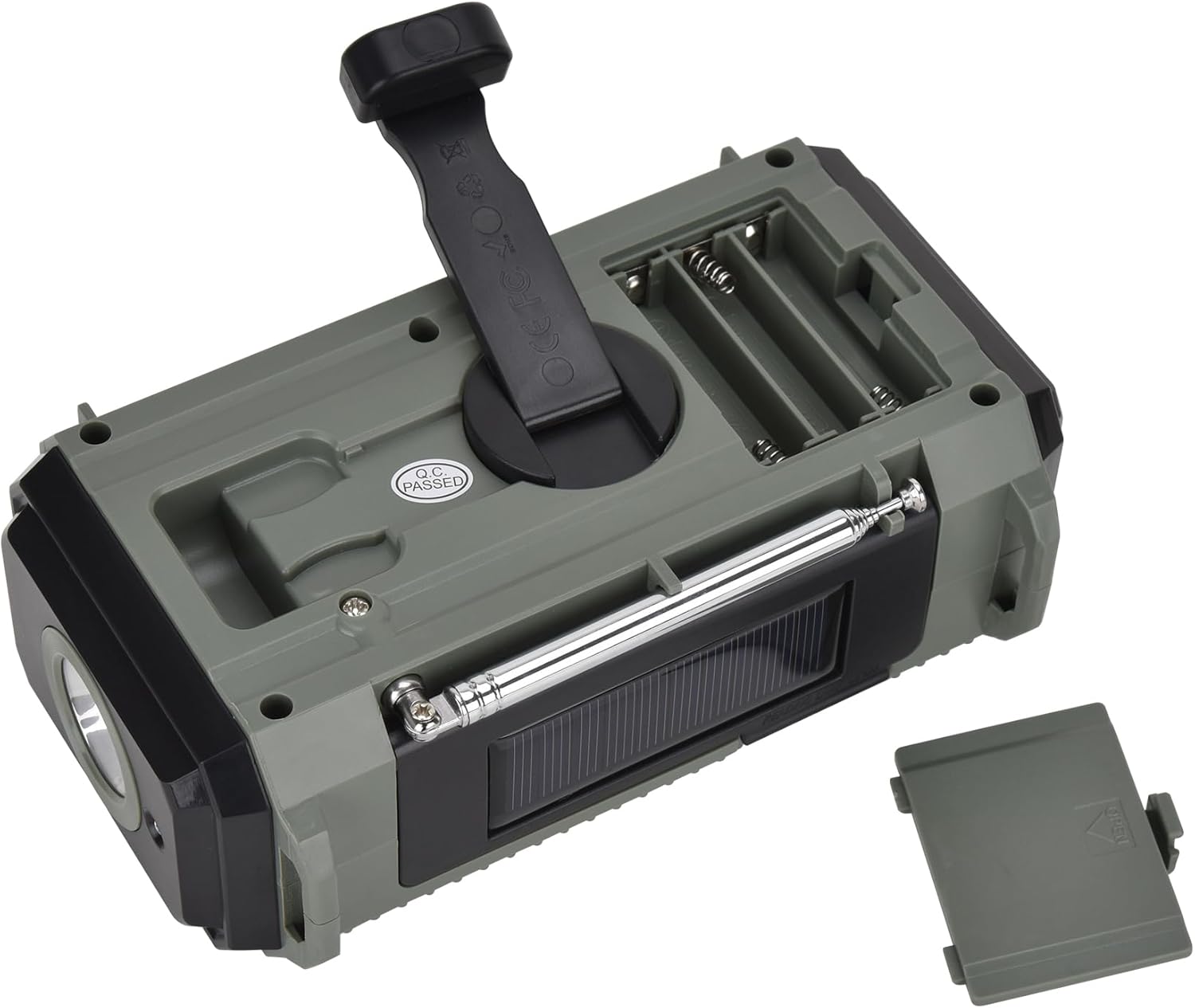
Image: Back view of the HRD-905 radio, showing the hand crank generator extended and the AAA battery compartment open.
- Telescopic Antenna: Extends for improved radio reception.
- Solar Panel: Charges the internal battery when exposed to sunlight.
- Hand Crank Generator: Manually charges the internal battery.
- AAA Battery Compartment: Holds 3 AAA batteries for alternative power.
- Reading Lamp: Located under the solar panel, provides ambient light.
Setup
Initial Charge
Before first use, it is recommended to fully charge the internal 10000mAh Lithium-Ion battery. Connect the supplied USB cable to the DC IN 5V port on the radio and to a USB power adapter (not included) or a computer USB port. The charging indicator will illuminate. A full charge may take several hours.
Note: If the internal battery is completely discharged, the radio may appear unresponsive or cycle on/off. Continue charging until sufficient voltage is restored.
AAA Battery Installation (Optional)
For an alternative power source, you can install 3 AAA batteries (not included) into the compartment on the back of the radio. Ensure correct polarity (+/-) when inserting the batteries.
Operating Instructions
Power On/Off and Lock Function
- Power On: Press and hold the POWER/LOCK button.
- Power Off: Press and hold the POWER/LOCK button again.
- Lock/Unlock: Briefly press the POWER/LOCK button while the radio is on to lock or unlock the controls. A lock icon will appear on the display when locked.
Radio Operation (AM/FM/SW/NOAA)
- Select Band: Press the BAND/SCAN button repeatedly to cycle through FM, AM, SW (Shortwave), and NOAA (Weather Band).
- Tune Frequency:
- Manual Tuning: Press the TUN+ or TUN- buttons to adjust the frequency incrementally.
- Auto Scan: Press and hold the BAND/SCAN button to automatically scan for and store available stations.
- Adjust Volume: Press the VOL+ or VOL- buttons to increase or decrease the volume.
- Antenna: Extend the telescopic antenna for optimal FM, SW, and NOAA reception. AM reception uses an internal antenna.
Flashlight and Reading Lamp
- Flashlight: Press the dedicated flashlight button on the side panel to turn the flashlight on/off. Some models may have multiple brightness levels.
- Reading Lamp: Lift the solar panel to reveal the reading lamp. Press the dedicated reading lamp button on the side panel to turn it on/off. Some models may have multiple brightness levels.
SOS Alarm
In an emergency, press the SOS button on the side panel to activate a loud siren and flashing light. Press it again to deactivate.
Powering the Radio
The HRD-905 offers multiple ways to power the unit and charge its internal 10000mAh battery.
| Power Source | Description |
|---|---|
| Internal Lithium-Ion Battery (10000mAh) | The primary rechargeable power source. |
| USB-C Charging (DC IN 5V) | Connect the radio to a USB power source using the provided cable for fastest charging. |
| Solar Panel | Place the radio in direct sunlight to slowly charge the internal battery. This is ideal for maintaining charge or trickle charging. |
| Hand Crank Generator | Rotate the hand crank clockwise or counter-clockwise to generate power and charge the internal battery. A few minutes of cranking can provide power for short periods of radio use or light. |
| 3 x AAA Batteries (Not Included) | Insert into the battery compartment for an additional backup power source. |
Image: Rear view showing the hand crank and the open compartment for AAA batteries.
Charging External Devices
The HRD-905 can function as a power bank to charge your mobile phone or other small USB-powered devices.
- Ensure the radio's internal battery has sufficient charge.
- Connect your device's USB charging cable to the USB Charging Port (5V 1A) on the side of the radio.
- The radio will begin charging your device.
Note: Charging speed may vary depending on the radio's battery level and the device being charged. Using the hand crank while charging an external device can provide additional power.
Maintenance
- Cleaning: Wipe the radio with a soft, damp cloth. Do not use abrasive cleaners or solvents.
- Storage: Store the radio in a cool, dry place when not in use. For long-term storage, ensure the internal battery is partially charged (around 50%) and recharge it every 3-6 months to prolong battery life.
- Battery Care: Avoid fully discharging the internal Lithium-Ion battery frequently. If using AAA batteries, remove them if the radio will not be used for an extended period to prevent leakage.
Troubleshooting
| Problem | Possible Cause | Solution |
|---|---|---|
| Radio does not turn on or turns off immediately. | Internal battery is completely discharged. | Connect the radio to a USB power source and charge for several hours. Even if it appears unresponsive initially, continue charging. |
| Poor radio reception. | Antenna not extended, weak signal, or interference. | Extend the telescopic antenna fully. Try repositioning the radio. For AM, rotate the radio for best reception. |
| Hand crank or solar charging is slow. | These are supplementary charging methods. | Hand cranking provides power for short-term use. Solar charging is for trickle charging or maintaining battery level. For faster charging, use the USB-C port. |
| Cannot charge external devices. | Radio's internal battery is too low or device requires more power than supplied. | Ensure the radio's internal battery is sufficiently charged. Some high-power devices may not charge optimally. |
| Controls are unresponsive. | Controls are locked. | Briefly press the POWER/LOCK button to unlock the controls. |
Specifications
- Model: HRD-905
- Dimensions: 6.5" L x 2.5" W x 3.7" H (16.5 cm x 6.35 cm x 9.4 cm)
- Weight: 1.41 pounds (0.64 kg)
- Radio Bands: AM, FM, Shortwave (SW), NOAA Weather Band
- Frequency Range: FM (87-108 MHz), AM (520-1710 KHz), SW (2.3-22 MHz), NOAA (162.400-162.550 MHz) - Note: SW frequency range is an estimate based on typical shortwave radios, as specific range was not provided in input.
- Internal Battery: 10000mAh Lithium-Ion (included)
- Backup Power: 3 x AAA batteries (not included)
- Charging Input: DC 5V (USB-C)
- USB Output: 5V 1A (for charging external devices)
- Special Features: Flashlight, Reading Lamp, SOS Alarm, Hand Crank Generator, Solar Panel, Headphone Jack

Image: Dimensions of the HRD-905 radio.
Warranty and Support
For warranty information and customer support, please refer to the official HanRongDa website or contact your retailer. Keep your purchase receipt as proof of purchase.
Manufacturer: HanRongDa
Date First Available: October 27, 2023


