
HANMATEK DOS1102S
HANMATEK DOS1102S Digital Storage Oscilloscope User Manual
Model: DOS1102S | Brand: HANMATEK
1. Introduction
The HANMATEK DOS1102S is a versatile 2-in-1 digital storage oscilloscope and waveform generator, designed for precise signal analysis and testing. It features a 110MHz bandwidth, 2 × 500MSa/s sampling rate, and a 7-inch high-resolution LCD display. This manual provides essential information for setting up, operating, maintaining, and troubleshooting your device.

Figure 1.1: The HANMATEK DOS1102S Digital Storage Oscilloscope and its accompanying accessories.
2. What's in the Box
Upon opening the package, please verify that all items listed below are present and in good condition:
- 1x HANMATEK 2 in 1 Digital Oscilloscope DDS Signal Generator DOS1102S
- 2x Oscilloscope Probes
- 1x Power Adapter
- 1x USB Cable
- 1x BNC to BNC Cable
- Additional accessories (e.g., probe adjustment tool, color rings)
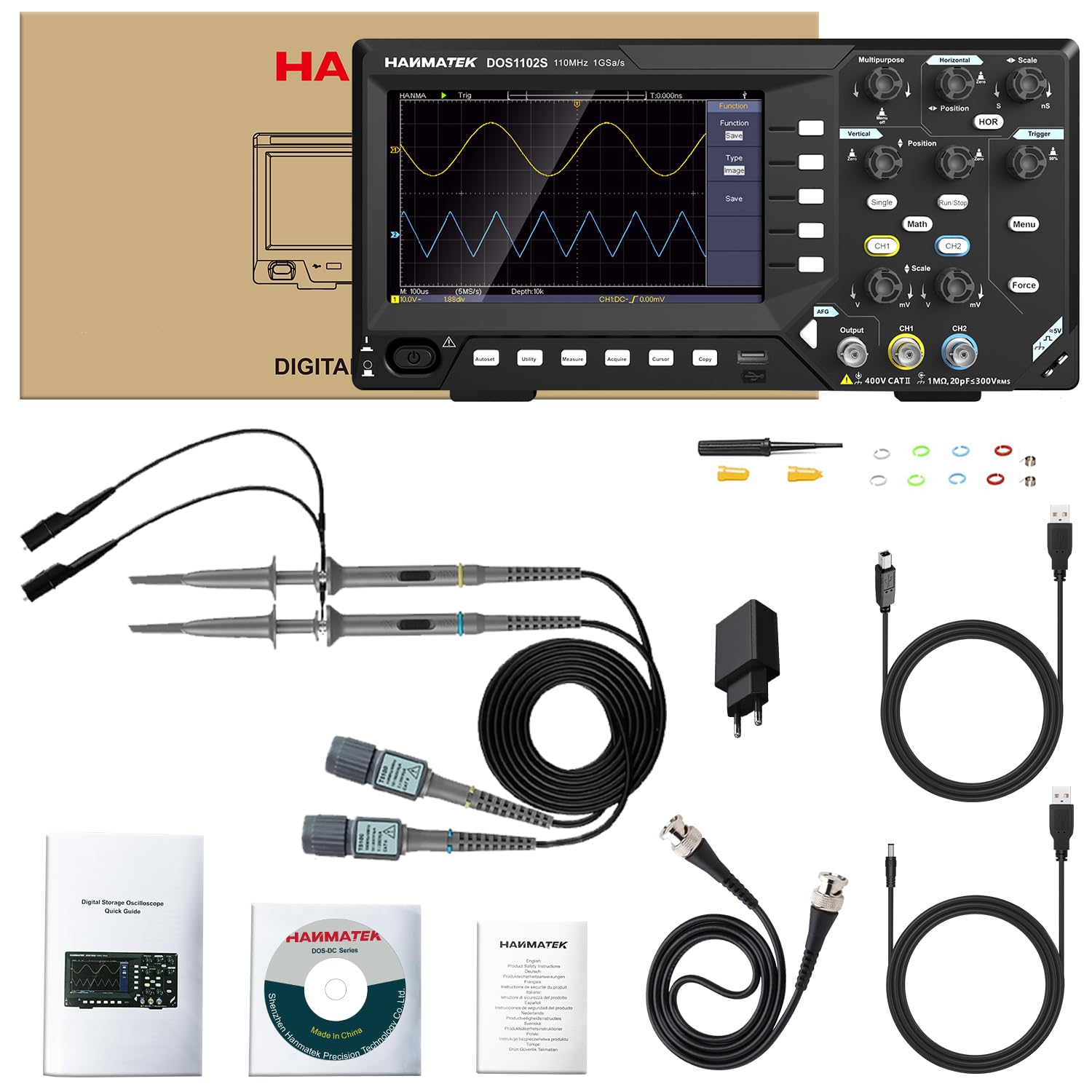
Figure 2.1: All components included in the HANMATEK DOS1102S product package.
3. Setup
Follow these steps to set up your HANMATEK DOS1102S oscilloscope:
- Power Connection: Connect the provided power adapter to the oscilloscope's power input and then to a suitable power outlet.
- Probe Connection: Connect the oscilloscope probes to the BNC input channels (CH1, CH2) on the front panel. Ensure a secure connection by twisting the BNC connector until it locks.
- Grounding: Always ensure proper grounding of the oscilloscope and the circuit under test to prevent electrical hazards and ensure accurate measurements.
- Initial Power On: Press the power button to turn on the device. The 7-inch LCD display will illuminate.

Figure 3.1: An example of connecting probes to the oscilloscope for signal measurement.
4. Operating Instructions
This section details the primary functions and operations of the DOS1102S.
4.1. Display and User Interface
The oscilloscope features a 7-inch 800x480 full-color TFT LCD screen, providing clear waveform visualization. Navigate through menus and adjust settings using the front panel buttons and rotary encoders.

Figure 4.1: The high-resolution 7-inch display showing waveform data.
4.2. Waveform Generator Functions
The built-in waveform generator can produce various signal types up to 10MHz. To access and configure the waveform generator, locate the 'Output' BNC connector and the associated controls.
- Sine Waveform: Generates a smooth, continuous oscillating signal.
- Square Waveform: Produces a signal that alternates between two voltage levels, useful for digital circuit testing.
- Ramp Waveform: Creates a signal that linearly increases or decreases over time.
- Pulse Waveform: Generates short bursts of voltage, ideal for triggering or timing applications.
- Arbitrary Waveform: Allows users to define custom waveform shapes.

Figure 4.2: The signal generator output port on the oscilloscope.
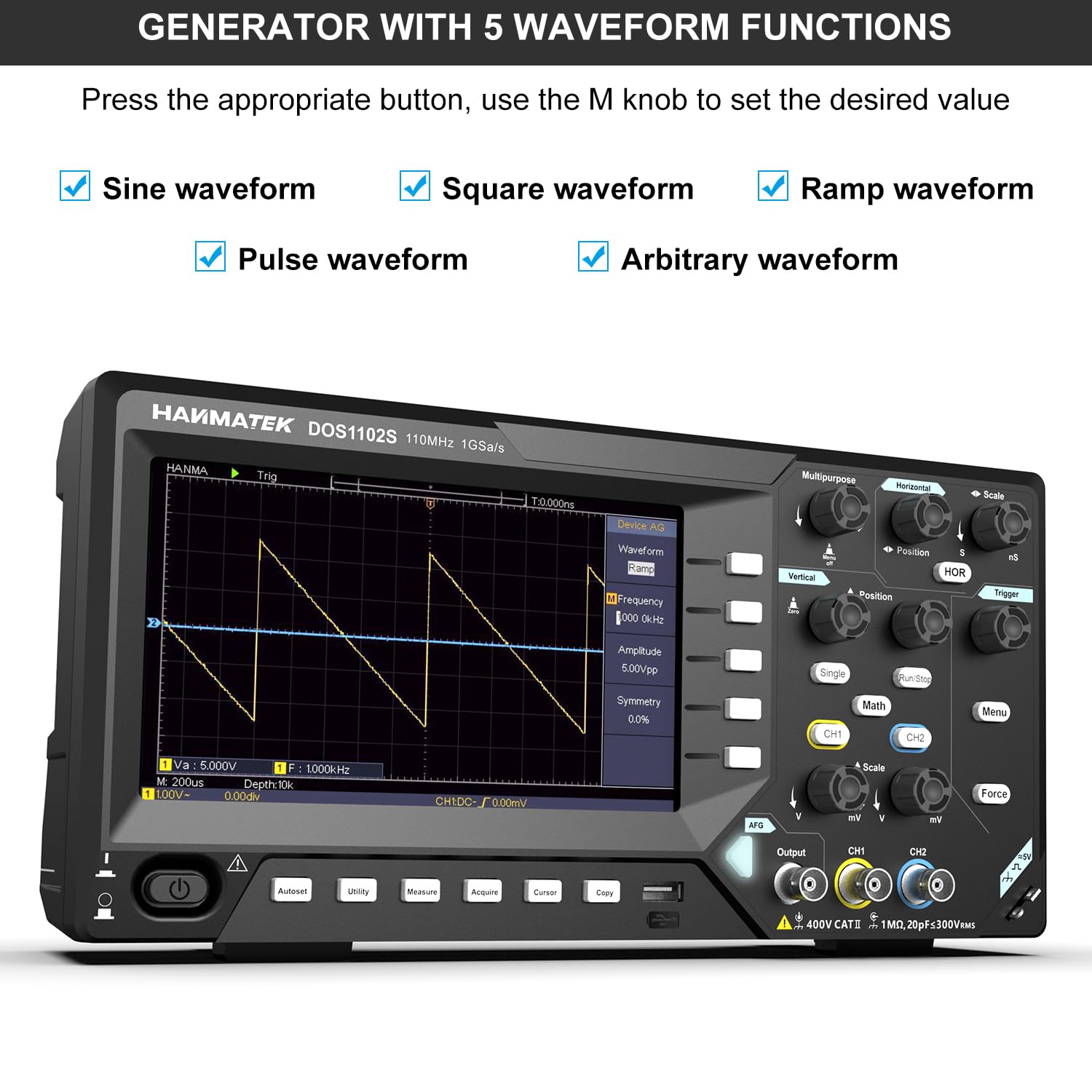
Figure 4.3: Interface for selecting and configuring the five waveform functions.
4.3. Trigger and Measurement System
The DOS1102S includes comprehensive trigger options (e.g., edge, video) and over 30 automatic measurements (e.g., frequency, peak-to-peak voltage, rise/fall time, duty cycle) for in-depth signal analysis.
4.4. USB Connectivity and PC Software
Utilize the USB 2.0 port for easy data transfer to a PC. The device supports PC software for waveform analysis and remote control, enhancing functionality and data management.

Figure 4.4: The oscilloscope connected to a host computer for data communication and analysis.
4.5. Official Product Video
Watch the official product video for a visual guide on the features and operation of the HANMATEK DOS1102S Oscilloscope with Waveform Generator.
Video 4.1: Official HANMATEK video demonstrating the DOS1102S Oscilloscope's features and functions, including its dual-channel capability, waveform generation, and connectivity options.
5. Maintenance
Proper maintenance ensures the longevity and accuracy of your oscilloscope:
- Cleaning: Use a soft, dry cloth to clean the exterior of the device. For stubborn dirt, a slightly damp cloth with mild detergent can be used, ensuring no liquid enters the device.
- Storage: Store the oscilloscope in a cool, dry place away from direct sunlight, extreme temperatures, and high humidity.
- Probe Care: Handle probes carefully. Avoid bending or kinking the cables. Store them properly to prevent damage to the tips.
- Calibration: For optimal performance, periodic calibration by qualified personnel is recommended.
6. Troubleshooting
This section addresses common issues you might encounter:
| Problem | Possible Cause | Solution |
|---|---|---|
| No display after power on | Power cable not connected, power adapter faulty, device malfunction. | Check power connections. Try a different power outlet. Contact support if issue persists. |
| No waveform displayed | Probe not connected correctly, input signal too low/high, incorrect vertical/horizontal settings. | Ensure probes are securely connected. Adjust vertical (Volts/Div) and horizontal (Time/Div) settings. Check input signal source. |
| Unstable waveform | Incorrect trigger settings, noisy signal, poor grounding. | Adjust trigger level and mode. Ensure proper grounding. Minimize external interference. |
| Waveform generator not outputting | Output cable not connected, generator settings incorrect, output disabled. | Verify cable connection to the 'Output' port. Check waveform type, frequency, and amplitude settings. Ensure output is enabled. |
If you encounter issues not listed here or if the suggested solutions do not resolve the problem, please refer to the full user manual or contact HANMATEK customer support.
7. Specifications
| Feature | Detail |
|---|---|
| Bandwidth | 110MHz |
| Sampling Rate | 2 × 500MSa/s |
| Channels | Dual-Channel |
| Display | 7" High-Resolution LCD (800 × 480) |
| Waveform Generator Output | Up to 10MHz (Sine, Square, Ramp, Pulse, Arbitrary) |
| Trigger System | Edge, Video triggering |
| Measurements | 30+ automatic measurements (e.g., frequency, Vpp, rise/fall time) |
| Connectivity | USB 2.0 (PC software support) |
| Dimensions | 11.85 x 5.98 x 2.76 inches |
| Weight | 3.42 Pounds (approx. 1.55 kg) |
| Model Number | DOS1102S |

Figure 7.1: Physical dimensions of the DOS1102S unit.
8. Warranty and Support
HANMATEK products are manufactured to high-quality standards. For specific warranty details, please refer to the warranty card included with your product or visit the official HANMATEK website. If you require technical assistance, have questions about your device, or need to report an issue, please contact HANMATEK customer support through their official channels. Keep your purchase receipt as proof of purchase for warranty claims.
For more information, visit the HANMATEK Store on Amazon.