
1. Product Overview
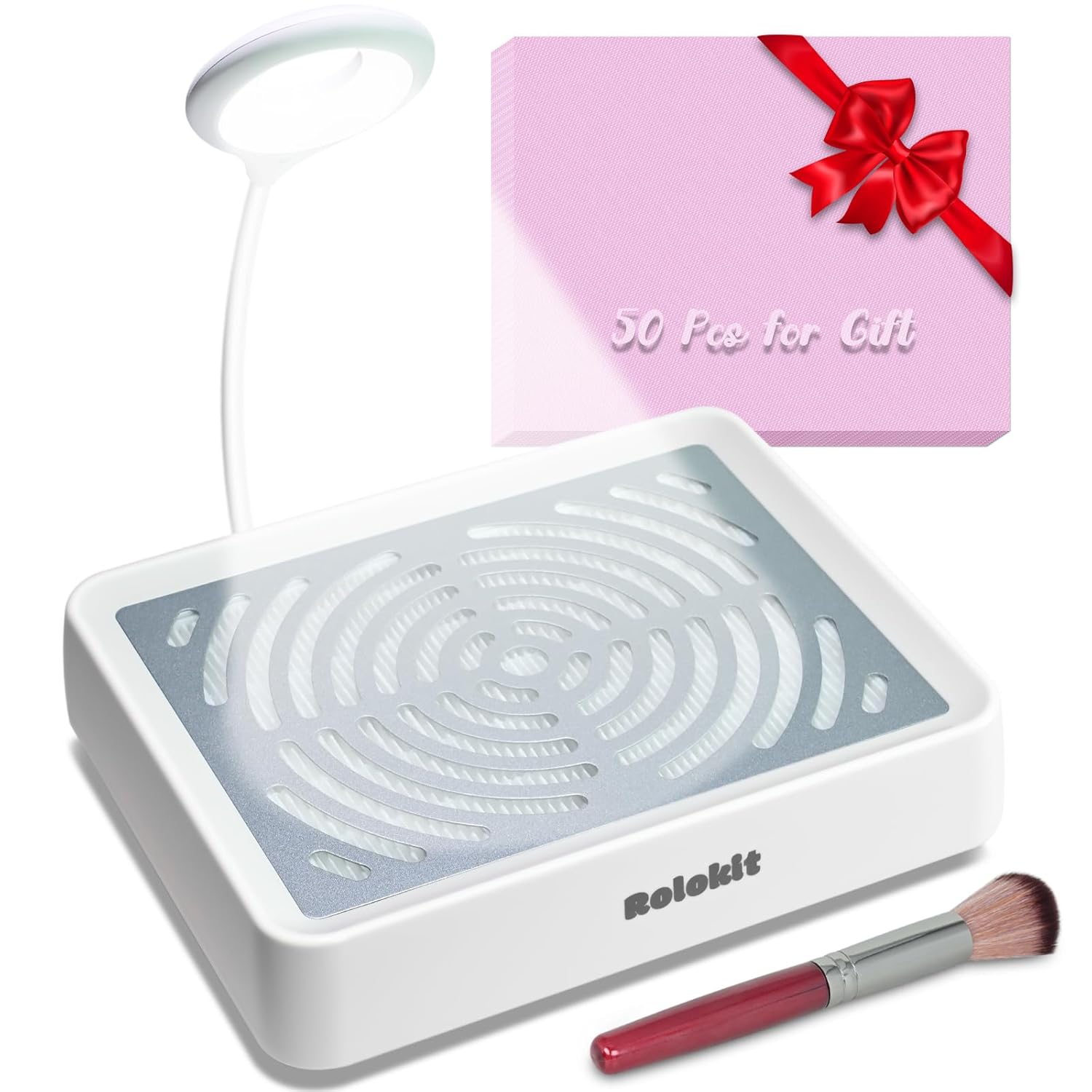
The Rolokit Nail Dust Collector is an essential tool designed to maintain a clean and dust-free environment during nail art procedures such as filing, polishing, and dipping powder applications. This device features a powerful suction fan, an integrated LED lighting lamp for enhanced visibility, and an efficient double filtration system to capture fine dust particles.
Key features include:
- Integrated LED Lamp: Plug-and-play design with arbitrary rotation and adjustable angle for optimal illumination of the work area.
- Adjustable Suction: Equipped with a 40W motor and up to 3750 RPM, featuring a speed control knob for low to high suction adjustment. Operates with upgraded noise-reduction technology.
- Efficient Heat Dissipation: Unique bottom heat dissipation design prevents overheating and prolongs the unit's lifespan.
- Double Filtration System: Includes a built-in reusable mesh filter and supports the use of biodegradable disposable filter cotton for enhanced particle entrapment.

2. Safety Information
To ensure safe operation and prolong the life of your device, please adhere to the following safety guidelines:
- Do not allow water or other liquids to enter the machine, as this may cause malfunction or electrical hazard.
- Keep the device away from heat sources and direct sunlight.
- Ensure the power cord is not damaged or pinched.
- Unplug the device before cleaning or performing any maintenance.
- This appliance is not intended for use by persons (including children) with reduced physical, sensory, or mental capabilities, or lack of experience and knowledge, unless they have been given supervision or instruction concerning use of the appliance by a person responsible for their safety.
3. Package Contents
Upon opening the package, please verify that all the following items are included:
- 1 x Nail Dust Collector Unit
- 1 x LED Lighting Lamp (detachable)
- 50 x Disposable Filter Cotton Sheets
- 1 x Dusting Brush
- 1 x Power Adapter

4. Setup Instructions
- Placement: Place the Nail Dust Collector on a stable, flat surface where you intend to perform nail work.
- Connect Power: Insert the power adapter into the DC input port on the side of the dust collector. Plug the other end into a suitable power outlet.
- Attach LED Lamp: If desired, insert the USB connector of the LED lighting lamp into the USB port on the side of the dust collector. Adjust the flexible arm of the lamp to your preferred angle for illumination.
- Filter Installation: Ensure the reusable mesh filter is properly seated inside the unit. If using disposable filter cotton, place one sheet on top of the mesh filter, aligning it with the suction area.

5. Operating Instructions
- Power On: Locate the rotary switch on the side of the unit. Twist the knob clockwise to turn on the machine. The fan will begin to operate.
- Adjust Suction: Continue twisting the rotary switch clockwise to increase the suction power. Twist counter-clockwise to decrease suction. Adjust to a comfortable level for your task.
- Using the LED Lamp: If connected, the LED lamp will illuminate when the unit is powered on. Adjust its position as needed to provide optimal lighting for your nail work.
- Dust Collection: Position your hand or the nail being worked on directly over the central suction area of the dust collector to effectively capture dust generated during filing, polishing, or other procedures.
- Power Off: When finished, twist the rotary switch counter-clockwise until it clicks off to power down the machine.


6. Maintenance
Regular maintenance ensures optimal performance and extends the lifespan of your Nail Dust Collector.
Filter Cleaning:
The device utilizes a double filtration system:
- Reusable Mesh Filter: This filter can be cleaned and reused. After use, lift the stainless steel cover and remove the reusable filter. Clean it using a hairdryer to blow off accumulated dust or use the provided dusting brush. Do not wash this filter with water.
- Disposable Filter Cotton: For maximum particle entrapment and hygiene, place a disposable filter cotton sheet on top of the reusable filter. After use, simply discard the soiled disposable sheet. This helps keep the built-in reusable filter cleaner for longer.


General Cleaning:
Wipe the exterior of the unit with a soft, dry cloth. Do not use abrasive cleaners or solvents.
7. Troubleshooting
| Problem | Possible Cause | Solution |
|---|---|---|
| Device does not turn on. | No power supply; power adapter not connected properly; rotary switch not fully turned. | Check power outlet; ensure power adapter is securely connected; fully twist the rotary switch clockwise. |
| Weak suction. | Filter is clogged with dust; suction setting is too low. | Clean or replace filters as described in the Maintenance section; increase suction using the rotary switch. |
| LED lamp not working. | Lamp not securely connected to USB port; lamp malfunction. | Ensure the LED lamp's USB connector is fully inserted; if issue persists, contact customer support. |
| Unusual noise or burning smell. | Internal malfunction; obstruction in fan. | Immediately power off and unplug the device. Do not attempt to repair. Contact customer support. |
8. Specifications
| Feature | Detail |
|---|---|
| Product Dimensions | 9.5 x 7.5 x 2.7 inches |
| Item Model Number | B0925Parent |
| Manufacturer | Rolokit |
| ASIN | B0CJR8PXQN |
| Brand | Rolokit |
| Material | Stainless Steel (for cover) |
| Color | White |
| Item Weight | 1.07 Kilograms (2.36 Pounds) |
| Motor Power | 40W |
| Rotation Speed | Up to 3750 RPM |

9. Warranty and Support
Rolokit is committed to providing high-quality products and excellent after-sales service.
- Warranty: This product is backed by a 30-day full refund policy.
- Customer Service: For any inquiries, technical support, or warranty claims, please contact our 24-hour service center.
Contact Information:
- Email: support@rolokit.com
- Website: Visit the Rolokit Store on Amazon