1. Introduction
1.1 Product Overview
The Putikeeg CW Morse Code Key Model 11 is designed for radio enthusiasts and operators. Constructed from aluminum alloy, it offers durability and a comfortable tactile experience. Its compact and lightweight design makes it suitable for both indoor and outdoor use, including portable operations like POTA, SOTA, or LOTA.
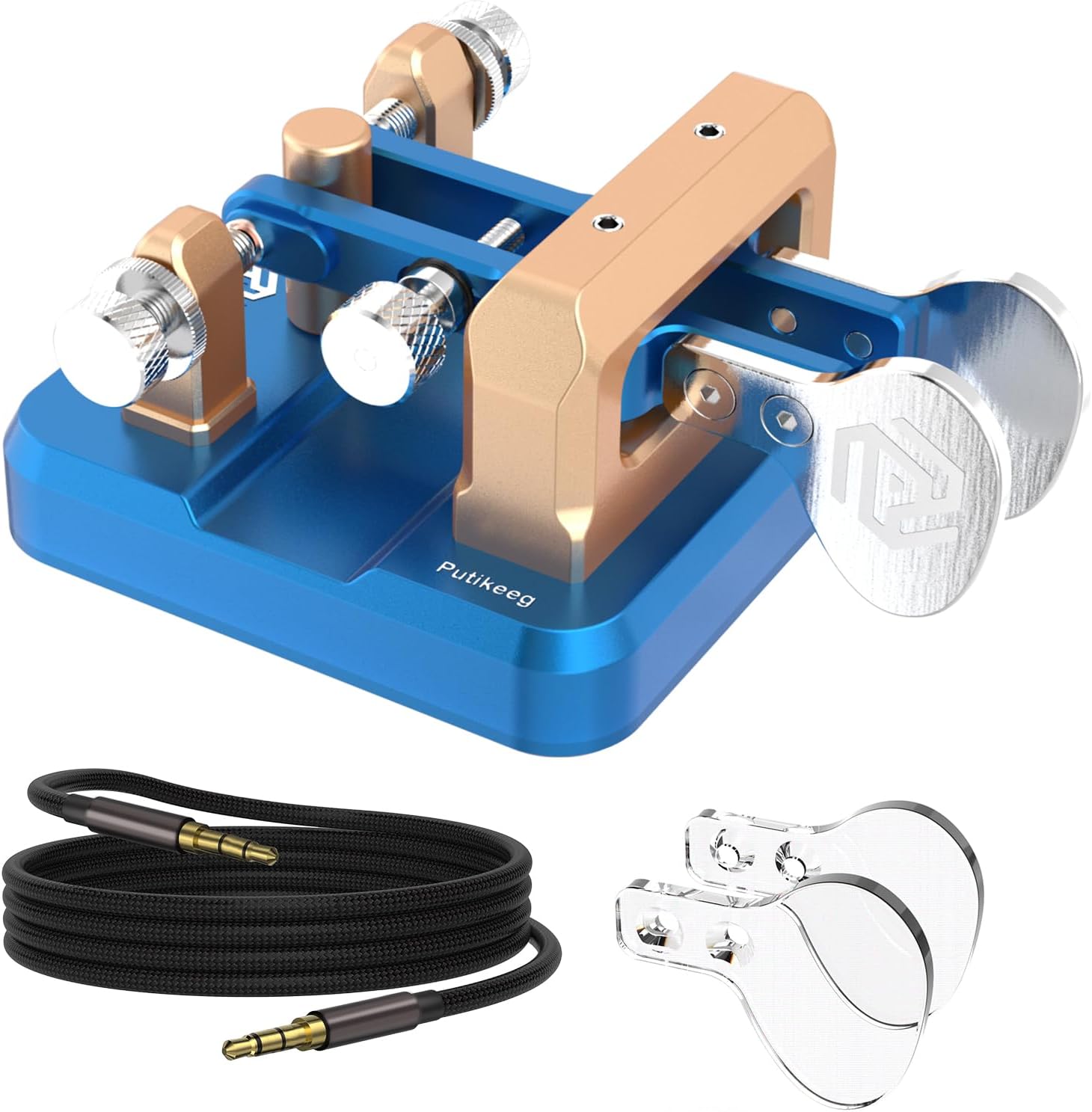
Image 1.1: Putikeeg CW Morse Code Key Model 11, showing the blue base, gold-colored arms, and silver paddles.
Key features include:
- Durable Construction: Made from aluminum alloy with a bright, rust-resistant surface.
- Precise Operation: Features four custom bearings for minimal gap and a magnetic return force for comfortable keying without springs.
- Portable Design: Small and light, with a base equipped with four magnetic magnets for secure attachment to iron surfaces, facilitating one-handed operation.
- Adjustable Paddles: Independent adjustment for Dit and Dah paddle distances to suit individual preferences.
- Standard Connectivity: Includes a 3.5mm standard stereo jack for compatibility with various short-wave radios.
- Switchable Configuration: Built-in left and right switches allow for easy paddle configuration.
2. Setup
2.1 Unpacking
Carefully remove the CW Morse Code Key from its packaging. Inspect the unit for any signs of damage during transit. Ensure all components, including the key and connecting cable, are present.
2.2 Connection
Connect the provided 3.5mm stereo cable to the jack located on the side of the Morse Code Key. The other end of the cable should be connected to the appropriate input on your short-wave radio or compatible device.

Image 2.1: Illustration of connecting the 3.5mm stereo jack into the key's port.
2.3 Placement
The key's base is equipped with four magnetic feet. This allows for secure placement on any ferrous metal surface, such as radio casings or vehicle hoods, preventing movement during operation. For non-magnetic surfaces, ensure the key is placed on a stable, flat area.

Image 2.2: Underside view of the key, highlighting the four magnetic feet for secure placement.
3. Operating Instructions
3.1 Paddle Adjustment
The distance between the Dit and Dah paddles can be adjusted independently. Use the small adjustment screws located on the key to set the paddle spacing to your preferred comfort and operating style. This allows for personalized tactile feedback and improved keying accuracy.

Image 3.1: Top-down view illustrating the adjustable paddle mechanism.
3.2 Magnetic Return Force
The key utilizes a magnetic return force mechanism instead of traditional springs. This design provides a consistent and comfortable feel during operation, contributing to precise tapping and clear message transmission. The magnetic force is factory-tuned for optimal performance.

Image 3.2: Close-up view showing the magnetic components responsible for paddle return.
3.3 Left/Right Switch
An internal switch allows you to configure the key for left-handed or right-handed operation, or to swap the Dit and Dah functions as needed. This provides flexibility for various operating preferences.

Image 3.3: Detailed view of the internal PC board and the left/right switch.
4. Maintenance
4.1 Cleaning
To maintain the appearance and functionality of your CW Morse Code Key, regularly wipe it with a soft, dry cloth. Avoid using abrasive cleaners or solvents, which can damage the aluminum alloy finish. Ensure no dust or debris accumulates in the paddle mechanisms.
4.2 Storage
When not in use, store the key in a clean, dry environment, away from extreme temperatures and direct sunlight. If transporting, consider using a protective case to prevent physical damage.
5. Troubleshooting
This section addresses common issues you might encounter with your Putikeeg CW Morse Code Key.
- Issue: Key not responding.
Solution: Ensure the 3.5mm stereo cable is securely connected to both the key and your radio. Verify that your radio's keying input is correctly configured and enabled. - Issue: Inconsistent keying or 'sticky' paddles.
Solution: Check for any debris or foreign objects obstructing the paddle movement. Ensure the paddle adjustment screws are not overtightened or too loose. The magnetic return system should provide smooth operation; if not, inspect for any physical damage. - Issue: Key slides on operating surface.
Solution: If using on a non-magnetic surface, ensure the surface is clean and dry. For optimal stability, place the key on a ferrous metal surface to utilize its magnetic base. - Issue: Incorrect Dit/Dah assignment.
Solution: Use the internal left/right switch to reconfigure the paddle assignments according to your preference. Refer to Section 3.3 for details.
6. Specifications
| Feature | Specification |
|---|---|
| Model Number | 11 |
| Item Weight | 1.15 pounds |
| Package Dimensions | 6.5 x 5 x 2.6 inches |
| Material | Aluminum Alloy |
| Color | Blue |
| Connectivity | 3.5mm Standard Stereo Receptacle |
| Compatible Devices | Any device with a 3.5mm audio jack |
| International Protection Rating | IP65 |
| First Available Date | September 25, 2023 |
7. Warranty and Support
7.1 Warranty Information
The Putikeeg CW Morse Code Key Model 11 comes with a 1-year limited warranty from the date of purchase. This warranty covers manufacturing defects under normal use. It does not cover damage resulting from misuse, accidents, unauthorized modifications, or improper maintenance.
7.2 Customer Support
For technical assistance, troubleshooting, or warranty claims, please contact Putikeeg customer support. Refer to your purchase documentation or the official Putikeeg website for the most current contact information.


