
XXK RC05RFB
XXK RC05RFB 8-Zone 2.4G RF Remote Control User Manual
Model: RC05RFB
1. Introduction
The XXK RC05RFB is an 8-zone 2.4G handheld RF remote control designed for managing various LED lighting systems. It is compatible with RGBCCT, RGBW, CCT, and RGB LED controllers, offering extensive control over color, brightness, and dynamic modes for your LED strip lights. This manual provides detailed instructions for setup, pairing, and operation.
2. Safety Information
- Ensure the power supply is disconnected before installation or maintenance.
- Do not expose the remote control to moisture or extreme temperatures.
- Use only the specified battery type (Alkaline) for the remote control.
- Keep out of reach of children.
- Refer to the LED controller's manual for specific wiring and power requirements.
3. Product Features
- 2.4G Wireless RF Control: Utilizes advanced RF radio frequency technology for effective control.
- Extended Control Range: Up to 99 feet (30 meters) with 360° control, capable of penetrating walls.
- 8-Zone Group Control: Manage up to 8 independent lighting zones simultaneously.
- Integrated Touch Screen Design: Sensitive color adjustment touch wheel for 16 million colors and 0-99% brightness adjustment.
- Wide Compatibility: Works with various LED strip controllers including WB5 WIFI controller, LM053 Bluetooth Mesh controller, and LM052 Zigbee controller.
- Quick Link: Fast pairing process without the need for Wi-Fi, Bluetooth, or app downloads.

Figure 1: XXK RC05RFB Remote Control highlighting 2.4G wireless transmitting and design features.
4. Product Overview and Button Functions
The RC05RFB remote control features an intuitive layout for easy operation. Below is a diagram illustrating the main components and their functions.

Figure 2: RC05RFB Remote Control Layout.
Button Descriptions:
- Master ON/OFF: Turns all paired lights ON or OFF.
- Color Ring: Touch to select desired color from 16 million options.
- Color Temp/Saturation: Adjusts color temperature or saturation.
- Brightness +/-: Increases or decreases light brightness (0-99%).
- Speed +/-: Adjusts the speed of dynamic modes.
- White Light (W): Activates pure white light mode.
- Dynamic Mode (M): Cycles through various dynamic lighting effects.
- Switch 7 Pure Colors: Cycles through 7 preset pure colors.
- Zone ON/Link (1-8): Turns on a specific zone or initiates pairing for that zone.
- Zone OFF/Night Light Mode (O): Turns off a specific zone or activates night light mode.
5. Setup and Connection
5.1 Battery Installation
The RC05RFB remote control uses Alkaline batteries. Open the battery compartment on the back of the remote and insert the batteries, ensuring correct polarity. Close the compartment securely.
5.2 Controller Compatibility
This remote is compatible with various XXK LED controllers. Ensure you have a compatible controller for your LED strip type.
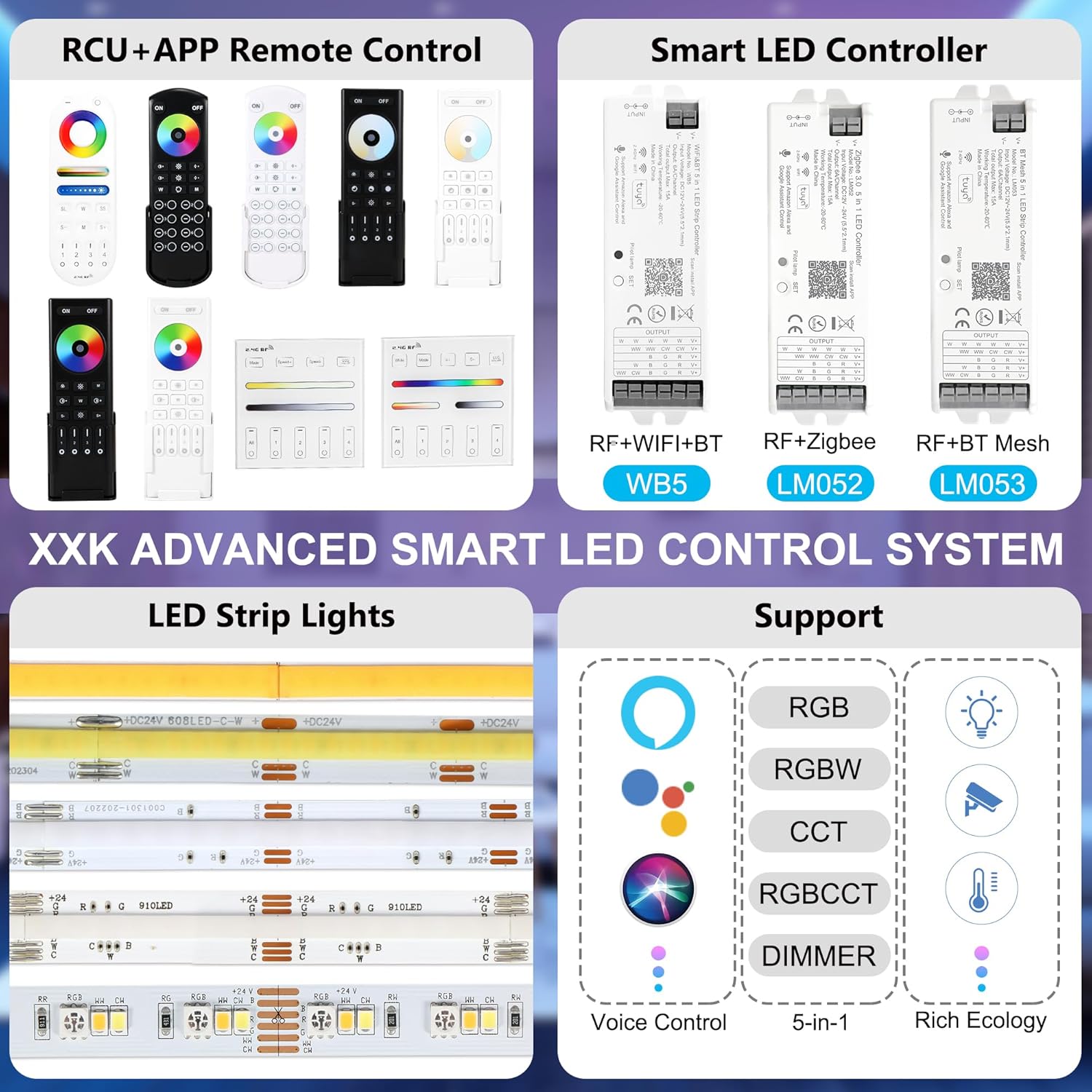
Figure 3: Overview of compatible LED controllers.
5.3 Wiring the LED Controller
Connect your LED strip to the appropriate terminals on the LED controller. The input voltage of the controller must match the working voltage of the connected LED strip. Always ensure power is off during wiring.
Video 1: This video illustrates how to connect different types of LED strips (single color, CCT, RGB, RGBW, RGBCCT) to the controller and how to switch the controller's output mode.

Figure 4: WB5 WiFi&BT 5 in 1 LED Strip Controller.

Figure 5: LM052 Zigbee 3.0 5 in 1 LED Controller.

Figure 6: LM053 BT Mesh 5 in 1 LED Strip Controller.

Figure 7: Example of an LED Strip Light.
5.4 Setting Output Mode on the Controller
After connecting the power supply and the LED strip, adjust the output mode of the controller to match the type of LED strip. Short press the "SET" button on the controller to switch the output mode. Different colors of indicator lights represent different output modes. The default mode is RGBCCT.
| Indicator Light | Output Mode |
|---|---|
| White Light Flickering | Single Color Mode |
| Yellow Light Flickering | Dual White Mode (CCT) |
| Red Light Flickering | RGB Mode |
| Green Light Flickering | RGBW Mode |
| Blue Light Flickering | RGB+CCT Mode (Default) |
6. Pairing Instructions
To establish communication between the remote control and the LED controller, follow these pairing steps:
- Turn off the power to the LED controller.
- Wait for 10 seconds.
- Turn the power back on to the LED controller.
- Within 3 seconds of turning on the controller, quickly press the desired Zone ON button (e.g., '1' for Zone 1) on the remote control 3 times.
- If the LED strip light blinks 3 times slowly, the pairing is successful for that zone.
Video 2: This video provides a step-by-step guide on how to pair the RF remote control with your LED controller.
7. Operating the Remote Control
Once paired, you can control your LED lights using the remote's various functions.

Figure 8: The RC05RFB remote control supports 8-zone group control for managing multiple lighting areas.
7.1 Basic Controls
- Power ON/OFF: Press the ON or OFF buttons to control all paired lights.
- Brightness Adjustment: Use the Brightness + and Brightness - buttons to increase or decrease the light intensity.
- Color Selection: Touch the Color Ring to select any color from the spectrum.
- Color Temperature/Saturation: Use the dedicated buttons to fine-tune the color temperature (for CCT lights) or saturation (for RGB/RGBCCT lights).
- White Light: Press the W button for pure white light.
7.2 Dynamic Modes
- Mode Selection: Press the M button to cycle through various pre-programmed dynamic lighting modes.
- Speed Adjustment: Use the Speed + and Speed - buttons to adjust the transition speed of the dynamic modes.
- 7 Pure Colors: Press the Switch 7 Pure Colors button to quickly switch between 7 static pure colors.
7.3 Zone Control
- Select Zone: Press any of the numbered Zone ON/Link (1-8) buttons to select and control a specific lighting zone.
- Zone OFF/Night Light: Press the Zone OFF/Night Light Mode (O) button for the selected zone to turn it off or activate a low-brightness night light setting.
Video 3: This video demonstrates the various color and brightness adjustments possible with the RF remote control for RGB+CCT LED smart lights.
8. Technical Specifications
| Feature | Specification |
|---|---|
| Brand | XXK |
| Model Name | RC05RFB |
| Connectivity Technology | Radio Frequency (2.4G) |
| Maximum Range | 99 Feet (30 meters) |
| Number of Zones | 8 |
| Controller Type | Button Control, Touch Wheel |
| Battery Type | Alkaline (AAA*2PCS, not included) |
| Item Weight | 0.1 Kilograms |
| Compatible Devices | WB5 WIFI controller, LM053 Bluetooth Mesh controller, LM052 Zigbee controller |
9. Troubleshooting
- Remote not responding:
- Check battery levels and replace if necessary.
- Ensure the remote is within the effective control range (99 feet).
- Re-pair the remote with the controller following the pairing instructions.
- Lights not changing color/brightness:
- Verify that the controller's output mode matches your LED strip type (refer to Section 5.4).
- Ensure the LED strip is correctly wired to the controller.
- Interference:
- While 2.4G RF is robust, strong electromagnetic interference might affect performance. Try to relocate the controller or remote if issues persist.
10. Warranty and Support
For warranty information and technical support, please refer to the product packaging or contact XXK customer service through the retailer where the product was purchased. Keep your purchase receipt for warranty claims.
Ask a question about this manual
Ask about setup, troubleshooting, compatibility, parts, safety, or missing instructions. Manuals+ will review the question and use this page’s manual context to help answer it.