
Introduction
This manual provides instructions for the installation, operation, and maintenance of your Matane 12-inch Motion Sensor LED Ceiling Light. This hardwired flush mount light features a 360-degree microwave motion sensor, a light sensor, and comes with a remote control for customizable settings. It offers three color temperature options (3000K, 4000K, 5000K) and dimmable brightness from 10% to 100%.

Image: Matane 12-inch Motion Sensor LED Ceiling Light with remote and color temperature examples.
The Matane Motion Sensor LED Ceiling Light is suitable for various indoor applications, providing efficient and convenient lighting in areas such as hallways, closets, stairs, and laundry rooms.

Image: Application scenarios for the Matane ceiling light.
Safety Information
Please read all instructions carefully before installation and use. Retain this manual for future reference.
- Electrical Hazard: Installation should be performed by a qualified electrician or a person with electrical knowledge. Ensure power is turned off at the circuit breaker before installation or maintenance.
- Proper Grounding: Ensure the fixture is properly grounded to avoid electrical shock.
- Indoor Use Only: This product is designed for indoor use in dry locations. Do not expose to water or moisture.
- Operating Voltage: This fixture operates on 120 Volts AC.
- Heat: LED lights generate heat. Ensure adequate ventilation around the fixture.
- Cleaning: Disconnect power before cleaning. Use a soft, dry cloth. Do not use abrasive cleaners.
Package Contents
Verify that all components are present before beginning installation:
- Matane 12-Inch Motion Sensor LED Ceiling Light Unit
- Remote Control
- Mounting Hardware (screws, wire nuts)
- Instruction Manual
Setup and Installation
This ceiling light is designed for hardwired flush mount installation. It is compatible with most standard junction boxes.
- Turn Off Power: Before starting, ensure the power supply to the installation area is turned off at the circuit breaker.
- Prepare Mounting Surface: The light can be mounted on ceilings or walls. Ensure the surface is clean and stable.
- Install Mounting Bracket: Attach the mounting bracket to your junction box using the provided screws.
- Adjust Color Temperature (Pre-installation): Before wiring, locate the color temperature selector switch inside the light fixture. Select your desired color temperature (3000K Warm White, 4000K Natural White, or 5000K Cool White). This setting cannot be changed via the remote control after installation.
- Wire Connections: Connect the household electrical wires to the light fixture wires using the provided wire nuts. Typically, connect the black wire from the fixture to the black (live) wire from the junction box, the white wire from the fixture to the white (neutral) wire from the junction box, and the ground wire from the fixture to the ground wire from the junction box. Ensure all connections are secure.
- Mount the Fixture: Carefully align the light fixture with the mounting bracket and secure it in place. Some fixtures include a safety wire to temporarily hold the light during wiring.
- Restore Power: Once the fixture is securely mounted, turn the power back on at the circuit breaker.

Image: Hardwired installation diagram and ultra-thin design dimensions.
Installation Recommendation: For optimal motion sensor performance, it is recommended to install the light at least 1.5 meters (approximately 5 feet) away from switches and Wi-Fi routers to prevent interference.
Operating Instructions
Your Matane ceiling light can be controlled using the included remote control to customize its behavior.
Remote Control Functions

Image: Remote control with customizable lighting settings.
- ON/OFF: Turns the light on or off manually.
- Reset: Resets all remote settings to default.
- DIM+/DIM-: Adjusts brightness up or down. Brightness is adjustable from 10% to 100%.
- Detection Range: Sets the motion sensor detection range to 3 feet (25%), 13 feet (50%), or 20 feet (100%).
- Daylight Sensor: Configures the light sensor sensitivity to 15 Lux, 50 Lux, or disables it. When disabled, the light will respond to motion regardless of ambient light levels.
- Hold Time: Sets the duration the light remains on after motion is no longer detected: 5 seconds, 30 seconds, 60 seconds (1 minute), or 300 seconds (5 minutes).
- Motion Sensor ON/OFF: Enables or disables the motion sensor function. When disabled, the light will operate in ON mode (always on) if not manually turned off.
Operating Modes

Image: Three operating modes: AUTO, G, and ON.
- AUTO Mode: The light activates only when motion is detected AND the ambient light level is below the set daylight sensor threshold. This mode combines both motion and light sensors for energy efficiency.
- G Mode (Motion Sensor Only): The light activates whenever motion is detected, regardless of the ambient light level. The light sensor is effectively bypassed in this mode.
- ON Mode: The light remains continuously on, bypassing both the motion and light sensors. This mode is activated by disabling the motion sensor function via the remote control.
Color Temperature and Brightness
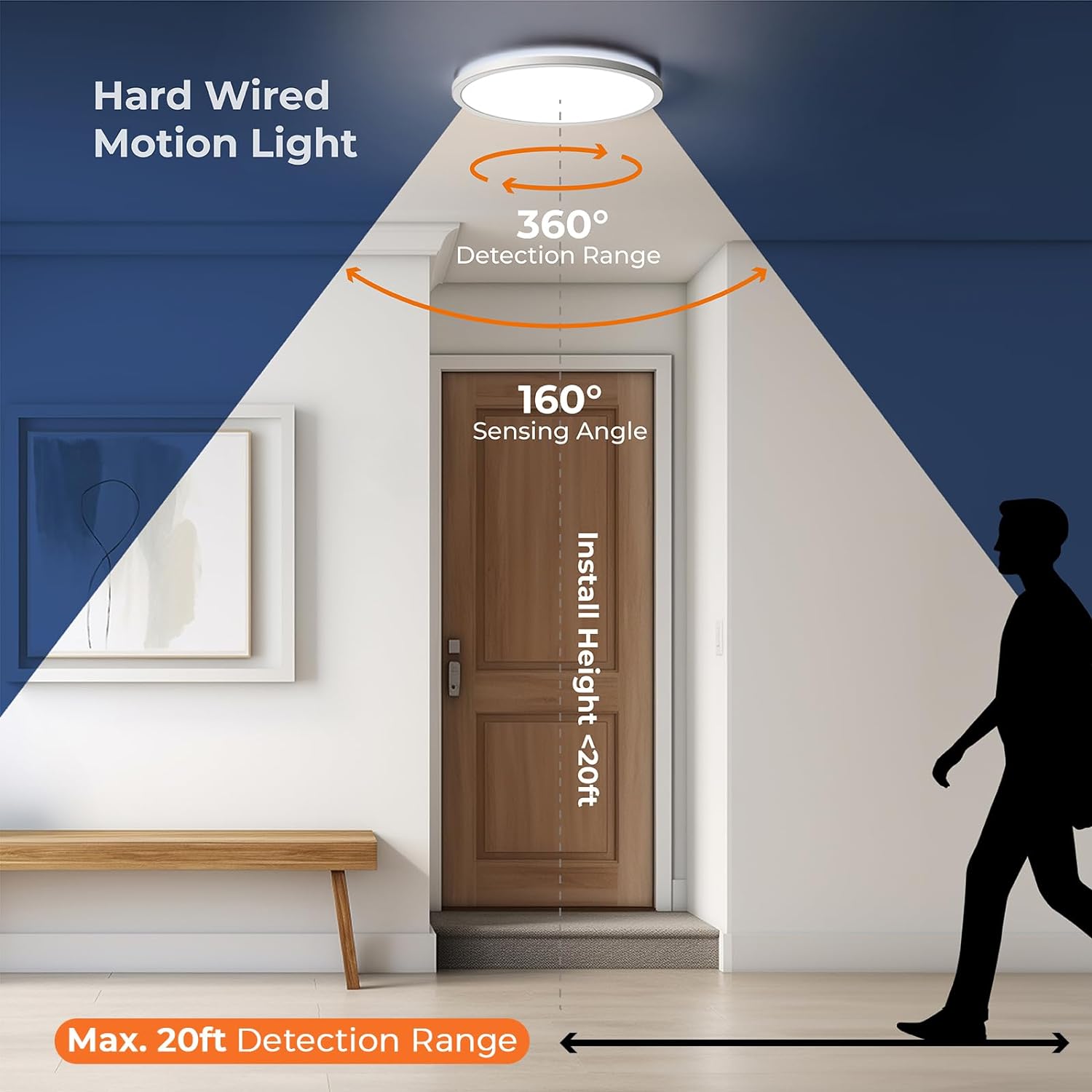
Image: Selectable color temperatures and dimmable brightness.
- Color Temperature: As mentioned in the setup, the color temperature (3000K Warm White, 4000K Natural White, 5000K Cool White) is selected via a physical switch inside the fixture before installation.
- Brightness: The brightness can be adjusted from 10% to 100% using the DIM+ and DIM- buttons on the remote control.
Motion Sensor Details
The Matane ceiling light features an advanced microwave radar sensor that can detect motion through certain non-metallic materials like thin walls or doors. This provides a wider detection range and higher sensitivity compared to traditional infrared sensors.

Image: Sensitive radar sensor detection through walls.
- Detection Angle: 360 degrees.
- Detection Range: Adjustable from 3 to 20 feet.
- Sensing Angle: 160 degrees.
- Installation Height: Recommended for installation heights less than 20 feet.
Maintenance
Regular maintenance helps ensure the longevity and optimal performance of your ceiling light.
- Cleaning: Disconnect power before cleaning. Use a soft, dry, or slightly damp cloth to wipe the surface of the light. Do not use harsh chemicals, abrasive cleaners, or solvents, as these can damage the finish or electronic components.
- Inspection: Periodically check the fixture for any signs of damage or loose connections. If any issues are found, turn off the power and consult a qualified electrician.
- Remote Control Battery: If the remote control stops responding, replace its batteries. The remote typically uses 2x AAA batteries (not included).
Troubleshooting
If you encounter issues with your Matane ceiling light, refer to the following common problems and solutions:
| Problem | Possible Cause | Solution |
|---|---|---|
| Light does not turn on. | No power; incorrect wiring; motion sensor disabled; light sensor set too high (in AUTO mode). | Check circuit breaker. Verify wiring connections. Ensure motion sensor is enabled via remote. Adjust daylight sensor sensitivity or switch to G mode. |
| Light turns on unexpectedly. | Motion sensor sensitivity too high; interference from other devices (e.g., Wi-Fi router). | Reduce the detection range via the remote control. Ensure the light is installed away from sources of interference. |
| Light stays on continuously. | Light is in ON mode; hold time set too long; continuous motion detected. | Ensure motion sensor is enabled (not in ON mode). Adjust hold time to a shorter duration. Check for constant motion in the detection area. |
| Remote control not working. | Remote battery depleted; obstruction between remote and light. | Replace the remote control batteries (2x AAA). Ensure a clear line of sight or proximity to the light. |
| Cannot change color temperature with remote. | Color temperature is set by a physical switch. | Color temperature must be selected using the switch inside the fixture during installation. Turn off power, remove fixture, adjust switch, then re-install. |
Specifications
| Brand | Matane |
| Model Name | LS-CL-G24W-M-DCCT |
| Product Dimensions | 12"L x 12"W x 1.3"H (11.8 inches diameter, 0.98 inches thickness) |
| Item Weight | 1.87 pounds |
| Material | Plastic |
| Power Source | Corded Electric (Hardwired) |
| Voltage | 120 Volts (AC) |
| Wattage | 24 watts |
| Brightness | 2400 Lumens |
| Color Temperature | 3000K Warm White, 4000K Natural White, 5000K Cool White (selectable via internal switch) |
| Special Features | Dimmable, Motion Sensor, Remote Control, Selectable Color Temperature |
| Control Method | Remote Control |
| Installation Type | Flush Mount |
| Room Type | Closet, Hallway, Laundry Room, Pantry, Porch, Basement, Stairs (Indoor) |
| Light Source Type | LED |
| Lifespan | Over 30,000 hours |
Warranty and Support
For warranty information or technical support, please contact Matane customer service. Refer to the product packaging or the seller's information for specific contact details.