
Introduction
Thank you for choosing the EUREKA ERGONOMIC ERK-OC12-B Office Chair. This manual provides detailed instructions for the assembly, operation, maintenance, and troubleshooting of your new ergonomic office chair. Please read this manual thoroughly before assembly and use to ensure proper function and longevity of the product.

Image: The EUREKA ERGONOMIC ERK-OC12-B office chair, showcasing its design and presence in a modern office environment.
Setup and Assembly
Assembly of the EUREKA ERGONOMIC ERK-OC12-B office chair is required. Please ensure all components are present before beginning. It is recommended to assemble the chair on a soft, clean surface to prevent damage.
Required Tools:
- Hex key (usually included)
Assembly Steps:
- Unpack Components: Carefully remove all parts from the packaging and lay them out. Verify against the parts list (if provided in the box) that all components are present and undamaged.
- Attach Casters to Base: Insert the casters (wheels) into the holes at the end of each leg of the chair base. Push firmly until they click into place.
- Insert Gas Lift: Place the gas lift cylinder into the center hole of the assembled chair base.
- Attach Mechanism to Seat: Secure the seat mechanism to the underside of the seat cushion using the provided screws. Ensure the front of the mechanism faces the front of the seat.
- Connect Seat to Gas Lift: Carefully place the assembled seat onto the gas lift cylinder, ensuring it is centered and stable.
- Attach Backrest: Connect the backrest to the seat mechanism using the designated screws.
- Install Armrests: Attach the armrests to the seat or backrest as indicated in the specific instructions provided with your chair.
- Install Headrest: Slide the headrest into its designated slot at the top of the backrest.
After assembly, sit on the chair to engage the gas lift and ensure all connections are secure.
Operating Instructions and Adjustments
The EUREKA ERGONOMIC ERK-OC12-B chair offers multiple adjustments to customize your seating experience for optimal comfort and ergonomic support.

Image: A detailed diagram illustrating the various adjustable components of the chair, such as 5 locking positions, adjustable 3D armrests, and seat depth adjustment.
1. Seat Height Adjustment:
To adjust the seat height, locate the lever on the right side, beneath the seat. While seated, pull the lever up to lower the seat. To raise the seat, stand up and pull the lever up. Release the lever at the desired height.
2. Adaptive Lumbar Support:
This chair features an innovative auto-following adaptive lumbar support. The lumbar support automatically adjusts to your sitting position. To fine-tune the support strength:
- Increase Support: Turn the knob on the side of the backrest clockwise.
- Reduce Support: Rotate the knob counter-clockwise.
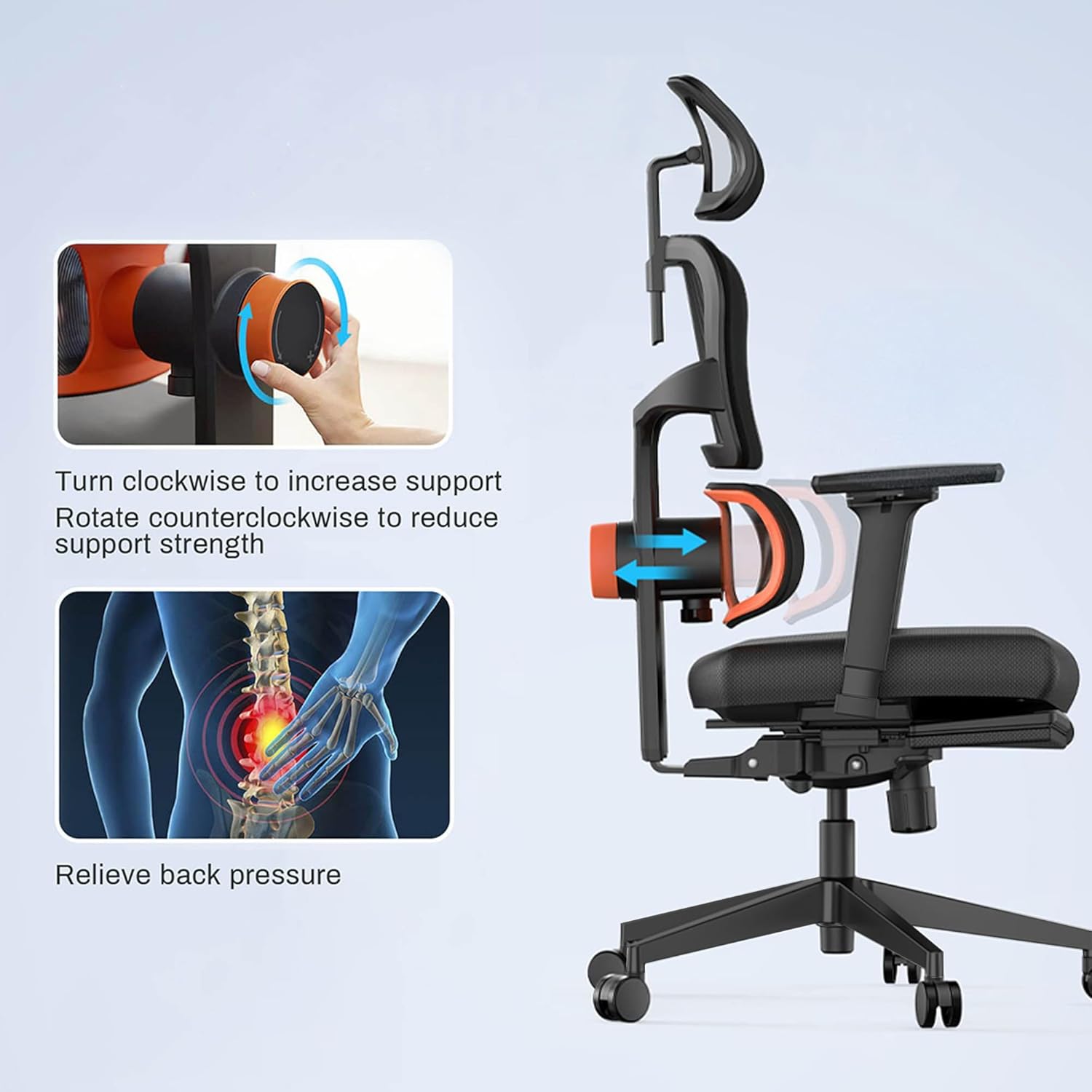
Image: Visual guide on adjusting the lumbar support. Turning the knob clockwise increases support, while counter-clockwise reduces it, helping to relieve back pressure.
3. Backrest Tilt Function:
The backrest can be tilted and locked at multiple angles (96°, 106°, 116°, 126°). Locate the tilt lever, typically on the left side beneath the seat.
- Unlock Tilt: Pull the lever outwards.
- Recline: Lean back to the desired angle.
- Lock Tilt: Push the lever inwards to lock the backrest in position.
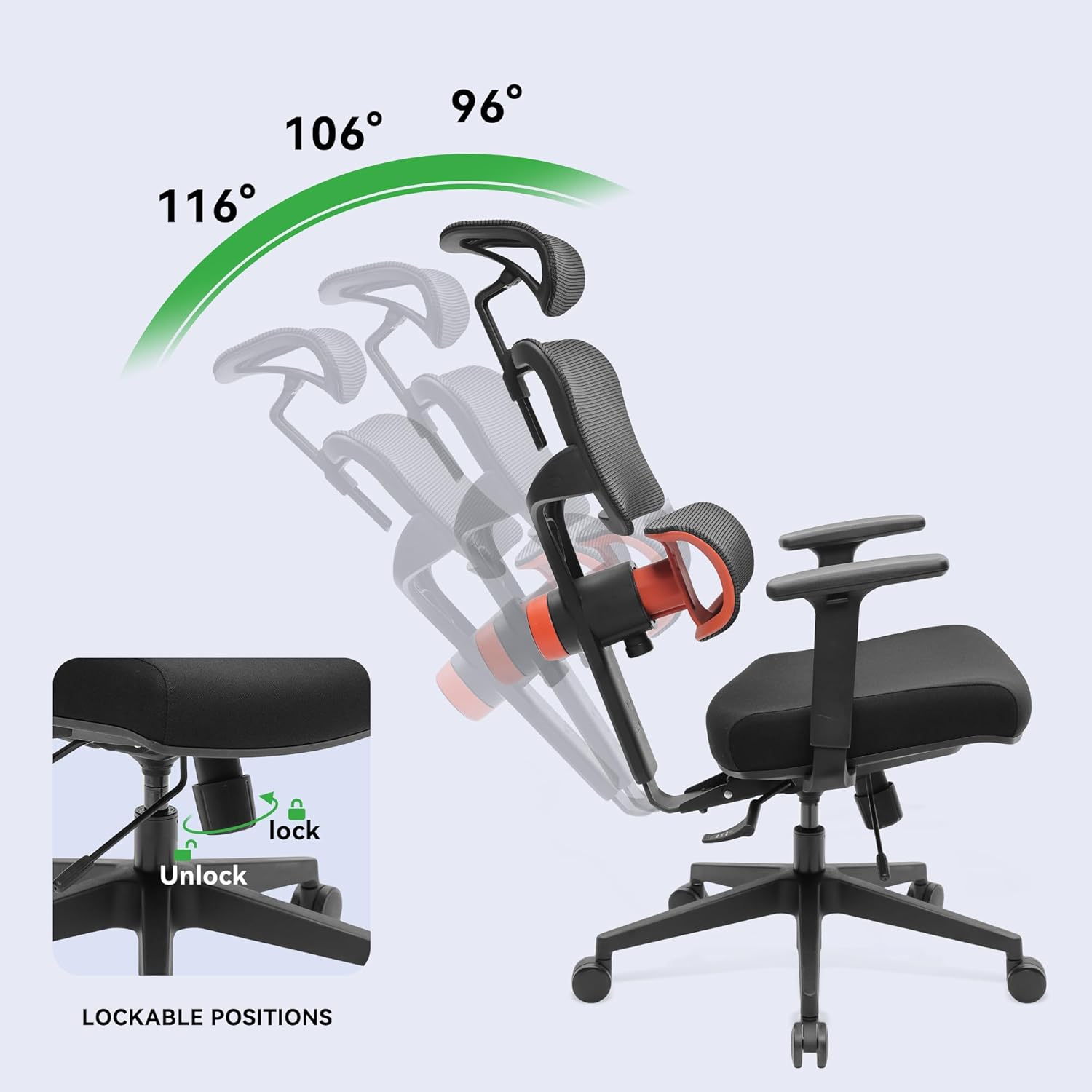
Image: The chair demonstrating its recline capabilities, showing four distinct lockable positions from 96° to 126° for varied comfort.
4. Seat Depth Adjustment:
To adjust the seat depth, locate the lever or button usually on the left side, beneath the seat. Engage the mechanism and slide the seat forward or backward to achieve the desired depth. Release the lever/button to lock the seat in place.
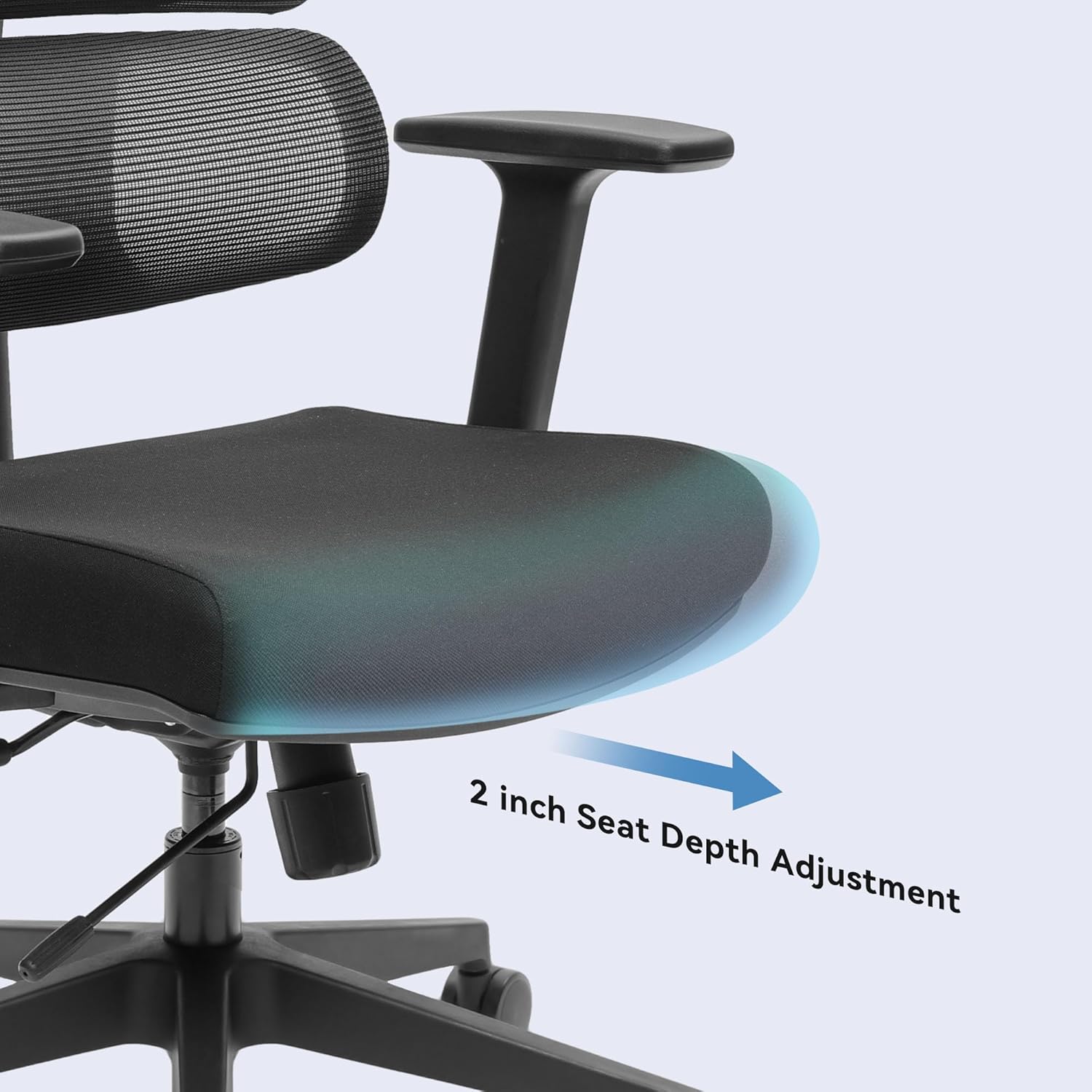
Image: A close-up view highlighting the seat depth adjustment, allowing the user to extend or retract the seat by up to 2 inches for personalized leg support.
5. 3D Adjustable Armrests:
The armrests can be adjusted in three dimensions:
- Height: Press the button on the side of the armrest and slide it up or down.
- Forward/Backward: Slide the armrest pad forward or backward.
- Pivot: Rotate the armrest pad inwards or outwards.
6. Adjustable Headrest:
The headrest can be adjusted for height and angle. Grasp the headrest and move it up or down, or tilt it to find your preferred position. It will lock into place.
Maintenance and Care
Proper maintenance ensures the longevity and optimal performance of your EUREKA ERGONOMIC office chair.
- Cleaning: Wipe clean with a damp cloth. Avoid harsh chemicals or abrasive cleaners, as these can damage the mesh, fabric, or frame.
- Caster Care: Periodically check the casters for accumulated hair or debris and clean them to ensure smooth movement.
- Fastener Check: Every few months, check all screws and bolts to ensure they are tight. Re-tighten if necessary to maintain stability and prevent squeaks.
- Mesh Inspection: Inspect the mesh backrest and seat for any signs of wear or damage.
Troubleshooting
If you encounter any issues with your EUREKA ERGONOMIC office chair, refer to the following common problems and solutions:
| Problem | Possible Cause | Solution |
|---|---|---|
| Chair does not adjust height | Gas lift malfunction or lever not engaged | Ensure the height adjustment lever is fully engaged. If the issue persists, the gas lift may need replacement. Contact customer support. |
| Chair is unstable or wobbly | Loose fasteners or damaged base/casters | Check and tighten all screws and bolts, especially those connecting the seat to the mechanism and the base. Inspect the base and casters for damage. |
| Squeaking noises | Loose connections or friction between parts | Tighten all fasteners. Apply a small amount of silicone lubricant to moving parts or connection points if the noise persists. |
| Lumbar support makes a 'tik tik' noise | Internal mechanism friction or loose component | Ensure the lumbar support knob is securely fastened. If the noise persists, it may indicate an internal component issue. Contact customer support for assistance. |
| Casters do not roll smoothly | Debris in casters or damaged wheels | Remove any hair, dust, or debris from the caster wheels. If a wheel is damaged, it may need replacement. |
Specifications
Below are the technical specifications for the EUREKA ERGONOMIC ERK-OC12-B Office Chair:
| Feature | Detail |
|---|---|
| Model Name | ERGONOMIC |
| Model Number | ERK-OC12-B |
| Brand | EUREKA ERGONOMIC |
| Color | Black |
| Material | Alloy Steel (Frame), Sponge (Fill), Fabric (Seat), Mesh (Back) |
| Product Dimensions (D x W x H) | 69.5D x 69.5W x 111H Centimetres |
| Item Weight | 23.59 kg |
| Maximum Weight Recommendation | 136.08 kg (300 lb) |
| Back Style | Solid Back, Mesh |
| Frame Material | Aluminum |
| Special Features | Adjustable Lumbar, Adjustable Headrest, 3D Armrests, Tilt Function, Seat Depth Adjustment |
| Reclining Position Count | 4 (96°, 106°, 116°, 126°) |
| Assembly Required | Yes |
| Certifications | BIFMA & SGS certified gas rods |
Warranty and Customer Support
For warranty information, please refer to the documentation included with your purchase or visit the official EUREKA ERGONOMIC website. If you have any questions, require assistance with assembly, or need to troubleshoot an issue not covered in this manual, please contact EUREKA ERGONOMIC customer support.
Customer Support: Please refer to your purchase receipt or the manufacturer's website for the most current contact information.


