
Introduction
This manual provides comprehensive instructions for the setup, operation, and maintenance of your PoundMax 32-inch FHD 1080p 75Hz Monitor (Model 100095550). This monitor features a 32-inch Full High Definition (1080p) LED-backlit display with a bezel-less design, offering a 1920x1080 resolution and a 75Hz refresh rate. It includes HDMI and VGA connectivity for versatile use. Please read this manual thoroughly before using your monitor to ensure proper installation and functionality.
Package Contents
Verify that all items listed below are present in your product packaging. If any items are missing or damaged, please contact customer support.

This image displays the PoundMax 32-inch monitor alongside its accessories, including the HDMI cable, AC adapter with power cable, and the monitor stand.
- 1 x PoundMax 32-inch Monitor
- 1 x HDMI Cable (6 ft / 1.8 m)
- 1 x AC Adapter + Power Cable (6 ft / 1.8 m)
- 1 x Monitor Stand
Product Overview
Familiarize yourself with the various components and connection ports of your monitor.
Front View

The front view of the monitor, showcasing its bezel-less display and the stand.
The front of the monitor features the 32-inch display panel. The bezel-less design provides an immersive viewing experience.
Rear View and Connection Ports

The rear of the monitor, highlighting the VESA mounting holes and the location of the input ports.

A detailed view of the monitor's connectivity panel, showing the power input, HDMI port, VGA port, and headphone jack.
The rear panel includes the power input, HDMI port, VGA port, and a headphone jack. It also features VESA 100 x 100 mm mounting holes for alternative mounting solutions.
Side View

The side profile of the monitor, illustrating its slim design.
The slim profile of the monitor allows for efficient use of desk space.
Setup Instructions
- Assemble the Stand: Carefully attach the monitor stand to the back of the monitor. Ensure it is securely fastened according to the instructions provided with the stand components.
- Connect Video Cable:
- For HDMI connection: Connect one end of the provided HDMI cable to the HDMI port on your computer or video source and the other end to the HDMI port on the monitor.
- For VGA connection: Connect a VGA cable (not included) to the VGA port on your computer and the VGA port on the monitor.
- Connect Power: Connect the AC adapter to the power input on the monitor, then plug the power cable into a wall outlet.
- Power On: Press the power button on the monitor to turn it on. The monitor should automatically detect the input source. If not, you may need to manually select the input source using the monitor's controls.
Operating Instructions
Power On/Off
Press the power button, typically located on the back or bottom edge of the monitor, to turn the monitor on or off.
On-Screen Display (OSD) Menu
The OSD menu allows you to adjust various display settings. Use the control buttons (usually located near the power button) to navigate the menu.
- Brightness/Contrast: Adjust the overall brightness and contrast of the display.
- Input Source: Manually select between HDMI and VGA input sources.
- Color Settings: Modify color temperature, hue, and saturation.
- Low Blue Light: Activate or adjust the low blue light setting to reduce eye strain.
- Aspect Ratio: Adjust the display aspect ratio (e.g., 16:9).
Tilt Adjustment
The monitor supports tilt adjustment from -5 degrees to +20 degrees. Gently hold the top and bottom edges of the monitor and tilt it to your desired viewing angle.
Maintenance
- Cleaning the Screen: Gently wipe the screen with a soft, lint-free cloth. For stubborn marks, lightly dampen the cloth with water or a non-abrasive screen cleaner. Avoid using alcohol-based cleaners or harsh chemicals.
- Cleaning the Casing: Use a soft, dry cloth to wipe the monitor casing.
- Storage: When not in use for extended periods, store the monitor in a cool, dry place, away from direct sunlight and extreme temperatures.
Troubleshooting
| Problem | Possible Cause | Solution |
|---|---|---|
| No image on screen |
|
|
| Image is blurry or distorted |
|
|
| Monitor not turning on |
|
|
Specifications
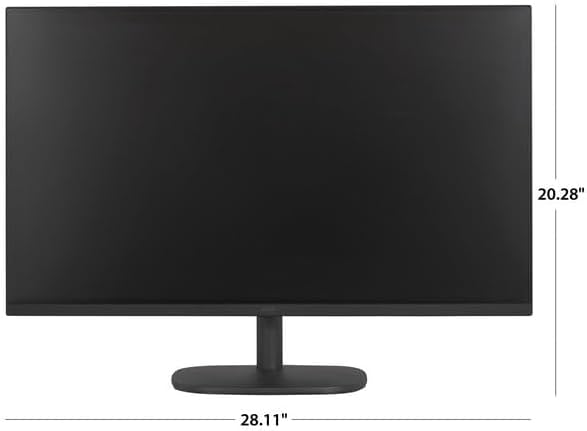
This image illustrates the physical dimensions of the monitor, including its width and height.
- Model Number: 100095550
- Screen Size: 32 inches (31.55 inches actual diagonal)
- Display Type: LED-backlit LCD
- Resolution: Full HD (FHD) 1920 x 1080
- Refresh Rate: 75Hz
- Aspect Ratio: 16:9
- Connections: 1 x HDMI, 1 x VGA, 1 x Headphone Jack
- Tilt Adjustment: -5° to +20°
- VESA Mount: 100 x 100 mm
- Product Dimensions (W x H x D): 28.11 x 20.28 x 3 inches
- Item Weight: 18.3 pounds
- Voltage: 120 Volts (AC)
- Screen Surface Description: Glossy
Warranty and Support
For warranty information or technical support, please refer to the warranty card included in your product packaging or visit the official PoundMax website. Keep your purchase receipt as proof of purchase for warranty claims.