
1. Introduction
Thank you for choosing the Enders Monroe PRO 3 SIK Turbo Shadow Gas Barbecue. This manual provides essential information for the safe assembly, operation, and maintenance of your new gas grill. Please read all instructions carefully before using the appliance to ensure proper function and to prevent injury or damage.
This gas barbecue is designed for outdoor use only and is intended for grilling and cooking a variety of meats and vegetables at various temperatures.
2. Safety Information
WARNING: Failure to follow these safety instructions could result in fire, explosion, or serious injury.
- Always operate the barbecue outdoors in a well-ventilated area. Never use in an enclosed space.
- Keep children and pets away from the barbecue at all times.
- Do not store or use gasoline or other flammable vapors and liquids in the vicinity of this or any other appliance.
- Ensure the gas cylinder is stored in the designated compartment underneath the barbecue during operation.
- Check all gas connections for leaks before each use. Use a soapy water solution; never use an open flame.
- A flexible hose and pressure regulator are not included with this product and must be purchased separately. Ensure they are compatible with your gas supply and local regulations.
- Do not move the barbecue while it is in use or still hot.
- Wear protective gloves when handling hot components.
3. Setup and Assembly
The Enders Monroe PRO 3 SIK Turbo Shadow Gas Barbecue requires minimal assembly. The main grill unit is largely pre-assembled, but some components, such as the barbecue cart and side shelves, may require attachment. Please follow the detailed assembly instructions provided in the separate assembly guide included in the packaging.
- Unpacking: Carefully remove all components from the packaging. Retain packaging materials for future transport or storage if needed.
- Cart Assembly: Assemble the barbecue cart according to the provided diagrams, ensuring all screws and fasteners are securely tightened.
- Side Shelf Attachment: Secure the side shelves, including the one with the integrated side burner, to the main grill body.
- Gas Connection: Connect a suitable flexible hose and pressure regulator (not included) to the gas cylinder and the barbecue's gas inlet. Ensure all connections are tight and perform a leak test with soapy water before first use.

Image: The Enders Monroe PRO 3 SIK Turbo Shadow gas barbecue in use on a patio, demonstrating its outdoor application.
4. Operating Instructions
4.1. Ignition
- Ensure the gas cylinder valve is open.
- Open the barbecue lid.
- Turn the control knob for the desired main burner to the 'HIGH' position and press it in to activate the igniter.
- Hold the knob for a few seconds until the burner ignites. If it does not ignite, turn the knob off, wait 5 minutes, and repeat the process.
- Once lit, adjust the heat to your desired cooking temperature.
4.2. Using the TURBO ZONE
The TURBO ZONE is designed for achieving extremely high temperatures quickly, up to 800°C, ideal for searing steaks and other foods to create a perfect crust. It utilizes an infrared network burner.
- To activate, turn the dedicated TURBO ZONE control knob to the 'HIGH' position and ignite as per standard burner ignition.
- Allow a few minutes for the TURBO ZONE to reach its optimal searing temperature.
- Place food directly over the TURBO ZONE for quick searing, then move to a lower heat area for finishing if needed.

Image: The TURBO ZONE infrared burner, showing its intense heat for searing.

Image: The TURBO ZONE feature, indicating its high-performance searing capability.
4.3. Using the Side Burner (K)
The integrated side burner provides an additional cooking surface, perfect for preparing sauces, side dishes, or boiling water while grilling.
- Lift the lid of the side burner on the side shelf.
- Place your cookware on the grate.
- Turn the side burner control knob to the 'HIGH' position and ignite.
- Adjust the flame as needed.

Image: The integrated side burner in operation, showing its utility for additional cooking.
4.4. Temperature Control with HEAT RANGE
The HEAT RANGE burner system ensures optimal heat distribution across the entire grilling surface, from edge to edge. This allows for both low-temperature cooking (maintaining a constant 80°C) and high-temperature grilling (up to 300°C in the cooking chamber).
- Use the individual burner control knobs to precisely adjust the heat output for different cooking zones.
- For low and slow cooking, set burners to their lowest stable setting.
- For high-temperature grilling, set burners to a higher setting.
- Monitor the internal temperature using the integrated thermometer in the double-walled cooking hood.

Image: The HEAT RANGE burner system, designed for consistent and versatile temperature control.
4.5. PANOVISION Window and SWITCH GRID
The PANOVISION window, located on the cooking hood, allows you to monitor the cooking process without lifting the lid, helping to maintain consistent internal temperatures. The integrated thermometer provides an accurate reading of the cooking chamber temperature.
The SWITCH GRID system offers versatility for your grilling needs. The removable circular insert in the main grate allows for the use of various Enders accessories (sold separately), such as a pizza stone, wok, or searing grate, to expand your cooking options.
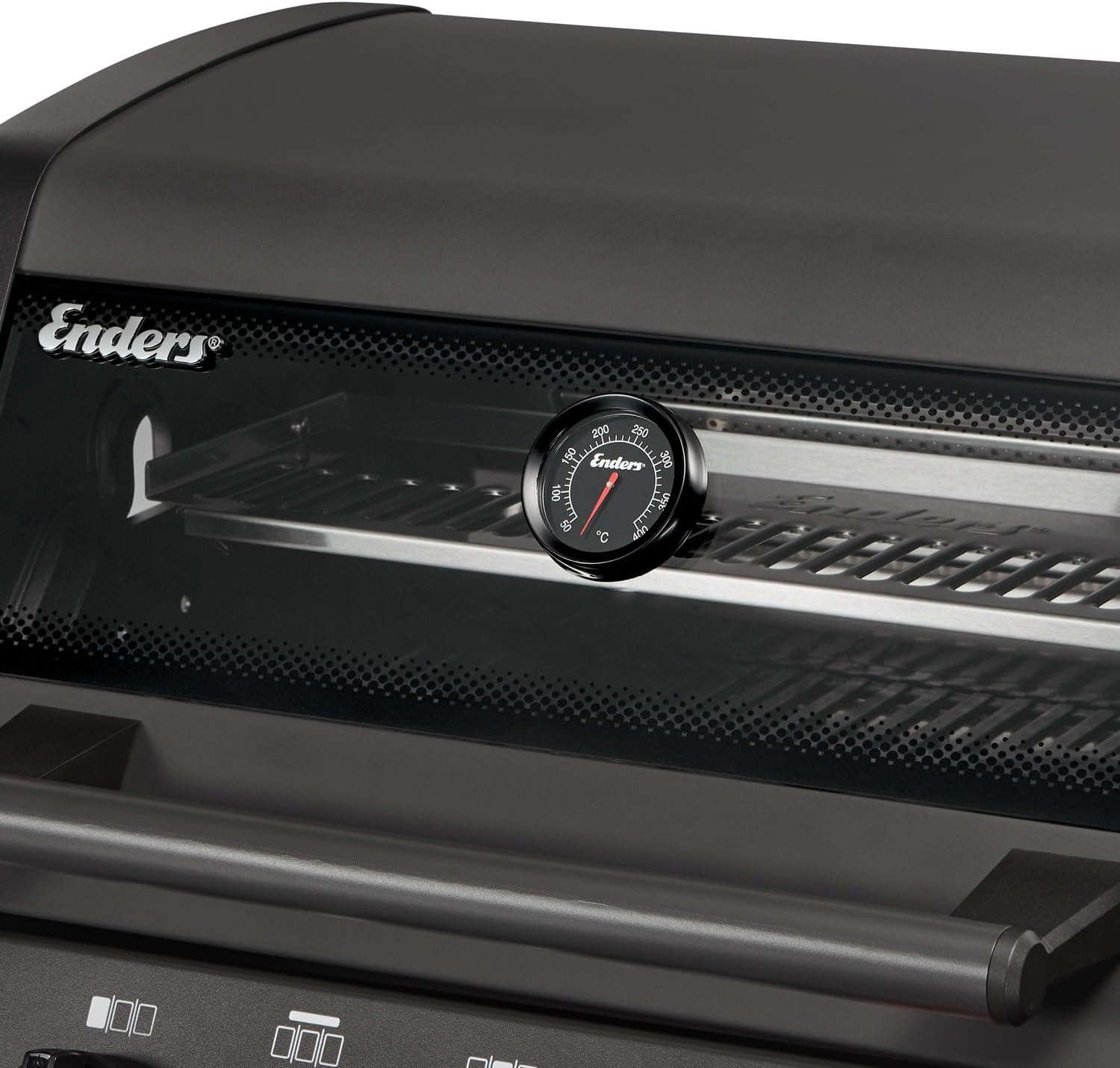
Image: The PANOVISION window and integrated thermometer for monitoring cooking progress.

Image: The SWITCH GRID system, highlighting its adaptability for various grilling accessories.
5. Maintenance and Cleaning
Regular cleaning and maintenance will extend the life of your Enders barbecue and ensure optimal performance.
5.1. SIMPLE CLEAN System
The SIMPLE CLEAN feature simplifies the cleaning of the combustion chamber. Individual parts of the combustion chamber can be easily removed without the need for tools, allowing for thorough cleaning.
- Ensure the barbecue is completely cool before attempting any cleaning.
- Open the barbecue lid and remove the cooking grates.
- Carefully lift out the flame tamers and other removable components from the combustion chamber.
- Clean these components with warm soapy water and a non-abrasive brush or sponge. For stubborn grease, use a dedicated barbecue cleaner.
- Rinse thoroughly and dry completely before reassembling.

Image: The SIMPLE CLEAN system, showing easy removal of internal components for cleaning.
5.2. General Cleaning
- Cooking Grates: After each use, burn off any food residue on the grates by turning the burners to high for 10-15 minutes. Once cooled, brush the grates with a stiff wire brush.
- Exterior Surfaces: Wipe down stainless steel and painted surfaces with a damp cloth and mild detergent. Avoid abrasive cleaners.
- Grease Tray: Regularly empty and clean the grease tray to prevent flare-ups and maintain hygiene.
6. Troubleshooting
If you encounter issues with your barbecue, consult the following common troubleshooting tips:
- Burner Not Lighting:
- Check if the gas cylinder valve is fully open.
- Ensure there is gas in the cylinder.
- Verify all gas connections are secure and free of leaks.
- Check if the igniter electrode is clean and properly positioned near the burner port.
- Uneven Heat:
- Clean the burners and flame tamers to remove any blockages.
- Ensure the barbecue is level.
- Excessive Flare-ups:
- Clean the cooking grates and grease tray.
- Trim excess fat from meat before grilling.
- Reduce burner heat if necessary.
For persistent issues, please contact Enders customer support.
7. Specifications
| Model Name | MONROE Pro 3 SIK Turbo Shadow |
| Brand | Enders |
| Fuel Type | Gas |
| Main Burners | 3 Stainless Steel Burners |
| Side Burners | 1 (Integrated) |
| Special Features | TURBO ZONE (up to 800°C), Simple Clean, Heat Range, Infrared Burner, PANOVISION Window, Switch Grid |
| Cooking Hood | Double-walled with integrated thermometer |
| Grill Grate Material | Stainless Steel |
| Frame Material | Stainless Steel |
| Assembly Required | No (Minimal assembly for cart/shelves) |
| Installation Type | Freestanding |
8. Warranty and Support
For warranty information, please refer to the warranty card included with your product or visit the official Enders website. In case of technical issues, missing parts, or questions not covered in this manual, please contact Enders customer support for assistance.
Keep your purchase receipt and model number handy when contacting support.


