
Introduction
This manual provides comprehensive instructions for the safe and efficient operation, installation, and maintenance of your Bennett Read KMW102 Digital Microwave. Please read all instructions carefully before using the appliance and retain this manual for future reference. Proper use of this microwave will ensure optimal performance and longevity.
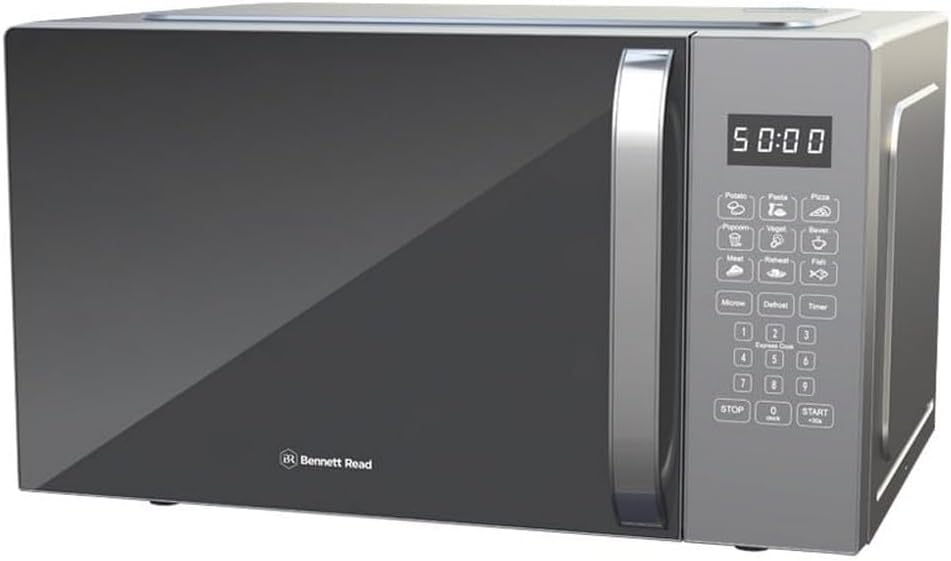
Image 1: Front view of the Bennett Read KMW102 Digital Microwave. This silver microwave features a dark mirror-finish door, a robust handle, and a digital control panel on the right side.
Important Safety Instructions
When using electrical appliances, basic safety precautions should be followed, including the following:
- Read all instructions before using the appliance.
- Do not operate the microwave if the cord or plug is damaged, if it is not working properly, or if it has been damaged or dropped.
- Do not heat liquids or other foods in sealed containers since they are liable to explode.
- Only allow children to use the oven without supervision when adequate instructions have been given so that the child is able to use the oven in a safe way and understands the hazards of improper use.
- Do not use corrosive chemicals or vapors in this appliance.
- Do not use this microwave for commercial purposes. It is designed for household use only.
- Ensure proper ventilation around the microwave. Do not block any ventilation openings.
- Do not attempt to operate this oven with the door open as this can result in harmful exposure to microwave energy.
- Do not place any object between the oven front face and the door or allow soil or cleaner residue to accumulate on sealing surfaces.
- Do not operate the oven if it is damaged. It is particularly important that the oven door closes properly and that there is no damage to the: (1) door (bent), (2) hinges and latches (broken or loosened), (3) door seals and sealing surfaces.
Setup and Installation
Unpacking
- Carefully remove the microwave oven and all packaging materials from the carton.
- Check the oven for any damage, such as dents or a misaligned door. Do not install if damaged.
- Remove any protective film from the surface of the cabinet and door.
- Remove the turntable, turntable ring, and shaft from the packaging. Wash these components in mild soapy water, rinse, and dry thoroughly.
Placement
- Place the microwave on a flat, stable surface that can support its weight and the heaviest food item likely to be cooked in it.
- Ensure there is adequate space for ventilation. A minimum of 10 cm (4 inches) of space is required at the rear, 20 cm (8 inches) at the top, and 5 cm (2 inches) on both sides.
- Do not place the microwave near heat sources such as a conventional oven or radiator.
- Keep the microwave away from radio and TV sets to avoid interference.
Electrical Connection
Plug the microwave into a properly installed and grounded wall outlet. Ensure the voltage and frequency match the specifications on the rating label of the appliance. Do not use extension cords or adapters.

Image 2: The Bennett Read KMW102 Digital Microwave, showcasing its control panel with various buttons and a digital display. This image provides a clearer view of the user interface.
Operating Instructions
Control Panel Overview
The digital control panel features an LED display, numeric keypad, and dedicated function buttons for various cooking modes and settings. Familiarize yourself with the layout for ease of use.
Setting the Clock
- Press the CLOCK button once.
- Use the numeric keypad to enter the current time (e.g., 12:30).
- Press the CLOCK button again to confirm.
Basic Microwave Cooking
- Place food in a microwave-safe container on the turntable.
- Close the door securely.
- Enter the desired cooking time using the numeric keypad.
- Press the POWER LEVEL button repeatedly to select the desired power level (10 options available). The display will show P10 for 100% power, P9 for 90%, and so on.
- Press the START button to begin cooking.
Using Preset Functions
The microwave includes one-touch preset buttons for common food items such as baked potatoes, pizzas, and frozen dinners.
- Place the food item in the microwave.
- Press the corresponding preset button (e.g., POTATO, PIZZA).
- The microwave will automatically set the cooking time and power level.
- Press the START button to begin.
Multi-Stage Cooking
This function allows you to program multiple cooking stages, such as defrosting followed by cooking, in a single cycle.
- Press the DEFROST button and set the defrost time/weight.
- Then, set the desired cooking time and power level for the second stage.
- Press START. The microwave will automatically transition between stages.
Defrosting
The Speed Defrost feature allows for quick and efficient thawing of frozen foods.
- Place the frozen food in the microwave.
- Press the DEFROST button.
- Enter the weight of the food using the numeric keypad.
- Press START.
Child Lock
To prevent unsupervised operation by children, activate the child lock.
- To activate: Press and hold the STOP/CANCEL button for 3 seconds. A lock indicator will appear on the display.
- To deactivate: Press and hold the STOP/CANCEL button for 3 seconds again. The lock indicator will disappear.

Image 3: A graphic illustrating key features of the Bennett Read KMW102 Digital Microwave, including its 28-liter capacity, 900 watts of power, mirror finish, digital LED display, 8 auto-settings, multi-stage cooking, 10 power levels, speed defrost, and child lock function.
Maintenance and Cleaning
Regular cleaning and maintenance will ensure the efficient operation and extend the lifespan of your microwave.
Exterior Cleaning
- Wipe the exterior surface with a soft, damp cloth. Do not use abrasive cleaners or harsh chemicals.
- Keep the control panel clean by wiping with a slightly damp cloth. Avoid excessive water.
Interior Cleaning
- Clean the interior cavity after each use to prevent food splatters from drying and hardening.
- Use a mild detergent and a soft cloth. For stubborn stains, place a bowl of water with lemon juice inside and microwave for a few minutes to loosen residue, then wipe clean.
- Ensure the microwave is unplugged before cleaning the interior.
Turntable Care
- The glass turntable and roller ring can be removed for cleaning. Wash them in warm, soapy water or in the dishwasher.
- Ensure they are completely dry before placing them back in the microwave.
- Always ensure the turntable and roller ring are correctly positioned before operating the microwave.
Troubleshooting Guide
Refer to the table below for common issues and their potential solutions.
| Problem | Possible Cause | Solution |
|---|---|---|
| Microwave does not start | Power cord not plugged in; Door not closed properly; Fuse blown or circuit breaker tripped; Child lock activated. | Ensure plug is firmly in outlet; Close door securely; Check household fuse/circuit breaker; Deactivate child lock. |
| Food not cooking evenly | Food not stirred or rotated; Incorrect power level or cooking time; Turntable not rotating. | Stir or rotate food halfway through cooking; Adjust power level/time; Check turntable and roller ring for obstructions. |
| Light not working | Bulb needs replacement. | Contact qualified service personnel for bulb replacement. |
| Excessive steam inside door | High moisture content in food. | This is normal for some foods. Wipe the interior after use. |
Product Specifications
- Brand: Bennett Read
- Model Number: KMW102
- Colour: Silver
- Product Dimensions: 57.6 x 43.6 x 32.6 cm
- Item Weight: 16.8 kg
- Material: Glass, Stainless Steel
- Capacity: 28 Liters
- Power Levels: 10
- Features: Digital LED Display, 99-minute cooking timer, One-touch preset buttons, Multi-stage cooking, Speed Defrost, Child Lock
Warranty and Customer Support
For warranty information, please refer to the documentation provided at the time of purchase. This typically includes details on coverage duration and terms. In case of technical issues, service requirements, or questions not covered in this manual, please contact Bennett Read customer support.
Please have your model number (KMW102) and proof of purchase ready when contacting support.


