1. Important Safety Instructions
Read all instructions carefully before using the AMZCHEF Electric Induction Cooktop. Keep this manual for future reference.
- Electrical Safety: Ensure the cooktop is connected to a properly grounded 110-120 volt power outlet. Do not use extension cords or adapters.
- Cookware Compatibility: Use only induction-compatible cookware (magnetic bottom). Incompatible cookware will not heat. Refer to the "Applicable Cookware" section for details.
- Surface Heat: While induction cooktops do not generate heat directly, the cooking surface will become hot from residual heat transferred from the cookware. Exercise caution and avoid touching the hot surface after cooking.
- Overheating Protection: The cooktop is equipped with an overheating protection system that will automatically shut off the unit if it detects excessive temperatures.
- Automatic Shut-Off: The cooktop features an automatic shut-off function for safety if left unattended for an extended period or if no cookware is detected.
- Child Safety Lock: Activate the child lock to prevent accidental operation, especially in households with children.
- Ventilation: Ensure adequate ventilation around the cooktop during operation. Do not block air vents.
- Cleaning: Always unplug the cooktop and allow it to cool completely before cleaning.
- Placement: Place the cooktop on a stable, flat, heat-resistant surface away from flammable materials.
2. Product Overview
The AMZCHEF Electric Induction Cooktop is a dual-burner appliance designed for efficient and precise cooking. It features a durable stainless steel construction and a polished crystal glass surface, suitable for both home and commercial use.

Figure 1: AMZCHEF Electric Induction Cooktop, showing the dual burner layout.
Key Features:
- Dual Burners: Two independent cooking zones, each with up to 1800W power.
- Power Levels: 9 adjustable heating levels for precise temperature control.
- Touch Control Panel: Intuitive sensor touch controls with an LCD screen for easy operation and viewing.
- Timer Function: Integrated timer for setting cooking durations.
- Child Safety Lock: Prevents unintended use.
- Safety Features: Includes overheating protection, automatic shut-off, and pan detection.
- Durable Construction: High-quality stainless steel housing and polished crystal glass surface.
3. Setup
3.1 Unpacking and Inspection
- Carefully remove the cooktop from its packaging.
- Inspect the unit for any signs of damage during transit. If damage is found, do not operate the cooktop and contact customer support.
- Remove all packaging materials, stickers, and protective films from the cooktop surface.
3.2 Placement
- Place the cooktop on a dry, stable, and level surface.
- Ensure there is sufficient space around the cooktop for proper ventilation (at least 4 inches from walls or other appliances).
- Avoid placing the cooktop near heat-sensitive materials or appliances.
3.3 Power Connection
Plug the power cord into a standard 110-120 volt, 60Hz grounded electrical outlet. Ensure the outlet is capable of handling the cooktop's power requirements (1800W per burner).
3.4 Cookware Compatibility
The AMZCHEF Induction Cooktop requires cookware with a magnetic bottom. To test if your cookware is compatible, place a magnet on the bottom of the pot or pan. If the magnet sticks, the cookware is suitable for induction cooking.

Figure 2: Examples of compatible cookware (Cast Iron, Steel, Stainless Steel) and incompatible cookware (Copper, Ceramic, Aluminum, Glass, Uneven Bottom).
- Compatible Cookware: Cast iron, steel, stainless steel (with magnetic base), enameled iron.
- Incompatible Cookware: Copper, ceramic, aluminum, glass, cookware with an uneven bottom.
- Ensure the cookware base diameter is appropriate for the burner size.
4. Operating Instructions
Familiarize yourself with the control panel before operating the cooktop.

Figure 3: Control panel layout, indicating ON/OFF, Timer, Heating Zone Selection, Power/Timer Regulating, and Keylock controls.
4.1 Powering On/Off
- Place induction-compatible cookware containing food or liquid on the desired cooking zone.
- Press the ON/OFF button to turn on the cooktop. The display will illuminate.
- To turn off, press the ON/OFF button again.
4.2 Selecting a Cooking Zone and Adjusting Power/Temperature
- After powering on, select the desired cooking zone by pressing the corresponding Heating Zone Selection Control button.
- Use the Power & Timer Regulating Controls (plus and minus buttons) to adjust the power level (W) or temperature (°F). The cooktop offers 9 heating levels.
- The LCD screen will display the selected power or temperature setting.
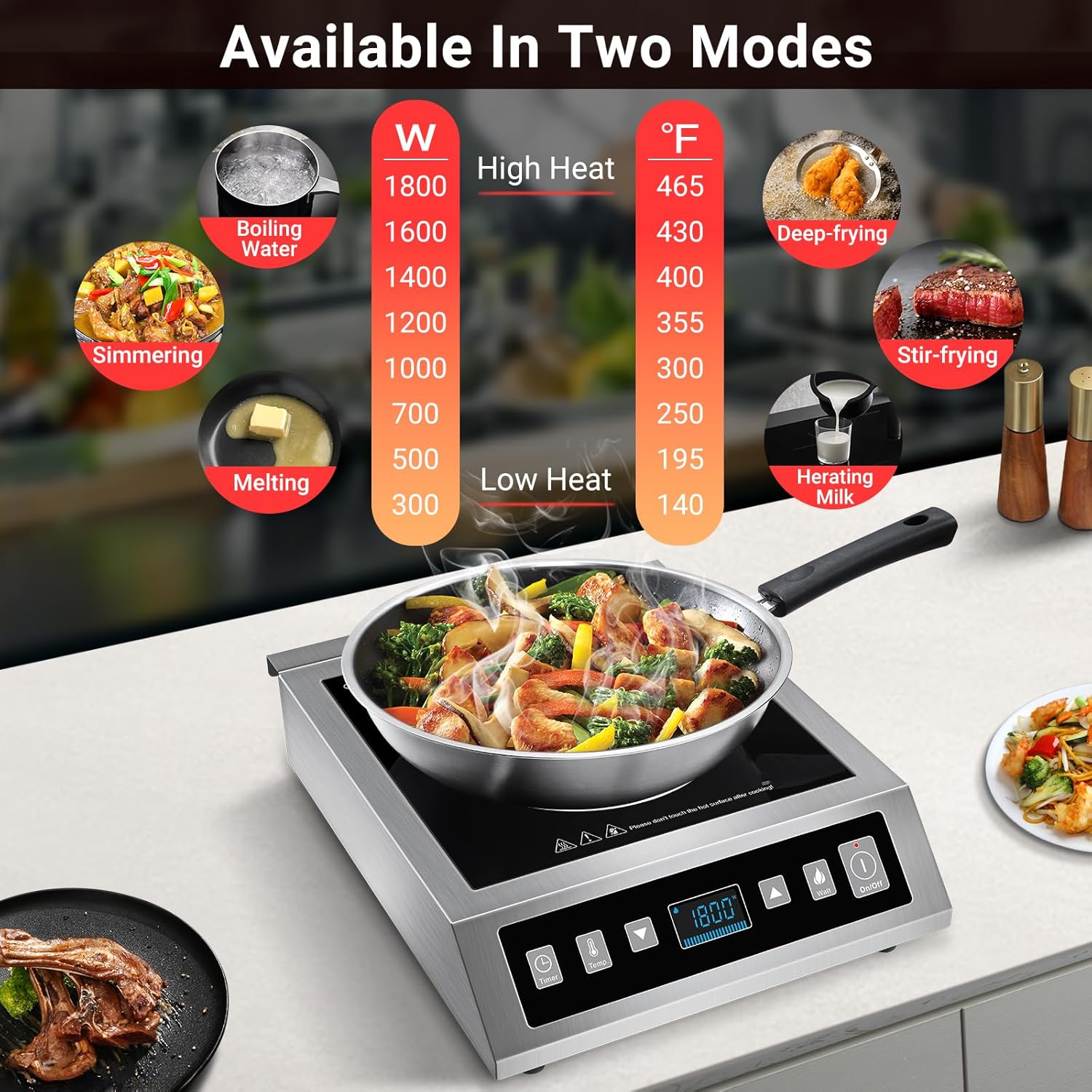
Figure 4: Power and temperature settings for various cooking tasks, ranging from 300W/140°F (Low Heat) to 1800W/465°F (High Heat).
4.3 Timer Function
- While a cooking zone is active, press the Timer Control button.
- Use the Power & Timer Regulating Controls (plus and minus buttons) to set the desired cooking time (1-99 minutes).
- The cooktop will automatically turn off once the timer expires.
4.4 Child Safety Lock
- To activate the child lock, press and hold the Keylock Control button for 3 seconds. An indicator light will illuminate, and the control panel will be locked.
- To deactivate, press and hold the Keylock Control button again for 3 seconds.

Figure 5: Visual representation of the Child Lock and Timer functions.
5. Maintenance and Cleaning
Regular cleaning and maintenance will ensure the longevity and optimal performance of your AMZCHEF Induction Cooktop.
- Always unplug the cooktop from the power outlet before cleaning.
- Allow the cooktop surface to cool completely before touching or cleaning.
- Wipe the polished crystal glass surface with a damp cloth and a mild detergent. For stubborn stains, use a non-abrasive cleaner specifically designed for glass cooktops.
- Dry the surface thoroughly with a clean, soft cloth.
- Clean the stainless steel housing with a damp cloth. Avoid abrasive cleaners or scouring pads that could scratch the surface.
- Do not immerse the cooktop in water or any other liquid.
- Ensure that no liquid enters the internal components of the cooktop.
6. Troubleshooting
If you encounter issues with your AMZCHEF Induction Cooktop, refer to the following common problems and solutions:
| Problem | Possible Cause | Solution |
|---|---|---|
| Cooktop does not turn on. |
|
|
| Cookware is not heating. |
|
|
| Cooktop shuts off unexpectedly. |
|
|
| Display shows an error code. |
|
|
7. Specifications
| Feature | Detail |
|---|---|
| Brand | AMZCHEF |
| Model | B0CJM69MNX |
| Color | Black |
| Material | Stainless Steel |
| Heating Elements | 2 |
| Controls Type | Touch |
| Special Features | Overheating Protection, Automatic Shut-Off Protection, Pan Detection |
| Power Source | Induction |
| Voltage | 110-120 Volts |
8. Warranty and Support
For warranty information, detailed troubleshooting, or further assistance, please contact AMZCHEF customer support. Refer to the product packaging or the official AMZCHEF website for contact details.
When contacting support, please have your product model (B0CJM69MNX) and purchase date available.


