
1. Product Overview
The Bestier 61-inch Gaming Desk is designed to enhance your gaming or work setup with integrated power solutions, dynamic LED lighting, and versatile storage options. This manual provides essential information for assembly, operation, and maintenance to ensure optimal use of your desk.

Image 1: Bestier 61-Inch Gaming Desk in a typical setup, showcasing its features.
2. Key Features
- Integrated Power Outlets: Features 4 AC outlets (120V/12A, 1500W) and 2 USB charging ports (5V 2.2A) for convenient device power.
- Dynamic LED Lighting: Equipped with LED lights offering 7 color selections and 22 dynamic modes, controllable via integrated buttons.
- Reversible Shelves: Storage shelves can be installed on either the left or right side to suit user preference.
- Adjustable Shelf Height: The second shelf is adjustable to 3 different heights, accommodating various computer towers or gaming consoles.
- Storage Accessories: Includes a side storage bag for cables and small items, and a headset hook.
- Durable Construction: Built with a steel frame and X-Crossbar for enhanced stability and long-lasting durability.
- Stylish Finish: Features a sleek 3D carbon fiber finish and is made with CARB P2 Class Board for quality and reduced formaldehyde emissions.

Image 2: Detailed view of the adjustable shelf, headset hook, side storage bag, and X-crossbar for stability.
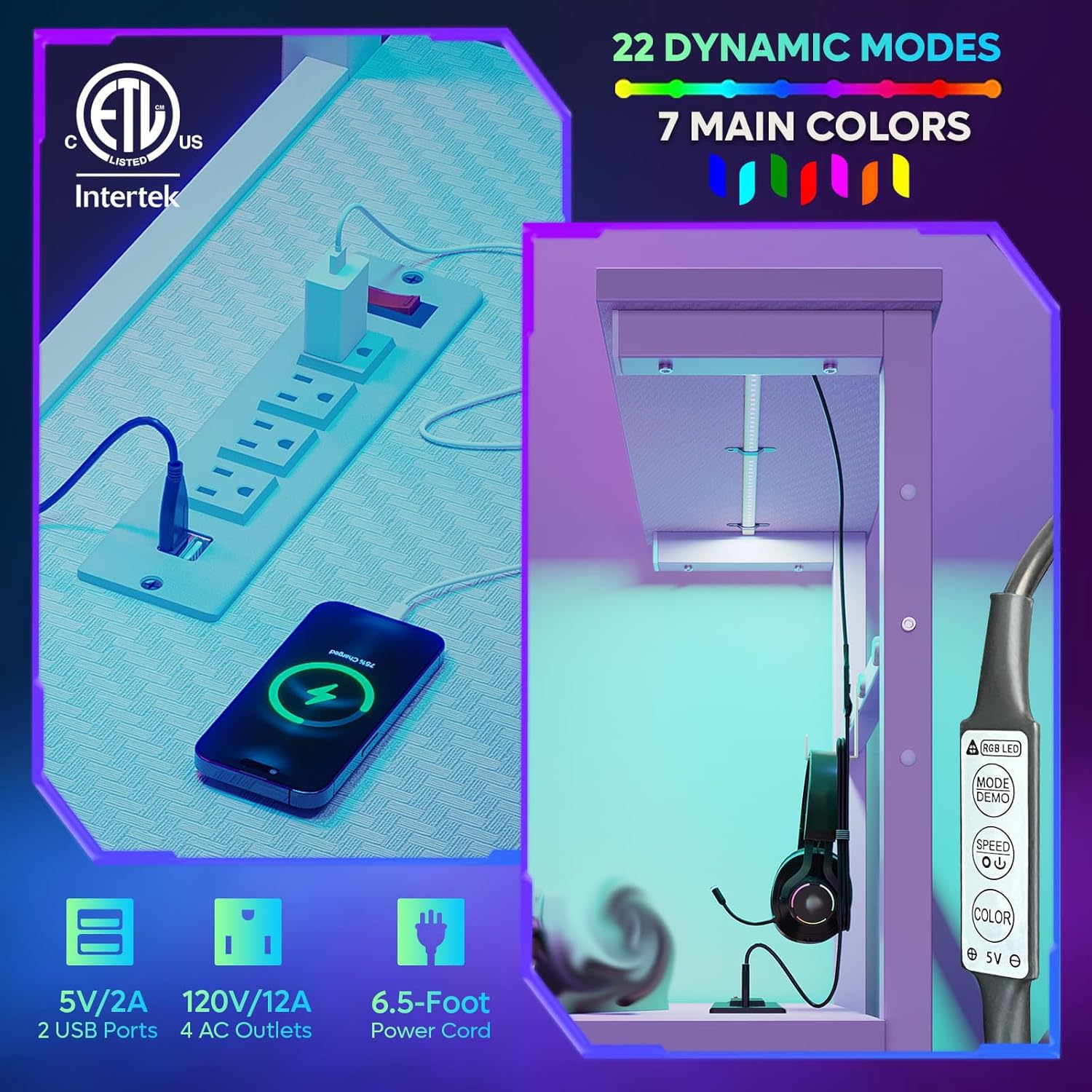
Image 3: Integrated power outlets and LED light control panel.
3. Setup and Assembly
Assembly is required for this product. Please follow the instructions provided in the included manual carefully. It is recommended that 2 people assemble the desk for ease and safety.
Assembly Video Guide
Video 1: Official Bestier guide on how to install the 61-inch Gaming Desk. This video demonstrates the step-by-step assembly process, including attaching the frame, shelves, and accessories.
Key Assembly Tips:
- Identify all parts and hardware before starting.
- Do not fully tighten all screws until the entire frame is assembled to allow for adjustments.
- Ensure the reversible shelves are oriented correctly according to your desired setup.
4. Operating Instructions
LED Lights Operation:
The integrated LED lights can be controlled using the buttons located on the light strip. Connect the LED light's USB cable to one of the desk's USB ports or a suitable USB power adapter.
- Color Button: Press to cycle through 7 static colors.
- Mode Button: Press to switch between 22 dynamic lighting modes.
- Speed/Brightness Buttons: Adjust the speed of dynamic modes or the brightness of static colors.
Power Outlets and USB Ports:
Plug the desk's main power cord (6.5-foot) into a standard wall outlet. The 4 AC outlets and 2 USB ports are then ready for use. Ensure total power consumption does not exceed 1500W.
5. Maintenance
- Cleaning: Wipe surfaces with a soft, damp cloth. Avoid harsh chemicals that may damage the carbon fiber finish.
- Stability Check: Periodically check and tighten all screws and connections to maintain desk stability.
- Electrical Components: Ensure the power cord and LED light connections are secure and free from damage. Do not expose electrical components to moisture.
6. Troubleshooting
- LED Lights Not Working: Check if the USB cable is securely connected to a power source. Ensure the power source is active.
- Power Outlets Not Functioning: Verify the main power cord is plugged into a live wall outlet. Check for tripped circuit breakers.
- Desk Wobbles: Ensure all screws are tightened. Adjust the non-slip feet on the bottom of the desk legs to level the desk on uneven surfaces.
7. Specifications
| Feature | Detail |
|---|---|
| Brand | Bestier |
| Model Number | H101116GUS |
| Dimensions (D x W x H) | 19"D x 61"W x 44"H |
| Item Weight | 41 Pounds |
| Color | White 3D Carbon Fiber |
| Material Type | Engineered Wood, Metal |
| Power Outlets | 4 AC (120V/12A, 1500W), 2 USB (5V 2.2A) |
| LED Lights | 7 Colors, 22 Dynamic Modes |
| Number of Shelves | 4 (including main desktop and top monitor shelf) |
| Special Features | Built-In USB Outlet, Reversible Shelves, Scratch Resistant, Water Resistant |
| Assembly Required | Yes |
8. Safety Information
Caution: Carefully handle the desk during assembly, movement, and use. Be sure to read and follow all instructions for use, including those related to the electrical components. Do not exceed the recommended weight limit, and ensure the desk is properly anchored if necessary.
9. Warranty and Support
This Bestier Gaming Desk comes with a 1-year warranty covering parts and labor. For any product issues or support needs, please feel free to contact Bestier customer service. The Bestier team is committed to providing satisfactory solutions.
Visit the Bestier Store for more information and contact options.