
uleway T2301
uleway 4G Senior Mobile Phone
User Manual - Model T2301
1. Introduction
Welcome to the user manual for your uleway 4G Senior Mobile Phone, Model T2301. This phone is designed with ease of use in mind, featuring large buttons, a clear display, and essential functions for seniors. Please read this manual carefully to ensure proper operation and maintenance of your device.
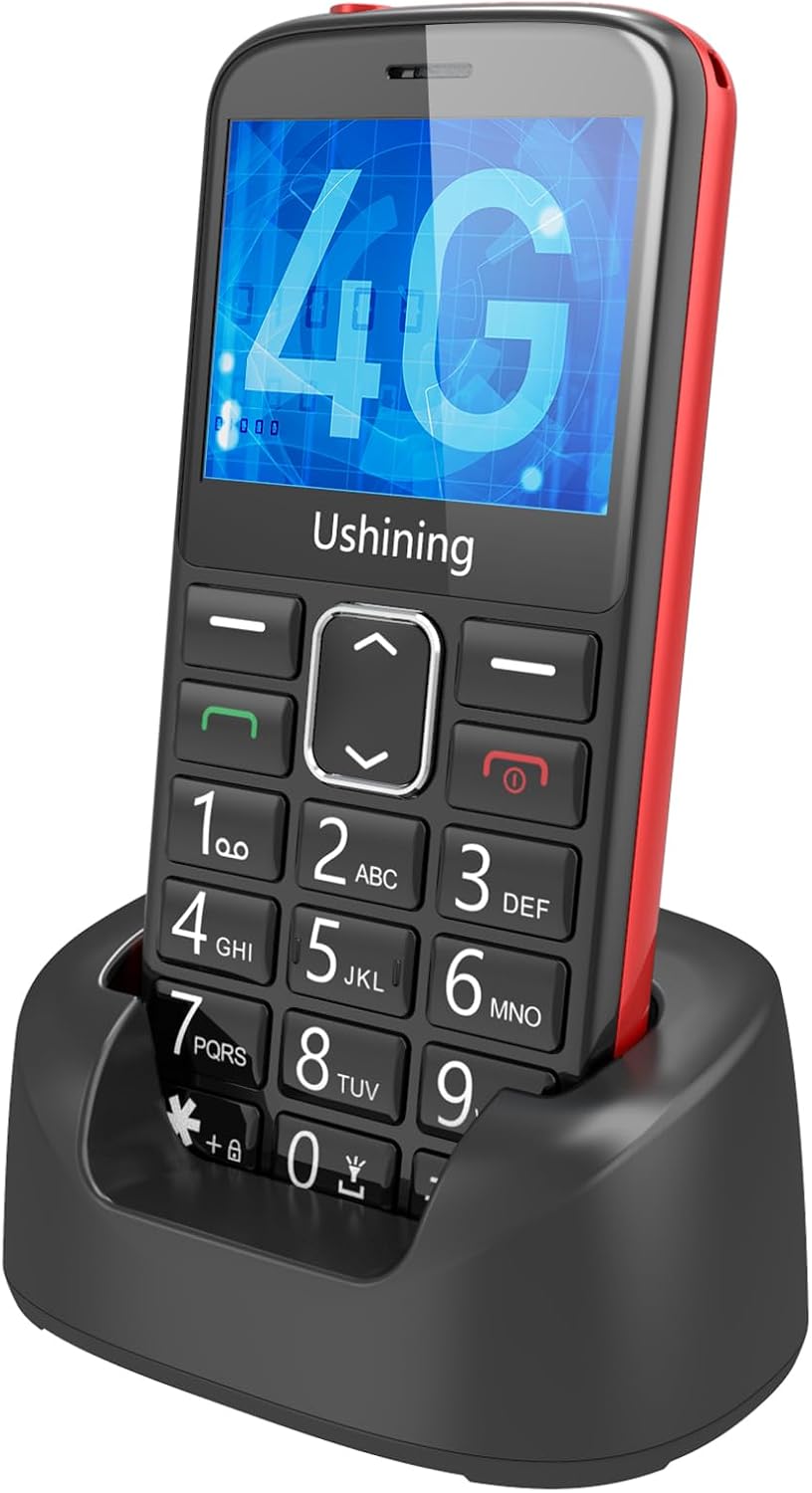
Figure 1: uleway 4G Senior Mobile Phone in its charging dock.
2. What's in the Box
Upon opening the package, please verify that all the following items are included:
- 1 x uleway 4G Senior Mobile Phone (Model T2301)
- 1 x Battery
- 1 x Charging Cable (Micro USB)
- 1 x Charging Dock
- 1 x User Manual (this document)

Figure 2: All components included in the product packaging.
3. Setup
3.1. Battery Installation
- Gently remove the back cover of the phone.
- Align the battery contacts with the phone's terminals.
- Insert the battery firmly into the compartment.
- Replace the back cover, ensuring it clicks into place.
3.2. SIM Card and Micro SD Card Installation
This phone supports one Nano SIM card and one Micro SD card (up to 32GB, not included).
- With the back cover removed, locate the SIM card slot and Micro SD card slot.
- Insert the Nano SIM card into the designated slot with the gold contacts facing down and the cut corner aligned.
- If using, insert the Micro SD card into its slot.
- Ensure both cards are securely seated.
- Replace the back cover.
3.3. Charging the Phone
Before first use, fully charge the phone battery.
- Using the Charging Dock: Connect the charging cable to the charging dock, then place the phone into the dock. Ensure the phone is properly seated and the charging indicator appears on the screen.
- Using the Charging Cable Directly: Connect the Micro USB charging cable directly to the phone's charging port and then to a power adapter.
A full charge typically takes approximately 2-3 hours. The phone features a 1000 mAh battery for long-lasting standby time.

Figure 3: The phone being charged in its dedicated charging dock, highlighting its 1000 mAh battery capacity.
4. Operating Instructions
4.1. Power On/Off
- To Power On: Press and hold the red End Call/Power button (☎) until the screen lights up.
- To Power Off: Press and hold the red End Call/Power button (☎) until the power off options appear, then select "Power off".
4.2. Basic Navigation
The phone features a 2.4-inch HD landscape screen with large icons and fonts for easy viewing.
- Use the Navigation Keys (up, down, left, right) to move through menu options.
- Press the Center Key to select an option.
- The Left Soft Key typically accesses the "Menu" or confirms an action.
- The Right Soft Key typically acts as a "Back" or "Clear" button.

Figure 4: The phone's large buttons and clear icons designed for senior users.

Figure 5: The 2.4-inch HD screen provides a significantly larger and clearer display compared to smaller phone screens.
4.3. Making and Receiving Calls
- To Make a Call: Dial the number using the keypad and press the green Call button (☎).
- To Answer a Call: When the phone rings, press the green Call button (☎).
- To End a Call: Press the red End Call button (☎).
- Speed Dial: The phone supports 8-speed dial options (keys 2-9). To set up, go to Menu > Contacts > Speed Dial.
4.4. SOS Emergency Function
The SOS button on the back of the phone is a critical safety feature. You can set up to 5 emergency contact numbers.
- Setting Up SOS Numbers: Go to Menu > SOS Settings. Add up to 5 contact numbers that will be called in sequence during an emergency. You can also enable an SOS message to be sent.
- Using the SOS Function: In an emergency, press and hold the SOS button on the back of the phone for 3 seconds. The phone will automatically dial the pre-set emergency numbers one by one until a connection is made. An emergency SMS message will also be sent to these contacts.

Figure 6: The SOS button on the back of the phone, designed for quick access to emergency contacts.
4.5. Volume Control and HAC Compatibility
The phone features high volume output and is Hearing Aid Compatible (HAC) for clear conversations.
- During a call, use the side volume buttons to adjust the earpiece volume.
- Adjust ringtone and media volume through the phone's settings menu.

Figure 7: The phone offers high volume and HAC compatibility for improved audio clarity during calls.
4.6. Other Features
- FM Radio: The phone includes an external FM radio. No headphones are required to enjoy radio broadcasts. Access it via the Menu.
- Flashlight: A powerful flashlight is integrated. Activate it via a dedicated button or through the menu.
- Contacts: Store up to 500 contacts. Manage them through the "Contacts" menu.
- Messages: Send and receive SMS messages.
- Camera: The phone has a 0.3 MP rear camera for basic photo capture.
- Bluetooth 5.0: Connect to Bluetooth headsets or other devices.
5. Maintenance
- Cleaning: Use a soft, dry cloth to clean the phone's surface. Avoid using liquid cleaners or abrasive materials.
- Battery Care: To prolong battery life, avoid extreme temperatures. Do not leave the phone fully discharged for extended periods.
- Storage: If storing the phone for a long time, charge the battery to about 50% and store it in a cool, dry place.
- Water Resistance: This phone is not water-resistant. Avoid exposure to liquids.
6. Troubleshooting
| Problem | Possible Solution |
|---|---|
| Phone won't turn on. | Ensure the battery is correctly installed and charged. Connect the phone to the charger and try again. |
| No signal or poor signal. | Check if the SIM card is properly inserted. Move to an area with better network coverage. Contact your network provider. |
| Cannot make or receive calls. | Check network signal. Ensure your SIM card is active and has sufficient credit/plan. Restart the phone. |
| Battery drains quickly. | Reduce screen brightness. Close unused applications. Limit background data usage. Ensure the battery is not old or damaged. |
| SOS function not working. | Verify that emergency numbers are correctly set in the SOS settings. Ensure the phone has network signal. |
7. Specifications
| Feature | Detail |
|---|---|
| Model Number | T2301 |
| Cellular Technology | 4G LTE, 3G WCDMA, 2G GSM |
| Supported Bands | LTE: B2/B4/B5/B7/B12/B17/B66, WCDMA: B2/B5, GSM: 900/850/1900 |
| Screen Size | 2.4 inches |
| Resolution | 240 x 320 |
| Rear Camera | 0.3 MP |
| Talk Time | 5-6 hours |
| Standby Time | 100 hours (4 days) |
| Speaker & Receiver | AAC 20 x 30 |
| SIM Card Support | 1 Nano SIM |
| Micro SD Card Support | Up to 32GB (not included) |
| Bluetooth | V5.0 |
| Wi-Fi | Not available |
| Phonebook Capacity | 500 contacts |
| Phone Dimensions | 12.2 x 5.7 x 1.4 cm |
| Charging Port | Micro USB 2.0 |
| Audio Jack | 3.5 mm |
| Languages Supported | English, French, Portuguese, Spanish, Italian, German |
| Battery Type | Lithium-ion (1000 mAh) |
| Operating System | Custom Senior-friendly OS |
8. Support and Warranty
For any issues not covered in this manual or for further assistance, please contact the retailer or the manufacturer's customer support.
Information regarding specific warranty terms and availability of spare parts or software updates is not provided in the product details. Please refer to your purchase documentation or contact the seller for details on warranty coverage.
Related documentsT2301

Ask a question about this manual
Ask about setup, troubleshooting, compatibility, parts, safety, or missing instructions. Manuals+ will review the question and use this page’s manual context to help answer it.