
1. Introduction
This instruction manual provides detailed information on the safe operation, maintenance, and troubleshooting of your PHALANX 3.7V Mini Cordless Rotary Tool Kit (Model: PRT-R3). Please read this manual thoroughly before using the tool to ensure proper function and to prevent injury or damage. This tool is designed for light-duty applications such as sanding, carving, polishing, engraving, and pet grooming.
2. Important Safety Information
Always follow basic safety precautions when using electrical tools to reduce the risk of fire, electric shock, and personal injury.
- Read all instructions: Familiarize yourself with the tool's operation and safety guidelines.
- Wear eye protection: Always wear safety goggles or safety glasses with side shields.
- Secure workpiece: Always clamp or otherwise secure the workpiece to prevent movement during operation.
- Maintain a clean work area: Cluttered areas invite accidents.
- Avoid dangerous environments: Do not use power tools in damp or wet locations, or expose them to rain. Keep work area well lit.
- Keep children away: All visitors should be kept at a safe distance from the work area.
- Dress properly: Do not wear loose clothing or jewelry. Contain long hair.
- Use proper accessories: Only use accessories recommended by the manufacturer.
- Disconnect tool: Disconnect the tool from the power source before making any adjustments, changing accessories, or storing the tool.
- Avoid accidental starting: Ensure the switch is in the OFF position before inserting the battery pack.
- Do not overreach: Keep proper footing and balance at all times.
- Maintain tools with care: Keep cutting tools sharp and clean for better and safer performance. Follow instructions for lubricating and changing accessories.
- Check for damaged parts: Before further use of the tool, a guard or other part that is damaged should be carefully checked to determine that it will operate properly and perform its intended function.
- Battery safety: Use only the specified charging cable. Do not expose batteries to extreme temperatures or fire.
3. Package Contents
Upon opening the package, verify that all items listed below are present and undamaged:
- PHALANX Mini Cordless Rotary Tool (x1)
- 70 PCS Accessories (various types for grinding, carving, polishing, cutting, sanding, drilling)
- Accessory Storage Bag (x1)
- Type-C Fast Charging Cable (x1)

Image: The PHALANX Mini Cordless Rotary Tool Kit, displaying the main tool, a Type-C charging cable, a wrench, and a wide assortment of 70 accessories including grinding stones, diamond bits, cutting wheels, sanding drums, polishing felts, and drill bits.
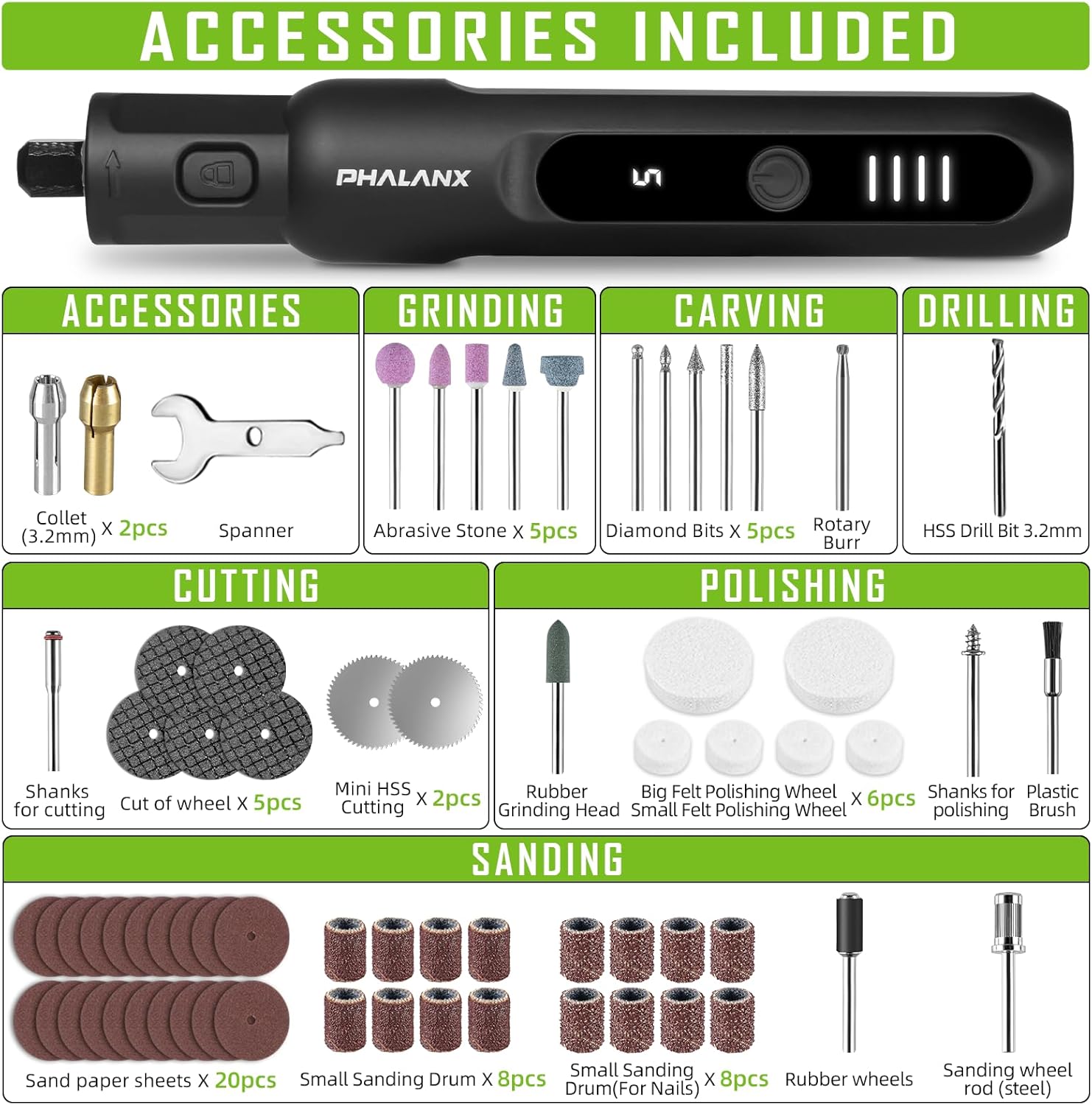
Image: A comprehensive visual guide to the 70 accessories included with the rotary tool. Categories shown are Collet (3.2mm) x2, Spanner x1, Abrasive Stone x5, Diamond Bits x5, Rotary Burr x1, HSS Drill Bit 3.2mm x1, Shanks for cutting x1, Cut of wheel x5, Mini HSS Cutting x2, Rubber Grinding Head x1, Small Felt Polishing Wheel x4, Big Felt Polishing Wheel x2, Shanks for polishing x1, Plastic Brush x1, Sand paper sheets x20, Small Sanding Drum x8, Small Sanding Drum (For Nails) x8, Rubber wheels x1, Sanding wheel rod (steel) x1, and USB Type-C Charging Cable.
4. Product Overview
The PHALANX Mini Cordless Rotary Tool is designed for precision work with its pen-like form factor and variable speed control. Key features include:
- Compact and Lightweight Design: Ergonomically designed for comfortable one-handed operation.
- Digital Display: Shows current speed setting and battery level.
- 5 Variable Speeds: Adjustable from 5000 RPM to 20000 RPM for various tasks.
- Power-On Memory Function: Remembers the last used speed setting.
- 360° Full Coverage Working Light: Illuminates the workpiece for improved visibility.
- Non-slip Rubber Grip: Enhances comfort and control during use.
- Type-C Charging: Convenient and fast charging.

Image: A detailed view of the rotary tool's control panel. It highlights the ON/OFF button (1), which requires a 1.5-second long press to activate or deactivate. The LED Digital Display (2) shows the current speed setting (e.g., '5') and includes a memory function. The Power Indicator (3) consists of four LED bars, providing a soft light for eye protection and indicating the remaining battery charge.

Image: This image illustrates the core functionalities of the PHALANX 3.7V Cordless Rotary Tool, including its 5-speed regulation, a speed range of 5000-20000 RPM, a power-on memory function that recalls the last speed setting, an LED digital display for speed and battery, and 360-degree full coverage lighting for enhanced visibility during operation.
5. Setup
5.1 Initial Charging
Before first use, fully charge the rotary tool. The battery is partially charged from the factory but a full charge is recommended for optimal performance.
- Connect the provided Type-C charging cable to the charging port at the bottom of the rotary tool.
- Connect the other end of the USB cable to a compatible USB power adapter (not included) or a computer USB port.
- The power indicator lights will illuminate and show charging progress. All four bars will be solid when fully charged.
5.2 Installing/Changing Accessories
Always ensure the tool is turned OFF before installing or changing accessories.
- Locate the spindle lock button near the chuck. Press and hold this button to lock the spindle.
- Using the provided spanner wrench, loosen the collet nut by turning it counter-clockwise.
- Insert the desired accessory shank into the collet. Ensure the shank is fully seated.
- While still holding the spindle lock button, tighten the collet nut clockwise with the spanner wrench until the accessory is securely held. Do not overtighten.
- Release the spindle lock button.
6. Operation
6.1 Powering On/Off
- To turn the tool ON, long press the ON/OFF button for approximately 1.5 seconds. The LED digital display will light up, showing the last used speed setting.
- To turn the tool OFF, long press the ON/OFF button for approximately 1.5 seconds again.
6.2 Adjusting Speed
The tool features 5 variable speed settings, ranging from 5000 RPM to 20000 RPM.
- Once the tool is ON, short press the ON/OFF button to cycle through the 5 speed settings. The digital display will show the current speed level (1-5).
- Select the appropriate speed for your application. Lower speeds are suitable for polishing and delicate work, while higher speeds are for cutting and grinding.

Image: This graphic illustrates the core functionalities of the PHALANX rotary tool, including its 5-speed regulation, a speed range of 5000-20000 RPM, a power-on memory function that recalls the last speed setting, an LED digital display for speed and battery, and 360-degree full coverage lighting for enhanced visibility during operation.

Image: This visual demonstrates the power-on memory function of the PHALANX rotary tool, which automatically remembers the last used speed setting. It also highlights the real-time speed and battery display, providing immediate feedback on the tool's operational status and remaining charge.
6.3 Applications
The PHALANX Mini Cordless Rotary Tool is versatile and can be used for a variety of tasks with the appropriate accessories:
- Sanding: Use sanding drums or sandpaper sheets for smoothing surfaces.
- Carving: Utilize diamond bits or rotary burrs for intricate designs on wood, plastic, or soft metals.
- Polishing: Apply felt polishing wheels with polishing compound for a high-gloss finish.
- Engraving: Employ fine diamond bits for detailed engraving on various materials.
- Cutting: Use mini HSS cutting wheels or cut-off wheels for light cutting tasks.
- Drilling: Use HSS drill bits for small holes.
- Pet Grooming: Specifically, for pet nail sanding using appropriate sanding drums.

Image: A collage demonstrating the wide range of applications for the PHALANX rotary tool, including drilling into wood, grinding metal, cutting thin materials, sanding pet nails, carving intricate details, and sanding wood surfaces.
7. Maintenance
Regular maintenance ensures the longevity and optimal performance of your rotary tool.
- Cleaning: After each use, wipe down the tool with a clean, dry cloth. Use a soft brush to remove dust and debris from vents and the chuck area. Do not use harsh chemicals or abrasive cleaners.
- Accessory Storage: Store all accessories in the provided storage bag or a suitable container to prevent loss and damage.
- Tool Storage: Store the rotary tool in a dry, cool place, away from direct sunlight and out of reach of children.
- Battery Care: For long-term storage, charge the battery to about 50% capacity. Recharge every 3-6 months if not in use to maintain battery health.
8. Troubleshooting
If you encounter issues with your PHALANX Mini Cordless Rotary Tool, refer to the table below for common problems and solutions.
| Problem | Possible Cause | Solution |
|---|---|---|
| Tool does not turn on. | Battery is depleted. Power button not pressed correctly. | Charge the tool fully. Long press the ON/OFF button for 1.5 seconds. |
| Accessory wobbles or falls out. | Collet nut is loose. Accessory shank is not fully inserted. Incorrect collet size. | Tighten the collet nut securely. Ensure accessory shank is fully seated. Use the correct collet for the accessory shank size. |
| Tool slows down or stops under light pressure. | Battery is low. Speed setting is too low for the task. Overload protection activated. | Recharge the battery. Increase the speed setting. Reduce pressure on the tool. Allow tool to cool if it overheats. |
| LED display not working. | Tool is off. Malfunction. | Turn the tool on. Contact customer support if the issue persists after charging. |
If the problem persists after attempting these solutions, please contact PHALANX customer support.
9. Specifications
| Feature | Detail |
|---|---|
| Brand | PHALANX |
| Model Number | PRT-R3 |
| Voltage | 3.7 Volts (DC) |
| Power Source | Battery Powered (1 Lithium Ion battery included) |
| Maximum Rotational Speed | 20000 RPM |
| Minimum Rotational Speed | 5000 RPM |
| Speed Settings | 5 Variable Speeds |
| Special Features | Cordless, Digital Display, Pen-like design, 360° Working Light, Power-on Memory Function |
| Item Weight | 13.4 ounces |
| Product Dimensions (L x W x H) | 6.02 x 0.78 x 0.78 inches |
| Included Components | Mini Rotary tool x1, 70 PCS accessories, Type-C Fast Charging Cable |
10. Warranty and Customer Support
PHALANX is committed to providing quality products and customer satisfaction. While specific warranty details are not provided in this manual, most PHALANX products come with a standard manufacturer's warranty covering defects in materials and workmanship.
For warranty claims, technical assistance, or any questions regarding your PHALANX 3.7V Mini Cordless Rotary Tool Kit, please contact PHALANX customer service through the retailer where the product was purchased or visit the official PHALANX website for support contact information.
You are welcome to reach out to PHALANX anytime, a quality after sales team will be at your service.
PHALANX Official Store: Visit PHALANX Store on Amazon


