
Introduction
This manual provides detailed instructions for the setup, operation, and maintenance of your TKMARS TK905 2G GPS Tracker. This device is designed for real-time tracking and anti-theft protection of vehicles and assets such as cars, trucks, motorcycles, and boats. Please read this manual thoroughly before using the device to ensure proper functionality and safety.
What's in the Box
Upon opening the package, verify that all the following components are included:
- 1 x TKMARS TK905 GPS Tracker
- 1 x USB Cable
- 1 x Protective Case
- 1 x Micro SIM Adapter
- 1 x Nano SIM Adapter
- 1 x User Manual
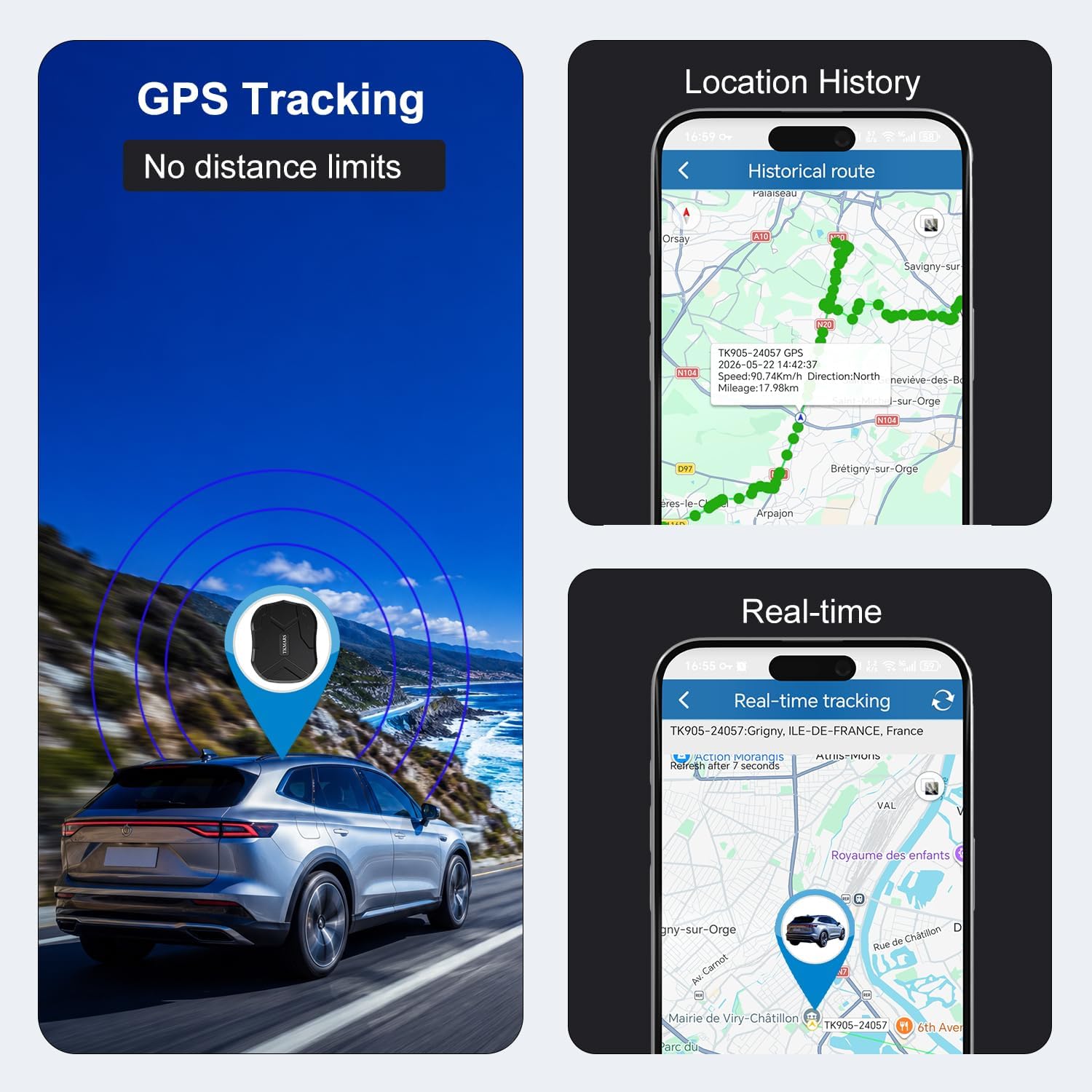
Image: TKMARS TK905 GPS Tracker and its included accessories.
Specifications
| Brand | TKMARS |
| Model Number | TK905 |
| Connectivity Technology | GPRS (2G Network) |
| Special Features | USB Charging, Virtual Guarding, Location History, Magnetic Attachment, Real-time Tracking |
| Battery Life (Standby) | Up to 90 days |
| Battery Capacity | 5000 mAh |
| Dimensions (L x W x H) | 7.2 x 2.2 x 9 cm |
| Material | Acrylonitrile Butadiene Styrene (ABS), Plastic |
| Water Resistance | IP65 (Dust tight and protected against water jets) |
| Compatible Devices | Personal Computer, Smartphone |
Setup Guide
1. SIM Card Requirements
The TKMARS TK905 requires a 2G GSM SIM card. You have two options for connectivity:
- Included International SIM Card: The device may come with an international SIM card compatible in 27 EU countries, USA, Canada, and Mexico. This SIM card typically does not require APN configuration for data tracking. Note that voice calls and SMS functions might not be supported with this included data SIM.
- Your Own Local SIM Card: You can use your own local 2G GSM SIM card. This is necessary if you wish to use SMS commands and receive SMS alerts. When using your own SIM, ensure the following:
- Network Compatibility: Must support 2G GSM network.
- PIN Code: Ensure the PIN code is removed. Insert the SIM into a mobile phone first to disable the PIN.
- Services: Internet data traffic, SMS, and call functions must be active.
- APN Information: You may need to manually configure the APN settings. Inquire about the correct APN information from your SIM card provider.
Using your own SIM card allows you to benefit from the free lifetime tracking platform without monthly fees.

Image: Illustration of compatible SIM card sizes (Normal, Micro, Nano) and key requirements for the SIM card, including disabling the PIN code.

Image: Comparison of using the included SIM card versus bringing your own SIM, detailing features and requirements for each option.
2. SIM Card Installation
- Open the rubber cover on the side of the GPS tracker to expose the SIM card slot.
- Insert the prepared 2G GSM SIM card into the slot with the metal contacts facing down and the notched corner oriented correctly. Use the provided Micro or Nano SIM adapters if necessary.
- Push the SIM card gently until it clicks into place.
- Close the rubber cover firmly to ensure water resistance.

Image: The TKMARS TK905 GPS Tracker showing its dimensions, USB port, and SIM card slot.
3. Initial Charging
Before first use, fully charge the device.
- Connect the provided USB cable to the tracker's USB port.
- Connect the other end of the USB cable to a compatible USB power adapter (not included) or a computer's USB port.
- Allow the device to charge until the charging indicator light shows a full charge (refer to the device's LED indicator guide for specific light patterns, usually a solid green or blue light).

Image: Illustration of connecting the USB cable for charging the GPS tracker.
Operating Instructions
The TKMARS TK905 GPS Tracker offers multiple tracking and alert functionalities.
Tracking Modes
The device supports three primary tracking modes: SMS, Mobile Application, and Web Platform.
- SMS Tracking: Send specific SMS commands to the tracker's phone number to receive location links or status updates. Refer to the full user manual for a list of SMS commands.
- Mobile Application: Download the official TKMARS tracking application (available for iOS and Android). Log in with your device ID to access real-time tracking, historical routes, and manage alerts.
- Web Platform: Access the tracking platform via a web browser on your computer. This provides a comprehensive overview of your device's location and data.

Image: Visual representation of the three tracking modes: SMS, Mobile App, and Web platform.
Key Features
- Real-time Tracking: Monitor the precise location of your vehicle or asset with up to 5-meter accuracy. Location information is updated every 10 seconds via the application.

Image: Screenshot of the mobile application displaying real-time GPS tracking and location history.
- Historical Route Playback: Review past travel routes for up to 180 days. This feature allows you to see where the tracker has been, including parking locations and driving times.
- Geofencing: Set up virtual boundaries (geo-fences) on the map. You will receive an alert if the tracker enters or exits these predefined zones. This is useful for securing specific areas.

Image: Mobile application interface showing how to set up a geofence on a map.
- Speed Alarm: Configure a maximum speed limit. If the tracker exceeds this speed, you will receive an alert, promoting safer driving.
- Vibration Alarm: The device can detect vibrations. If suspicious movement or vibration is detected, an alert will be sent to your phone via the app or SMS.
- Low Battery Alarm: Receive notifications when the device's battery level is low, allowing you to recharge it promptly.
- Removal Alarm: Get an alert if the GPS tracker is removed from its installed location.
- Multi-Device Management: If you own multiple TKMARS trackers, you can manage them all from a single account on the mobile application or web platform. This allows for simultaneous monitoring of up to 500 trackers.

Image: Overview of smart alert features including vibration, virtual fence, overspeed, removal, and battery status alarms.
Maintenance
- Charging: Recharge the device regularly, especially when a low battery alert is received, to ensure continuous operation.
- Cleaning: Wipe the device with a soft, dry cloth. Avoid using harsh chemicals or abrasive cleaners.
- Water Resistance: The device is IP65 rated, meaning it is protected against dust and water jets. Do not immerse the device in water. Ensure the rubber cover for the SIM slot and USB port is securely closed.
- Storage: Store the device in a cool, dry place when not in use for extended periods.
Troubleshooting
| Problem | Possible Cause | Solution |
|---|---|---|
| Device not connecting/no signal |
|
|
| Inaccurate location or no GPS fix |
|
|
| Battery drains quickly |
|
|
Warranty and Support
TKMARS is the original manufacturer, ensuring quality and reliability.
- Technical Assistance: For any installation or usage queries, direct technical support is available. Experts can provide practical and effective solutions.
- Product Solutions: TKMARS offers reliable and proven solutions for various needs, including vehicle tracking, valuable asset protection, and fleet management.
Please refer to your purchase documentation for specific warranty terms and contact information for support.


