
Introduction
This manual provides comprehensive instructions for the setup, operation, and maintenance of your ZOSKVEE Smart Watch P95. Please read this manual thoroughly before using the device to ensure proper functionality and to maximize your user experience.
What's in the Box
Upon opening the package, verify that all components are present:
- ZOSKVEE Smart Watch P95
- Charging Cable
- User Manual (this document)
- Silicone Black Band
- Stainless Black Band

Image: Package contents of the ZOSKVEE Smart Watch P95.
Setup and Initial Use
1. Charging the Smart Watch
Before first use, fully charge your smart watch. Connect the charging cable to the charging port on the back of the watch and plug the USB end into a low-power USB port (e.g., computer USB port or a 5V/1A adapter). A full charge typically takes approximately 2 hours.
Note: Using fast chargers may damage the battery.
2. App Installation and Pairing
To unlock the full features of your ZOSKVEE Smart Watch, download and install the companion application on your smartphone. The watch is compatible with smartphones running iOS 9.0 or Android 9.0 and above.
- Scan the QR code provided in the quick start guide or on the watch screen (if available) to download the official app, or search for "FitCloudPro" in your smartphone's app store.
- Install the application and open it.
- Ensure Bluetooth is enabled on your smartphone.
- Follow the in-app instructions to search for and pair with your ZOSKVEE Smart Watch (Model P95).
- Grant all necessary permissions requested by the app for full functionality, including notifications, location, and health data access.

Image: Call/Receive Dial feature on the ZOSKVEE Smart Watch.
Operating Instructions
Display and Navigation
The ZOSKVEE Smart Watch features a 2.0-inch HD display for clear visuals and easy interaction.
- Swipe Up: Access messages and notifications.
- Swipe Down: Enter the quick control center for settings like brightness, do not disturb, etc.
- Swipe Left: View exercise data and activity summaries.
- Swipe Right: Enter the split screen mode for quick access to frequently used features.
- Raise to Wake: Lift your wrist to automatically illuminate the screen.

Image: Easy Swipe Interfaces for navigation.

Image: Details of the 2.0" HD Display.
Customizing Watch Faces
The watch offers 8 built-in dials and allows for custom watch faces. Use the companion app to select from a variety of designs or upload your own photos to personalize your watch face.

Image: Multiple Watch Faces & DIY options.
Making and Answering Calls
After connecting your watch to the app and your phone, you can make and answer calls directly from your watch. The built-in speaker allows for mobile music playback, with adjustable volume. You can switch the default playback device between the watch and your phone.

Image: Smart Watch with Call Receive/Dial functionality.
AI Voice Control
Activate the voice assistant with a single click to control your phone hands-free. Commands include making calls, searching for information, or playing music.

Image: Voice Control feature.
Smart Notifications
Receive incoming calls, SMS, and app messages (e.g., WhatsApp, Twitter, Facebook) directly on your smart watch. Configure notification settings via the companion app.

Image: Smart Message Reminder.
Health Monitoring (24/7)
The P95 smartwatch provides continuous health monitoring:
- Heart Rate: Regular measurement of heart rate levels. The 'Elevated Heart Rate Measuring' feature ensures accurate readings.
- Blood Pressure: Track your blood pressure.
- Blood Oxygen (SpO2): Monitor your blood oxygen saturation levels.
- Sleep Monitoring: Comprehensive analysis of your sleep patterns.
- Female Health Reminders: Specific reminders for female health tracking.

Image: 24/7 Health Monitoring features.

Image: Menstrual Cycles and Breath Training features.
Sports Modes and Activity Tracking
The watch supports over 100 sports modes available through the app. It records various exercise metrics:
- Exercise duration
- Calories burned
- Steps taken
- Distance covered
- And more.
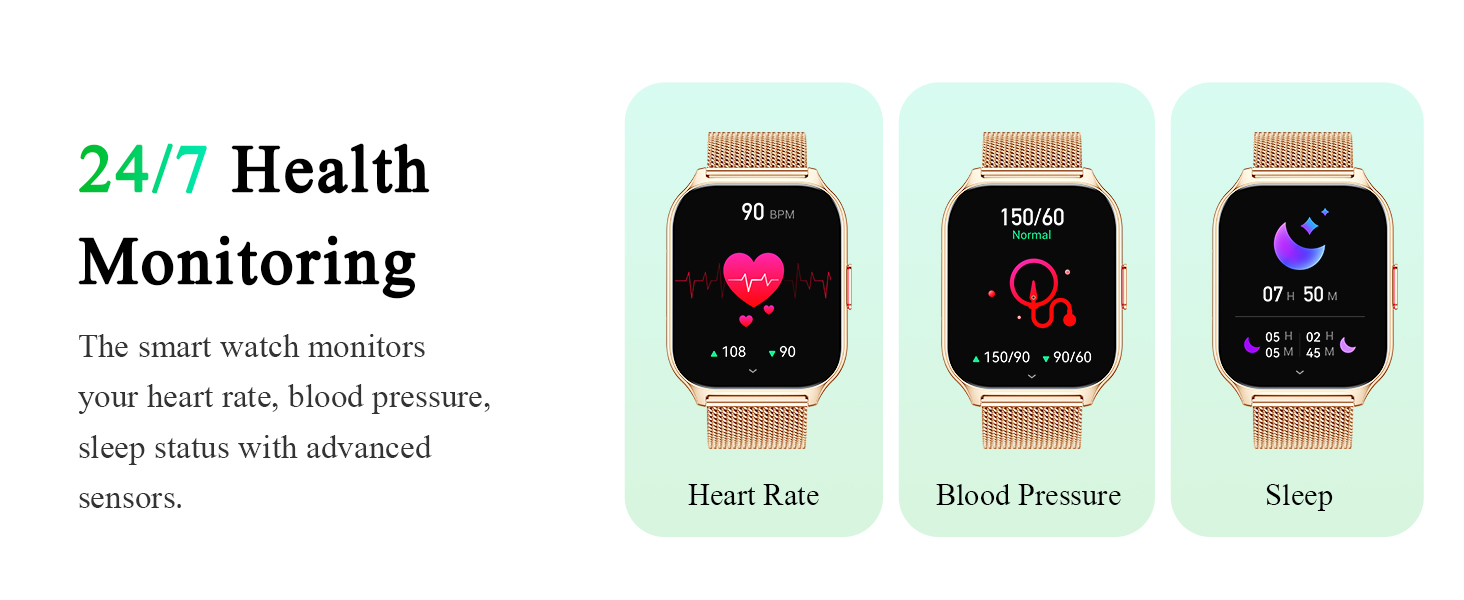
Image: 100+ Sport Modes & Detailed Analysis.

Image: Workout Records tracking.
Other Convenient Features
The ZOSKVEE Smart Watch includes several practical features to enhance daily life:
- Business Card: Save social media QR codes in the app and display them on your watch.
- Camera Control: Remotely control your phone's camera.
- Alarm Clock: Set alarms directly from the watch or app.
- Timer & Stopwatch: Built-in timing functions.
- Drinking Reminder: Get reminders to drink water.
- Sedentary Reminder: Alerts to encourage movement after periods of inactivity.
- Find Device/Phone: Locate your watch or phone if misplaced.
- Music Control: Control music playback on your connected phone.
- Weather Forecast: View current weather conditions.
- Watch Password: Set a password for watch security.

Image: Overview of various convenient features.

Image: Drink Water and Sedentary Reminders.

Image: Instructions for controlling media audio.
Battery Life and Charging
The ZOSKVEE Smart Watch P95 is equipped with a 270 mAh Lithium Polymer battery. Battery performance varies based on usage:
- Standby Time: Up to 20 days
- Normal Usage: 7-10 days
- Power Saving Mode: Up to 15 days
- Charging Time: Approximately 2 hours for a full charge.
Always use a low-power USB port for charging to prevent damage to the battery.

Image: Outstanding Battery Life details.
Maintenance and Care
Water Resistance
The ZOSKVEE Smart Watch P95 is water resistant for daily life activities such as washing hands or wearing it on rainy days. It is not suitable for bathing, diving, saunas, or other water-intensive activities. Exposure to hot water or steam may damage the device.

Image: Water Resistance information.
Cleaning
Wipe the watch and bands regularly with a soft, dry cloth. If necessary, use a slightly damp cloth and then dry thoroughly. Avoid using harsh chemicals or abrasive materials.
Storage
Store the watch in a cool, dry place away from direct sunlight and extreme temperatures when not in use for extended periods.
Troubleshooting
| Problem | Possible Cause | Solution |
|---|---|---|
| Watch does not turn on. | Low battery. | Charge the watch for at least 30 minutes using the provided charging cable. |
| Cannot pair with smartphone. | Bluetooth is off; app permissions not granted; watch not discoverable. | Ensure Bluetooth is on. Check app permissions. Restart both watch and phone. Try "forgetting" the device in phone's Bluetooth settings and re-pairing. |
| Notifications not received. | App notification permissions not enabled; app not running in background; phone's notification settings. | Verify notification permissions in the app and phone settings. Ensure the app is running. Check phone's battery optimization settings for the app. |
| Inaccurate health data. | Watch not worn correctly; sensor obstruction; movement during measurement. | Ensure the watch is snug on your wrist, not too tight or loose. Clean the sensor area. Remain still during measurements. |
| Short battery life. | Frequent use of power-intensive features (calls, bright screen); continuous monitoring. | Reduce screen brightness, shorten screen-on time. Limit continuous heart rate monitoring. Use power-saving mode. Avoid using fast chargers. |
Specifications
- Model Number: P95
- Product Dimensions: 11.81 x 7.48 x 1.18 inches
- Item Weight: 1.73 ounces (49 Grams)
- Screen Size: 2.01 Inches (Standing screen display size: 2.01 Inches)
- Resolution: 240*296 (implied from A+ content image)
- Battery: 1 Lithium Polymer battery (included)
- Battery Capacity: 270 Milliamp Hours
- Operating System: Watch OS 8
- Memory Storage Capacity: 1 MB
- Connectivity Technology: Bluetooth
- Wireless Communication Standard: Bluetooth
- GPS: GPS Via Smartphone (connected phone's GPS)
- Shape: Rectangular
- Manufacturer: ZOSKVEE
- Date First Available: September 21, 2023

Image: Heart Rate Monitor in action.
Warranty and Support
ZOSKVEE offers a 12-month warranty for your peace of mind. We are committed to providing excellent products and outstanding customer service. For any product issues, suggestions, or support inquiries, please contact ZOSKVEE customer service. Your satisfaction is our top priority, and your feedback is crucial in helping us improve our products.
Additional support information:
- Lifetime Support: Lifetime support and satisfied solutions.
- 24 Hours Service: Quick service via email.
- 30 Days Return Policy: 30 days no reason to return policy.
- 1 Year Free Replacement: 1 year free replacement.

Image: ZOSKVEE Brand Logo.

Image: Sleep Monitoring for comprehensive well-being.


