
ninetom C GLC Class for NTG 5.0 System
NINETOM Android 13 Car Radio User Manual
Model: C GLC Class for NTG 5.0 System
1. Compatibility Information
This NINETOM 12.3-inch touchscreen unit is designed for specific Mercedes-Benz models and NTG systems. Please verify your vehicle's compatibility before installation.
1.1. Compatible Models and Years

Image: Table showing compatible Mercedes Benz C Class W205 and GLC Class X253 models from 2015 to 2018, specifically for NTG5.0, NTG5.1, and NTG5.2 systems.
- C Class W205: C180, C200, C220, C250, C300, C350, C320, C63, C350E, C43 AMG, C45 AMG, C63 AMG, C63 AMG S (2015-2018)
- GLC Class X253: GLC250, GLC300, GLC350e, GLC43 AMG, GLC63 AMG (2015-2018)
1.2. NTG System Verification
This unit is specifically designed for NTG 5.0/5.1/5.2 systems. It is not compatible with NTG 4.0, 4.5, or 4.7 systems. Please identify your original radio's NTG version.
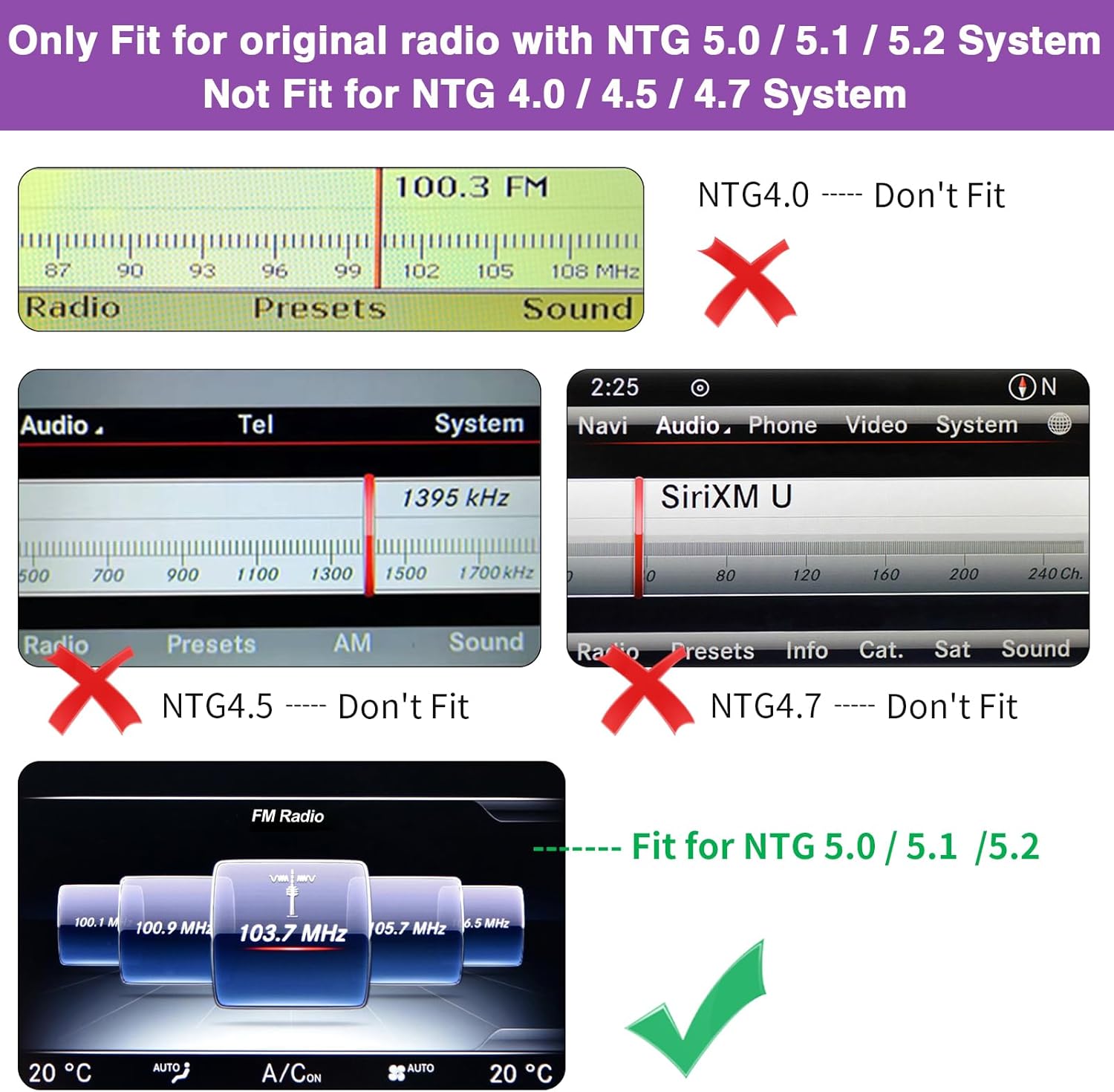
Image: Comparison of different NTG system interfaces, indicating which are compatible (NTG 5.0/5.1/5.2) and incompatible (NTG 4.0/4.5/4.7) with this product.

Image: Guide to determine car compatibility by examining the original radio's card slot (small/large) and button type (flat), correlating to NTG 4.0, 4.5, 4.7, and 5.0 systems.
2. Setup and Installation
This section provides an overview of the product components and general installation considerations. Professional installation is recommended if you are not confident with automotive electronics.
2.1. Package Contents
Verify that all components are present in your package:

Image: Visual representation of the product's components, including the main touchscreen unit and various cables and accessories.
- 12.3-inch touchscreen unit
- Power cable
- LVDS cable
- GPS antenna
- Trumpet
- Microphone
- WiFi antenna
- USB audio box
- Installation kit
2.2. Installation Guidance
The installation process involves replacing the original car screen with the new Android 13 touchscreen. It is designed to integrate seamlessly without damaging your original car wiring or affecting your factory car warranty.

Image: Visual comparison illustrating the aesthetic and functional upgrade from the original car screen to the NINETOM Android 13 touchscreen.
While the unit includes necessary cables for a plug-and-play setup, some users may find the wiring process complex due to the number of cables. It is crucial to test all functions on your vehicle before finalizing the installation. If you are unsure about any steps, it is highly recommended to seek assistance from a professional installer or an auto repair shop.
For detailed visual instructions, refer to online video tutorials. Search for installation guides specific to Mercedes Benz C Class W205 or GLC Class X253 Android screen upgrades. The manufacturer also provides support for installation queries.
3. Operating Instructions
This section details the primary functions and features of your new NINETOM Android 13 Car Radio.
3.1. Core Features

Image: The primary user interface of the NINETOM Android 13 system, showcasing key application shortcuts.
- Android 13 System: Equipped with 8GB RAM and 256GB storage for smooth performance and ample space for apps.
- Wireless/Wired Apple CarPlay & Android Auto: Seamlessly integrate your smartphone for navigation, music, calls, and messages. Supports Siri/Maps/Music/Phone Call.
- Mirror Link Function: Display your phone's screen directly on the unit (AirPlay for iPhone, AutoLink for Android).
- Built-in Connectivity: Features built-in WiFi, USB, and SIM card ports for versatile connectivity options.
- Multilingual Settings: Supports various language settings for user convenience.
- Browser: Access the internet directly from the unit.
3.2. Original Car Functions Support
The upgraded Android 13 screen is designed to retain all original car functions, ensuring no loss of existing features.

Image: Visual confirmation that the unit supports and integrates with the vehicle's existing audio, control, and input systems.
- Original car radio and amplifier functions
- Factory joystick control
- Original reversing camera and parking radar
- Support for aftermarket reverse camera and 360 camera
- Support for front view camera DVR (CVBS input)
- No software changes are made to the vehicle control units.
3.3. Switching Between Systems
Easily switch between the factory car system and the Android 13 system by tapping the 'Car Info' button on the Android home screen menu.

Image: Flowchart demonstrating how to toggle between the new Android interface and the original Mercedes-Benz system.
3.4. User Interface Customization
The Android 13 system offers 8 different color options for the user interface, allowing for personalization.

Image: Display of various theme color options for the Android 13 system, allowing users to customize the visual appearance.
3.5. Display and Resolution
The unit features an ultra-high screen resolution of 1920*720 pixels, providing approximately 1,368,000 pixels, an increase of about 120% compared to standard displays (1280*480 pixels).

Image: A visual comparison demonstrating the superior resolution and clarity of the NINETOM display.
The physical screen size is 12.3 inches. For reference, a 10.25-inch screen is also available from the manufacturer.

Image: Visual comparison of different screen sizes (10.25-inch vs. 12.3-inch) and their respective dimensions.
3.6. Connectivity and Navigation
The unit supports various connectivity options and navigation features.

Image: Overview of connectivity features (WiFi, USB, Bluetooth), weather display, camera support, and GPS navigation capabilities.
- WiFi / USB / Bluetooth: Connect your phone for music, calls, and data.
- Global Weather: Access real-time weather information.
- GPS Navigation: Utilize the built-in GPS antenna to download and use various navigation apps.
3.7. Official Product Video
Watch the official product video for a visual demonstration of the NINETOM Android 13 Car Radio's features and interface.
Video: A comprehensive overview of the 12.3-inch touchscreen for Mercedes Benz, demonstrating its various functions and user interface.
4. Maintenance
To ensure the longevity and optimal performance of your NINETOM Android 13 Car Radio, follow these simple maintenance guidelines:
- Screen Cleaning: Use a soft, lint-free cloth, preferably microfiber, to gently wipe the touchscreen. For stubborn smudges, slightly dampen the cloth with water or a screen-safe cleaner. Avoid abrasive materials or harsh chemicals, as they can damage the screen coating.
- Software Updates: Periodically check for software updates through the unit's settings. Keeping the software updated ensures you have the latest features, performance improvements, and security patches.
- Environmental Conditions: Avoid exposing the unit to extreme temperatures, direct sunlight for prolonged periods, or excessive moisture.
- Cable Connections: Ensure all cables are securely connected. Loose connections can lead to intermittent functionality.
5. Troubleshooting
This section addresses common issues you might encounter and provides potential solutions.
5.1. Common Issues and Solutions
| Issue | Possible Cause / Solution |
|---|---|
| No Power / Unit Not Turning On | Check all power cable connections. Ensure the vehicle's ignition is on. Verify the fuse for the car radio circuit. |
| No Audio Output / Low Volume | Ensure the unit's volume is turned up. Check audio cable connections. Verify that the original car radio/amplifier functions are correctly integrated. Some users reported initial volume issues; ensure all settings are configured correctly. |
| CarPlay/Android Auto Not Connecting | Ensure your phone's Bluetooth and Wi-Fi are enabled. Try restarting both the phone and the car unit. Check USB cable connection if using wired CarPlay/Android Auto. Update your phone's operating system. |
| Poor GPS Signal | Ensure the GPS antenna is properly installed and has a clear view of the sky (e.g., on the dashboard). Avoid placing it under metallic objects. |
| Original Camera / Parking Radar Not Working | Verify that the original camera and parking sensor connections are correctly routed and connected to the new unit. Ensure the unit's settings are configured to recognize these inputs. |
| Screen Glare | Adjust screen brightness settings. Some glare may be inherent due to the screen's position; adjusting app settings (e.g., Waze day/night mode) can help. |
| Unit Freezing / Unresponsive | Perform a soft reset by pressing and holding the power button until the unit restarts. If the issue persists, check for available software updates. |
If you encounter an issue not listed here or if the suggested solutions do not resolve the problem, please contact NINETOM customer support for further assistance.
6. Specifications
| Feature | Detail |
|---|---|
| Brand | ninetom |
| Model | C GLC Class for NTG 5.0 System |
| Operating System | Android 13 |
| Display Size | 12.3 Inches |
| Resolution | 1920 x 720 pixels |
| Memory Storage Capacity | 256 GB |
| RAM | 8 GB |
| Connectivity Technology | Bluetooth, Wi-Fi, USB, SIM card |
| Special Feature | Touchscreen, Wireless CarPlay/Android Auto, Mirror Link, GPS Navigation |
| Mounting Type | Dashboard Mount |
| Item Weight | 6.3 pounds |
| Package Dimensions | 15.27 x 7.17 x 6.77 inches |
| Country of Origin | China |
7. Warranty and Support
NINETOM provides comprehensive support for its products.
- 1-Year Warranty: The product comes with a 1-year warranty.
- Installation Assistance: If you require assistance with installation or encounter any issues, please feel free to reach out to NINETOM customer support. They are knowledgeable and can provide guidance beyond what a typical auto repair shop might offer.
- Contact: Refer to your purchase documentation or the NINETOM brand store on Amazon for specific contact details.
Ask a question about this manual
Ask about setup, troubleshooting, compatibility, parts, safety, or missing instructions. Manuals+ will review the question and use this page’s manual context to help answer it.