1. Introduction
The Yamaha Tio1608-D2 is a high-performance, Dante-equipped I/O rack designed for professional audio applications. It features 16 microphone/line inputs and 8 line outputs, operating at a 96kHz sample rate. This stage box system seamlessly integrates with Yamaha digital consoles, including the DM3-D and TF series. The Tio1608-D2 incorporates low-latency 96kHz converters and recallable D-PRE preamplifiers, ensuring pristine audio quality. Its Auto Setup feature simplifies configuration with compatible Yamaha digital consoles, minimizing setup time and effort.
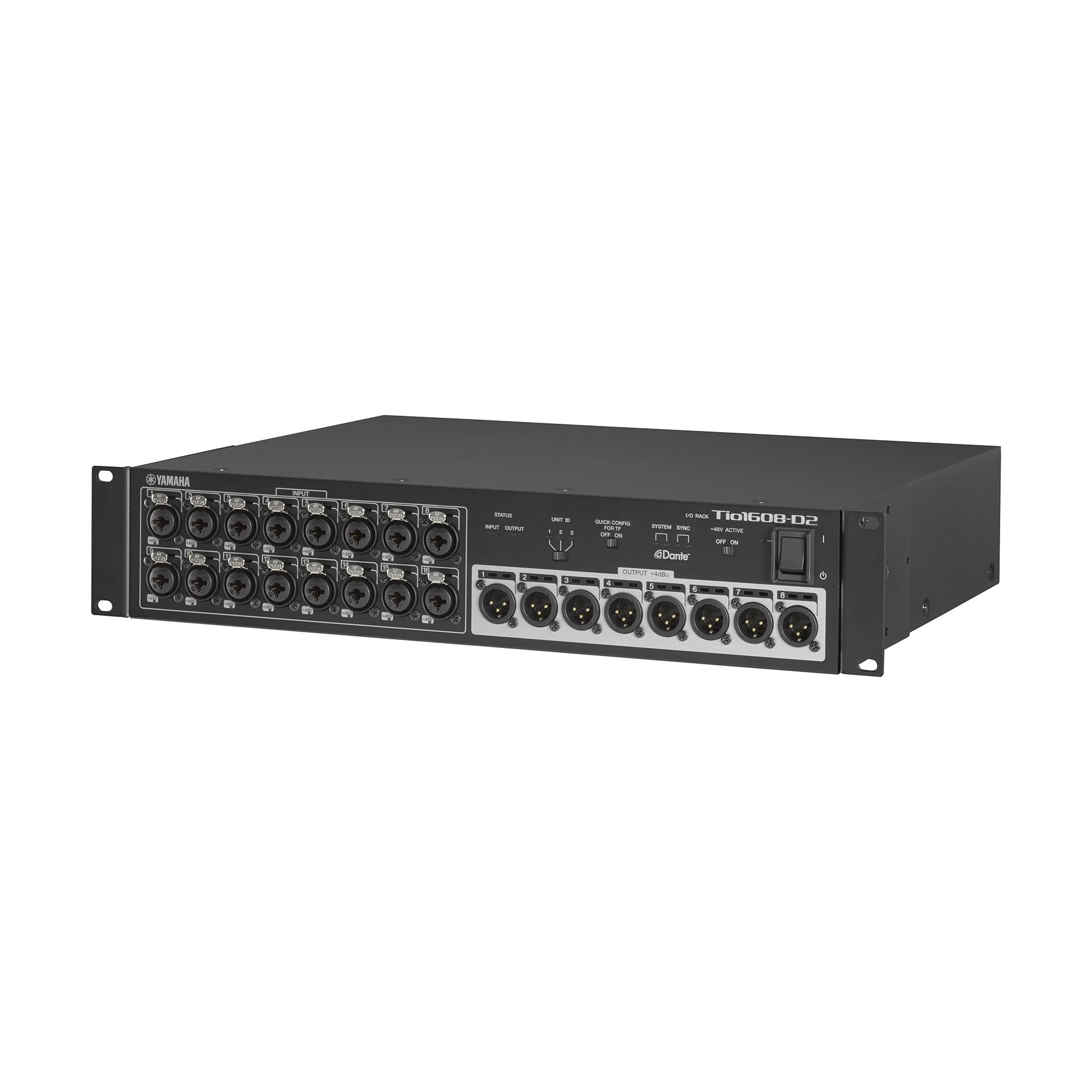
Figure 1.1: Front view of the Tio1608-D2 I/O Rack.
2. Key Features
- High-Quality Audio: Renowned Yamaha sound quality with a 96kHz sample rate for superior audio fidelity.
- Compact Design: 3U rack-mountable size, ideal for stage or studio environments.
- Extensive I/O: Equipped with 16 inputs and 8 outputs for versatile connectivity.
- Quick Configuration: Supports QUICK CONFIG Mode for seamless integration with DM3 and TF series digital consoles.
- Premium Preamplifiers: Features recallable D-PRE preamplifiers for excellent microphone and line signal capture.
- Dante Network Integration: Dante-enabled for flexible and reliable audio networking.
3. Setup Guide
This section outlines the steps to connect and configure your Yamaha Tio1608-D2 with a compatible Yamaha TF series digital console.
3.1 Physical Connection
- Connect to TF Console: On the rear panel of your TF console, locate the Dante primary port (typically on an NY64-D card). Connect a standard Ethernet cable from this port to the primary Dante port on the rear of the Tio1608-D2.
- Power Connection: Ensure the Tio1608-D2 is connected to a power source using the provided AC cable.
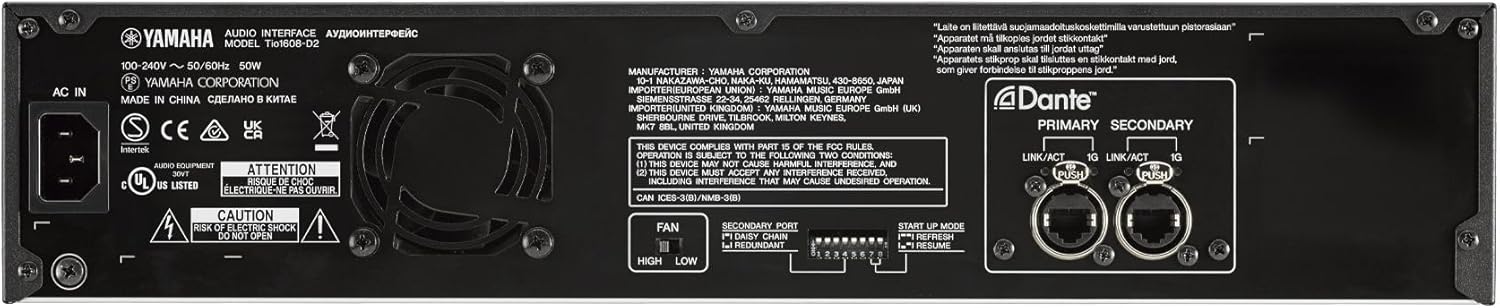
Figure 3.1: Rear panel of the Tio1608-D2 with Dante ports and configuration switches.
3.2 Tio1608-D2 Initial Configuration
- Set Unit ID: On the front panel of the Tio1608-D2, set the UNIT ID switch to '1' for the first unit.
- Enable Quick Config: Set the QUICK CONFIG switch to 'ON'.
- Enable +48V Master (if needed): If phantom power is required for microphones, set the +48V MASTER switch to 'ON'.
- Power On: Turn on the power switch for the Tio1608-D2.

Figure 3.2: Front panel controls for Tio1608-D2 configuration.
3.3 TF Console Configuration
- Access Setup Menu: On your TF console's touchscreen, tap the gear icon (Setup) at the top of the display.
- Navigate to Slot Setup: Select "Slot Setup" from the setup menu.
- Verify Tio1608-D2 Detection: The TF console should automatically detect the connected Tio1608-D2. The inputs and outputs of the Tio1608-D2 will be displayed. By default, outputs 7 and 8 are configured as stereo left and right.
- Adding a Second Tio1608-D2: If connecting a second Tio1608-D2, connect it from the secondary Dante port of the first Tio1608-D2 to the primary Dante port of the second unit. Set the UNIT ID of the second Tio1608-D2 to '2'. The TF console will then display the inputs and outputs of the second unit on page 2 of the Slot Setup screen.
3.4 Video Guide: Connecting Tio1608-D to TF Console
Video 3.1: This video demonstrates the process of connecting a Yamaha Tio1608-D stage box to a TF series digital console, including physical connections and console setup steps. It shows how to access the slot setup menu and verify device detection.
4. Operating Instructions
Once the Tio1608-D2 is successfully connected and configured with your Yamaha digital console, you can begin routing and processing audio signals.
- Input Routing: Use your digital console's routing matrix to assign the 16 inputs from the Tio1608-D2 to desired channels on the console.
- Output Routing: Route console outputs (e.g., mixes, matrix outputs) to the 8 line outputs of the Tio1608-D2 for sending signals to amplifiers, monitors, or other external devices.
- Preamplifier Control: The recallable D-PRE preamplifiers on the Tio1608-D2 can be remotely controlled directly from your connected Yamaha digital console, allowing for gain adjustments and phantom power activation.
- Dante Network: The Dante network provides flexible audio signal distribution. Ensure proper clocking and network settings are maintained for stable operation. Refer to your console's manual for advanced Dante network configuration.

Figure 4.1: Yamaha DM3 digital mixing console, compatible with Tio1608-D2.
5. Maintenance
Proper maintenance ensures the longevity and optimal performance of your Tio1608-D2.
- Cleaning: Regularly wipe the unit with a soft, dry cloth. Avoid using abrasive cleaners or solvents.
- Ventilation: Ensure adequate ventilation around the unit to prevent overheating. Do not block ventilation openings.
- Cable Management: Organize and secure all cables to prevent accidental disconnections or damage.
- Firmware Updates: Periodically check the Yamaha website for firmware updates for both the Tio1608-D2 and your connected digital console to ensure compatibility and access to new features.
6. Troubleshooting
If you encounter issues with your Tio1608-D2, refer to the following common troubleshooting steps:
| Problem | Possible Cause | Solution |
|---|---|---|
| No audio signal | Incorrect cable connection, incorrect routing on console, Tio1608-D2 not powered on, phantom power not enabled for condenser mics. | Verify all Dante and audio cables are securely connected. Check console routing. Ensure Tio1608-D2 is powered on. Activate +48V Master if using condenser microphones. |
| Tio1608-D2 not recognized by console | Incorrect Unit ID, Quick Config off, network issue, firmware mismatch. | Confirm UNIT ID is set correctly (e.g., '1' for the first unit). Ensure QUICK CONFIG is 'ON'. Check Dante network cable. Update firmware on both Tio1608-D2 and console if necessary. |
| Intermittent audio dropouts | Network interference, faulty cable, clocking issues. | Use high-quality shielded Ethernet cables. Check Dante network settings for proper clock master and slave configuration. Avoid running network cables near power lines. |
7. Specifications
| Feature | Detail |
|---|---|
| Brand | Yamaha |
| Model | Tio1608-D2 |
| Connectivity Technology | Dante Ethernet |
| Number of Channels | 16 Inputs, 8 Outputs (24 total) |
| Audio Input Type | XLR (Combo jacks for Mic/Line) |
| Audio Output Type | XLR |
| Sample Rate | 96kHz capable |
| Preamplifiers | Recallable D-PRE |
| Form Factor | 3U Rackmount |
| Item Weight | 12.6 Pounds |
| UPC | 889025153454 |
8. Warranty and Support
The Yamaha Tio1608-D2 comes with a 1-year manufacturer warranty. Yamaha Corporation of America (Yamaha) stands by the quality and craftsmanship of its products. The limited warranty applies exclusively to products purchased from an authorized Yamaha retailer within the fifty United States (including the District of Columbia) and used within this region. Authorized retailers are equipped with the necessary sales and service support materials and training. For complete details regarding the Yamaha limited warranty for this product, please visit the official Yamaha website.
For further support, technical assistance, or to locate an authorized service center, please refer to the contact information provided on the official Yamaha website.


