Important Safety Information
Please read all instructions carefully before using the treadmill. Keep this manual for future reference.
- Ensure the treadmill is placed on a flat, stable surface.
- Keep children and pets away from the treadmill during operation.
- Always wear appropriate athletic footwear.
- Do not operate the treadmill if it is damaged or malfunctioning.
- Disconnect power before cleaning or performing maintenance.
- Do not exceed the maximum weight capacity of 130 KG.
- Use the safety key clip at all times during operation.
Setup and Assembly
The TOPUTURE 2-in-1 Folding Treadmill is designed for convenience and comes largely pre-assembled, allowing for quick setup.
Unpacking and Initial Placement
Carefully remove the treadmill from its packaging. Place it on a level, solid surface with adequate space around it for safe operation.

Image: The TOPUTURE 2-in-1 Folding Treadmill shown in both its upright running mode and flat walking pad configuration.
Folding and Storage
This treadmill features a convenient folding design for easy storage. Built-in transport wheels allow for effortless movement. When not in use, it can be folded flat and stored under a bed or sofa, requiring minimal space.

Image: Illustration of the treadmill's folding mechanism and its compact storage capability, fitting under a sofa.
Operating Instructions
Powering On and Off
Connect the power cord to a grounded outlet. Locate the power switch, usually at the front base of the treadmill, and turn it to the 'ON' position. To turn off, switch it to 'OFF' and unplug the unit.
Understanding the 2-in-1 Modes
The TOPUTURE treadmill offers two primary modes: running and walking. The speed range adjusts based on the mode, from 1-16 KM/H for running and typically lower speeds for walking pad use.

Image: Visual representation of the treadmill's two modes: running mode (1-16 KM/H) with the handlebar raised, and walking mode (1-8 KM/H) with the handlebar folded down for under-desk use.
Dual LED Display and Controls
The treadmill features a multi-function dual LED display that provides real-time exercise data, including time, speed, calories burned, distance, and heart rate. Control the treadmill using the integrated console or the wireless remote control.

Image: Detailed view of the treadmill's LED display, highlighting metrics such as time, speed, calories, distance, and heart rate.
Running Area and Comfort
The treadmill is designed with an extra-wide and comfortable running area, measuring 1040mm x 420mm, providing ample space for natural movement during your workout.

Image: An overhead perspective showing the generous dimensions of the running belt (1040mm length, 420mm width), ensuring a comfortable and spacious workout area.
Bluetooth Connectivity and App Integration
Connect your device via Bluetooth to the treadmill's built-in speaker to play music during your workout. The treadmill also supports a dedicated Sports APP for enhanced control and tracking of your fitness progress. Hold the metal plates on the display to monitor your heart rate.

Image: A user running on the treadmill while interacting with a fitness application on a tablet, demonstrating Bluetooth connectivity and app integration for workout programs.
Maintenance
Running Belt Care
The treadmill features a widened running belt (1040mm x 420mm) with 8 shock-absorbing cushions for comfort and knee protection. Regularly inspect the belt for wear and tear. Keep the belt clean by wiping it with a damp cloth after each use.

Image: An exploded view illustrating the multi-layer non-slip running belt and the 8 silicone shock absorbers designed to protect knees during exercise.
Lubrication
To ensure smooth operation and prolong the life of your treadmill, regular lubrication of the running belt is essential. Refer to the specific instructions provided with your lubrication oil for frequency and application method. Some models feature an integrated lubrication reservoir for ease of use.
Motor and Frame
The treadmill is equipped with a powerful and quiet 2.5HP motor, supporting a maximum load capacity of 130 KG. The durable steel frame ensures stability. Keep the motor area free from dust and debris. Do not attempt to open the motor cover unless instructed by a qualified technician.
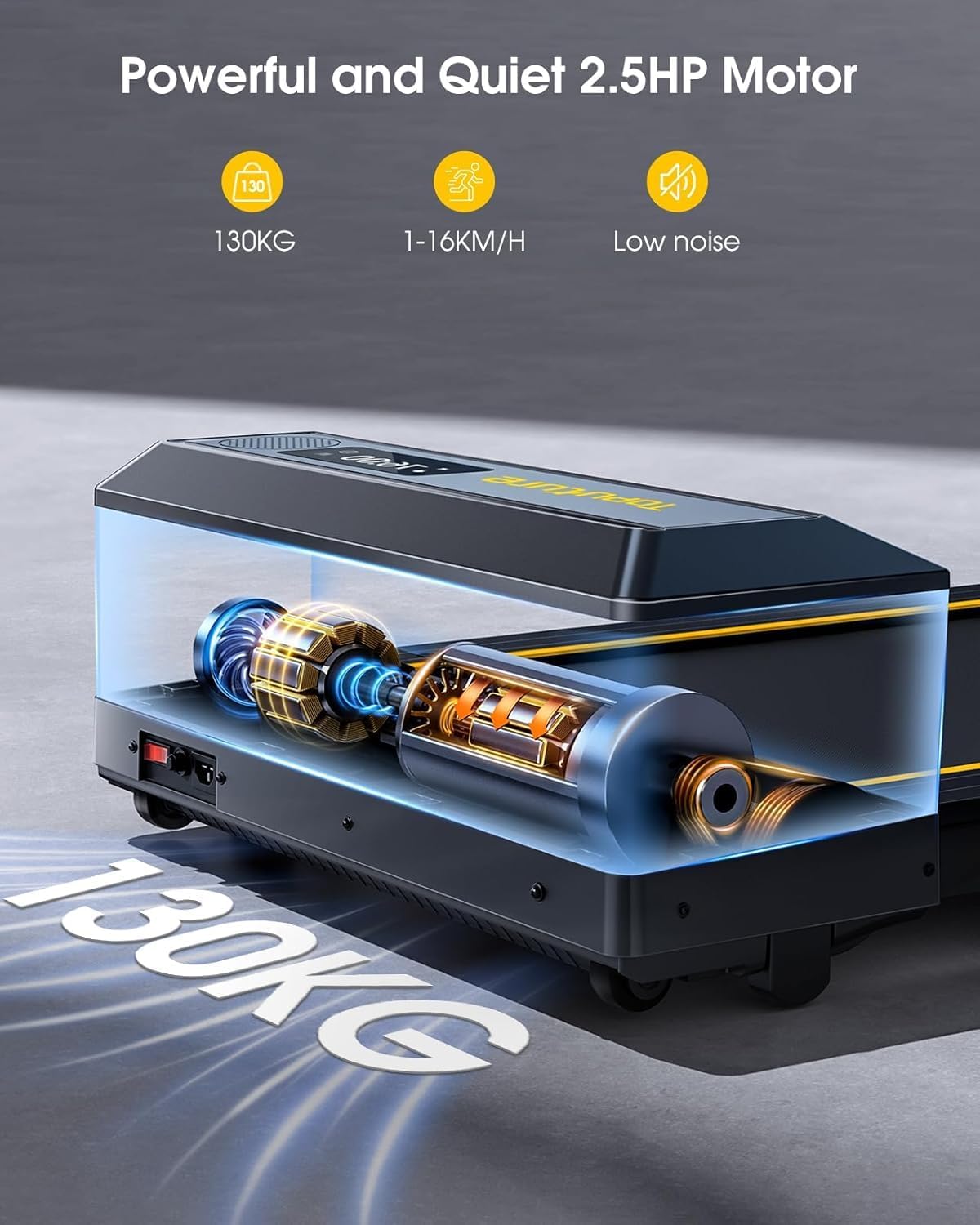
Image: An internal view highlighting the powerful 2.5HP motor, indicating its capacity to support up to 130KG and its low noise operation.
Troubleshooting
| Problem | Possible Cause | Solution |
|---|---|---|
| Treadmill does not power on. | Power cord not plugged in; power switch off; circuit breaker tripped. | Ensure power cord is securely plugged in. Turn power switch to 'ON'. Check household circuit breaker. |
| Running belt slips or hesitates. | Belt tension too loose; insufficient lubrication. | Adjust belt tension according to manual (if applicable). Apply lubrication as per maintenance instructions. |
| Unusual noise during operation. | Loose parts; motor issue; belt friction. | Check for and tighten any loose screws. Lubricate the belt. If noise persists, contact customer support. |
| Display not showing data correctly. | Loose connection; sensor issue. | Ensure all connections are secure. Restart the treadmill. If problem continues, contact support. |
Specifications
| Model Number | TP1 |
| Brand | Toputure |
| Product Dimensions (Assembled) | 125.7 cm (L) x 71.8 cm (W) x 110.5 cm (H) |
| Product Weight | 34.5 kg |
| Maximum Speed | 16 KM/H |
| Motor Horsepower | 2.5 HP |
| Maximum Load Capacity | 130 KG |
| Running Belt Dimensions | 1040 mm x 420 mm |
| Material | High Carbon Steel |
| Target Audience | Adult |
| Included in Box | Remote control |
Warranty and Support
TOPUTURE offers a 24-month warranty on this product, ensuring satisfactory service to every customer.
For any questions, technical assistance, or warranty claims, please contact the seller or manufacturer directly through your purchase platform. Please have your model number (TP1) and purchase details ready when contacting support.


