
1. Introduction
The SmallRig Z f Camera Cage 4261 is specifically designed to provide robust protection and enhanced functionality for your Nikon Z f camera. This form-fitting cage integrates an ergonomic ebony grip for comfortable handling and features a built-in Arca-Swiss quick-release plate for seamless transitions between handheld, tripod, and gimbal setups. It maintains full access to all camera controls, ports, and battery compartments, while offering multiple mounting points for various accessories.
2. Package Contents
Verify that all items listed below are included in your package:
- 1x SmallRig Z f Camera Cage 4261
- 1x User Manual

Figure 2.1: Package contents and product dimensions. The cage measures approximately 158mm x 56.6mm x 118.5mm.
3. Setup and Installation
3.1 Attaching the Camera Cage
- Preparation: Before installation, ensure the camera is powered off. Remove the strap ring located on the right side of the camera to allow for proper cage fitment.
- Secure Bottom: Align the camera with the cage and secure it using the 1/4"-20 screw on the bottom of the cage. Tighten firmly with the included tool.
- Secure Side: Fasten the M2.5 screw on the right side of the cage into the camera's strap lug for additional stability and anti-twist protection.
- Verify Fit: Ensure the camera is snugly seated within the cage and all screws are tightened to prevent movement.

Figure 3.1: Step-by-step guide for attaching the camera cage, highlighting the removal of the strap ring and the two-point locking mechanism.
3.2 Installation Video Guide
Video 3.1: This video demonstrates the installation of a camera cage for the Nikon Z f, showing how to secure the camera and highlighting key features.
4. Operating Instructions
4.1 Ergonomic Grip
The integrated ebony handle provides a comfortable and secure grip, improving stability during handheld shooting. The natural wood grain may vary, making each grip unique.

Figure 4.1: The ergonomic ebony grip enhances comfort and security during use.
4.2 Quick Release System
The built-in Arca-Swiss quick-release plate on the bottom of the cage allows for rapid and effortless switching between handheld shooting, tripod setups, and gimbal usage (e.g., DJI RS mini series). This feature streamlines your workflow and adapts to various shooting scenarios.

Figure 4.2: Seamless switching between tripod and gimbal setups using the integrated Arca-Swiss plate.
4.3 Access to Camera Functions
The cage is designed to maintain full access to all essential camera functions, including buttons, card slots, the flip screen, and the battery door. This ensures uninterrupted operation and convenience.

Figure 4.3: Unobstructed access to the camera's flip screen and battery.
4.4 Mounting Accessories
The cage features multiple mounting points for attaching various camera accessories:
- 1/4"-20 Threaded Holes: For attaching side handles (e.g., SmallRig Side Handle 4015).
- 3/8"-16 ARRI Locating Holes: For top handles (e.g., SmallRig Top Handle 3765) or monitor mounts (e.g., SmallRig Monitor Mount 2903B).
- Cold Shoe Mount: For attaching LED video lights (e.g., SmallRig LED Video Light 3286B) or microphones.
- Strap Holes & QD Mounts: For hand straps (e.g., SmallRig Hand Strap 3848) and shoulder straps (e.g., SmallRig Shoulder Strap 4118).
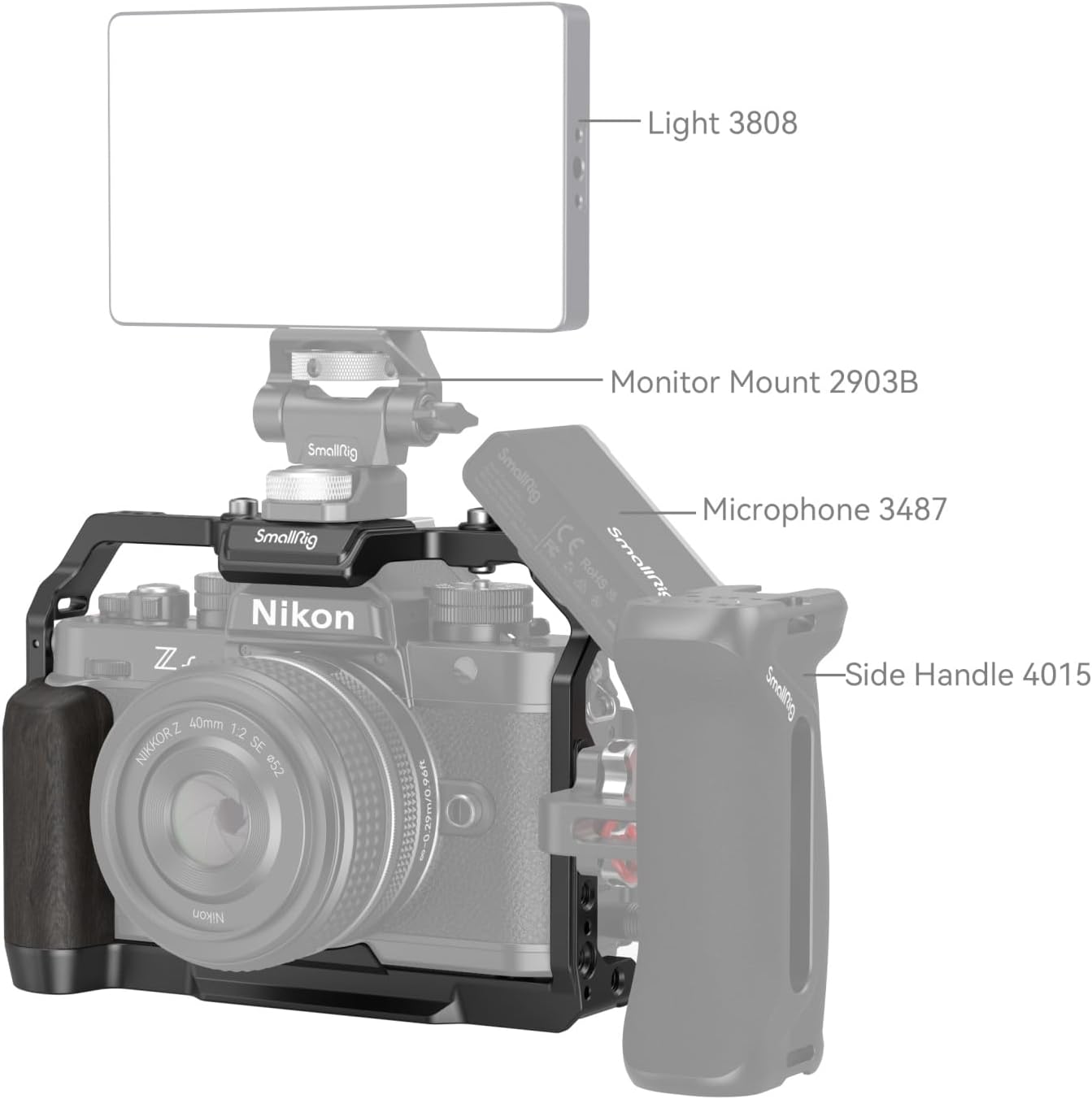
Figure 4.4: Example setup with a light, monitor, and side handle.

Figure 4.5: Another accessory setup with a top handle and wooden side handle.
4.5 Accessory Ecosystem Video
Video 4.1: This video from SmallRig showcases various accessories compatible with the Nikon Z f camera cage, demonstrating their attachment and functionality.
5. Key Features
- Ergonomic Ebony Grip: Provides a comfortable and secure hold, enhancing the camera's ergonomics for extended shooting sessions.
- All-Round Protection: Securely locks the camera via a 1/4"-20 screw on the bottom and an M2.5 screw on the right side, with rubber pads to prevent scratches.
- Integrated Arca-Swiss Plate: Allows for quick and easy transitions between handheld, tripod, and gimbal setups.
- Multiple Mounting Points: Features 1/4"-20 threaded holes, 3/8"-16 ARRI locating holes, a cold shoe mount, strap holes, and QD mounts for extensive accessory compatibility.
- Unobstructed Access: Maintains full access to all camera buttons, card slots, flip screen, and battery door.
6. Maintenance
To ensure the longevity and optimal performance of your SmallRig Z f Camera Cage, follow these maintenance guidelines:
- Cleaning: Wipe the cage with a soft, dry cloth to remove dust and fingerprints. For stubborn dirt, use a slightly damp cloth and dry thoroughly. Avoid harsh chemicals or abrasive materials.
- Screw Tightness: Periodically check all screws (1/4"-20 and M2.5) to ensure they remain securely tightened. Loose screws can affect stability and camera protection.
- Storage: Store the cage in a dry, clean environment when not in use. Avoid extreme temperatures and humidity.
7. Troubleshooting
If you encounter any issues with your camera cage, refer to the following common problems and solutions:
- Issue: The camera does not fit properly into the cage or feels loose.
Solution: Ensure the strap ring on the right side of the camera has been removed prior to installation. Verify that both the 1/4"-20 bottom screw and the M2.5 side screw are correctly aligned and fully tightened. - Issue: Accessories are difficult to attach or do not sit securely.
Solution: Check that the accessory's mounting screw or pin is compatible with the cage's mounting points (e.g., 1/4"-20, 3/8"-16 ARRI, cold shoe). Ensure screws are tightened appropriately. - Issue: The ebony handle's color or grain differs from product images.
Solution: This is normal. The ebony handle is made of natural wood, and variations in texture and color are inherent, making each handle unique.
8. Specifications
| Feature | Detail |
|---|---|
| Product Dimensions | 2.23"D x 6.22"W x 4.67"H (56.6mm x 158mm x 118.5mm) |
| Item Weight | 6.8 ounces (192 Grams) |
| Material(s) | Aluminum Alloy, Ebony Wood |
| Compatible Devices | Nikon Z f Camera |
| Mounting Points | 1/4"-20 Threaded Holes, 3/8"-16 ARRI Locating Holes, Cold Shoe, Strap Holes, QD Mounts |
| Quick Release | Integrated Arca-Swiss Plate |
| Color | Black |
| Model Number | 4261 |
9. Warranty and Support
SmallRig products are manufactured to high-quality standards. For warranty information, product support, or to inquire about replacement parts, please refer to the official SmallRig website or contact their customer service directly. Keep your purchase receipt as proof of purchase for any warranty claims.


