Introduction
Thank you for choosing the HADBLENG Q28S-B Wireless Bluetooth Earbuds. This manual provides detailed instructions on how to set up, operate, maintain, and troubleshoot your new earbuds. Please read this manual carefully before use to ensure optimal performance and longevity of your device.

Image: The HADBLENG Q28S-B Wireless Bluetooth Earbuds in their open charging case, showcasing the earbuds and the digital battery display.
Package Contents
Please check the package for the following items:
- 2 x HADBLENG Q28S-B Wireless Earbuds (Left and Right)
- 1 x Charging Case
- 1 x USB Type-C Charging Cable
- 3 x Pairs of Ear Tips (S/M/L)
- 1 x User Manual

Image: A visual representation of the package contents, including the earbuds, charging case, USB-C cable, and ear tips.
Setup
1. Initial Charging
Before first use, fully charge the charging case and earbuds. Connect the provided USB Type-C cable to the charging port on the case and a power source. The LED display on the case will show the battery percentage. The earbuds will charge automatically when placed inside the case.
- Charging Case Battery: 800 mAh capacity, providing up to 50 hours of additional playtime.
- Earbud Playtime: Up to 8 hours on a single charge.
- Quick Charge: 10 minutes of charging provides 1 hour of playtime.
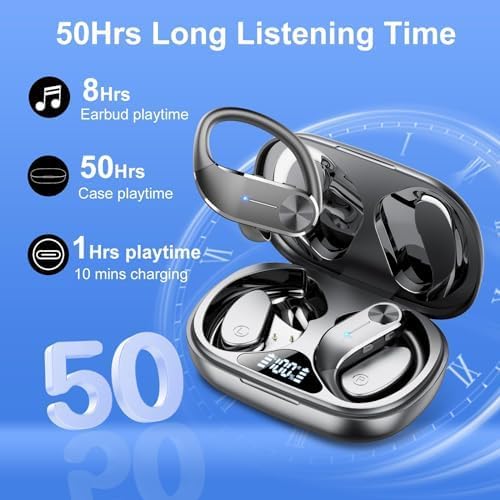
Image: The earbuds and charging case illustrating the extended listening time and quick charge capabilities.

Image: The charging case with its dual digital LED display, showing the battery level of the case and individual earbuds.
2. Pairing with Your Device
The earbuds feature one-step pairing for convenience.
- Open the charging case. The earbuds will automatically power on and enter pairing mode.
- On your device (smartphone, tablet, laptop), enable Bluetooth and search for available devices.
- Select "Q28S" from the list of found devices.
- Once connected, you will hear a confirmation tone, and the earbuds will be ready for use.
The earbuds will automatically reconnect to the last paired device when removed from the case, provided Bluetooth is enabled on the device.

Image: A visual guide demonstrating the simple one-step pairing process with a smartphone, highlighting the Bluetooth connection range of 15 meters.

Image: A diagram illustrating the advanced Bluetooth 5.3 chip, which ensures stable and efficient wireless connectivity.
3. Wearing the Earbuds
For optimal sound quality and comfort, choose the correct ear tip size and adjust the ear hooks.
- Select the ear tips (S/M/L) that provide a snug and comfortable fit in your ear canal.
- Place the earbud into your ear, ensuring the ear tip is properly sealed.
- Adjust the flexible ear hook over your ear to secure the earbud in place.

Image: A visual guide demonstrating how to achieve a secure and comfortable fit using the flexible ear hooks and selecting the appropriate ear tip size (S, M, L).
Operating Instructions
Touch Controls
The Q28S-B earbuds feature intuitive button controls on each earbud. The functions are mirrored on both left and right earbuds unless specified.
| Action | Function |
|---|---|
| Single Click (R/L) | Play/Pause Music |
| Single Click (R/L) | Answer/End Call |
| Long Press 2S (R/L) | Reject Call |
| Long Press 2S (R) | Next Song |
| Long Press 2S (L) | Previous Song |
| Triple Click (R/L) | Activate Voice Assistant (Siri, Google Assistant, etc.) |
| Click (R) | Volume Up |
| Click (L) | Volume Down |
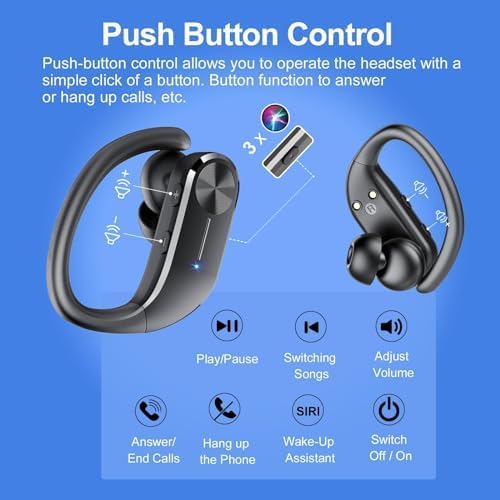
Image: A detailed diagram illustrating the various push-button controls on the earbuds for managing music, calls, and voice assistant.
Usage Modes
- Binaural Mode: Use both earbuds for immersive stereo sound with powerful bass. Ideal for music listening.
- Mono Mode: Use either the left or right earbud independently. Useful for calls or when you need to be aware of your surroundings.

Image: Examples of different usage scenarios, including driving, leisure, work, and fitness, demonstrating the versatility of the earbuds.
Maintenance
Cleaning
Regular cleaning helps maintain sound quality and hygiene.
- Gently wipe the earbuds and charging case with a soft, dry, lint-free cloth.
- Remove ear tips and clean them with mild soap and water, then dry thoroughly before reattaching.
- Do not use abrasive cleaners or immerse the earbuds or case in liquid.
Water Resistance (IPX7)
The earbuds are IPX7 waterproof, meaning they are protected against temporary immersion in water up to 1 meter for 30 minutes. This makes them suitable for sports and protection against sweat and rain.
- Do not intentionally submerge the earbuds for extended periods or use them for swimming.
- Ensure the charging port is dry before charging to prevent damage.
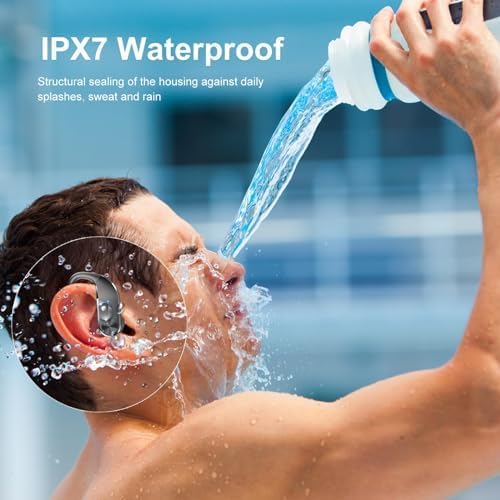
Image: A demonstration of the IPX7 waterproof rating, showing the earbuds resisting splashes, sweat, and rain.
Storage
Always store the earbuds in their charging case when not in use to protect them and keep them charged.
Troubleshooting
If you encounter any issues, please refer to the following common solutions:
| Problem | Possible Solution |
|---|---|
| Earbuds not pairing |
|
| Only one earbud working |
|
| Poor sound quality / No bass |
|
| Earbuds not charging |
|
Specifications
Key technical specifications for the HADBLENG Q28S-B Wireless Bluetooth Earbuds:
| Feature | Specification |
|---|---|
| Model Number | Q28S-B |
| Brand | hadbleng |
| Connectivity Technology | Wireless (Bluetooth 5.3) |
| Ear Placement | In-Ear |
| Water Resistance Level | IPX7 (Waterproof) |
| Playtime (Earbuds) | Up to 8 hours |
| Total Playtime with Charging Case | Up to 50 hours |
| Charging Time | Approx. 2 hours |
| Charging Case Capacity | 800 mAh (Digital Display) |
| Driver Size | 13.44 mm Dual Diaphragm Drivers |
| Frequency Range | 20 Hz - 20,000 Hz |
| Microphone | Built-in with ENC Noise Reduction |
| Weight | 100 Milligrams (total package weight) |
| Compatible Devices | Bluetooth-enabled devices (smartphones, tablets, computers) |

Image: An exploded view diagram highlighting the 13.44mm dual diaphragm drivers responsible for powerful and dynamic bass.

Image: A graphic illustrating the ENC (Environmental Noise Cancellation) technology in the microphone, which reduces ambient noise for clear calls.
Warranty and Support
Your HADBLENG Q28S-B Wireless Bluetooth Earbuds are covered by a comprehensive warranty and support policy:
- 30-Day Money-Back Guarantee: If you are not satisfied with your purchase, you can return it within 30 days for a full refund.
- 24-Month Warranty: The product is covered by a 24-month warranty for manufacturing defects and quality-related issues.
- Customer Service: For any questions or support needs, please contact our 24-hour online customer service. Refer to your purchase documentation for contact details.


