
1. Product Overview
This manual provides comprehensive instructions for the assembly, operation, and maintenance of your TRIUMPHKEY Electric Height-Adjustable Desk. Designed for versatility and productivity, this desk allows seamless transitions between sitting and standing positions, promoting a healthier work environment. Please read all instructions carefully before use.
Key Features:
- Adjustable Height: Seamlessly adjust your work and sitting posture with two height-adjustable functions, ranging from 72 cm to 117 cm, suitable for most users.
- Classic Modern Style: Features an industrial design concept with attractive details, including dual tabletops that add aesthetic appeal to the adjustable desk.
- Multifunctional Monitor Shelves: Practical workspaces in 120 cm, 140 cm, and 160 cm options provide ample space. The ergonomic monitor stand can also serve as an open storage cube, offering more storage and organization. It can be attached or removed as needed.
- Sturdy and Reliable: Constructed with a robust industrial-grade steel frame and specially designed legs, ensuring a static load capacity of 60 kg (including the desktop). Provides a reliable workspace for your equipment.
- Easy Assembly: Shipped in a single box for convenience and reduced environmental impact. Numbered parts and clear instructions facilitate efficient setup, typically within 30 minutes.

Figure 1.1: The TRIUMPHKEY Electric Height-Adjustable Desk with monitor shelves, showcasing its clean white finish and spacious design.
2. Safety Guidelines
Please read and adhere to the following safety warnings to prevent injury or damage to the product.
- Weight Capacity: Do not exceed the maximum weight capacity of 60 kg (132 lbs) on the desktop. Overloading can cause instability and damage.
- Assembly: Ensure the desk is assembled correctly and securely according to the provided instructions. Improper assembly can lead to structural failure.
- Clearance: Keep the area around the desk clear during height adjustments to prevent pinching or crushing hazards.
- Power Cord: Do not place the power cord in high-traffic areas where it could be tripped over or damaged.
- Children and Pets: Keep children and pets away from the desk during operation to prevent accidents.
- Liquid Spills: Avoid spilling liquids on the control panel or electrical components. In case of a spill, immediately unplug the desk and allow it to dry completely before use.
- Maintenance: Do not attempt to repair or modify the electrical components of the desk yourself. Contact qualified service personnel for any repairs.

Figure 2.1: Illustration showing the product dimensions and emphasizing the maximum load capacity of 60 kg.
3. Package Contents
Before beginning assembly, please verify that all components listed below are present and undamaged. If any parts are missing or damaged, please contact customer support.
- Desktop Panels (Split design)
- Desk Legs and Frame Components
- Electric Motor and Control Box
- Control Panel with LED Display
- Monitor Shelf (Optional attachment)
- Adjustable Feet (x4)
- Headphone Hook
- Cable Management Holes/Grommets (x2)
- Assembly Hardware (screws, bolts, tools)
- Power Adapter and Cable
- User Manual (this document)
4. Setup and Assembly
The TRIUMPHKEY Electric Height-Adjustable Desk is designed for straightforward assembly. Follow the clear, numbered instructions provided in the separate assembly guide included with your package. Typically, assembly can be completed within 30 minutes.
Assembly Steps (General Overview):
- Unpack all components and lay them out on a clean, soft surface to prevent scratches.
- Attach the desk legs to the main frame according to the diagrams.
- Secure the electric motor and control box to the frame.
- Assemble the desktop panels and attach them to the frame.
- Install the control panel in the designated slot.
- Attach the monitor shelf and headphone hook if desired.
- Connect all necessary cables to the control box and motor.
- Insert the adjustable feet into the bottom of the desk legs.
- Plug the power adapter into a wall outlet.
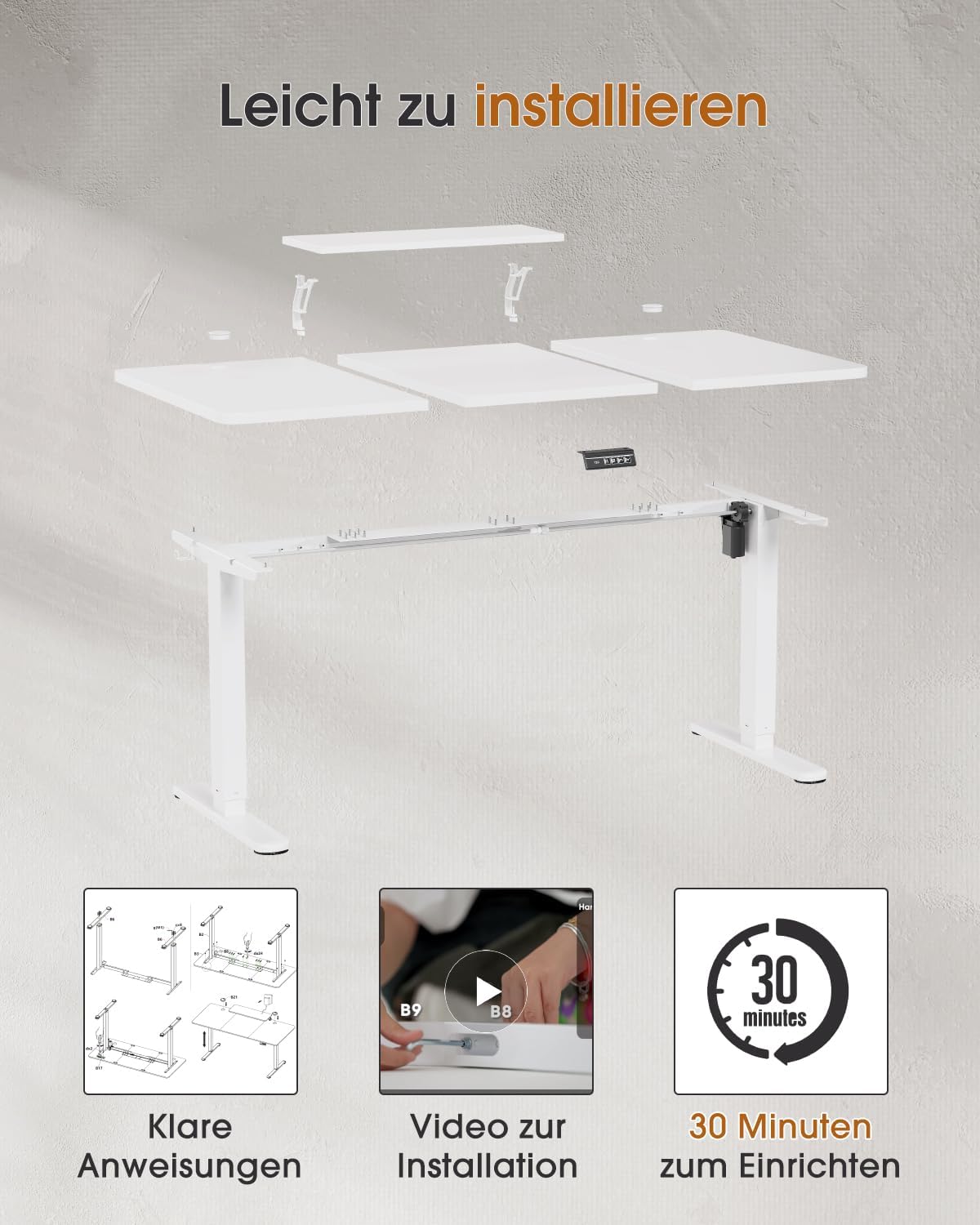
Figure 4.1: Visual representation of the easy installation process, highlighting clear instructions and a typical 30-minute setup time.

Figure 4.2: Details of the desk's stable lifting mechanism, dual cable management holes, adjustable feet for leveling, and a convenient headphone hook.
5. Operating Instructions
Your TRIUMPHKEY Electric Height-Adjustable Desk features an intuitive control panel for easy height adjustments and memory presets.
Adjusting Desk Height:
- Up/Down Buttons: Use the Up (▲) and Down (▼) arrow buttons on the control panel to manually adjust the desk height. The LED digital display will show the current height in centimeters.
- Memory Presets: The control panel includes two memory preset buttons (1 and 2). To save a desired height:
- Adjust the desk to your preferred height using the Up/Down buttons.
- Press and hold the desired memory button (1 or 2) until the LED display flashes or beeps, indicating the height has been saved.
- Recalling Presets: Simply press the saved memory button (1 or 2) to automatically move the desk to the pre-set height.

Figure 5.1: The intelligent multifunction control unit, featuring an LED digital display and intuitive Up/Down buttons for precise height adjustment.
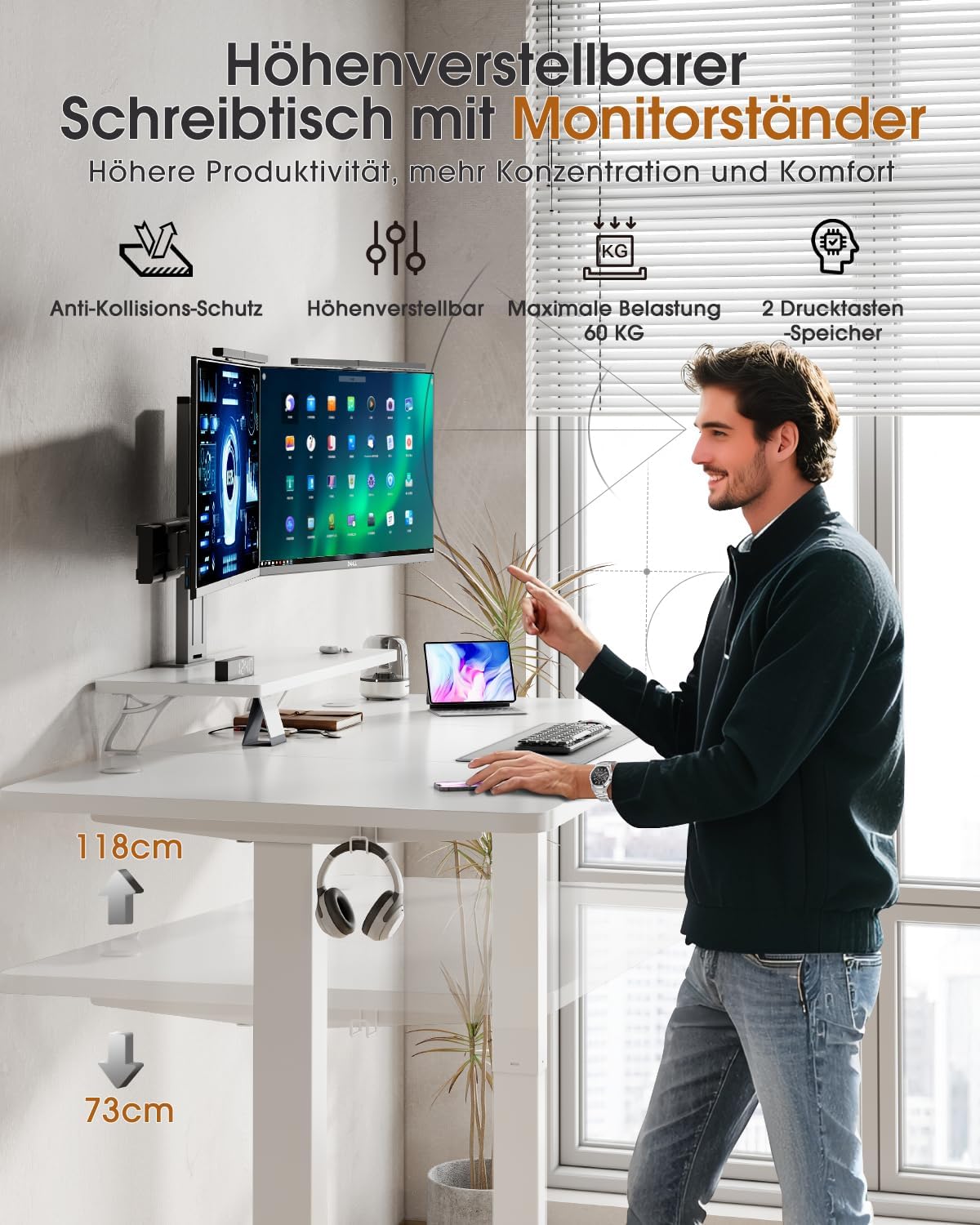
Figure 5.2: The height-adjustable desk with monitor stand, illustrating its ergonomic benefits, anti-collision protection, 60 kg max load, and two memory presets for enhanced productivity and comfort.

Figure 5.3: Demonstrates the smooth and quiet operation of the desk, with noise levels typically below 45dB, ensuring a peaceful working environment.
6. Maintenance
Regular maintenance will help prolong the life and performance of your TRIUMPHKEY desk.
- Cleaning: Wipe the desk surfaces with a soft, damp cloth. Avoid using harsh chemicals or abrasive cleaners, as they may damage the finish. Ensure the desk is unplugged before cleaning electrical components.
- Cable Management: Periodically check and organize cables using the integrated cable management holes to prevent tangles and damage.
- Fastener Check: Every few months, check all screws and bolts to ensure they are tight. Retighten if necessary to maintain stability.
- Motor Inspection: Listen for any unusual noises from the motor during operation. If you notice any issues, refer to the troubleshooting section or contact customer support.
7. Troubleshooting
If you encounter any issues with your TRIUMPHKEY Electric Height-Adjustable Desk, please refer to the common problems and solutions below.
| Problem | Possible Cause | Solution |
|---|---|---|
| Desk does not move. | Power cable unplugged; Overload; Motor error. | Check power connection. Reduce weight on desk. Unplug for 10 seconds, then plug back in to reset. |
| Desk moves unevenly or makes unusual noise. | Loose fasteners; Obstruction; Uneven load. | Check and tighten all assembly fasteners. Ensure no obstructions are in the path of the legs. Distribute weight evenly. |
| Height display shows an error code. | System malfunction; Sensor issue. | Refer to the specific error code in the detailed assembly manual (if provided). Try a power cycle reset. If persistent, contact support. |
| Anti-collision feature activates frequently. | Obstruction detected; Sensitivity setting. | Ensure no objects are in the desk's path during movement. Check the assembly manual for instructions on adjusting anti-collision sensitivity if available. |
If the problem persists after attempting these solutions, please contact TRIUMPHKEY customer support for further assistance.
8. Technical Specifications
Detailed specifications for the TRIUMPHKEY Electric Height-Adjustable Desk (Model 0162).
- Brand: TRIUMPHKEY
- Model Number: 0162
- Color: White
- Product Dimensions: 160D x 70W x 117H cm (Maximum Height)
- Minimum Height: 72 cm
- Weight: 28.5 kg
- Material: Engineered Wood (Desktop), Steel (Frame)
- Special Features: Electric Height Adjustment, Ergonomic Design, Storage Shelf, Monitor Stand, Anti-Collision Protection, 2 Memory Presets
- Maximum Load Capacity: 60 kg
- Noise Level: < 45 dB during operation
- Desktop Finish: Lacquered
- Desk Design: Standing Desk
- Shape: Rectangular
- First Available Date: September 20, 2023

Figure 8.1: The multifunctional monitor shelves and open storage area, providing additional space and organization options for your workspace.

Figure 8.2: A view of the large-format premium desktop, designed to offer more storage space and simplify your work life.
9. Warranty and Customer Support
TRIUMPHKEY is committed to providing high-quality products and customer satisfaction. While specific warranty details are not provided in this manual, most products come with a standard manufacturer's warranty covering defects in materials and workmanship.
For warranty claims, technical support, or any questions regarding your TRIUMPHKEY Electric Height-Adjustable Desk, please contact the seller or manufacturer directly through the platform where you purchased the product. Please have your purchase receipt and model number (0162) ready when contacting support.


