
KUXISA CZK-5624
KUXISA Portable Tire Inflator User Manual
Model: CZK-5624
Product Overview
The KUXISA Portable Tire Inflator is a versatile and powerful air compressor designed for convenient inflation of various items, including car, motorcycle, and bicycle tires, as well as sports balls. Featuring a built-in 25000mAh battery, it offers cordless operation and rapid inflation. Its dual digital LCD display provides real-time pressure readings and allows for precise preset values. Beyond inflation, it includes practical functions such as an emergency power bank and an LED light for dark conditions.

Figure 1: KUXISA Portable Tire Inflator and its applications.

Figure 2: Overview of key features: wireless inflation, HD dual screen, 25000mAh battery, 180 PSI maximum pressure, and automatic cooling.
What's Included
The KUXISA Portable Tire Inflator package includes everything you need for immediate use and versatile applications:
- Tire Inflator Unit (1)
- Connecting Air Hose (1)
- Atmospheric Nozzle (1)
- Stingy Mouthpiece (1)
- French Adapter (1)
- Ball Needle (1)
- Fuse Wire (1)
- DC Power Cord (1)
- USB Charging Cable (1)
- User Manual (1)
- Storage Bag (1)
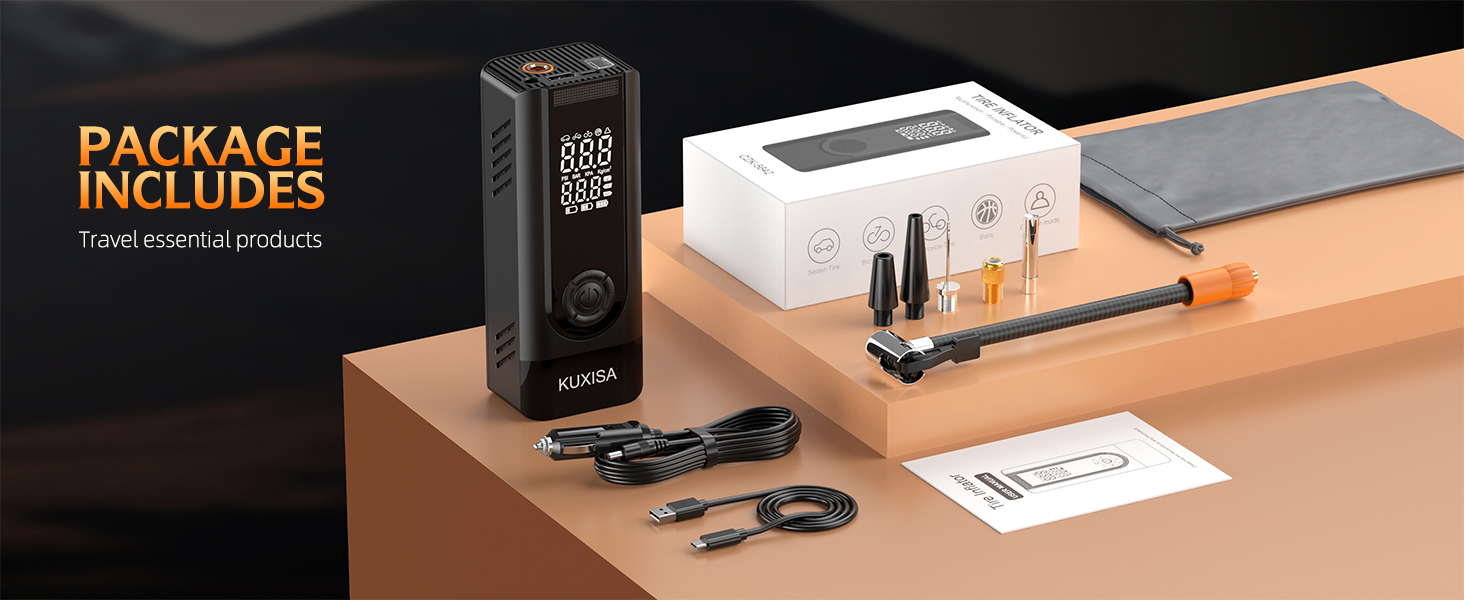
Figure 3: All items included in the product package.
Setup
- Charge the Device: Before first use, fully charge the tire inflator using the provided USB charging cable. The device has a 25000mAh battery for cordless operation. Alternatively, it can be powered via the car's cigarette lighter port using the DC power cord.
- Attach Air Hose: Connect the flexible air hose to the top port of the inflator. Ensure it is securely fastened.
- Select Nozzle: Choose the appropriate nozzle for your inflation object (e.g., standard tire nozzle, ball needle, French adapter). The standard nozzle is pre-ready for tire valves.
- Connect to Object: Securely attach the chosen nozzle to the valve of the item you wish to inflate.

Figure 4: Power supply options: cordless and 12V DC car adapter.
Operating Instructions
- Power On: Press and hold the power button located in the center of the device to turn it on. The dual digital LCD display will illuminate.
- Select Inflation Mode: Press the 'Mode' button (often indicated by a car icon or similar) to cycle through the four preset inflation modes:
- Car Mode: Preloaded PSI for car tires.
- Motorcycle Mode: Preloaded PSI for motorcycle tires.
- Bike Mode: Preloaded PSI for bicycle tires.
- Ball Mode: Preloaded PSI for sports balls.
- Adjust Preset Pressure: Use the '+' and '-' buttons to adjust the target PSI value for the selected mode. The display shows both the real-time pressure and your preset value.
- Start Inflation: Once the desired pressure is set, press the power button again to begin inflation. The device will automatically shut off when the preset pressure is reached.
- Disconnect: After inflation is complete and the device has stopped, carefully disconnect the nozzle from the valve.

Figure 5: Button layout and functions.

Figure 6: Various inflation modes and their typical PSI ranges.

Figure 7: Dual screen display showing real-time and preset values.

Figure 8: Simple 3-step operation for inflation.
Additional Functions
- Power Bank: The 5V/2A USB output/input port on the top of the pump allows it to serve as an emergency power source for mobile phones or other electronic devices.
- LED Emergency Light: The built-in LED light can be used for illumination when inflating tires in the dark, changing tires, or as a warning light for other vehicles.

Figure 9: Power bank and emergency light features.

Figure 10: Using the built-in LED flashlight.
Maintenance
- Charging: Recharge the device regularly, especially after prolonged use, to ensure it's ready for emergencies. Use the provided USB charging cable or DC power cord.
- Storage: Store the air pump and its accessories in the special storage bag provided. Keep it in a cool, dry place, away from direct sunlight and extreme temperatures. Its compact design allows for easy storage in a car, bike rack, or backpack.
- Cleaning: Wipe the exterior of the device with a soft, damp cloth. Do not immerse the unit in water or use harsh chemicals.
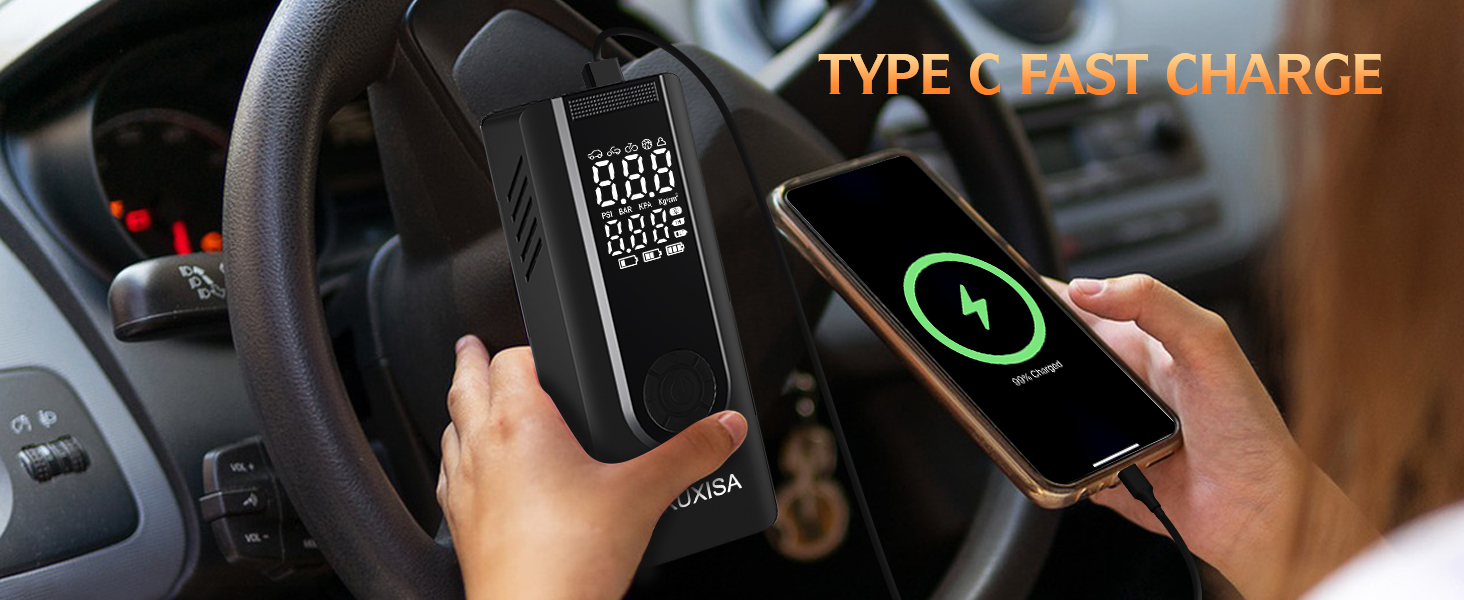
Figure 11: Type-C fast charging capability.

Figure 12: Portable and easy to carry design.
Troubleshooting
| Problem | Possible Cause | Solution |
|---|---|---|
| Device does not turn on. | Low battery or power button not held long enough. | Charge the device fully. Ensure the power button is pressed and held for a few seconds. |
| Inflator not reaching preset PSI. | Air hose not securely connected or valve not properly sealed. | Check all connections for leaks. Ensure the nozzle is firmly attached to the valve. |
| Inaccurate pressure reading. | Improper connection to valve or sensor issue. | Ensure the nozzle is perfectly aligned and sealed on the valve. If issues persist, contact customer support. |
| Device stops unexpectedly. | Overheating or low battery. | Allow the device to cool down. Recharge the battery. |
Specifications
| Feature | Value |
|---|---|
| Brand | KUXISA |
| Model Number | CZK-5624 |
| Voltage | 12 Volts |
| Power Source | Battery Powered |
| Battery Capacity | 25000mAh (Internal) |
| Maximum Operating Pressure | 180 PSI |
| Air Flow Capacity | 30 L/min |
| Noise Level | 40 dB |
| Item Weight | 1 Pound |
| Product Dimensions | 7.5"L x 4.5"W x 2.4"H |
| Special Feature | Portable, LED Emergency Light, Power Bank Function |
Warranty and Support
This product is typically covered by a standard return policy, allowing for returns or replacements within 30 days of purchase. For specific warranty details, technical support, or any product-related inquiries beyond the initial return period, please contact the manufacturer, KUXISA, directly or refer to the official product page on Amazon. Additional protection plans (e.g., 3-Year or 4-Year Protection Plans) may be available for purchase separately to extend coverage.
Manufacturer: KUXISA
Model: CZK-5624
Ask a question about this manual
Ask about setup, troubleshooting, compatibility, parts, safety, or missing instructions. Manuals+ will review the question and use this page’s manual context to help answer it.