
JDR SF-1
JDR 800W Snow Machine User Manual
Model: SF-1
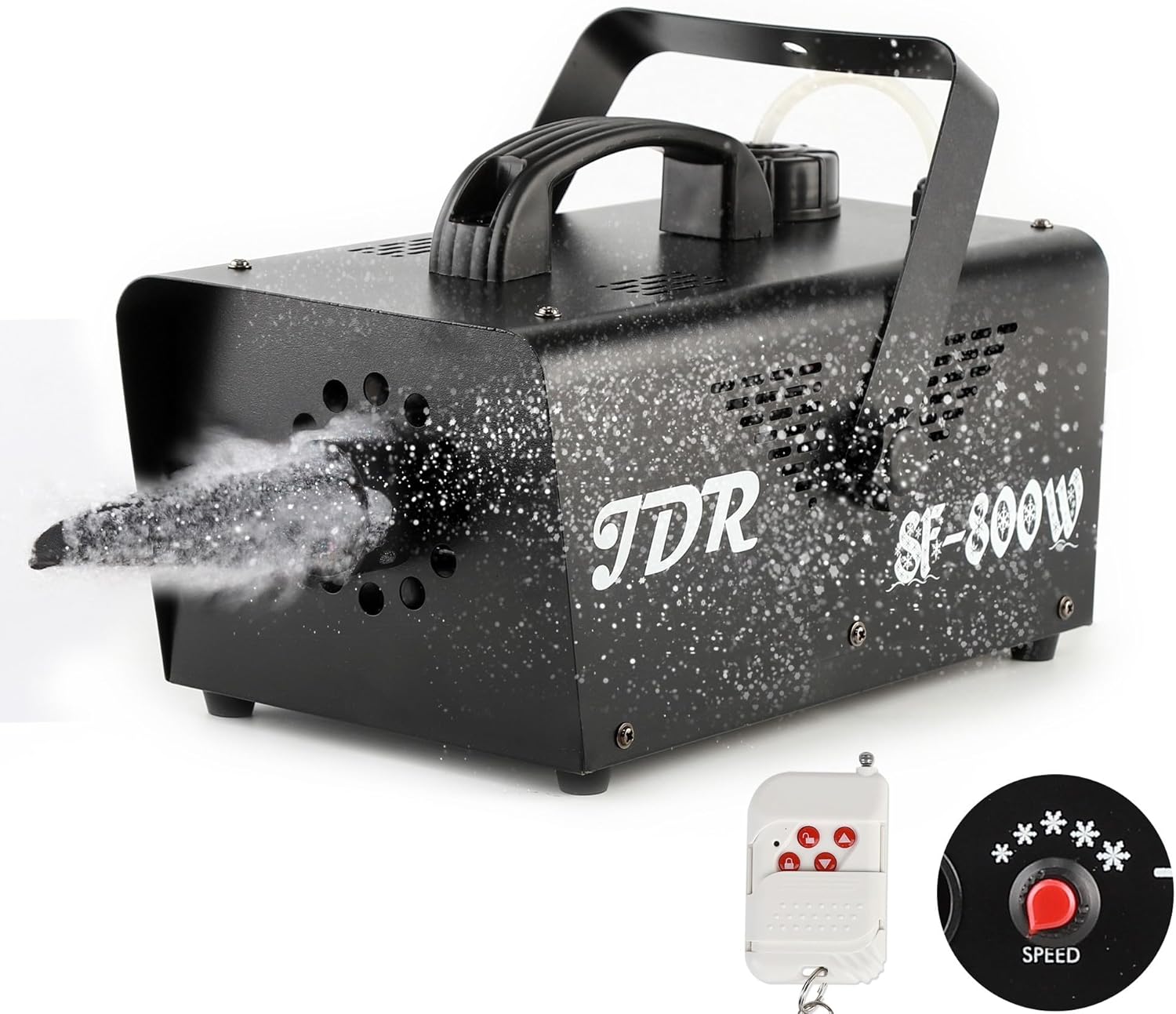
The JDR 800W Snow Machine, designed for creating artificial snow effects for various events and occasions.
1. Introduction and Safety Information
Thank you for purchasing the JDR 800W Snow Machine. This manual provides important information regarding the safe operation, setup, maintenance, and troubleshooting of your device. Please read it thoroughly before use and retain it for future reference.
Important Safety Precautions:
- Power Supply: Ensure the power supply matches the voltage requirements (AC 110-130V for US models). Always connect the power cable securely.
- Fluid Type: Only use water-based snow fluid specifically designed for snow machines. Using other liquids (e.g., oil-based fog fluid) can damage the machine and pose a fire hazard.
- Fluid Level: Do not operate the machine without sufficient snow fluid. Ensure the metal nozzle is completely immersed in the liquid.
- Placement: Place the machine on a stable, flat surface. Ensure adequate ventilation around the unit. Do not block air vents.
- Obstructions: Keep the snow output area clear of any obstructions.
- Fuse Protection: The machine includes a fuse holder to prevent short circuits. If the machine does not power on, check the fuse.
- Children and Pets: Keep the machine out of reach of children and pets during operation.
- Indoor/Outdoor Use: This machine is suitable for both indoor and outdoor use, but avoid direct exposure to rain or extreme weather conditions.
2. Package Contents
Verify that all items listed below are included in your package:
- JDR 800W Snow Machine
- Wireless Remote Controller
- Wireless Receiver
- Power Cord
- Handle (for carrying)
- Mounting Bracket and Screws
- User Manual

Image: All components included in the JDR 800W Snow Machine package.
3. Parts Overview
Familiarize yourself with the different parts of your snow machine:

Image: Labeled diagram of the JDR 800W Snow Machine components.
- Handle: For easy transport.
- 1L Tank: Reservoir for snow fluid.
- Foam Outlet: Where the artificial snow is expelled.
- Power Switch: Turns the machine ON/OFF.
- Wireless Receiver Input: Port for connecting the wireless remote receiver.
- Foam Speed Control Knob: Adjusts the volume of snow output.
- Fuse Holder: Contains the protective fuse.
- Power Input: Connects the power cord.
4. Setup
4.1 Filling the Snow Fluid Tank
- Ensure the machine is unplugged and the power switch is in the OFF position.
- Unscrew the cap of the 1L tank located on top of the machine.
- Carefully pour water-based snow fluid into the tank. Do not overfill; the 'FULL' line indicates the maximum level.
- Ensure the metal nozzle inside the tank is fully submerged in the fluid.
- Securely screw the cap back on.

Image: Pouring snow fluid into the machine's tank.
4.2 Connecting Power and Wireless Receiver
- Connect the power cord to the power input on the back of the machine.
- Plug the other end of the power cord into a standard AC 110-130V power outlet.
- Insert the wireless receiver into the 'WIRELESS RECEIVER' input port on the machine. Ensure it is firmly seated.

Image: Turning on the machine via the power switch.
5. Operation
5.1 Powering On and Warm-up
Once connected, flip the power switch to the 'ON' position. The machine will begin to warm up. Allow a few minutes for the internal components to reach optimal operating temperature before expecting snow output.
5.2 Adjusting Snow Output (Automatic Spray)
The JDR 800W Snow Machine features an automatic spray function controlled by a knob. Turn the 'SPEED' knob clockwise to increase the amount of snow output. Turning it counter-clockwise will decrease the output.

Image: Adjusting the snow output speed using the control knob.
5.3 Wireless Remote Control
The included wireless remote control allows you to trigger snow output from a distance of up to 50 meters. Press the button on the remote to activate or deactivate the snow effect. Note that using the remote may override the fine-tuned knob setting, providing a more general output level.

Image: Operating the snow machine with the wireless remote control.
5.4 Diverse Applications
The JDR Snow Machine is versatile and can be used for various events and settings, including:
- Parties and Celebrations
- Outdoor Events
- Kids' Playtime
- Weddings
- Stage Effects
- Indoor Decorations (with proper ventilation)
- Christmas and Holiday Displays
- Parades and Themed Events

Image: Examples of diverse applications for the JDR Snow Machine.
6. Maintenance
Proper maintenance ensures the longevity and optimal performance of your snow machine.
6.1 Cleaning
- After each use, especially if storing for an extended period, empty any remaining snow fluid from the tank.
- Run a small amount of distilled water through the machine to clean the pump and nozzle. This helps prevent clogs from dried fluid.
- Wipe down the exterior of the machine with a soft, dry cloth.
6.2 Fluid Storage
Store snow fluid in a cool, dry place, away from direct sunlight and extreme temperatures. Ensure the fluid container is tightly sealed.
7. Troubleshooting
If you encounter issues with your JDR Snow Machine, refer to the following common problems and solutions:
| Problem | Possible Cause | Solution |
|---|---|---|
| Machine does not power on. | No power, blown fuse, loose connection. | Check power cord connection. Verify power outlet is functional. Check and replace fuse if blown. |
| No snow output or weak output. | Insufficient fluid, clogged nozzle, machine not warmed up, incorrect fluid type. | Ensure tank is filled. Allow adequate warm-up time. Clean nozzle if clogged. Use only water-based snow fluid. |
| Machine is excessively loud. | Normal operation noise (similar to a vacuum cleaner), or pump issues. | Some operational noise is normal. Ensure machine is on a stable surface. If noise is unusual or excessive, contact customer support. |
| Wireless remote not working. | Receiver not connected, remote battery low, out of range. | Ensure wireless receiver is securely plugged in. Replace remote battery. Operate within 50-meter range. |
8. Specifications
| Feature | Detail |
|---|---|
| Output Wattage | 800 Watts |
| Voltage | AC 110-130V (US) |
| Capacity of Tank | 1 Liter |
| Control Mode | Machine knob and wireless remote control |
| Snow Distance | 3-5 meters |
| Remote Distance | 50 meters |
| Item Weight | 8.12 pounds (approx. 3.68 kg) |
| Product Dimensions | 11.8 x 6.5 x 5.7 inches (approx. 30 x 16.5 x 14.5 cm) |
| Item Model Number | SF-1 |
| Batteries (for remote) | 1 x 12V battery (included) |
| Battery Type | Zinc |

Image: Detailed specifications for the JDR 800W Snow Machine.
9. Warranty and JDR Policy
JDR is committed to customer satisfaction. This product is eligible for return, refund, or replacement within 30 days of receipt, in accordance with standard retail policies.
For any machine that may be defective or for further assistance, please contact JDR customer support promptly. We are dedicated to resolving any issues you may encounter.
10. Customer Support
If you have any questions, concerns, or require technical assistance, please do not hesitate to contact our customer support team. We aim to provide an email response within 24 hours.
For the most up-to-date support information, please visit the official JDR store on Amazon or refer to the contact details provided with your purchase documentation.
Thank you for choosing JDR. Enjoy your snow machine!
Related documentsSF-1

Ask a question about this manual
Ask about setup, troubleshooting, compatibility, parts, safety, or missing instructions. Manuals+ will review the question and use this page’s manual context to help answer it.