
M7 GTW-940
M7 GTW-940 1/2-inch Digital Torque Wrench Adapter User Manual
Model: GTW-940 | Brand: M7
1. Introduction
Thank you for choosing the M7 GTW-940 1/2-inch Digital Torque Wrench Adapter. This precision tool is designed to convert any standard 1/2-inch square drive ratchet wrench into a digital torque wrench, providing accurate and reliable torque measurements for various fastening tasks. It features multiple unit displays, audible and visual alerts, and advanced functions like Peak and Trace modes. Please read this manual thoroughly before operation to ensure safe and effective use.
2. Safety Information
Always observe the following safety precautions to prevent injury or damage to the tool:
- Wear appropriate personal protective equipment, such as safety glasses, when operating the tool.
- Do not exceed the maximum torque capacity of the adapter (200 Nm / 147.5 lb-ft).
- Ensure the adapter is securely attached to the ratchet and the fastener before applying torque.
- Keep the tool clean and free from oil, grease, and debris.
- Do not use the adapter if it is damaged or malfunctioning.
- Store the tool in a dry, secure place away from extreme temperatures and direct sunlight.
- This tool is designed for hand tools only. Do not use with impact wrenches or power tools.
3. Package Contents
Verify that all items are present in the package:
- M7 GTW-940 Digital Torque Wrench Adapter
- Protective Storage Case
- User Manual (this document)

Image: The M7 GTW-940 Digital Torque Wrench Adapter stored in its protective case, displaying the unit conversion table on the lid.
4. Product Overview
Components
The M7 GTW-940 features a compact design with an easy-to-read digital display and intuitive controls.

Image: A detailed view of the M7 GTW-940 adapter, highlighting its digital screen and button layout.
- Digital Display: Shows torque readings, selected units, and mode.
- Control Buttons: For power, unit selection, mode selection, and value adjustment.
- 1/2-inch Square Drive: Input for connecting to a ratchet wrench.
- 1/2-inch Square Output: Output for connecting to sockets or other accessories.
- LED Indicator: Provides visual alerts when target torque is reached.
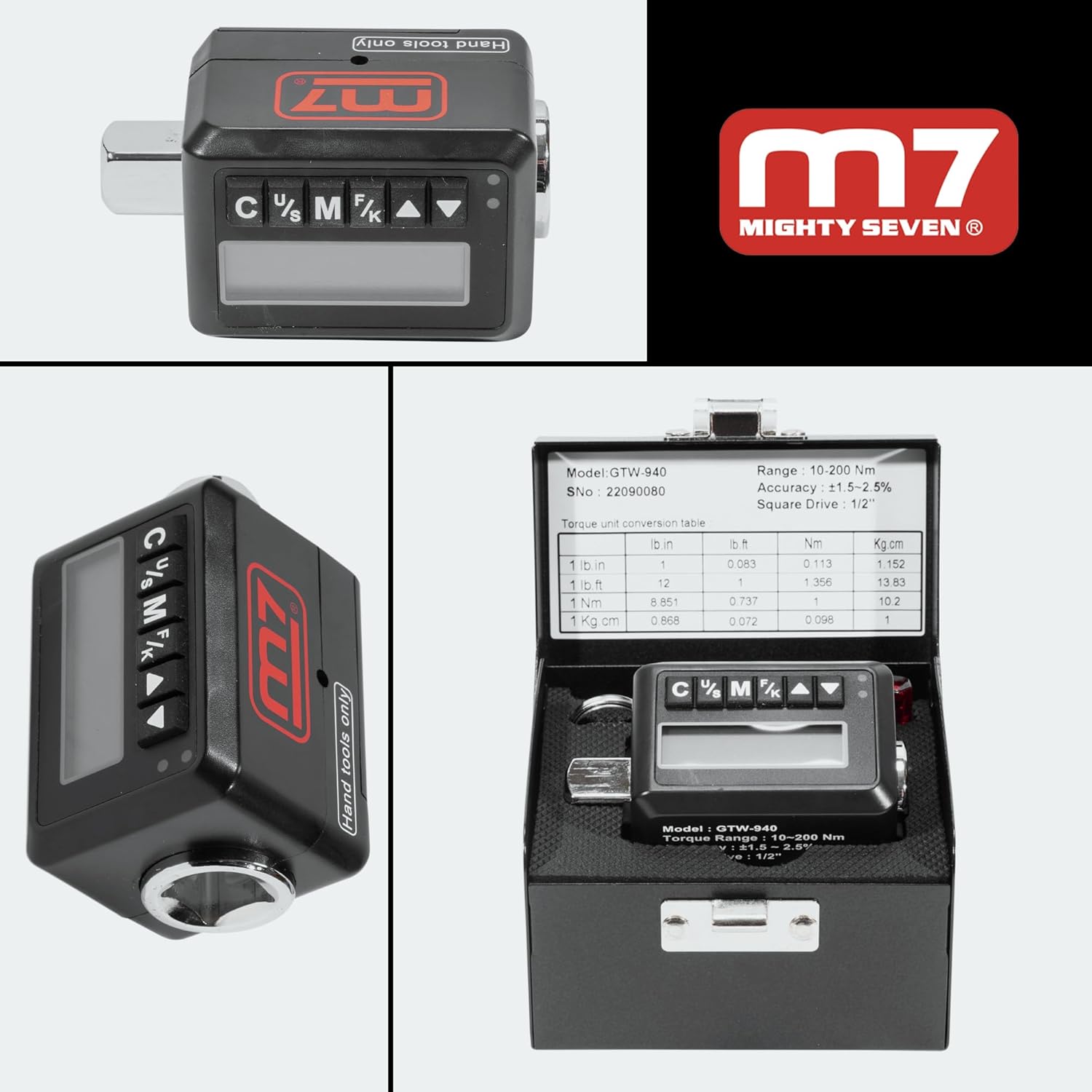
Image: Various perspectives of the M7 GTW-940 adapter, showcasing its compact design and square drive ends.
5. Setup
Battery Installation
The M7 GTW-940 operates on batteries (not included). Locate the battery compartment, typically on the back or side of the unit. Insert the required batteries, ensuring correct polarity. Close the battery compartment securely.
Attaching to Ratchet
To use the adapter, securely attach it to any standard 1/2-inch square drive ratchet wrench. Then, attach the appropriate socket or accessory to the output square drive of the adapter.

Image: The M7 GTW-940 adapter shown connected to a standard 1/2-inch drive ratchet wrench, ready for use.
6. Operating Instructions
Power On/Off
Press and hold the power button (usually marked 'C' or 'Power') to turn the unit on or off. The unit will automatically power off after 2 minutes of inactivity to conserve battery life.
Unit Selection
Press the 'U/S' (Unit/Set) button to cycle through the available torque units: lb-ft, N-m, Kg-cm, and lb-in. Select the desired unit for your measurement.
Mode Selection (Peak/Trace)
Press the 'M/F' (Mode/Function) button to switch between operating modes:
- Trace Mode: Displays the real-time torque value as it is applied.
- Peak Mode: Captures and displays the maximum torque value reached during the fastening process.
Setting Target Torque
In the desired mode, use the up/down arrow buttons to set your target torque value. The display will show the set value.
Torque Application and Alert
Apply torque to the fastener. As you approach the target torque, the adapter will provide audible and visual notifications (flashing LED) to indicate when the desired torque setting is reached. Stop applying force once the alert activates to avoid over-torquing.
Storing Presets
The adapter can store up to 30 frequently used settings. Refer to the detailed instructions in the full manual for saving and recalling preset values.

Image: The M7 GTW-940 adapter actively being used to tighten a lug nut on a vehicle wheel, demonstrating its practical application.
7. Maintenance
- Cleaning: Wipe the adapter with a clean, dry cloth after each use. Do not use abrasive cleaners or solvents.
- Storage: Store the adapter in its protective case in a cool, dry place when not in use.
- Battery Replacement: Replace batteries when the low battery indicator appears on the display. Remove batteries if the tool will not be used for an extended period.
- Calibration: For optimal accuracy, periodic calibration by a qualified service center is recommended.
8. Troubleshooting
| Problem | Possible Cause | Solution |
|---|---|---|
| Unit does not power on. | Dead or incorrectly installed batteries. | Check battery polarity or replace batteries. |
| Inaccurate readings. | Needs calibration; improper use. | Contact service center for calibration; ensure proper technique and secure connections. |
| No audible/visual alert. | Alert function disabled; unit malfunction. | Check settings to ensure alerts are enabled; if problem persists, contact support. |
| Display is blank or flickering. | Low battery; environmental conditions. | Replace batteries; operate within specified temperature range. |
9. Specifications
| Feature | Detail |
|---|---|
| Model Number | GTW-940 |
| Drive Size | 1/2-inch Square |
| Torque Range | 10-200 Nm (7.38-147.5 lb-ft) |
| Accuracy (CW) | ±1.5% |
| Accuracy (CCW) | ±2.5% |
| Units of Measure | N-m, Kg-cm, lb-ft, lb-in |
| Min. Scale Unit | 0.1 Nm |
| Storage Presets | 30 |
| Max. Reverse Torque | 200 |
| Operation Mode | Battery |
| Battery Life (Standby) | 1 year |
| Battery Life (Continuous) | 37 hours |
| Operating Temperature | -10°C ~ 60°C |
| Storage Temperature | -20°C ~ 70°C |
| Material | Alloy Steel |
| Item Weight | 1.05 pounds |
| Product Dimensions | 2 x 3 x 4 inches |

Image: A visual representation of the M7 GTW-940's technical specifications, alongside a mechanic performing work on a vehicle.
10. Warranty and Support
M7 products are built for durability and reliability. This product comes with a standard manufacturer's warranty against defects in materials and workmanship. For specific warranty terms, claims, or technical support, please refer to the warranty card included with your product or visit the official M7 website. You may also contact the seller directly for assistance.
For further inquiries or assistance, please visit the M7 Store on Amazon.
Related documentsGTW-940


Ask a question about this manual
Ask about setup, troubleshooting, compatibility, parts, safety, or missing instructions. Manuals+ will review the question and use this page’s manual context to help answer it.