
1. Introduction
The Dpofirs Universal Garage Door Remote is a versatile 4-button cloning key fob designed for various access control systems. It supports a wide range of frequencies from 280MHz to 868MHz, making it compatible with most fixed code, learning code, and rolling code systems on the market. This remote is suitable for garage doors, rolling gates, keyless entry systems, car alarms, industrial controls, and anti-theft alarms.

Image 1.1: The Dpofirs Universal Garage Door Remote, a compact 4-button device with a black body and blue accents, featuring a keyring attachment.
2. Safety Information
- Keep the remote control out of reach of children to prevent accidental operation or ingestion of small parts.
- Do not expose the device to extreme temperatures, direct sunlight, or moisture.
- Avoid dropping or subjecting the remote to strong impacts.
- Dispose of batteries according to local regulations.
- This device is intended for controlling compatible systems only. Ensure proper setup to avoid unintended operation.
3. Package Contents
Please check the package for the following items:
- 1 x Dpofirs Universal Remote Control Key
4. Specifications
| Feature | Detail |
|---|---|
| Material | ABS Plastic |
| Supported Frequencies | 280MHz - 868MHz (including 287MHz, 300MHz, 306MHz, 310MHz, 315.5MHz, 330MHz, 360MHz, 390MHz, 410MHz, 430.5MHz, 433.42MHz, 433.92MHz, 868.35MHz, 286-361MHz) |
| Battery Type | Button Cell (CR2032, Built-in) |
| Battery Capacity | 180mAH |
| Voltage | 3V |
| Buttons | 4 |
| Model Number | Dpofirssqkw72von0 |
5. Setup and Cloning Instructions
This universal remote is designed to clone signals from most fixed code, learning code, and some rolling code remotes. It features automatic frequency identification, eliminating the need to manually set oscillating resistors.
5.1. Clearing Existing Codes
- Press and hold the top two buttons (A and B, or Lock and Unlock) simultaneously on the Dpofirs remote.
- Continue holding until the LED indicator flashes rapidly three times, then release the buttons.
- Press any button on the Dpofirs remote. If the LED does not light up, the codes have been successfully cleared. If the LED lights up, repeat the clearing process.
5.2. Cloning a Remote Control
Ensure your original remote is functional and has a fresh battery for optimal signal transmission.
- Place the Dpofirs remote and your original remote side-by-side, ensuring they are within 5 cm (approximately 2 inches) of each other. For best results, they should be almost touching.
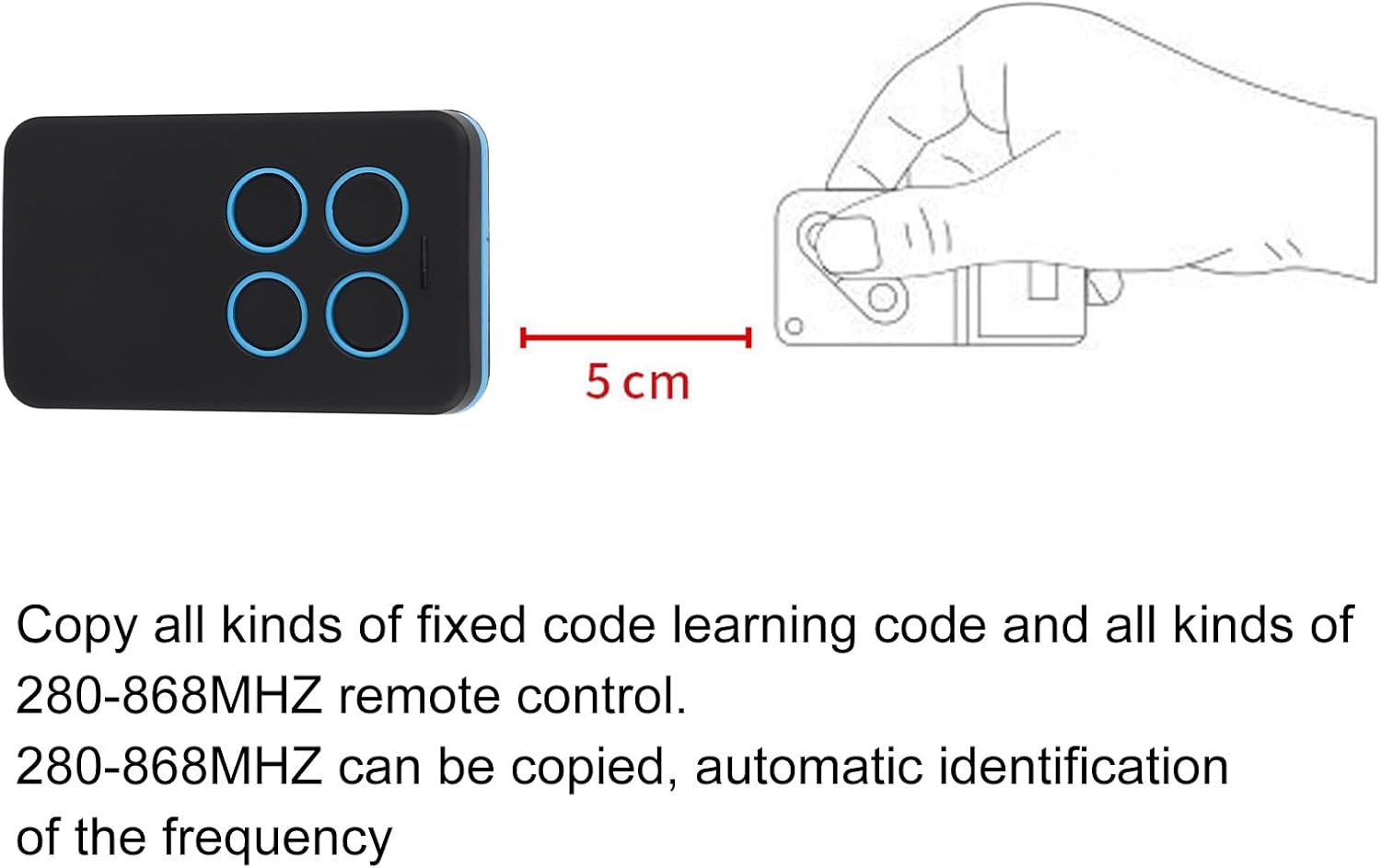
Image 5.1: Illustration showing the recommended 5 cm distance between the Dpofirs remote and the original remote for successful cloning.
- On the Dpofirs remote, press and hold the button you wish to program (e.g., Button A).
- While still holding the button on the Dpofirs remote, press and hold the corresponding button on your original remote.
- Hold both buttons until the LED indicator on the Dpofirs remote flashes rapidly. This indicates successful cloning.
- Release both buttons.
- Repeat steps 1-5 for each button you wish to program.
Note: If the LED does not flash rapidly, try repositioning the remotes or ensuring the original remote's battery is strong. Some rolling code systems may require additional programming steps directly on the receiver unit; consult your receiver's manual if cloning is unsuccessful.
6. Operating Instructions
Once the Dpofirs remote has been successfully cloned, it operates similarly to your original remote.
- Point the Dpofirs remote towards the receiver of your garage door opener, gate, or other compatible device.
- Press the corresponding button that you have programmed for the desired function (e.g., open/close garage door).
- The device should respond as expected.

Image 6.1: A hand holding the Dpofirs remote, demonstrating its use to transmit a signal to an access control system.
7. Maintenance
7.1. Battery Replacement
The Dpofirs remote uses a CR2032 button cell battery. When the remote's range decreases or the LED indicator becomes dim, it may be time to replace the battery.
- Carefully open the remote casing using a small flat-head screwdriver or similar tool, typically by prying along the seam.
- Remove the old CR2032 battery.
- Insert a new CR2032 battery with the positive (+) side facing up.
- Close the remote casing securely.
- Test the remote's functionality.
7.2. Cleaning
Wipe the remote with a soft, dry cloth. Do not use abrasive cleaners or immerse the remote in water.
8. Troubleshooting
| Problem | Possible Cause | Solution |
|---|---|---|
| Remote does not work after cloning. | Cloning process was unsuccessful; original remote's signal was weak; incompatible original remote (e.g., advanced rolling code). | Ensure original remote has a strong battery. Repeat the clearing and cloning steps carefully, maintaining the 5 cm distance. If using a rolling code system, consult your receiver's manual for direct programming instructions. |
| Short operating range. | Low battery in the Dpofirs remote; environmental interference. | Replace the CR2032 battery. Ensure there are no large metal objects or other strong radio frequency sources blocking the signal path. |
| LED indicator does not light up. | Dead battery. | Replace the CR2032 battery. |
9. Warranty and Support
For warranty information or technical support, please refer to the retailer's return policy or contact Dpofirs customer service through the platform where the product was purchased. Keep your purchase receipt as proof of purchase.