
FLEXISPOT ET365W
FLEXISPOT E6 Essential Dual Motor Standing Desk Frame User Manual
Model: ET365W (White Frame, 3 Stage Lite Leg)
Important Safety Information
Please read and understand all instructions before assembly and use. Failure to follow these instructions may result in injury or damage to the product.
- Always follow the assembly instructions carefully to ensure stability.
- Do not exceed the maximum weight limit of 220 lbs (100 kg).
- Keep the desk and its electrical components away from water and other liquids.
- Always turn off and unplug the desk when not in use or when leaving the room.
- Keep the desk area clear of obstacles to prevent tripping or collision.
- Always supervise children when using the desk.
- Ensure all screws are tightened securely before use.
Product Overview
The FLEXISPOT E6 Essential Dual Motor Standing Desk Frame provides a versatile and ergonomic workspace solution. Featuring a robust 3-stage lift system and quiet dual motors, it allows for seamless transitions between sitting and standing positions.
Key Features:
- 3-Stage Lift System: Offers a wide height adjustment range from 23.6 inches to 48.8 inches, accommodating various user heights.
- Quiet Dual Motors: Operates with less than 50 dB noise level and supports a weight capacity of up to 220 lbs (100 kg).
- Programmable Controller: Features a convenient control panel with four memory presets for quick height adjustments.
- Durable Construction: Built with a strong metal base for stability and longevity.

Image: The FLEXISPOT E6 Essential Dual Motor Standing Desk Frame in white, featuring the integrated control panel.
Package Contents
Please verify that all components are present and undamaged before beginning assembly. If any parts are missing or damaged, please contact customer support.
- 1. Side bracket x2
- 2. Left beam x2
- 3. Right beam x2
- 4. Column x2
- 5. Keypad x1
- 6. Power adaptor x1
- 7. Pedestal x2
- 8. AC power cable x1
- 9. Extension cord x1
- 10. Cable clip x4
- 11. T-Socket Wrench x1
- 12. Adapter bracket x1

Image: All frame components laid out for inspection.
Assembly Instructions
Follow these steps carefully to assemble your FLEXISPOT E6 Essential Standing Desk Frame. It is recommended to have two people for assembly.
Video: Official FLEXISPOT E6 Essential Standing Desk Installation Guide. This video provides a visual walkthrough of the assembly process.
Step 1: Assemble the Cross Beams
Connect the left and right beams (parts 2 and 3) using the provided screws (C) and the T-Socket Wrench (11). Ensure screws are aligned with square holes and pressed tightly. The length of the cross beams can be adjusted to fit a desktop of 51-59 inches (1300-1500mm).

Image: Illustration showing the connection of the left and right beams.
Step 2: Attach Columns to Cross Beams
Attach the two columns (part 4) to the assembled cross beams using screws (A) and the T-Socket Wrench (11). Pre-tighten all screws for the cross beams, then tighten them simultaneously for a secure fit. Prioritize installing diagonal screws first.

Image: Visual guide for attaching the columns to the cross beams.
Step 3: Install Pedestals
Secure the pedestals (part 7) to the bottom of the columns using screws (E) and the T-Socket Wrench (11).

Image: Diagram showing the attachment of the pedestals to the columns.
Step 4: Attach Adapter Bracket and Keypad
Mount the adapter bracket (part 12) and the keypad (part 5) to the underside of your chosen desktop. Ensure the curved edge of the keypad is flush with the edge of the table top. Use screws (F) and a drill for this step. Make sure the keypad is on the same side as the adapter bracket.

Image: Illustration of attaching the adapter bracket and keypad to the desktop.
Step 5: Connect Wiring
Connect all necessary cables: the keypad to the control box, the motors to the control box, the power adapter (part 6) to the control box, and the AC power cable (part 8) to the power adapter. Use cable clips (part 10) to manage and secure the cables neatly under the desktop.

Image: Diagram showing the proper routing and connection of all electrical cables.
Operating Instructions
The FLEXISPOT E6 Essential features an intuitive programmable controller for easy height adjustment.

Image: The intelligent keypad with LED display and buttons for height adjustment and memory presets.
Controller Functions:
- Up/Down Arrows (▲ / ▼): Press and hold to manually adjust the desk height up or down. The LED display will show the current height.
- Memory Presets (1, 2, 3, 4): The controller allows you to save up to four preferred height settings.
- Adjust the desk to your desired height using the up/down arrows.
- Press the "M" button. The display will show "S-".
- Immediately press one of the number buttons (1, 2, 3, or 4) to save the current height to that preset.
- To recall a saved height, simply press the corresponding number button.
- Anti-Collision Feature: The desk is equipped with an anti-collision system. If the desktop encounters an obstacle while moving, it will automatically stop and reverse slightly to prevent damage.
Product Specifications
| Feature | Detail |
|---|---|
| Model Number | ET365W |
| Brand | FLEXISPOT |
| Color | White Frame |
| Product Dimensions (Frame) | 43.3"D x 23.6"W x 23.6"H (Adjustable width for desktop) |
| Height Adjustment Range | 23.6 inches (Minimum) to 48.8 inches (Maximum) |
| Lifting Mechanism | Electric Dual Motor, 3-Stage Lift System |
| Maximum Weight Capacity | 220 lbs (100 kg) |
| Noise Level | Less than 50 dB |
| Base Material | Metal |
| Included Components | Installation Tools and Wire |
| UPC | 810072845221 |
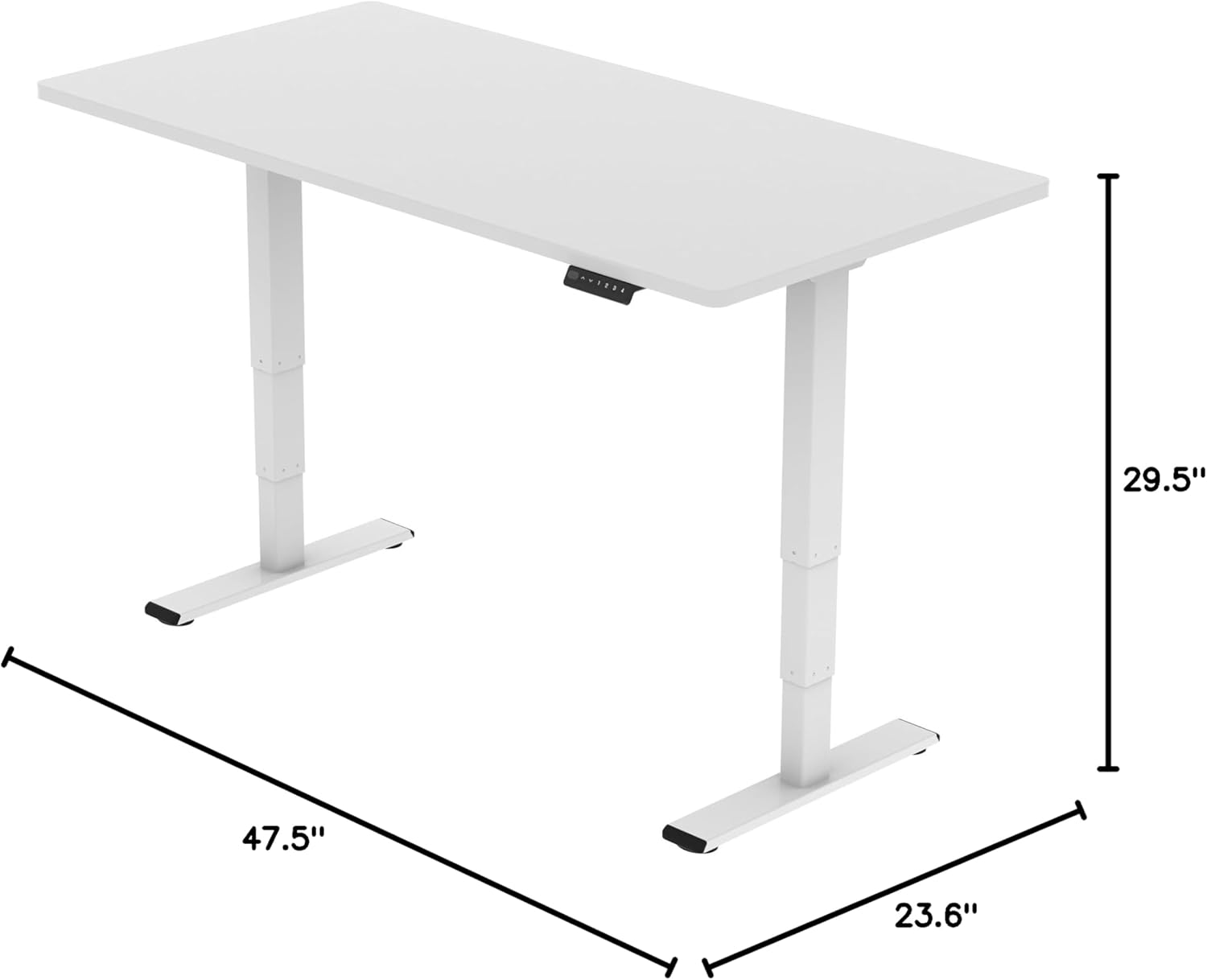
Image: Diagram illustrating the adjustable dimensions of the desk frame.
Maintenance
Regular maintenance ensures the longevity and optimal performance of your standing desk frame.
- Cleaning: Wipe the desk frame with a soft, damp cloth. Avoid using harsh chemicals or abrasive cleaners that could damage the finish.
- Cable Management: Periodically check that all cables are securely fastened and not pinched or tangled. Re-organize with cable clips if necessary.
- Fasteners: Occasionally check all screws and bolts to ensure they are tight. Re-tighten if any feel loose.
- Obstruction Check: Ensure there are no obstructions in the path of the desk's movement, especially underneath the desktop.
Troubleshooting
If you encounter any issues with your FLEXISPOT E6 Essential Standing Desk Frame, refer to the common problems and solutions below.
- Desk not moving or unresponsive:
- Check all cable connections to ensure they are securely plugged in.
- Verify that the power adapter is correctly connected to a working power outlet.
- Perform a reset: Unplug the desk from the power outlet for 10-15 seconds, then plug it back in.
- Uneven height adjustment:
- Ensure the desk is placed on a level surface.
- Check for any obstructions under the desk that might impede one leg's movement.
- Contact customer support if the issue persists after checking connections and obstructions.
- Desk stops unexpectedly during movement:
- This may be the anti-collision feature activating. Check for any obstacles in the desk's path.
- Ensure the weight on the desk does not exceed the maximum capacity of 220 lbs.
Warranty and Support
FLEXISPOT is committed to providing high-quality products and excellent customer service.
- Warranty Coverage: Enjoy peace of mind with our 5-year coverage on the desk frame and motor, and 2-year protection on the control panel and electronics.
- Customer Support: For any questions, assistance with assembly, troubleshooting, or warranty claims, please visit the official FLEXISPOT website or contact their customer service directly.
- Online Resources: Additional resources, including FAQs and detailed video tutorials, may be available on the FLEXISPOT Store.
Video: "Welcome to FLEXISPOT'S Mega Factory" - Showcasing the manufacturing process and commitment to quality.
Related documentsET365W


Ask a question about this manual
Ask about setup, troubleshooting, compatibility, parts, safety, or missing instructions. Manuals+ will review the question and use this page’s manual context to help answer it.