
Decathlon EB520
Contents
Domyos EB520 Self-Powered Exercise Bike User Manual
Model: EB520 | Brand: Decathlon
Introduction
This manual provides essential information for the safe and effective use of your Domyos EB520 Self-Powered Exercise Bike. Please read it thoroughly before assembly, operation, or maintenance. Retain this manual for future reference.
The Domyos EB520 is designed for indoor exercise, offering a smooth and comfortable cycling experience with its self-powered flywheel and adjustable features.

Image: The Domyos EB520 Self-Powered Exercise Bike, showcasing its sleek black design and integrated console.
Product Features
- Self-Powered Flywheel: The 6 kg self-powered flywheel ensures smooth and consistent pedaling without jerking.
- Comfortable Seating: Equipped with a gel seat for enhanced comfort during extended workouts.
- Adjustable Ergonomics: Height-adjustable handlebar and seat allow for optimal posture and user comfort.
- Easy Mobility: Integrated wheels at the front facilitate convenient movement and storage of the exercise bike.
- Variable Resistance: Offers 15 resistance levels, enabling progressive training and intensity adjustments.

Image: A close-up view of the Domyos EB520's LCD console and handlebars, highlighting the control buttons and heart rate sensors.
Setup and Assembly
The Domyos EB520 requires minimal assembly. Follow the included assembly guide for detailed step-by-step instructions. Ensure all components are securely fastened before use.
Placement
Place the exercise bike on a flat, stable surface. Ensure there is sufficient clear space around the bike for safe operation and movement. The bike dimensions are approximately 132 x 58 x 94 cm (L x W x H).
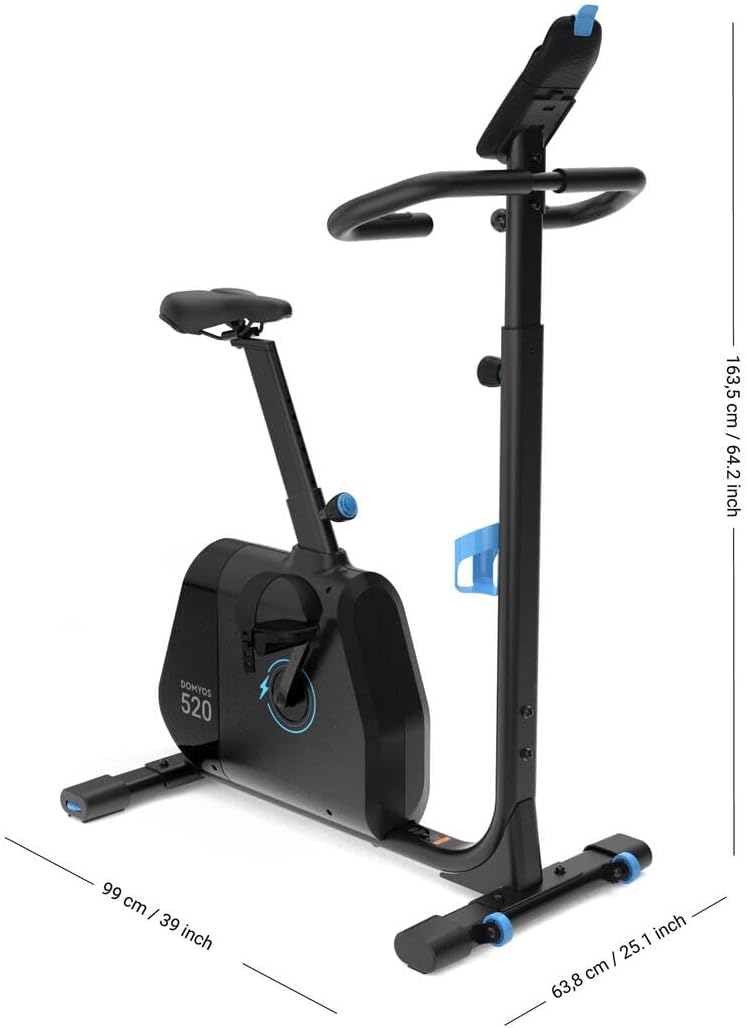
Image: The Domyos EB520 Exercise Bike with its key dimensions (length, width, height) indicated, useful for planning placement.
Moving the Bike
The EB520 is equipped with transport wheels at the front for easy relocation. To move, tilt the bike forward onto its wheels and push or pull it to the desired location.

Image: A close-up view of the blue transport wheels located at the front base of the Domyos EB520, designed for easy movement.
Operation
Adjusting Seat and Handlebar
Adjust the seat height and handlebar position to ensure a comfortable and ergonomically correct cycling posture. Loosen the adjustment knobs, set to your desired height, and tighten securely.
Using the Console
The LCD console displays key workout metrics such as time, distance, speed, calories burned, and heart rate (if applicable). Refer to the console's specific instructions for detailed navigation and program selection.

Image: The Domyos EB520 Exercise Bike with a tablet mounted on its console, displaying the Kinomap application, indicating connectivity features.
Resistance Levels
The EB520 offers 15 levels of resistance. Use the controls on the console to increase or decrease the resistance, allowing you to tailor your workout intensity.
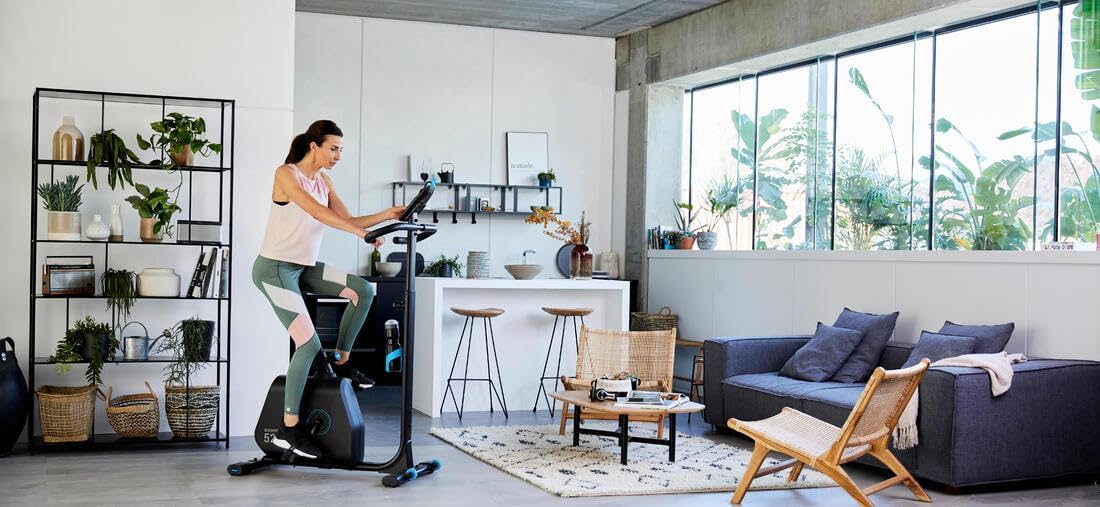
Image: A woman actively exercising on the Domyos EB520 in a modern living room setting, demonstrating typical usage.
Maintenance
Regular maintenance ensures the longevity and optimal performance of your Domyos EB520 Exercise Bike.
Cleaning
Wipe down the bike with a damp cloth after each use to remove sweat and dust. Avoid using abrasive cleaners or solvents that could damage the finish or electronic components.
Periodic Checks
- Inspect all bolts and nuts periodically to ensure they are tight.
- Check pedals for any signs of wear or looseness.
- Ensure the seat and handlebar adjustment mechanisms operate smoothly and lock securely.
Troubleshooting
| Problem | Possible Cause | Solution |
|---|---|---|
| Console not displaying data | Low or dead batteries (if applicable); loose connection. | Replace batteries; check all cable connections to the console. |
| Unusual noise during operation | Loose bolts; worn components. | Tighten all visible bolts and nuts; inspect for worn parts and contact support if necessary. |
| Resistance not changing | Mechanism malfunction. | Ensure the resistance knob/buttons are functioning correctly. If issue persists, contact customer support. |
Specifications
| Model Number | 4266855 |
| Colour | Black |
| Display Type | LCD |
| Drive System | External Hex |
| Material Type | Alloy Steel, Polystyrene |
| Power Source | Battery Powered (for console) |
| Features | Adjustable Seat, Transport Wheels, Self-Powered Flywheel |
| Product Dimensions (L x W x H) | 132 x 58 x 94 cm |
| Item Weight | 40 kg |
| Resistance Levels | 15 |
Warranty and Support
For warranty information, product support, or to purchase replacement parts, please refer to the official Decathlon website or contact their customer service directly. Keep your proof of purchase for warranty claims.
Decathlon Customer Service: Visit Decathlon Australia Contact Us Page
Ask a question about this manual
Ask about setup, troubleshooting, compatibility, parts, safety, or missing instructions. Manuals+ will review the question and use this page’s manual context to help answer it.