
Brilvibera Dawn to Dusk Outdoor Light Fixture (ae1941b6-c511-4662-a02b-f13f219b32f9)
Brilvibera Dawn to Dusk Motion Sensor Wall Light Fixture User Manual
Model: Dawn to Dusk Outdoor Light Fixture (ae1941b6-c511-4662-a02b-f13f219b32f9)
Brand: Brilvibera
1. Introduction
Thank you for choosing the Brilvibera Dawn to Dusk Motion Sensor Wall Light Fixture. This manual provides essential information for the safe installation, operation, and maintenance of your new lighting fixture. Please read it thoroughly before installation and retain it for future reference.
This outdoor light fixture is designed with a modern aesthetic, featuring heavy-duty metal construction and tempered glass panels. It incorporates a motion sensor and a dusk-to-dawn sensor, offering versatile lighting modes for enhanced security and convenience around your home, porch, garage, or entryway.

Image 1.1: The Brilvibera Dawn to Dusk Motion Sensor Wall Light Fixture in white, showcasing its design and motion sensor.
2. Important Safety Instructions
WARNING: Risk of Electric Shock. Disconnect power at the fuse or circuit breaker before installing or servicing.
- Always turn off the power supply at the main circuit breaker before beginning installation or performing any maintenance.
- All electrical connections must be in accordance with local codes, ordinances, or the National Electric Code (NEC). Consult a qualified electrician if you are unfamiliar with proper electrical wiring connections.
- Use only E26 base bulbs with a maximum wattage of 100W.
- Do not attempt to modify the fixture. Any modifications may void the warranty and create a safety hazard.
- Ensure the fixture is securely mounted to a stable surface.
- Keep children away from the installation area.
3. What's in the Box
Verify that all components are present before beginning installation:
- Wall Light Fixture
- Mounting Hardware
- Shade (pre-assembled)
Note: Bulbs are not included. Please refer to the Bulb Compatibility section for recommended bulb types.
4. Setup and Installation
The Brilvibera wall light fixture is designed for easy installation. It comes with a pre-assembled glass shade and all essential mounting hardware.
4.1 Installation Steps
- Prepare for Installation: Turn off power at the circuit breaker.
- Mount the Fixture: Secure the mounting plate to the junction box using the provided screws.
- Wire Connections: Connect the fixture wires to the house wires according to standard electrical practices (black to black, white to white, ground to ground). Use wire nuts to secure connections.
- Attach Fixture: Carefully push the fixture onto the mounting plate and secure it with the provided screws or nuts.
- Install Bulb: Insert an E26 base bulb (not included) into the socket.
- Restore Power: Turn on power at the circuit breaker.

Image 4.1: Visual guide demonstrating the simple 5-minute installation process and easy bulb replacement.
5. Operating Instructions
Your Brilvibera light fixture features a tact switch for easy control of modes and brightness.
5.1 Mode Selection
The light fixture offers three distinct operating modes:
- Motion-Only Mode: Press the tact switch once. In this mode, the light remains off when no motion is detected at night. It turns on to 100% brightness when motion is detected and turns off again after 120 seconds of no motion.
- Dusk to Dawn Mode: Press the tact switch once again. The light maintains a low brightness (15%-50% adjustable) when no motion is detected at dusk. It activates to 100% brightness upon motion detection and returns to low brightness after 120 seconds.
- Override Mode: Press the tact switch a third time. The light stays at 100% brightness all night and automatically turns off at dawn.

Image 5.1: One-click mode switching and brightness adjustment.
5.2 Brightness Adjustment (Dusk to Dawn Mode)
In Dusk to Dawn Mode, you can adjust the low-level brightness between 15% and 50%. To do this, press and hold the tact switch until the desired brightness level is achieved.
5.3 Motion Detection
The integrated motion sensor offers a generous 40ft detection range and a wide 220° angle, ensuring comprehensive coverage for your outdoor areas.
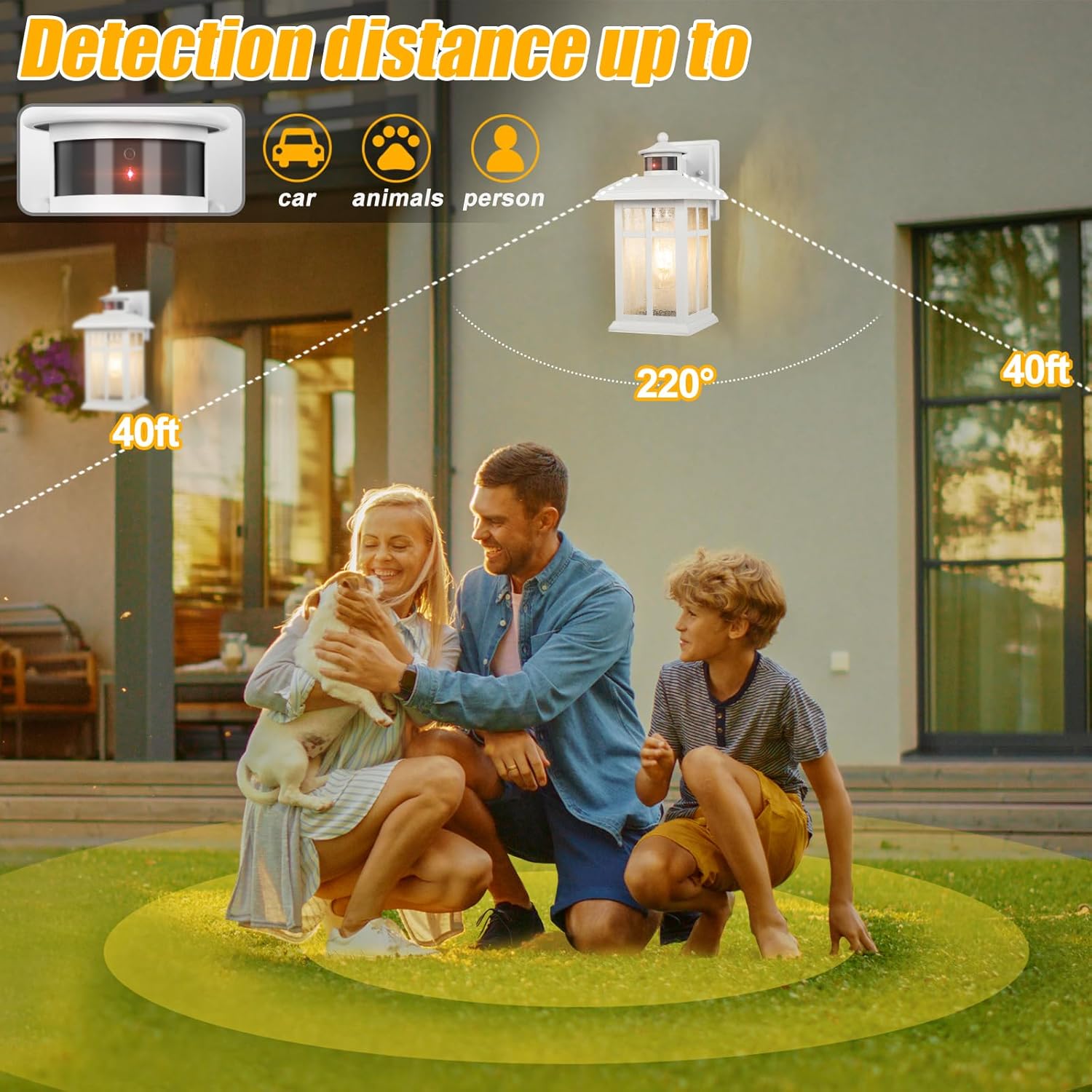
Image 5.2: Motion detection range and angle.
5.4 Weather Resistance
The fixture is constructed with reinforced metal and sealed with waterproof glue at the glass-to-shade connection, ensuring reliable operation in various outdoor conditions including rain, snow, and fluctuating temperatures.
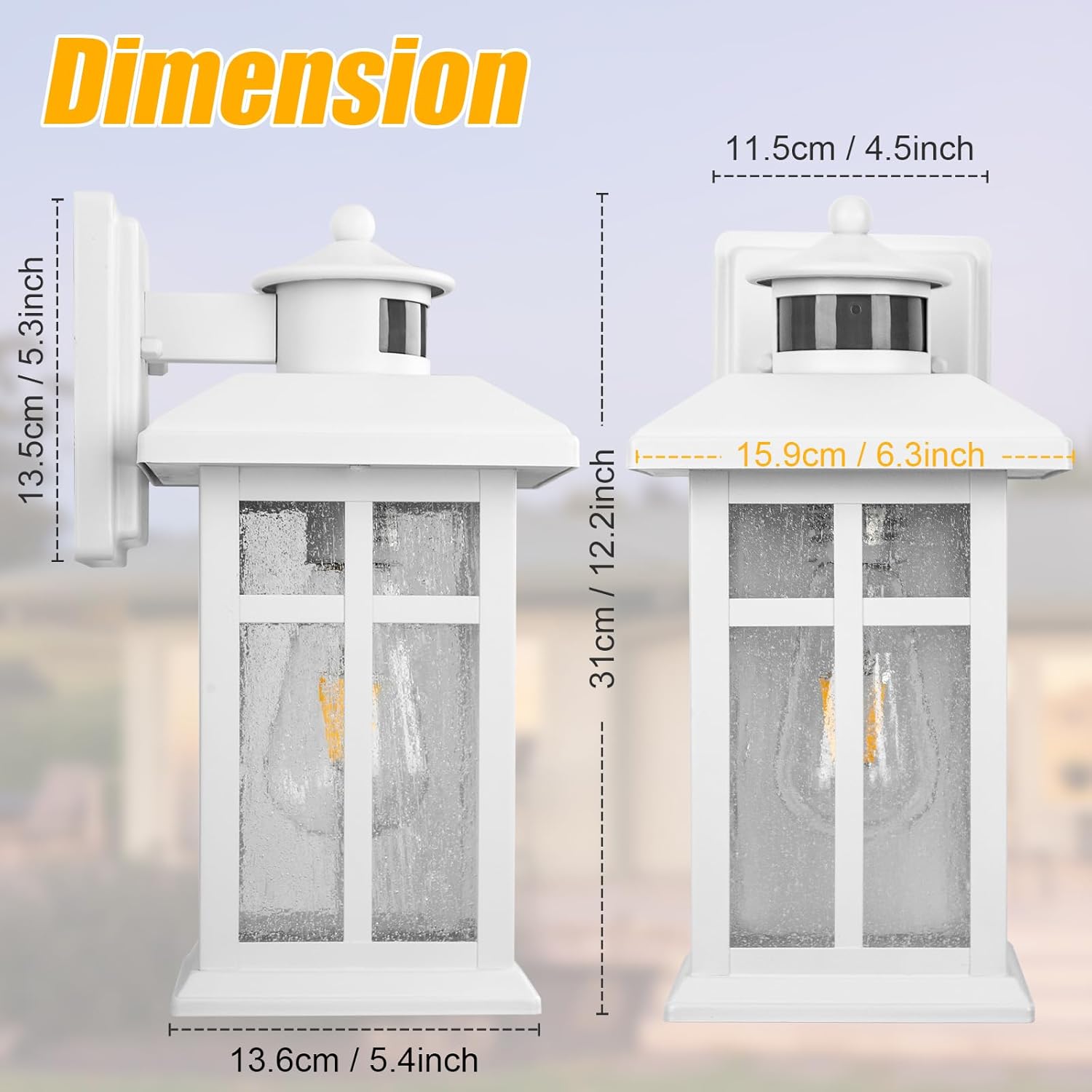
Image 5.3: Weather resistance features.
5.5 Product Overview Video
Video 5.1: An official product video demonstrating the features and functionality of the Brilvibera Dawn to Dusk Outdoor Light Fixture.
6. Maintenance
6.1 Bulb Replacement
This fixture is compatible with E26 base bulbs (100W Max). To prevent flickering, it is recommended to use dimmable LED bulbs or incandescent bulbs.

Image 6.1: Key features including the E26 bulb base.
6.2 Cleaning
To clean the fixture, ensure power is off. Wipe with a soft, damp cloth. Do not use abrasive cleaners or solvents as they may damage the finish or glass.
7. Troubleshooting
| Problem | Possible Cause | Solution |
|---|---|---|
| Light does not turn on. | No power; Loose wiring; Faulty bulb; Sensor obstructed. | Check circuit breaker. Ensure all connections are secure. Replace bulb. Clear any obstructions from the sensor. |
| Light flickers. | Incompatible bulb type; Loose bulb. | Use dimmable LED or incandescent bulbs. Tighten bulb. |
| Motion sensor not working. | Incorrect mode selected; Sensor obstructed; Detection range too low. | Verify correct mode (Motion-Only or Dusk to Dawn). Clear sensor. Adjust sensor sensitivity if applicable (not directly adjustable via tact switch, but ensure proper placement). |
| Light stays on constantly. | Override mode selected; Constant motion detected. | Switch to Motion-Only or Dusk to Dawn mode. Ensure no continuous motion is within detection range. |
8. Product Specifications
| Feature | Detail |
|---|---|
| Brand | Brilvibera |
| Model Name | Dawn to Dusk Outdoor Light Fixture |
| Item Model Number | ae1941b6-c511-4662-a02b-f13f219b32f9 |
| Color | White |
| Material | Glass, Metal |
| Style | Modern, Classic, Contemporary, Mid-Century Modern |
| Light Fixture Form | Sconce |
| Product Dimensions | 5.3"L x 5.3"W x 12.2"H |
| Item Weight | 4.09 pounds |
| Indoor/Outdoor Usage | Outdoor |
| Power Source | Corded Electric |
| Installation Type | Wall Mount |
| Special Features | Energy Efficient, Waterproof, Anti-Rust, Motion Sensor |
| Control Method | Push Button (Tact Switch) |
| Light Source Type | Edison, Incandescent, LED |
| Finish Type | Matte |
| Shade Material | Glass |
| Number of Light Sources | 1 |
| Voltage | 110 Volts |
| Bulb Base | E26 |
| Wattage | 100 watts (Max) |
| Water Resistance Level | Waterproof |
| Assembly Required | No (pre-assembled shade) |
| Country of Origin | China |

Image 8.1: Product dimensions.
9. Warranty and Support
9.1 Warranty Information
This Brilvibera product comes with a Limited Warranty. Please refer to the product packaging or contact customer support for specific warranty terms and conditions.
9.2 Customer Support
For technical assistance, troubleshooting, or warranty claims, please contact Brilvibera customer support through the retailer's platform or visit the official Brilvibera store online.
We are committed to providing high-quality products and excellent customer service. Your satisfaction is our priority.
Related documentsDawn to Dusk Outdoor Light Fixture (ae1941b6-c511-4662-a02b-f13f219b32f9)

Ask a question about this manual
Ask about setup, troubleshooting, compatibility, parts, safety, or missing instructions. Manuals+ will review the question and use this page’s manual context to help answer it.