
Introduction
Thank you for choosing the SUNOL GM20 True Wireless Earbuds. These earbuds are designed to provide a high-quality audio experience with advanced features such as Bluetooth 5.3 connectivity, IPX8 waterproofing, and a convenient LED display charging case. This manual will guide you through the setup, operation, and maintenance of your new earbuds to ensure optimal performance and longevity.
What's in the Box
- SUNOL GM20 True Wireless Earbuds (Left and Right)
- Charging Case
- Charging Cable
- Multiple sizes of ear tips (for comfortable fit)
Product Overview
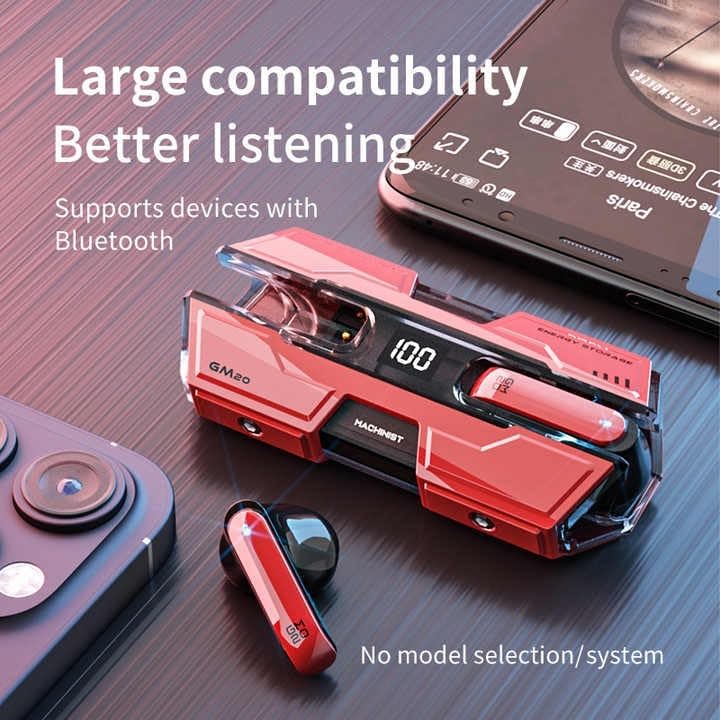
Figure 1: Compatibility and Design. The earbuds and charging case are designed for broad compatibility with Bluetooth-enabled devices, including smartphones and tablets.

Figure 2: Advanced Features. Showcasing the earbuds' HD sound quality and Bluetooth 5.3 technology for an enhanced audio experience.

Figure 3: Audio Quality Components. An exploded view illustrating the 13mm moving coil and composite diaphragm responsible for high-resolution, lossless sound.

Figure 4: Quick Pairing. The earbuds are designed for quick and efficient connection to your devices, ensuring a seamless pairing process.

Figure 5: Low Latency Performance. The earbuds offer fast transmission and minimal delay, suitable for gaming and other real-time audio applications.
Setup
1. Initial Charging
Before first use, fully charge the earbuds and the charging case. Connect the provided charging cable to the charging case and a USB power source. The LED display on the charging case will indicate the battery level. A full charge for the case can provide up to four full charges for the earbuds, offering approximately 48 hours of total playback time.
2. Pairing with a Device
- Ensure the earbuds are charged.
- Open the charging case. The earbuds will automatically power on and enter pairing mode after approximately 10 seconds if they are not connected to a previously paired device.
- On your device (smartphone, tablet, etc.), enable Bluetooth and search for available devices.
- Select "GM20 TWS" from the list of found devices to connect.
- Once paired, the earbuds will automatically connect to this device whenever taken out of the charging case.
Operating Instructions
Power On/Off
- Power On: Open the charging case, and the earbuds will automatically power on.
- Power Off: Place the earbuds back into the charging case and close the lid. They will automatically power off and begin charging.
Music Playback
- Play/Pause: Press the multifunction button on either earbud once.
- Next Song: Press the multifunction button on the right earbud twice.
- Previous Song: Press the multifunction button on the left earbud twice.
Call Management
- Answer/End Call: Press the multifunction button on either earbud once.
- Reject Call: Press and hold the multifunction button on either earbud for 2 seconds.
LED Display
- The charging case features an LED display that shows the battery percentage of the case.
- When earbuds are charging inside the case, the display may show their individual battery levels.
Maintenance
Cleaning
Regularly clean your earbuds and charging case to maintain optimal performance and hygiene. Use a soft, dry, lint-free cloth. For ear tips, you may gently wipe them with a slightly damp cloth and mild soap, then dry thoroughly before reattaching.
Water Resistance
The earbuds feature an IPX8 waterproof nano-coating, making them resistant to sweat and splashes. They are suitable for activities like running and cycling. However, they are not designed for swimming or prolonged submersion. Ensure the charging port is dry before charging.
Storage
When not in use, store the earbuds in their charging case to protect them and keep them charged. Avoid storing them in extreme temperatures or high humidity.
Troubleshooting
- Earbuds not pairing: Ensure both earbuds are charged. Place them back in the case, close the lid, then open it again to re-initiate pairing mode. Check your device's Bluetooth settings and try reconnecting.
- Only one earbud working: Try placing both earbuds back into the charging case, closing the lid, and then taking them out again. This often re-syncs them. If the issue persists, try resetting the earbuds (refer to manufacturer support if a specific reset procedure is not provided).
- No sound or low volume: Check the volume level on both your connected device and the earbuds. Ensure the earbuds are properly seated in your ears.
- Charging issues: Ensure the charging cable is securely connected to both the case and the power source. Check if the charging contacts on the earbuds and inside the case are clean and free of debris.
- Connectivity drops: Ensure you are within the Bluetooth range (up to 10 meters) of your device. Avoid obstacles that might interfere with the signal.
Specifications
| Model Name | GM20 (K8) |
| Brand | SUNOL |
| Connectivity Technology | Wireless (Bluetooth 5.3) |
| Bluetooth Range | 10 Meters |
| Audio Driver Size | 14 Millimeters |
| Frequency Response | 20 KHz |
| Impedance | 32 Ohms |
| Battery Life (Earbuds) | Up to 12 Hours (single charge) |
| Total Playback Time (with case) | Up to 48 Hours |
| Water Resistance Level | IPX8 Waterproof |
| Control Method | Touch / Button |
| Material | Acrylonitrile Butadiene Styrene (ABS) |
| Included Components | Cable |
Warranty and Support
For warranty information, technical support, or any inquiries regarding your SUNOL GM20 True Wireless Earbuds, please refer to the documentation provided with your purchase or contact SUNOL customer service directly through their official website or the retailer where the product was purchased. Please have your purchase receipt and product model number (GM20 or K8) ready when contacting support.