
1. Introduction
Thank you for choosing the KENT Zoom Plus Cordless Vacuum Cleaner. This manual provides essential information for the safe and efficient operation, maintenance, and troubleshooting of your new appliance. Please read it thoroughly before first use and keep it for future reference.
The KENT Zoom Plus is a powerful, battery-operated, and bagless vacuum cleaner designed for versatile indoor cleaning. It features Cyclone5 Technology, a washable HEPA filter, and multiple nozzles for comprehensive cleaning across various surfaces.
2. Safety Instructions
To reduce the risk of fire, electric shock, or injury, always follow basic safety precautions when using an electrical appliance, including the following:
- Read all instructions before using the appliance.
- Do not use outdoors or on wet surfaces.
- Do not allow to be used as a toy. Close attention is necessary when used by or near children.
- Use only as described in this manual. Use only manufacturer's recommended attachments.
- Do not use with a damaged cord or plug. If appliance is not working as it should, has been dropped, damaged, left outdoors, or dropped into water, return it to a service center.
- Do not pull or carry by cord, use cord as a handle, close a door on cord, or pull cord around sharp edges or corners. Do not run appliance over cord. Keep cord away from heated surfaces.
- Do not unplug by pulling on cord. To unplug, grasp the plug, not the cord.
- Do not handle plug or appliance with wet hands.
- Do not put any object into openings. Do not use with any opening blocked; keep free of dust, lint, hair, and anything that may reduce airflow.
- Keep hair, loose clothing, fingers, and all parts of body away from openings and moving parts.
- Do not pick up anything that is burning or smoking, such as cigarettes, matches, or hot ashes.
- Do not use to pick up flammable or combustible liquids, such as gasoline, or use in areas where they may be present.
- Do not pick up toxic material, such as chlorine bleach, ammonia, or drain cleaner.
- Do not use without dust bag and/or filters in place.
- Turn off all controls before unplugging.
- Use extra care when cleaning on stairs.
- Do not use to pick up hard or sharp objects such as glass, nails, screws, coins, etc.
- Store the appliance indoors. Put away after use to prevent accidents.
- Use only the charger supplied by the manufacturer to recharge.
- Do not incinerate the appliance even if it is severely damaged. The batteries can explode in a fire.
3. Package Contents
Verify that all items are present in the package:
- KENT Zoom Plus Vacuum Cleaner Unit
- Crevice Tool
- Brush
- HEPA Filter (pre-installed or spare)
- Nozzle
- Extension Handle
- Charging Adapter
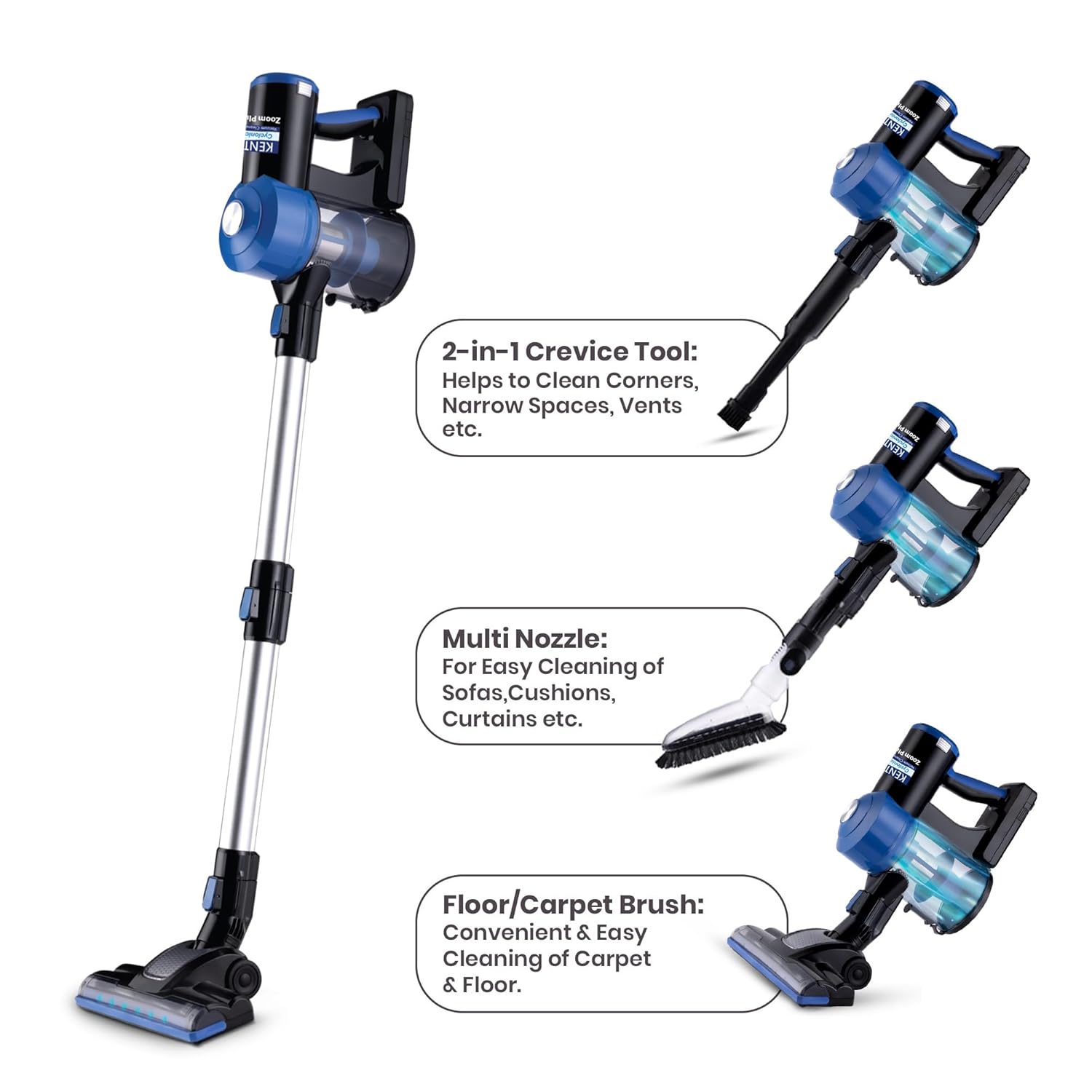
Image: KENT Zoom Plus Vacuum Cleaner with its various attachments including the main unit, extension handle, crevice tool, brush, and nozzle.
4. Product Overview
The KENT Zoom Plus is designed for ease of use and efficient cleaning. Key components include:
- Main Unit: Contains the motor, dustbin, and control buttons.
- Extension Handle: For extended reach and floor cleaning.
- Floor/Carpet Brush: Motorized brush head for effective cleaning of floors and carpets. Features an inbuilt LED light.
- 2-in-1 Crevice Tool: Ideal for cleaning corners, narrow spaces, and vents.
- Multi Nozzle: Suitable for cleaning sofas, cushions, and curtains.
- HEPA Filter: High-Efficiency Particulate Air filter for trapping fine dust particles.
- Dustbin: Bagless design for easy disposal of collected debris.
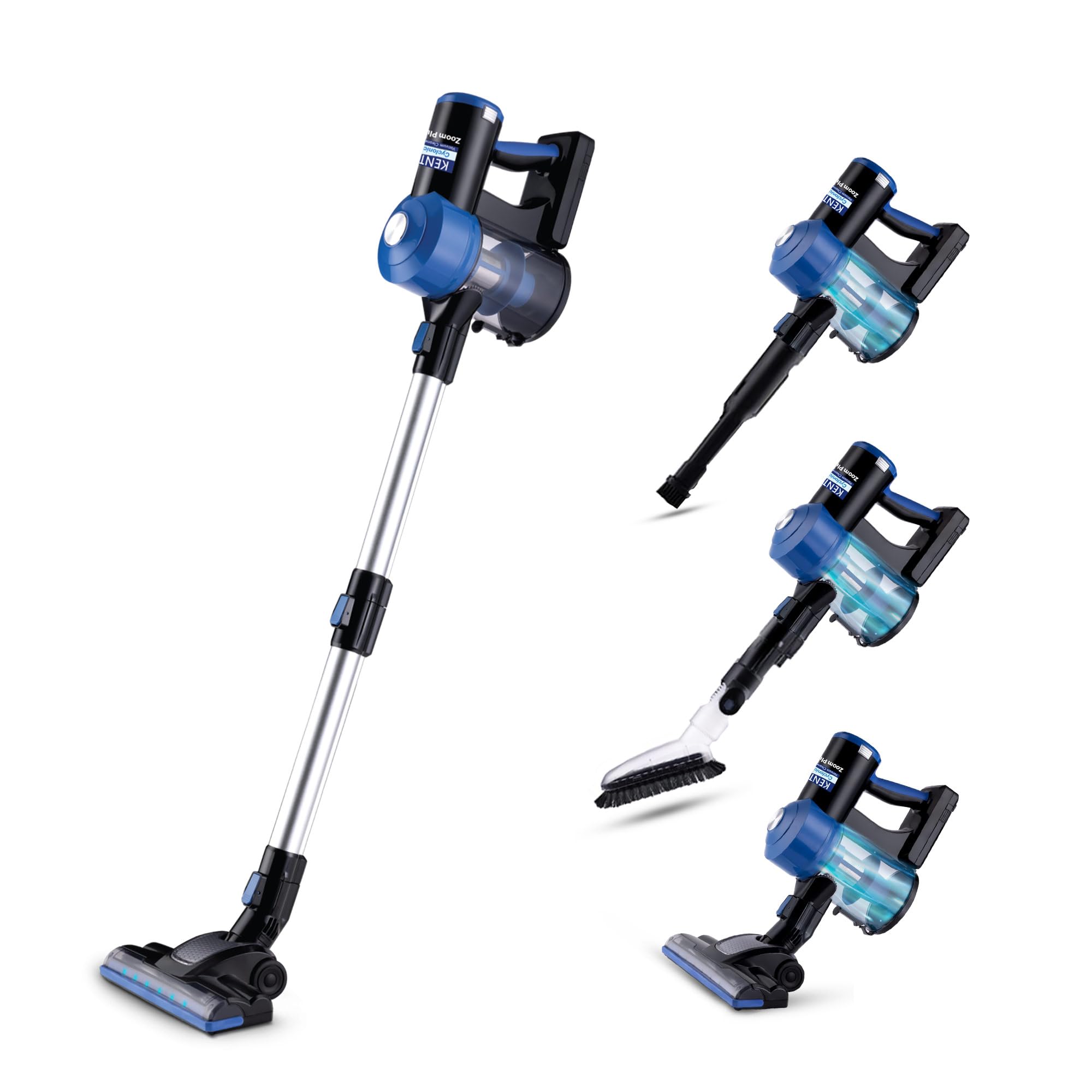
Image: The main unit of the KENT Zoom Plus Cordless Vacuum Cleaner, showcasing its compact design and dust collection bin.

Image: An overview of the KENT Zoom Plus Vacuum Cleaner with its various accessories, including the extension tube, 2-in-1 crevice tool, multi-nozzle brush, and motorized floor/carpet brush.
5. Setup
5.1 Initial Charging
- Before first use, fully charge the vacuum cleaner. Connect the charging adapter to the charging port on the main unit.
- Plug the adapter into a standard electrical outlet (220 Volts).
- The charging indicator light will illuminate. A full charge takes approximately 5 hours.
- Once fully charged, disconnect the adapter.
5.2 Assembly
- For Floor/Carpet Cleaning:
- Attach the extension handle to the main unit until it clicks into place.
- Attach the motorized floor/carpet brush to the other end of the extension handle until it clicks.
- For Handheld Cleaning:
- Directly attach the desired accessory (2-in-1 crevice tool or multi nozzle) to the main unit until it clicks.
6. Operating Instructions
6.1 Power On/Off
- Press the power button (push button control) on the main unit to turn the vacuum cleaner on.
- Press the power button again to turn it off.
6.2 Cleaning Surfaces
- Floors and Carpets: Use the main unit with the extension handle and motorized floor/carpet brush. The inbuilt LED light will illuminate the cleaning path, making dirt visible.
- Corners and Narrow Spaces: Attach the 2-in-1 crevice tool directly to the main unit or the extension handle for reaching tight areas.
- Upholstery and Curtains: Use the multi nozzle attachment for gentle yet effective cleaning of fabrics.

Image: The KENT Zoom Plus Vacuum Cleaner in operation, highlighting its capability for up to 30 minutes of cleaning on a single charge.

Image: A user operating the KENT Zoom Plus Vacuum Cleaner in a living room, illustrating its low noise operation (below 80 dB).
7. Maintenance
Regular maintenance ensures optimal performance and extends the lifespan of your vacuum cleaner.
7.1 Emptying the Dustbin
- Ensure the vacuum cleaner is turned off.
- Locate the dustbin release button on the main unit.
- Press the button to detach the dustbin.
- Hold the dustbin over a trash can and open the bottom flap to empty the contents.
- Reattach the dustbin to the main unit until it clicks securely.

Image: A hand holding the KENT Zoom Plus Vacuum Cleaner's dustbin over a trash can, demonstrating the no-touch emptying process.
7.2 Cleaning the HEPA Filter
- With the dustbin detached, carefully remove the HEPA filter.
- Tap the filter gently to remove loose dust.
- The HEPA filter is washable. Rinse it under running water until the water runs clear.
- Allow the filter to air dry completely for at least 24 hours before reinserting. Do not use the vacuum cleaner with a wet filter.
- Reinsert the dry HEPA filter and reattach the dustbin.
7.3 Cleaning the Brush Roll
- Turn off the vacuum cleaner and detach the floor/carpet brush.
- Inspect the brush roll for tangled hair or debris.
- Use scissors or a brush to carefully remove any obstructions.
- Ensure the brush roll spins freely before reattaching.
8. Troubleshooting
| Problem | Possible Cause | Solution |
|---|---|---|
| Vacuum cleaner does not turn on. | Battery is depleted. | Charge the battery for 5 hours. |
| Reduced suction power. | Dustbin is full. HEPA filter is clogged. Nozzle/brush roll is blocked. | Empty the dustbin. Clean or replace the HEPA filter. Remove any blockages from the nozzle or brush roll. |
| Brush roll not spinning. | Hair or debris tangled in brush roll. | Clean the brush roll as described in the maintenance section. |
| Unusual noise during operation. | Blockage in the air path or brush roll. | Check for and remove any blockages in the dustbin, filter, or attachments. |
| Battery not charging. | Charger not properly connected. Faulty charger or battery. | Ensure charger is securely connected to both the vacuum and the power outlet. If problem persists, contact customer support. |
9. Specifications
- Model Name: Zoom Plus
- Brand: KENT
- Power: 150 Watts
- Suction Power: 14 kPa
- Power Source: Battery Powered
- Battery Type: Rechargeable
- Battery Charge Time: Approximately 5 Hours
- Runtime: Up to 30 Minutes
- Filter Type: Washable HEPA Filter
- Dustbin Capacity: 0.6 Liters
- Special Feature: Cyclone5 Technology, Cordless, Bagless Design, Multi Nozzle Operation
- Noise Level: 80 Decibels
- Item Weight: 2.3 Kilograms
- Dimensions (L x W x H): 19L x 44W x 32H Centimeters
- Recommended Use: Floors, carpets, curtains, upholstery, indoor surfaces
- Included Components: Brush, Crevice Tool, HEPA Filter, Nozzle, Extension Handle
10. Warranty and Support
KENT products are designed for quality and performance. For warranty information, please refer to the warranty card included with your purchase or visit the official KENT website. In case of any issues or for technical assistance, please contact KENT customer support.
Importer Contact Information:
KENT RO Systems Ltd. E-6,7 & 8, Sector 59 Noida
Manufacturer Contact Information:
Wang Appliances, Shenzhen, China
For further assistance, you may also refer to the official KENT store on Amazon: KENT Store


