
sinocare SafeAccu25
SINOCARE SAFE ACCU Blood Glucose Monitor User Manual
Model: SafeAccu25
Introduction
The Sinocare Safe-Accu Blood Glucose Monitor is designed for self-testing of blood glucose levels. This device provides a safe, accurate, and reliable method for monitoring blood sugar, crucial for managing diabetes. Sinocare, with over two decades of experience in the Blood Glucose Monitor (BGM) industry, is committed to innovation in biosensor technology and the development of rapid diagnostic testing products.
Product Overview
The Sinocare Safe-Accu Blood Glucose Testing Kit includes all necessary components for immediate use:
- Sinocare Safe-Accu Blood Glucose Monitor
- Test Strips (25 count)
- Lancets
- Pain-free Lancing Device
- Carrying Case
- User Manual

Image: Complete Sinocare Safe-Accu Blood Glucose Monitor kit, including the monitor, test strips, lancets, lancing device, and carrying case.
Key Features
- Low Cost and High Performance: An affordable, full-featured glucometer suitable for long-term use.
- Precise & Easy to Use: Code-free test strips, providing results in just 10 seconds with a small 0.6 microliters blood sample volume.
- Convenient: Exquisite and lightweight design, making it easy to carry for testing anywhere, anytime.
- Large Memory Capacity: Stores up to 200 test results, with the ability to display 7-day, 14-day, and 28-day average data for easy historical tracking.

Image: Visual representation of key features including large memory, convenience, accuracy, fast results, ease of use, small sample size, and portability.
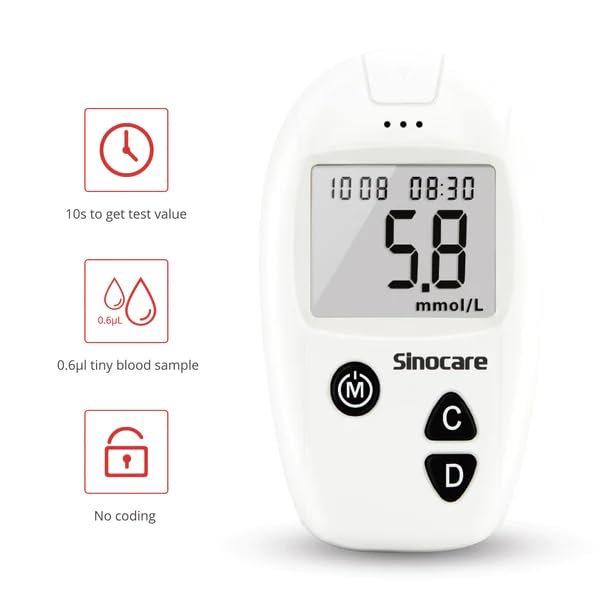
Image: Highlights of 10-second test time, 0.6µL tiny blood sample, and no coding required for the test strips.

Image: Illustration of the 200-memory capacity and average value calculations for 7, 14, and 28 days.
Setup
Before performing a blood glucose test, ensure you have all components ready and understand their function.
Preparing the Lancing Device:
- Pull off the end cap of the lancing device.
- Push a new lancet firmly into the holder until it clicks into place.
- Remove the lancet top by twisting it off. Save the top for safe disposal of the used lancet.
- Replace the end cap onto the lancing device.
- Turn the depth dial to your desired lancing depth (usually 2-3 for most users).
- Gently pull the arming barrel until a click is heard, indicating it is ready to use.

Image: Step-by-step visual guide for setting up the lancing device, from inserting the lancet to adjusting the depth and arming the device.
Operating Instructions
Follow these steps to perform a blood glucose test:
- Wash your hands thoroughly with soap and warm water, then dry them completely.
- Insert a new test strip into the meter. The meter will turn on automatically.
- Prepare your lancing device as described in the "Setup" section.
- Prick the side of your fingertip with the lancing device. Gently squeeze your finger to form a small drop of blood.
- Touch the tip of the test strip to the blood drop. The strip will automatically draw the blood into the reaction area. Ensure sufficient blood volume is applied.
- The meter will display your blood glucose result in 10 seconds.
- Record your result if necessary.
- Dispose of the used test strip and lancet safely in a sharps container.

Image: Demonstrates correct blood sampling technique and how the test strip draws blood. Also shows examples of sufficient and insufficient blood volume.

Image: Illustrates the 0.6µL micro blood sampling principle, showing a user performing a test with the device.
Maintenance
Cleaning the Meter:
Wipe the meter's exterior with a soft cloth dampened with mild detergent or a 70% alcohol solution. Do not immerse the meter in water or any liquid. Ensure no liquid enters the test strip port.
Storage:
- Store the meter and test strips in a cool, dry place, away from direct sunlight and extreme temperatures.
- Keep test strips in their original vial with the cap tightly closed to protect them from moisture.
- Use test strips within the valid time frame, typically six months after opening the vial.
Troubleshooting
If you encounter issues with your Sinocare Safe-Accu Blood Glucose Monitor, refer to the following common problems and solutions:
| Problem | Possible Cause | Solution |
|---|---|---|
| Meter does not turn on. | No test strip inserted or strip inserted incorrectly. | Insert a new test strip correctly into the strip port. |
| Error message displayed. | Insufficient blood sample, damaged test strip, or extreme temperature. | Ensure adequate blood sample. Use a new test strip. Perform test within recommended temperature range. |
| Inaccurate readings. | Expired test strips, improper storage, or incorrect testing procedure. | Check test strip expiry date. Store strips properly. Review operating instructions carefully. Consult a healthcare professional if concerns persist. |
Specifications
| Feature | Detail |
|---|---|
| Brand | Sinocare |
| Model Number | SafeAccu25 |
| Measurement Unit | mmol/L (UK standard) |
| Test Time | 10 seconds |
| Blood Sample Volume | 0.6 microliters |
| Memory Capacity | 200 test results |
| Average Data | 7, 14, and 28 days |
| Item Weight | 200 g |
| Product Dimensions | 18.5 x 6 x 16.5 cm |
| Country of Origin | India |
| Included Components | Glucometer Device, Strips, Lancets and Lancet Device |
Important Information
Indications: This device is indicated for individuals with diabetes mellitus for self-monitoring of blood glucose levels.
Always consult with your healthcare professional for interpretation of results and for any medical advice.
Warranty and Support
For warranty information or technical support, please refer to the contact details provided in the packaging or visit the official Sinocare website. Keep your purchase receipt as proof of purchase for any warranty claims.
Related documentsSafeAccu25

Ask a question about this manual
Ask about setup, troubleshooting, compatibility, parts, safety, or missing instructions. Manuals+ will review the question and use this page’s manual context to help answer it.