
Kepwam W6-black
Kepwam Coffee Mug Warmer Instruction Manual
Model: W6-black
Brand: Kepwam
Product Overview
The Kepwam Coffee Mug Warmer is designed to keep your beverages at an optimal temperature, ensuring a warm drink for extended periods. It features multiple temperature settings, a customizable timer with an auto shut-off function, and a versatile heating plate suitable for various cup sizes and materials. This device can also function as a candle warmer, incorporating LED lights for visual indication.

Image: The Kepwam Coffee Mug Warmer, showcasing its sleek design, digital display, and a mug placed on the heating surface. The display indicates the current temperature and timer setting.
Setup
- Unpacking: Carefully remove the mug warmer from its packaging. Ensure all components are present and undamaged.
- Placement: Place the mug warmer on a flat, stable, and heat-resistant surface. Ensure it is away from water sources and out of reach of children.
- Power Connection: Plug the power cord into a standard 127V (AC) electrical outlet. The device will enter standby mode.
Operating Instructions
Power On/Off
- Press the Power Button to turn the device on. The default temperature setting will activate.
- Press and hold the Power Button to turn the device off.
Temperature Settings
The warmer offers three adjustable temperature settings to suit your preference:
- Press the Temp Button to cycle through the settings:
- 170°F (Red Light): High Gear, for very hot beverages.
- 150°F (Purple Light): Mid Gear, for warm beverages.
- 130°F (Blue Light): Low Gear, for mildly warm beverages.
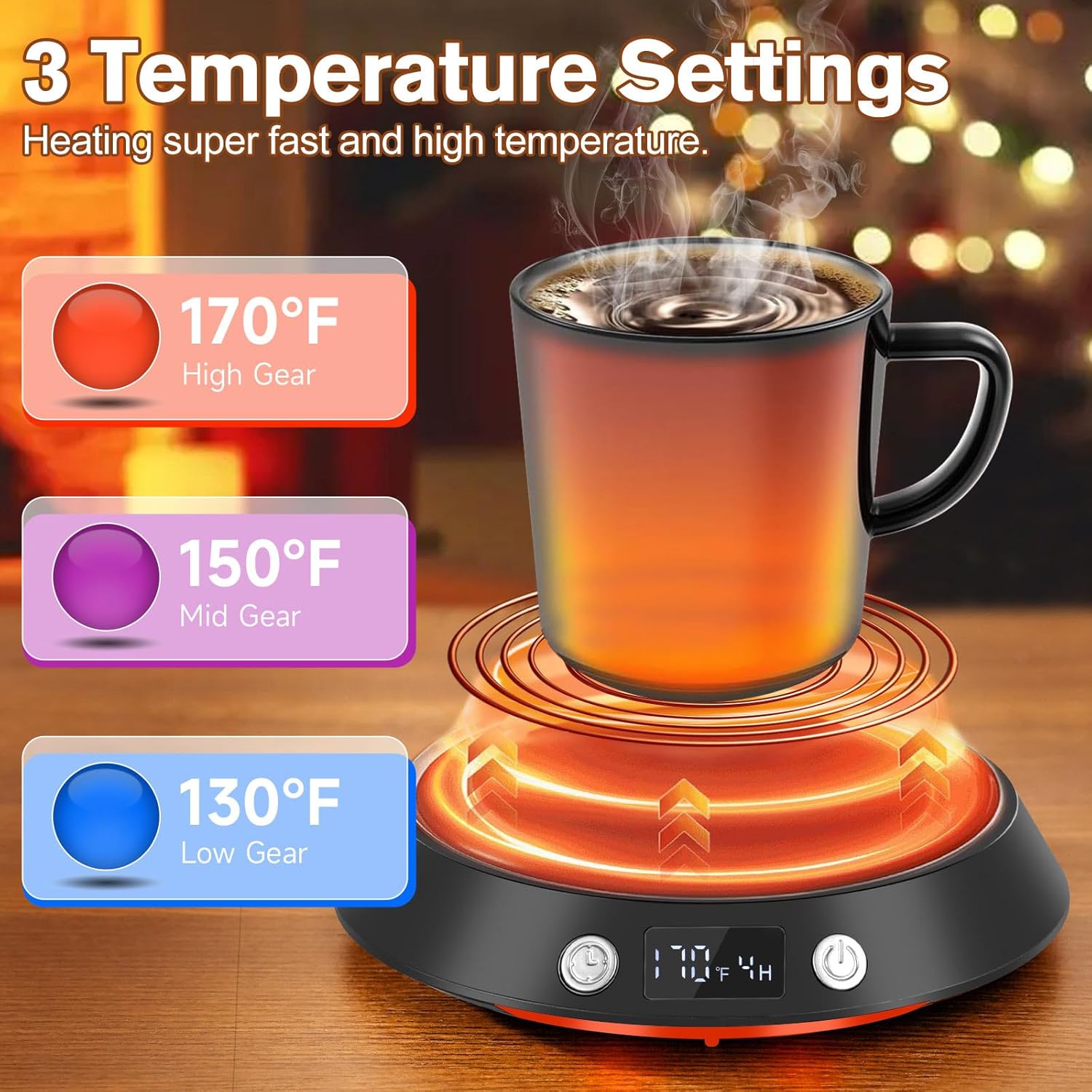
Image: Visual representation of the three temperature settings (170°F, 150°F, 130°F) and their corresponding indicator light colors (Red, Purple, Blue).
Timer Settings & Auto Shut-off
- Press the Timer Button to set the automatic shut-off time from 2 to 9 hours.
- By default, the warmer will automatically turn off after 4 hours if no timer is set.

Image: A mug on the warmer with a visual overlay indicating the 4-hour auto shut-off feature, emphasizing convenience and safety.
Candle Warmer with Night Light Function
- The warmer can also be used to melt scented candles.
- The LED lights indicate the current temperature setting and can serve as a night light.
- Long press the Timer Button to turn the LED night light on or off.

Image: The mug warmer with a candle on its surface, demonstrating its use as a candle warmer and the ambient lighting provided by the LED indicators.
Compatible Drinkware
- The 4.8-inch heating plate is designed to accommodate a wide range of cup sizes and various materials, including ceramic, glass, stainless steel, and more.
- For optimal heating, use flat-bottomed mugs that make full contact with the heating surface.

Image: The large heating plate of the warmer shown with various items, including a teapot, demonstrating its versatility beyond just coffee mugs.
Maintenance
Proper maintenance ensures the longevity and optimal performance of your mug warmer.
- Cleaning: The high-hardness microcrystal panel is waterproof and easy to clean. Unplug the device and allow it to cool completely before wiping the surface with a damp cloth. Do not immerse the device in water.
- Heat Emission: The device features heat emission holes for fast heat dissipation, contributing to a longer service life. Ensure these holes are not obstructed.
- Stability: The non-slip foot pads provide steady support. Keep them clean and free from debris to maintain stability.

Image: A close-up view detailing the construction of the mug warmer, including the easy-to-clean microcrystal panel, ventilation for heat, and stable non-slip feet.
Troubleshooting
If you encounter issues with your Kepwam Coffee Mug Warmer, refer to the following common problems and solutions:
- Device Does Not Power On:
- Ensure the power cord is securely plugged into a working electrical outlet.
- Check if the power outlet is functional by plugging in another device.
- Beverage Not Heating:
- Verify that the device is powered on and the desired temperature setting is selected.
- Ensure the mug has a flat bottom and is making full contact with the heating plate.
- Thicker mugs or mugs with concave bottoms may not heat as effectively.
- Automatic Shut-off Occurs Too Soon/Late:
- Check the timer setting. Adjust it by pressing the Timer Button to your desired duration (2-9 hours).
- Remember the default auto shut-off is 4 hours if no specific timer is set.
Safety Precautions
- The heating plate becomes hot during operation. Avoid direct contact with the heating surface to prevent burns.
- Keep the device out of reach of small children and pets. Unplug the warmer when not in use or if left unsupervised.
- Do not place flammable materials or electrical cords on or near the heating plate.
- Do not immerse the device in water or other liquids.
Specifications
| Feature | Specification |
|---|---|
| Model Number | W6-black |
| Brand | Kepwam |
| Wattage | 55 Watts |
| Voltage | 127 Volts (AC) |
| Temperature Settings | 130°F, 150°F, 170°F |
| Timer Settings | 2-9 Hours (Default 4 hours auto shut-off) |
| Heating Plate Diameter | 4.8 inches |
| Cable Length | 59 Inches |
| Material | Acrylonitrile Butadiene Styrene (ABS) |
| Item Weight | 14.7 ounces (0.92 Pounds) |
| Color | Black |
Warranty and Support
For detailed warranty information and customer support, please refer to the official Kepwam website or contact their customer service directly. A digital version of the Instructions for Use (IFU) is available in PDF format for your convenience.
- Official User Guide (PDF): Instructions for Use (IFU)
- Kepwam Store: Visit the Kepwam Store on Amazon
Related Documents - W6-black
 |
SENSO Coffee Table Assembly Instructions Step-by-step assembly guide for the SENSO coffee table by MEBLE LASKI KACZOROWSKA SP.K. Includes parts list, textual descriptions of diagrams, safety warnings, and care instructions for proper assembly and maintenance. |
 |
AI-SONIC S3-C6.2 Component Speaker System Owners Manual Official owners manual for the AI-SONIC S3-C6.2 2-Way Component Speaker System, including technical specifications, wiring diagrams, installation guidelines, and safety instructions. |
 |
Ansmann Racing W6 2.4 GHz 3-Channel Wheel Radio Instruction Manual This is the instruction manual for the Ansmann Racing W6 2.4 GHz 3-Channel Wheel Radio, providing detailed setup, operation, and safety guidelines for RC car and boat enthusiasts. |
 |
Netum 2.4G CCD/2D Barcode Scanner Quick Setup Guide This guide provides instructions for setting up and using Netum 2.4G CCD and 2D barcode scanners, covering connection methods, keyboard language configuration, offline mode, and troubleshooting. |
 |
Netum 2.4G Wireless Barcode Scanner Quick Setup Guide Comprehensive guide for setting up and using the Netum 2.4G Wireless Barcode Scanner, covering connection modes, programming, and troubleshooting. |
 |
W6 Beacon Product Specification - MOKO TECHNOLOGY LTD. Detailed product specification for the W6 Beacon by MOKO TECHNOLOGY LTD. Covers product brief, application scenarios, general and electronic specifications, user guidance, functions, certifications, and ordering information. |
Ask a question about this manual
Ask about setup, troubleshooting, compatibility, parts, safety, or missing instructions. Manuals+ will review the question and use this page’s manual context to help answer it.