1. Introduction
This manual provides essential information for the safe and efficient operation of your TCL 7.5 kg Fully-Automatic Top Load Washing Machine, model TWA75-F3G. Please read these instructions thoroughly before using the appliance and retain them for future reference. Proper use and maintenance will ensure optimal performance and extend the lifespan of your washing machine.

Image: Front view of the TCL 7.5 kg Fully-Automatic Top Load Washing Machine TWA75-F3G.
2. Safety Information
Always follow basic safety precautions when using electrical appliances to reduce the risk of fire, electric shock, and injury to persons.
- Ensure the washing machine is properly grounded.
- Do not operate the machine with a damaged power cord or plug.
- Keep children and pets away from the appliance during operation.
- Do not wash items that are soiled with flammable substances.
- Unplug the appliance before cleaning or performing any maintenance.
- Do not attempt to repair or replace any part of the appliance unless specifically recommended in this manual.
- Ensure the water inlet and drain hoses are securely connected to prevent leaks.
3. Setup and Installation
3.1 Unpacking
Carefully remove all packaging materials. Check for any damage during transit. The package includes: 1 Washing Machine, 1 User Manual, 1 Tapping Screw, 1 Water Inlet hose, 1 Bottom cover, 1 Drain hose component.
3.2 Location
Place the washing machine on a firm, level surface. Avoid direct sunlight or areas with high humidity. Ensure adequate ventilation around the appliance.
3.3 Water Connection
Connect the water inlet hose to a cold water tap and to the inlet valve on the back of the washing machine. Ensure connections are tight to prevent leaks. Position the drain hose to allow proper water drainage.

Image: Rear view of the washing machine, showing the water inlet and drain hose connections.
3.4 Power Connection
Plug the power cord into a grounded electrical outlet. Ensure the voltage matches the specifications of the appliance (230 Volts).
4. Operating Instructions
4.1 Control Panel Overview
The control panel allows you to select wash programs and adjust settings. Familiarize yourself with the buttons and display before operation.

Image: Close-up of the washing machine's control panel with various buttons and digital display.
4.2 Loading Laundry
Open the top lid and load clothes loosely into the drum. Do not overload the machine. The maximum capacity is 7.5 kg.

Image: Top view of the washing machine with the lid open, showing the interior drum.
4.3 Adding Detergent and Softener
Add appropriate amounts of detergent and fabric softener to their designated compartments. Refer to detergent packaging for recommended quantities.
4.4 Selecting a Wash Program
Your washing machine offers 10 wash programs:
- Mixed: For everyday mixed laundry.
- Quick: For lightly soiled items requiring a fast wash.
- Delicate: For fragile garments.
- Energy Saver: Optimized for lower energy consumption.
- Jeans: Specifically designed for denim.
- Aqua Save: Reduces water consumption.
- Soak Wash: For heavily soiled items requiring pre-soaking.
- Blanket: For washing blankets and bulky items.
- Drum Clean: For cleaning the washing machine drum.
- Baby: Gentle wash for baby clothes.
Turn the program selector or press the program button to choose the desired cycle.
4.5 Special Features
- Fuzzy Logic: This feature automatically detects the laundry load and adjusts the water level and wash cycle duration for optimal washing performance and efficiency.
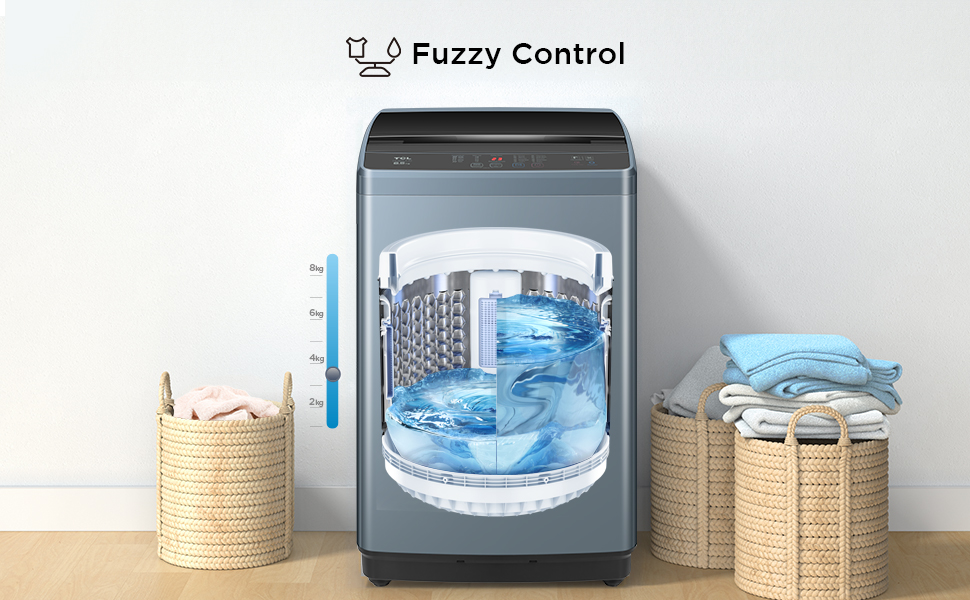
Image: Illustration of Fuzzy Control automatically adjusting water levels based on laundry weight.
- 24 Hours Delay: Allows you to set a delayed start time for your wash cycle, up to 24 hours. This is useful for washing at off-peak hours or having laundry ready at a specific time.

Image: Icon representing the 24 Hours Delay function.
- Child Lock: Activates a lock on the control panel to prevent accidental changes to settings or starting the machine by children. To activate/deactivate, refer to the control panel instructions.

Image: Illustration of the Child Lock feature, showing a child near the washing machine with a lock icon.
- Magic Filter: This filter effectively collects lint and debris from your laundry, ensuring cleaner clothes and preventing clogs.

Image: Icon representing the Magic Filter feature.
- Memory Back-up: In case of a power outage, the machine will resume the wash cycle from where it left off once power is restored.

Image: Overview of features including Magic Filter, Memory Backup, 24 Hours Delay, Fuzzy Control, One Click Spinning, and Child Lock.
- Honeycomb Crystal Drum: Designed to be gentle on clothes while providing effective cleaning, preventing fabric damage.

Image: Close-up of the Honeycomb Crystal Drum texture.
5. Maintenance
Regular maintenance ensures the longevity and optimal performance of your washing machine.
5.1 Cleaning the Magic Filter
The Magic Filter should be cleaned regularly (e.g., after every 2-3 washes) to remove lint and debris. Locate the filter inside the drum, remove it, clean it under running water, and reinsert it securely.
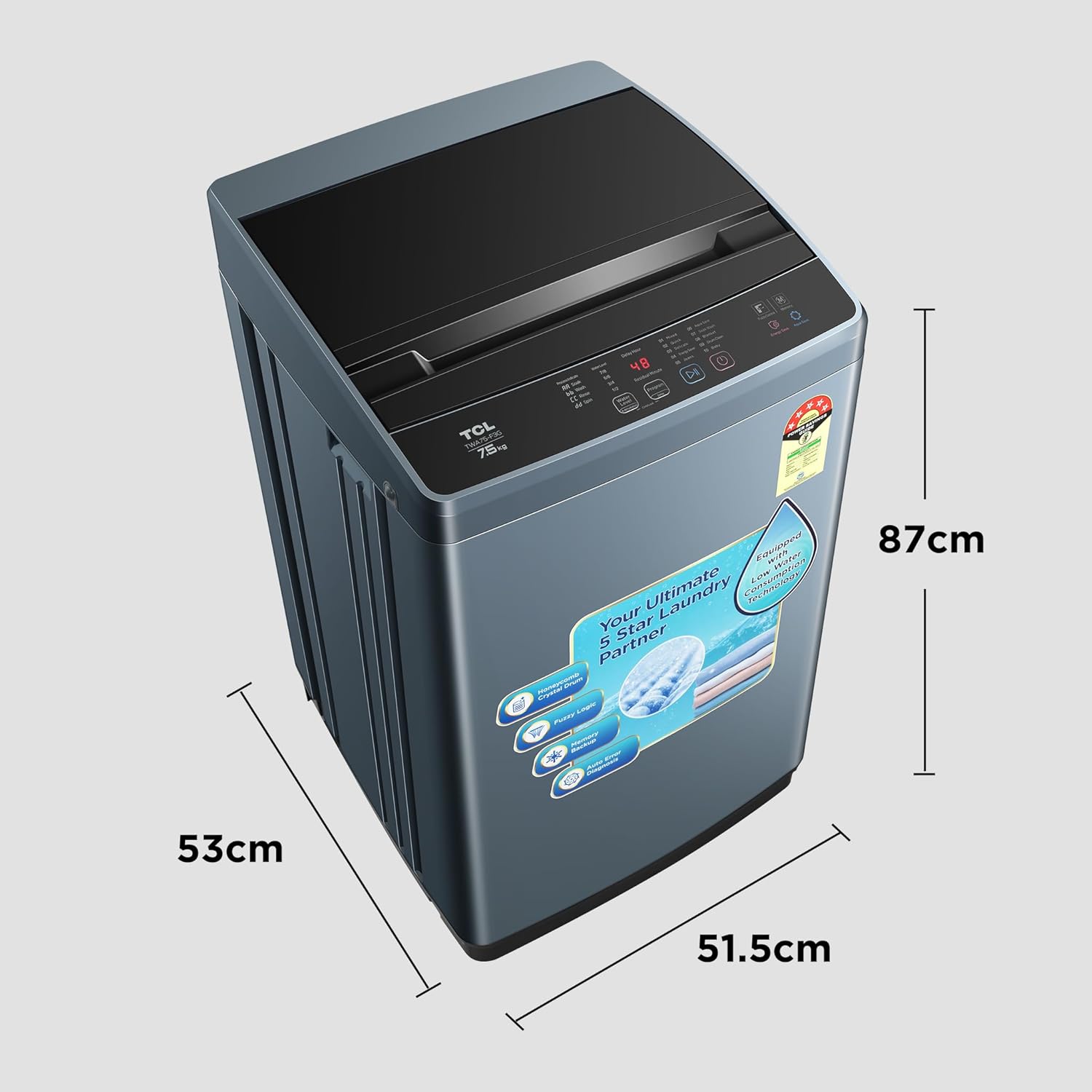
Image: Close-up view of the Magic Filter inside the washing machine drum, showing its function.
5.2 Drum Clean Function
Use the "Drum Clean" program periodically to clean the inner and outer tubs of the washing machine, preventing mold and odor buildup. Follow the instructions on the control panel for this cycle.

Image: Illustration of the Drum Clean function, showing water jets cleaning the drum interior.
5.3 Exterior Cleaning
Wipe the exterior of the washing machine with a soft, damp cloth. Do not use abrasive cleaners or solvents.
6. Troubleshooting
Before contacting service, refer to the following table for common issues and solutions.
| Problem | Possible Cause | Solution |
|---|---|---|
| Machine does not start | Power cord unplugged; Lid not closed properly; Power outage. | Check power connection; Ensure lid is fully closed; Check household power supply. |
| No water filling | Water tap closed; Water inlet hose kinked; Water supply cut off. | Open water tap; Straighten hose; Check household water supply. |
| Machine vibrates excessively | Machine not level; Laundry unevenly distributed; Transit bolts not removed. | Adjust leveling feet; Redistribute laundry; Ensure all transit bolts are removed during installation. |
| Water not draining | Drain hose kinked or blocked; Drain pump filter clogged. | Check and clear drain hose; Clean drain pump filter (refer to full manual for location). |
If the problem persists after attempting these solutions, please contact customer support.
7. Specifications
| Feature | Detail |
|---|---|
| Brand | TCL |
| Model | TWA75-F3G |
| Capacity | 7.5 Kilograms |
| Energy Efficiency | 5 Star |
| Installation Type | Freestanding |
| Special Features | Drum clean, Child lock, 24 hours delay, One key dehydration, Fuzzy logic, Memory back-up, Honeycomb crystal drum. |
| Control Console | Push Button |
| Number of Standard Cycles | 10 |
| Access Location | Top Load |
| Voltage | 230 Volts |
| Wattage | 700 Watts |
| Material | ABS |
| Item Weight | 23 kg |
| Product Dimensions (LxWxH) | 51.5 x 51.5 x 87 Centimeters |
| Included Components | 1 Washing Machine, 1 User Manual, 1 Tapping Screw, 1 Water Inlet hose, 1 Bottom cover, 1 Drain hose component |

Image: Diagram showing the dimensions (Length, Width, Height) of the TCL TWA75-F3G washing machine.

Image: Energy efficiency label indicating 5-star rating and energy consumption details for the TCL TWA75-F3G.
8. Warranty and Support
Your TCL TWA75-F3G washing machine comes with a comprehensive warranty:
- Product Warranty: 2 Years comprehensive warranty on the product.
- Motor Warranty: 5 Years warranty on the motor.

Image: Graphic indicating 2-year comprehensive warranty and 5-year motor warranty for TCL washing machines.
For warranty claims, technical support, or service requests, please contact TCL customer service. Keep your purchase receipt and product serial number handy.


