
1. Introduction
Thank you for choosing the TCL TWA60-F3G 6 kg Fully-Automatic Top Load Washing Machine. This manual provides comprehensive instructions for the safe and efficient use of your new appliance. Please read this manual thoroughly before installation and operation, and keep it for future reference.

Image 1.1: Front view of the TCL TWA60-F3G washing machine.
2. Safety Information
To prevent injury to yourself and others, and to avoid property damage, please observe the following safety precautions:
- Ensure the washing machine is properly grounded.
- Do not allow children to play on or in the appliance.
- Keep flammable materials away from the washing machine.
- Do not wash items that have been soiled with gasoline, dry-cleaning solvents, or other flammable or explosive substances.
- Unplug the appliance before cleaning or performing any maintenance.
- Do not operate the machine with a damaged power cord or plug.
- Ensure the water supply hoses are securely connected to prevent leaks.
3. Product Overview
3.1 Components
The TCL TWA60-F3G washing machine includes the following main components:
- Control Panel: For selecting wash programs and settings.
- Wash Tub/Drum: Stainless steel Honeycomb Crystal Drum for gentle yet effective washing.
- Lid: Top-loading access to the wash tub.
- Magic Filter: Collects lint and debris during the wash cycle.
- Water Inlet: Connection point for the water supply hose.
- Drain Hose: For expelling wastewater.
3.2 Control Panel
The control panel allows you to select various wash programs and customize settings. Refer to the image below for an overview of the buttons and indicators.

Image 3.1: Close-up view of the control panel with program selections and function buttons.
3.3 Key Features
- Fuzzy Logic: Automatically detects the laundry load and optimizes water level and wash cycle for efficient cleaning.
- Honeycomb Crystal Drum: Designed to be gentle on clothes while providing effective washing.
- Magic Filter: Effectively captures lint and debris, ensuring cleaner clothes and preventing drain clogs.
- Memory Backup: Resumes the wash cycle from where it left off after a power outage.
- 24 Hours Delay: Allows you to set a delayed start time for your wash cycle.
- Child Lock: Prevents accidental changes to settings during operation.
- Drum Clean: A dedicated program to clean the washing machine drum.
- One Click Spinning: Simplifies the spin cycle operation.
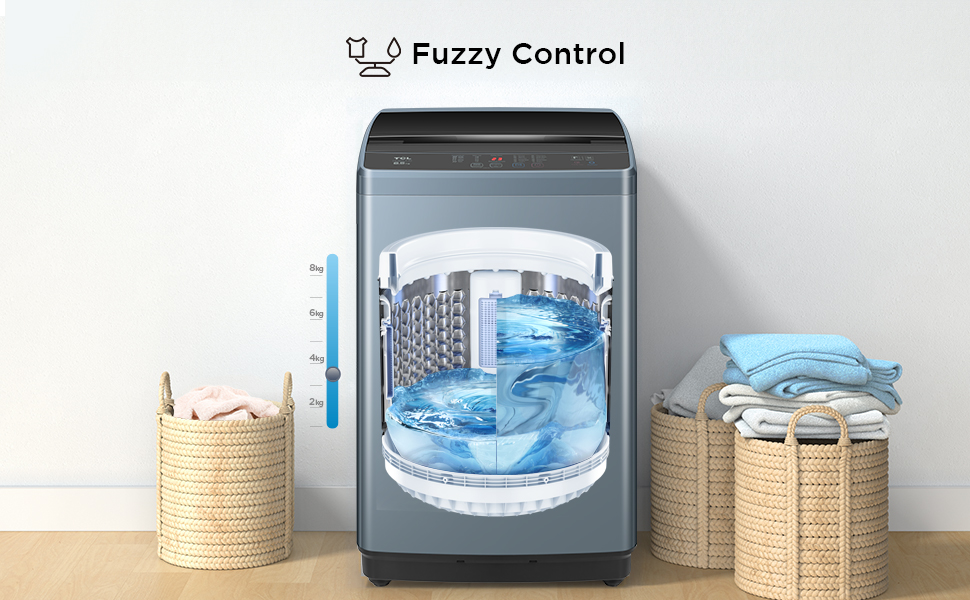
Image 3.2: Illustration of Fuzzy Logic detecting laundry weight and optimizing water level.

Image 3.3: Icon representing the Honeycomb Crystal Drum design.

Image 3.4: Icon representing the Magic Filter system.

Image 3.5: Icon representing the Memory Backup feature.

Image 3.6: Icon representing the 24 Hours Delay function.

Image 3.7: Illustration of the Child Lock feature in use.

Image 3.8: Icon representing the Drum Clean function.

Image 3.9: Icon representing the One Click Spinning feature.
4. Setup and Installation
4.1 Unpacking
Carefully remove all packaging materials. Check for any damage during transit. Ensure all included components are present: 1 Washing Machine, 1 User Manual, 1 Tapping Screw, 1 Water Inlet hose, 1 Bottom cover, 1 Drain hose component.
4.2 Location Requirements
Place the washing machine on a firm, level surface. Avoid direct sunlight or excessively humid environments. Ensure there is adequate space around the machine for ventilation and maintenance.

Image 4.1: Dimensions of the TCL TWA60-F3G washing machine (52.1D x 51.5W x 86H Centimeters).
4.3 Water Connection
Connect the water inlet hose to a cold water tap and to the water inlet valve on the back of the washing machine. Ensure connections are tight to prevent leaks. Position the drain hose into a suitable drain pipe or sink, ensuring it is securely fixed and not kinked.
4.4 Power Connection
Plug the power cord into a grounded electrical outlet. The washing machine operates on 230 Volts. Do not use extension cords or adapters.
5. Operating Instructions
5.1 Loading Laundry
Open the lid and place laundry evenly inside the drum. Do not overload the machine. For optimal results, ensure clothes can move freely.

Image 5.1: Top view of the washing machine with the lid open, showing the drum.
5.2 Adding Detergent
Add the appropriate amount of detergent and fabric softener to their respective dispensers. Refer to detergent packaging for recommended quantities based on load size and soil level.
5.3 Selecting a Wash Program
Turn on the washing machine. Use the 'Program' button on the control panel to select one of the 10 available wash programs:
- Mixed
- Quick
- Delicate
- Energy Saver
- Jeans
- Aqua Save
- Soak Wash
- Blanket
- Drum Clean
- Baby
The Fuzzy Logic feature will automatically adjust water levels and wash times based on the selected program and load.
5.4 Starting and Pausing
Press the 'Start/Pause' button to begin the selected wash cycle. Press it again to pause the cycle. To resume, press 'Start/Pause' once more.
5.5 Using Special Functions
- Delay Start: Press the 'Delay Hour' button to set a delayed start time (up to 24 hours).
- Child Lock: To activate, press and hold the designated Child Lock button (refer to control panel diagram) for a few seconds until the indicator lights up. Repeat to deactivate.
6. Maintenance
6.1 Cleaning the Magic Filter
The Magic Filter should be cleaned regularly (e.g., after every 2-3 washes) to maintain optimal performance. Remove the filter from the drum, clean out any lint and debris under running water, and then reinsert it securely.

Image 6.1: Diagram showing how the Magic Filter collects debris in the wash tub.
6.2 Drum Clean Function
Use the dedicated 'Drum Clean' program periodically (e.g., once a month) to clean the inside of the wash tub and remove detergent residue and odors. Do not add laundry during this cycle.

Image 6.2: Illustration of the Drum Clean function, showing water jets cleaning the drum interior.
6.3 Exterior Cleaning
Wipe the exterior of the washing machine with a soft, damp cloth. Avoid using abrasive cleaners or solvents.
7. Troubleshooting
If you encounter issues with your washing machine, refer to the following common problems and solutions:
| Problem | Possible Cause | Solution |
|---|---|---|
| Machine does not start | Power cord unplugged; Lid not closed properly; Water supply off. | Check power connection; Ensure lid is fully closed; Turn on water supply. |
| Water not draining | Drain hose kinked or blocked; Drain filter clogged. | Straighten drain hose; Clean drain filter (if accessible) or Magic Filter. |
| Excessive vibration | Machine not level; Load unbalanced. | Adjust leveling feet; Redistribute laundry evenly in the drum. |
| No water filling | Water tap closed; Water inlet hose kinked; Water pressure too low. | Open water tap; Straighten hose; Check household water pressure. |
If the problem persists after attempting these solutions, please contact customer support.
8. Specifications
| Feature | Detail |
|---|---|
| Model Number | TWA60-F3G |
| Capacity | 6 kg |
| Product Dimensions (D x W x H) | 52.1D x 51.5W x 86H Centimeters |
| Item Weight | 23 Kilograms |
| Operation Mode | Fully Automatic |
| Access Location | Top Load |
| Number of Standard Cycles | 10 |
| Drum Material | Stainless Steel |
| Voltage | 230 Volts |
| Special Features | Drum clean, Child lock, 24 hours delay, One key dehydration, Fuzzy logic, Memory back-up, Honeycomb crystal drum |
9. Warranty and Support
9.1 Warranty Information
This TCL TWA60-F3G washing machine comes with a 2-year comprehensive warranty on the product and a 5-year warranty on the motor from the date of purchase. Please retain your purchase receipt as proof of warranty.

Image 9.1: Visual representation of the 2-year product and 5-year motor warranty.
9.2 Customer Support
For any service, support, or warranty claims, please contact TCL customer service. You can find their contact details on the official TCL website or your warranty card.
Manufacturer: TCL home appliance(Hefei) Co. Ltd.


