Introduction
This manual provides essential information for the safe operation, maintenance, and troubleshooting of your Segway Ninebot P65A Electric KickScooter. Please read this manual thoroughly before your first ride to ensure optimal performance and safety.

The Segway Ninebot P65A Electric KickScooter, shown alongside a smartphone displaying its dedicated mobile application, which provides ride data and control options.
Safety Information
Your safety is paramount. Always wear a helmet and appropriate protective gear when riding. Adhere to local traffic laws and regulations. Avoid riding in adverse weather conditions or on slippery surfaces. Do not perform stunts or ride with more than one person.
- Always inspect the scooter before each ride, checking brakes, tires, and battery level.
- Maintain a safe distance from other vehicles and pedestrians.
- Be aware of your surroundings and potential hazards.
- Do not ride under the influence of alcohol or drugs.
Setup
Unboxing and Initial Inspection
Carefully remove the scooter from its packaging. Inspect for any visible damage. Ensure all components listed in the packing list are present.
Assembly
The Segway Ninebot P65A features a simple 3-step folding mechanism. Unfold the scooter by releasing the latch on the stem and raising the handlebar until it locks into place. Ensure all locking mechanisms are securely engaged before riding.

A person demonstrating the portability of the Segway Ninebot P65A Electric KickScooter by carrying it in its folded state.
Initial Charging
Before first use, fully charge the scooter's battery. Connect the charger to the charging port and then to a power outlet. The smart battery system provides 14 levels of protection against overcharging or discharging. A full charge typically takes approximately 4 hours.
Operating
Controls and Display
The P65A features a large screen display with intuitive controls. The display shows speed, battery life, and current riding mode. Controls include power on/off, throttle, horn, headlight/cruise control, and turning signals.
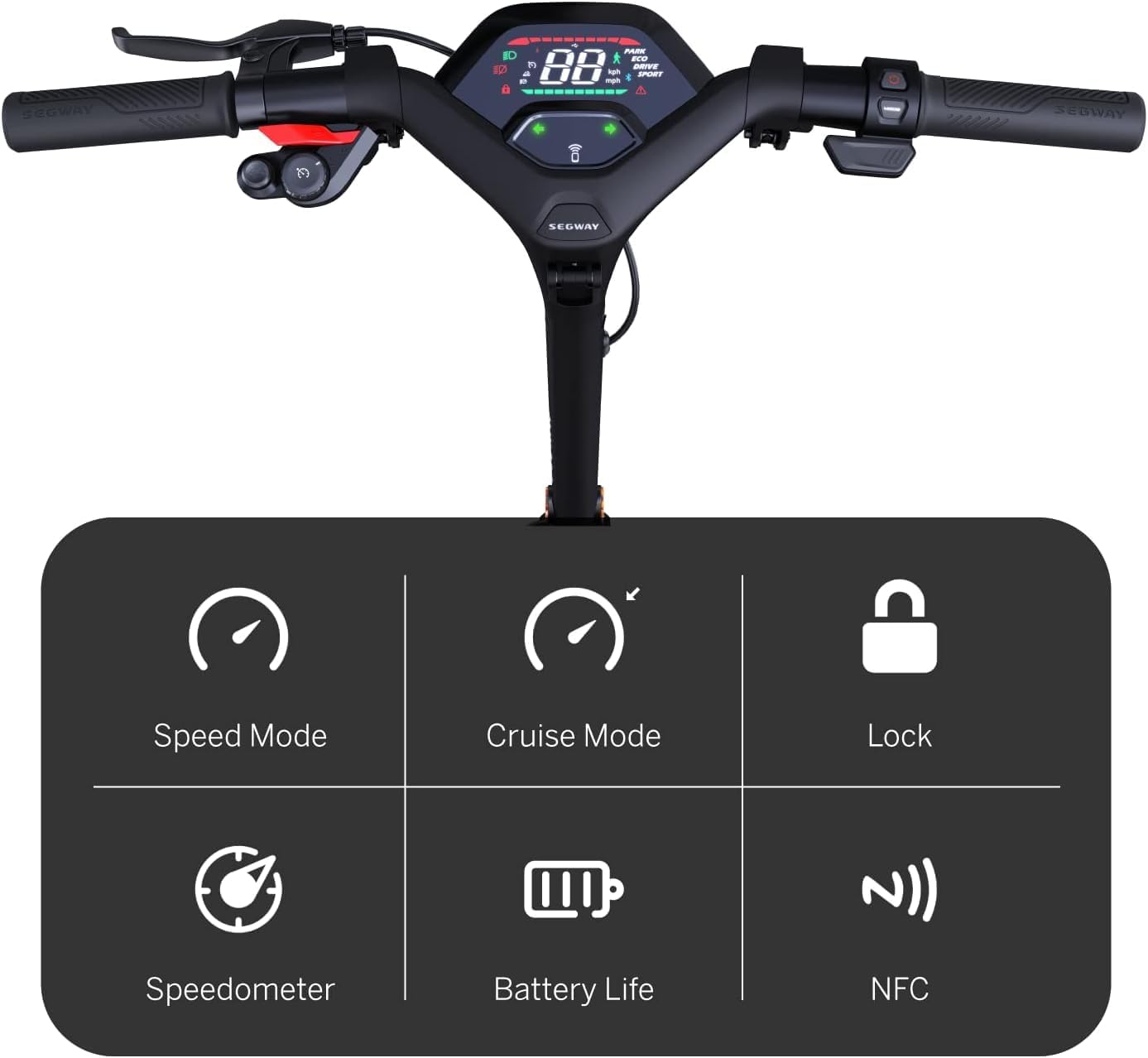
A detailed view of the Segway Ninebot P65A's handlebars and digital display, illustrating the various controls and information indicators such as speed mode, cruise mode, lock, speedometer, battery life, and NFC functionality.
Riding Modes
The scooter offers three distinct riding modes: ECO, Sport, and Drive. Select the appropriate mode based on your desired speed and range. The P65A can reach speeds of up to 40 km/h and climb slopes of up to 22%.

Side profile of the Segway Ninebot P65A Electric KickScooter, visually presenting its key performance metrics including max speed, range, motor power, maximum slope capability, and the dual disc and electric braking system.
Braking System
The P65A is equipped with a dual disc braking system combined with a self-regenerative braking system. This system charges the battery when braking, extending your ride time. Always use both brakes for effective stopping.

A close-up image focusing on the front wheel of the Segway Ninebot P65A, highlighting its 10.5-inch self-sealing tubeless tire and the robust disc brake system.
Lighting System
The comprehensive lighting system includes a front LED light, front and rear turn signals, a daytime running light, and a brake tail light, ensuring 360° protection and visibility during your journey. The system also features an alarm and RGB colors that synchronize with turn signals.

A detailed view of the comprehensive lighting system located at the front of the Segway Ninebot P65A, showcasing its bright LED headlight and integrated turn signals for enhanced visibility and safety.
Maintenance
Battery Care
To prolong battery life, avoid completely draining the battery. Charge the scooter regularly, even if not in use for extended periods. Store the scooter in a cool, dry place away from direct sunlight.
Tire Maintenance
The P65A is equipped with 10.5-inch self-sealing tubeless tires, designed to reduce the risk of punctures. Regularly check tire pressure and inspect for any signs of wear or damage.
Cleaning and Storage
Clean the scooter with a damp cloth. Do not use high-pressure water jets or corrosive cleaners. When storing, ensure the scooter is clean and dry. Store in a location with an operating temperature between -10°C and 40°C.
Troubleshooting
Common Issues
- Scooter not turning on: Check battery level. Ensure the power button is pressed correctly.
- Reduced range/speed: May indicate low tire pressure, heavy load, or riding against strong winds. Ensure battery is fully charged.
- Brakes not responsive: Inspect brake levers and cables. If issues persist, seek professional assistance.
For more complex issues or repairs, it is recommended to contact authorized Segway service centers or qualified technicians.
Specifications

The Segway Ninebot P65A Electric KickScooter displayed with its key dimensions: length (119 cm), width (63.4 cm), and height (121.4 cm).
| Feature | Specification |
|---|---|
| Model | P65A |
| Max Speed | 40 km/h |
| Max Range | 65 km |
| Max Slope | 22% |
| Wheel Size | 10.5 Inches (Self-Sealing Tubeless Tires) |
| Brake Type | Dual Disc Brake & Electric Brake |
| Charging Time | Approx. 4 hours |
| Maximum Weight Capacity | 265 Pounds (approx. 120 kg) |
| Product Dimensions (L x W x H) | 119 x 63.4 x 121.4 cm |
| Product Weight | 26.9 kg |
| Operating Temperature | -10 to 40°C |
| Material Type | Aluminium |
Warranty and Support
Segway products are covered by a manufacturer's warranty. Please refer to the warranty card included with your purchase or visit the official Segway website for detailed warranty terms and conditions. For technical support or service inquiries, please contact Segway customer service through their official channels.


