
1. Introduction
Thank you for choosing the CMF BY NOTHING 65W GaN 3-in-1 Power Charger. This compact and powerful wall charger is designed to provide efficient and safe charging for a wide range of devices, including smartphones, tablets, and laptops. Featuring GaN technology and multiple protection mechanisms, it ensures optimal performance and device safety. Please read this manual carefully before use to ensure proper operation and to maximize the lifespan of your charger.
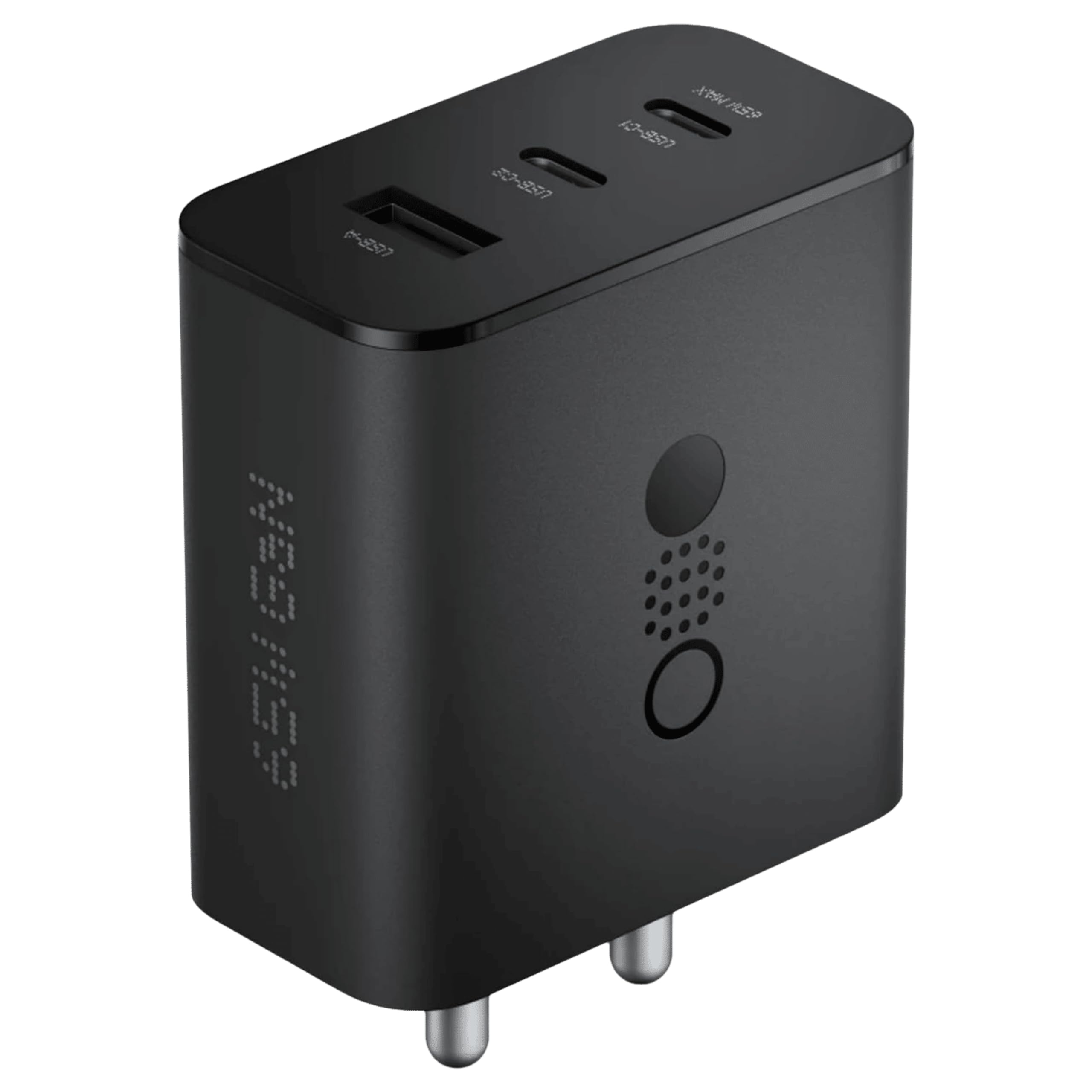
Image 1: The CMF BY NOTHING 65W GaN 3-in-1 Power Charger, showcasing its compact design and three charging ports (USB-A, USB-C1, USB-C2).
2. Product Overview
Key Features:
- 3-in-1 Compact Design: Equipped with two USB-C ports and one USB-A port to charge multiple devices simultaneously.
- 65W GaN Ultra Charging: Utilizes advanced GaN technology for fast, safe, and energy-efficient charging, capable of charging compatible smartphones up to 50% in approximately 25 minutes.
- All-Round Protection: Incorporates safeguards against short circuits, overheating, excessive currents, high voltage, low voltage, interference, and features a flame-retardant outer shell.
- Wide Compatibility: Supports major fast charging protocols including PD3.0, QC4.0+/3.0/2.0, SCP, FCP, PPS, AFC, Samsung 9V2A, DCP, and Apple 2.4A. Compatible with MFI-certified cables.
- Intelligent Power Distribution: Automatically adjusts voltage and current across ports to ensure optimal charging speed for all connected devices.
What's in the Box:
- CMF BY NOTHING 65W GaN Power Charger
- Safety information and warranty information

Image 2: An overview of the CMF BY NOTHING 65W GaN Charger highlighting its connector types, dimensions, power, compatibility, protection, special features, technology, and warranty.
3. Setup
- Unpack the Charger: Carefully remove the CMF BY NOTHING 65W GaN Power Charger from its packaging.
- Inspect for Damage: Before use, visually inspect the charger for any signs of physical damage. Do not use if damaged.
- Plug into Power Outlet: Insert the charger's two-pin plug into a standard wall power outlet (Type A - North American compatible). Ensure it is securely seated.
- Connect Your Device: Use a compatible USB charging cable (not included) to connect your device to one of the charger's ports (USB-A, USB-C1, or USB-C2).
- Begin Charging: Once connected, your device should begin charging automatically.

Image 3: A close-up view of the charger's top face, showing the USB-A, USB-C2, and USB-C1 ports, with '65W MAX' indicated for the USB-C1 port.
4. Operating Instructions
The CMF BY NOTHING 65W GaN charger is designed for simple plug-and-play operation. It automatically detects connected devices and delivers the appropriate power.
Using the Ports:
- USB-C1 (65W Max): This port is capable of delivering up to 65W of power, ideal for fast charging laptops, tablets, and high-power smartphones.
- USB-C2: This port provides power for various devices, including smartphones and smaller tablets.
- USB-A: This port is suitable for charging a wide range of USB-A compatible devices, such as older smartphones, smartwatches, and accessories.
Intelligent Power Distribution:
The charger features intelligent power distribution, which dynamically allocates power based on the number and type of devices connected. This ensures that each device receives optimal charging without overloading the charger.

Image 4: A table illustrating the intelligent power distribution of the charger across single, dual, and triple port usage scenarios for USB-A, USB-C2, and USB-C1 ports.
For example, if only USB-C1 is used, it can deliver up to 65W. If USB-C1 and USB-C2 are used simultaneously, power will be distributed, such as 45W for USB-C1 and 20W for USB-C2. Refer to the power distribution table in Image 4 for detailed scenarios.

Image 5: An illustration showing the CMF BY NOTHING 65W GaN charger can charge a Nothing Phone (2) up to 50% in 25 minutes.
5. Compatibility
The CMF BY NOTHING 65W GaN charger offers broad compatibility with a wide range of electronic devices due to its support for multiple fast charging protocols.
Supported Protocols:
- PD3.0 (Power Delivery 3.0)
- QC4.0+/3.0/2.0 (Quick Charge)
- SCP (SuperCharge Protocol)
- FCP (Fast Charge Protocol)
- PPS (Programmable Power Supply)
- AFC (Adaptive Fast Charging)
- Samsung 9V2A
- DCP (Dedicated Charging Port)
- Apple 2.4A
Compatible Devices Include:
- Smartphones: iPhone 12/13/14/15 series, Galaxy S10/S9/Note 10, Galaxy S20/S21/S22/S23 series, Nothing Phone (1)/(2), and other Type-C phones.
- Tablets: iPad Pro and other Type-C tablets.
- Laptops: Type-C compatible laptops requiring up to 65W.
- Other: Earbuds, smartwatches, and various USB-powered accessories.

Image 6: Visual representation of the charger's universal compatibility with various devices including earbuds, smartwatches, smartphones, tablets, and laptops.
6. Safety and Protection
Your safety and the protection of your devices are paramount. The CMF BY NOTHING 65W GaN charger is built with multiple layers of protection to ensure a secure charging experience.
Protection Features:
- Excessive Power Protection: Prevents damage from power surges.
- Interference Protection: Minimizes electromagnetic interference.
- High Voltage Protection: Guards against damage from excessive input voltage.
- Low Voltage Protection: Ensures stable operation even with low input voltage.
- Short Circuit Protection: Automatically cuts power in case of a short circuit.
- Overheating Protection: Monitors internal temperature and reduces power or shuts down if it exceeds safe limits.
- Excessive Current Protection: Prevents damage from overcurrent conditions.
- Flame Retardant Protection: The charger's outer shell is made from flame-retardant materials for added safety.

Image 7: Icons representing the various all-round protection features of the charger, including excessive power, interference, high voltage, low voltage, short circuits, overheating, excessive current, and flame retardant protection.
7. Specifications
| Feature | Specification |
|---|---|
| Brand | CMF BY NOTHING |
| Model Number | C286 |
| Color | Dark Grey |
| Material | Plastic |
| Total USB Ports | 3 (2x USB-C, 1x USB-A) |
| Wattage | 65W (Max) |
| Input Voltage | 240 Volts |
| Output Current | 3 Amps (Max) |
| Output Voltage | 21.67 Volts (Max) |
| Power Source | Corded Electric |
| Power Plug Type | Type A - 2 pin (North American) |
| Special Features | Short Circuit Protection, Over Power Protection, Over Temperature Protection |
| Specification Met | MFI |

Image 8: The CMF BY NOTHING 65W GaN Charger with its dimensions indicated: 5.66 cm height, 5.50 cm width, and 3.00 cm depth.
8. Maintenance
To ensure the longevity and optimal performance of your CMF BY NOTHING 65W GaN Power Charger, follow these simple maintenance guidelines:
- Cleaning: Disconnect the charger from the power outlet before cleaning. Use a soft, dry cloth to wipe the exterior. Do not use liquid cleaners, aerosols, or solvents.
- Storage: Store the charger in a cool, dry place away from direct sunlight and extreme temperatures.
- Handling: Avoid dropping the charger or subjecting it to strong impacts. Do not attempt to disassemble or modify the charger.
- Cable Care: Always unplug cables by gripping the plug, not the cable itself, to prevent damage to the cable and ports.
9. Troubleshooting
If you encounter any issues with your CMF BY NOTHING 65W GaN Power Charger, please refer to the following common troubleshooting steps:
| Problem | Possible Cause | Solution |
|---|---|---|
| Device not charging | Charger not properly plugged in; faulty cable; device not compatible; charger in protection mode. | Ensure charger is firmly plugged into the wall. Try a different cable. Verify device compatibility. Unplug all devices and the charger from the wall for 30 seconds, then reconnect. |
| Slow charging | Cable not fast-charge compatible; multiple devices connected; device not supporting fast charging. | Use a high-quality, fast-charge compatible cable. Refer to the Intelligent Power Distribution section (Section 4) if multiple devices are connected. Ensure your device supports the fast charging protocol. |
| Charger feels warm/hot | Normal operation under heavy load; charger in overheating protection. | It is normal for the charger to become warm during operation, especially when charging multiple devices or high-power devices. If it becomes excessively hot or stops charging, disconnect it immediately and allow it to cool down. Ensure adequate ventilation around the charger. |
| Intermittent charging | Loose connection; faulty cable; power fluctuation. | Ensure all connections are secure. Try a different cable. Test the charger in a different power outlet. |
10. Warranty and Support
The CMF BY NOTHING 65W GaN Power Charger comes with a 6-month warranty from the date of purchase, covering manufacturing defects. Please refer to the included safety and warranty information leaflet for full details on warranty terms and conditions.
For technical support, warranty claims, or further assistance, please contact CMF BY NOTHING customer service through their official website or the retailer where the product was purchased. Keep your proof of purchase for warranty validation.
11. Product Video
Video 1: An official product video titled "CMF by Nothing Buds Pro and 65w GaN Charger" by FishBee Productions, demonstrating the features and usage of the CMF BY NOTHING 65W GaN Charger alongside other CMF products.