
Introduction
Thank you for choosing the KADAMS K5078 Digital Waterproof Shower Timer Clock. This versatile device is designed to assist with time management in various environments, including bathrooms, kitchens, and offices. It features a clear digital display, countdown and count-up timer functions, temperature monitoring, and multiple convenient placement options.
Product Features
- Efficient Time Management: Helps manage daily schedules effectively with clear time display.
- Water Resistant: IPX5 rating ensures superior water and spray resistance, ideal for high-humidity areas.
- Customizable Timer: Offers both countdown and count-up modes with a maximum setting of 99 minutes, adjustable to the second.
- Temperature Display: Monitors temperatures within the 32°F-122°F (0°C-50°C) range.
- Multiple Placement Options: Can be stood on a table, attached with suction cups, mounted magnetically, or hung using the included ring.
- Battery Powered: Operates on 2 AAA batteries (not included).
Package Contents
- KADAMS K5078 Digital Waterproof Shower Timer Clock
- Suction Cups (pre-installed or included)
- User Manual
Setup
1. Battery Installation
- Locate the battery compartment on the back of the device.
- Open the battery cover.
- Insert 2 AAA batteries, ensuring correct polarity (+/-).
- Close the battery cover securely.
2. Mounting Options
The KADAMS K5078 offers several flexible mounting solutions:
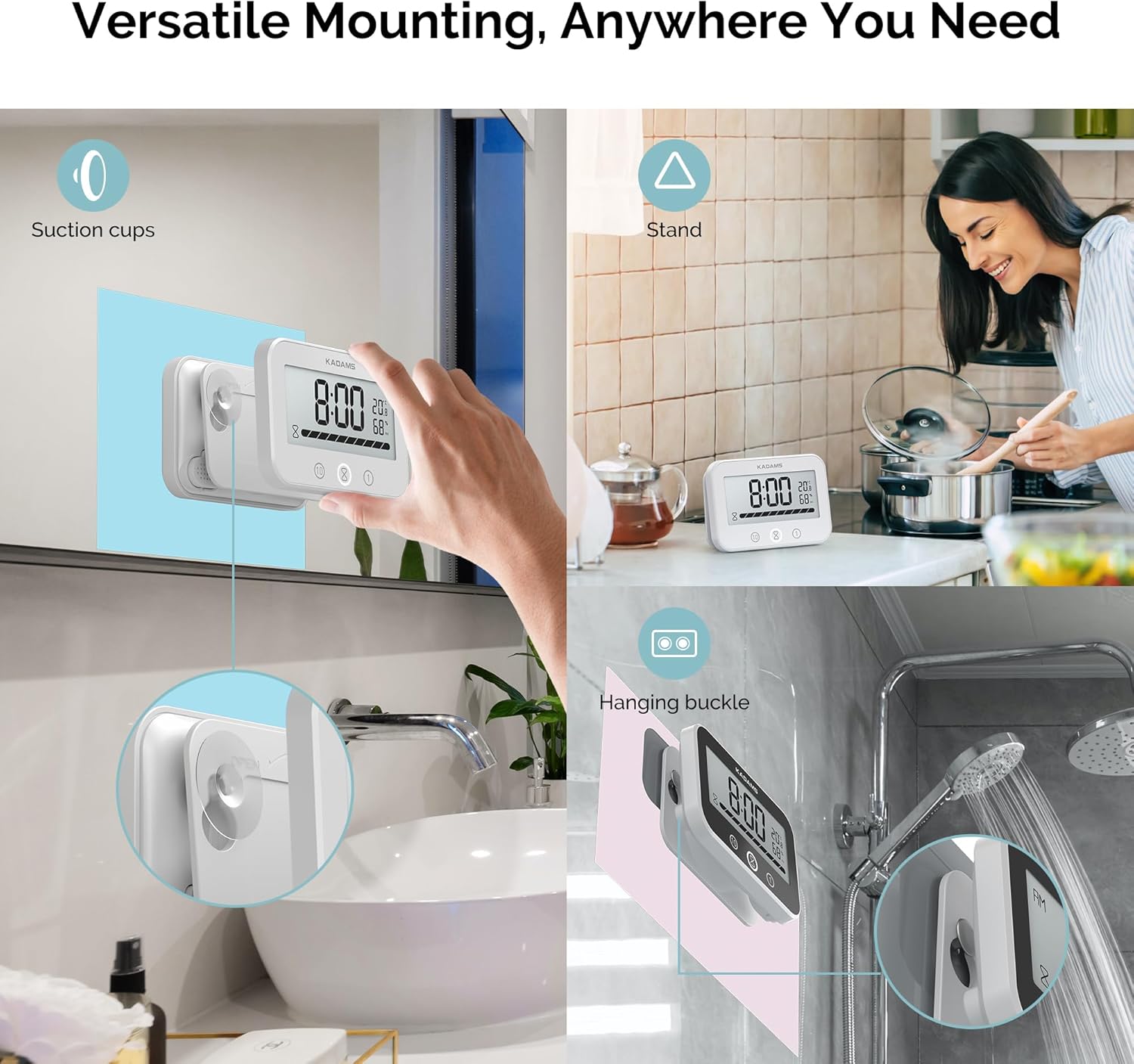
- Suction Cup: Press the clock firmly onto a clean, smooth, non-porous surface (e.g., tile, glass, mirror) until the suction cups adhere.
- Magnetic Back: Attach the clock to any metallic surface, such as a refrigerator or metal cabinet.
- Stand: Utilize the integrated kickstand to place the clock on a flat surface like a countertop or desk.
- Hanging: Use the built-in hanging hole or ring to suspend the clock from a hook or nail.
Operating Instructions
1. Setting the Time

- Press and hold the 'SET' button until the hour digits begin to flash.
- Use the '+' or '-' buttons to adjust the hour.
- Press 'SET' again to move to minute adjustment.
- Use the '+' or '-' buttons to adjust the minutes.
- Press 'SET' one more time to confirm and exit time setting mode.
2. Setting Temperature Unit (Fahrenheit/Celsius) and Time Format (12/24 Hour)
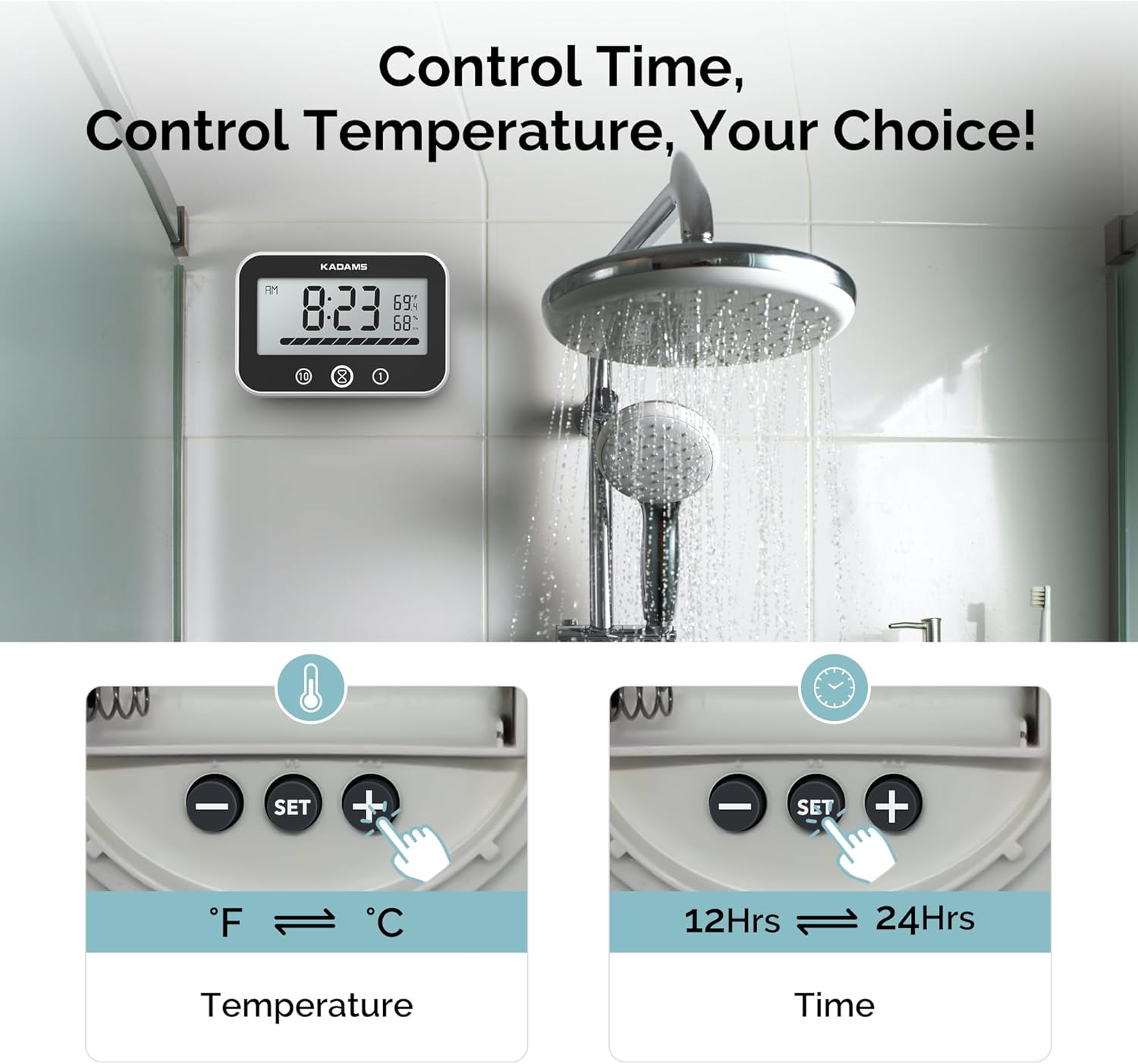
These settings are typically adjusted using buttons located on the back of the device, often near the battery compartment:
- To switch between Fahrenheit (°F) and Celsius (°C), press the dedicated temperature unit button (often labeled with °F/°C or a thermometer icon).
- To switch between 12-hour and 24-hour time formats, press the dedicated time format button (often labeled with 12/24H or a clock icon).
3. Using the Countdown Timer


- Press the '10' button to add 10 minutes to the timer.
- Press the '1' button to add 1 minute to the timer.
- Press the 'hourglass' button to add 10 seconds to the timer.
- To start the countdown, press the 'START/STOP' button (often the 'hourglass' button after setting time).
- To pause or resume the timer, press the 'START/STOP' button again.
- To clear the timer, press and hold the 'CLEAR' button (often the '10' button or a dedicated button).
4. Using the Count-up Timer
- Ensure the timer is cleared (set to 00:00).
- Press the 'START/STOP' button to begin counting up from zero.
- To pause or resume the count-up, press the 'START/STOP' button again.
- To reset the count-up timer to zero, press and hold the 'CLEAR' button.
Maintenance
- Cleaning: Wipe the device with a soft, damp cloth. Do not use abrasive cleaners or immerse the device in water.
- Battery Replacement: Replace batteries when the display dims or functions become erratic. Ensure to use 2 new AAA batteries.
- Storage: If storing for an extended period, remove the batteries to prevent leakage.
Troubleshooting
| Problem | Possible Cause | Solution |
|---|---|---|
| Display is dim or blank. | Low or dead batteries. | Replace with 2 new AAA batteries. |
| Timer not functioning correctly. | Incorrect button sequence or settings. | Refer to 'Operating Instructions' for correct usage. Try resetting the device by removing and reinserting batteries. |
| Suction cups not adhering. | Surface is dirty, wet, or porous. | Clean and dry the surface thoroughly. Ensure the surface is smooth and non-porous. Lightly moisten suction cups before applying. |
| Temperature reading is inaccurate. | Device exposed to extreme temperatures or direct sunlight. | Move the device to a stable environment. Allow time for the sensor to adjust. |
Specifications
- Brand: KADAMS
- Model: K5078
- Display Type: Digital
- Special Features: Silent Clock, Timer, Waterproof (IPX5)
- Product Dimensions: 4.65" W x 3.15" H x 1.18" D (11.8 cm W x 8.0 cm H x 3.0 cm D)
- Power Source: 2 x AAA batteries (not included)
- Temperature Range: 32°F-122°F (0°C-50°C)
- Mounting Type: Wall Mount (Suction Cup, Magnetic), Tabletop (Stand), Hanging
- Item Weight: 6 ounces
Warranty
This KADAMS product comes with a limited warranty. For specific details regarding warranty coverage and terms, please refer to the product packaging or contact KADAMS customer support.
Support
For further assistance, product information, or to explore other KADAMS products, please visit the official KADAMS store:
