
Introduction
This manual provides detailed instructions for the installation, operation, and maintenance of the Generic 12V 0.8A DC PWM 2-3 Wire Fan Temperature Control Speed Controller. This module is designed to regulate the speed of 12V DC fans based on temperature, helping to reduce noise and optimize cooling in chassis computers and other applications. Please read this manual thoroughly before use to ensure proper functionality and safety.
Product Overview
The fan speed controller module integrates temperature sensing and PWM (Pulse Width Modulation) technology to dynamically adjust fan speed. It supports both 2-wire and 3-wire 12V DC fans up to 0.8A. The module includes an NTC thermistor for accurate temperature measurement.
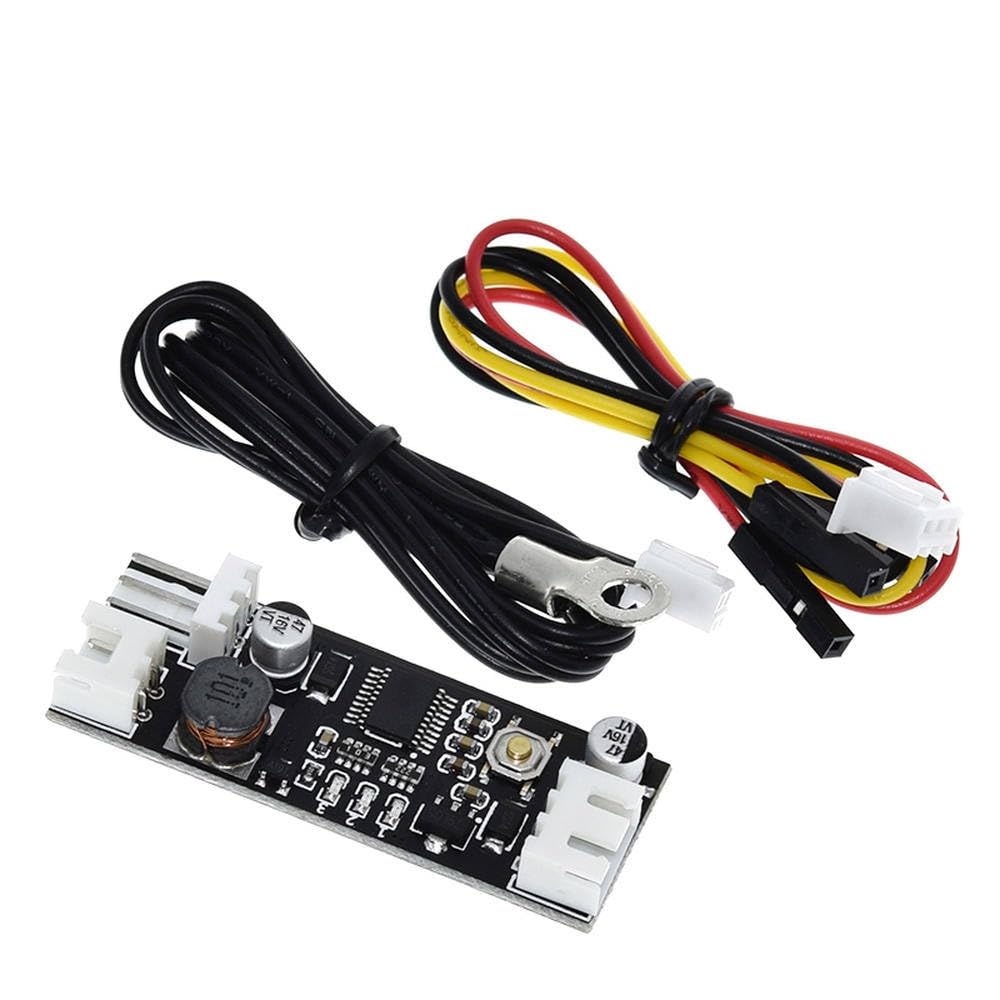
Figure 1: The fan speed controller module, including the main circuit board, an NTC thermistor cable, and a fan connection cable.

Figure 2: Physical dimensions of the controller module, measuring approximately 49.0mm in length and 18.0mm in width. The total weight with wires is 13.65g.

Figure 3: Rear view of the circuit board, showing clearly labeled connection points for FAN, NTC thermistor, and DC12V power input. It also indicates a maximum current of 0.8A.
Specifications
| Feature | Value |
|---|---|
| Brand | Generic |
| Model Number | LilE_MDz_2457 |
| Input Voltage | 12V DC |
| Max Fan Current | 0.8A |
| Supported Fan Types | 2-wire, 3-wire (PWM control for 3-wire fans) |
| Temperature Sensor | NTC B 50K 3950 Thermistor |
| Material | Copper (PCB traces/components) |
| Dimensions | Approx. 49.0mm x 18.0mm |
| Weight (with wire) | 13.65g |
Setup and Installation
- Power Connection: Connect a 12V DC power source to the "DC12V" input terminals on the module. Ensure correct polarity (+ and -).
- Fan Connection: Connect your 12V DC fan (2-wire or 3-wire) to the "FAN" output terminals. For 3-wire fans, the module will control speed via PWM. For 2-wire fans, speed control will be voltage-based. Ensure the fan's current draw does not exceed 0.8A.
- NTC Thermistor Connection: Connect the provided NTC thermistor cable to the "NTC" input terminals. Position the thermistor sensor in the area where temperature monitoring is desired (e.g., near a CPU, GPU, or inside a chassis).
- Mounting: Secure the module in a suitable location within your system, ensuring it is not exposed to excessive heat or moisture.

Figure 4: Top and bottom views of the controller board, illustrating component placement and clearly labeled connection points for power, fan, and NTC thermistor.
Operating Instructions
Once connected, the module will automatically begin to control the fan speed based on the temperature detected by the NTC thermistor. The fan speed will increase as the temperature rises and decrease as it falls, aiming to maintain an optimal temperature while minimizing noise.
Adjusting Operating Modes/Thresholds:
The module features a small push-button switch (see Figure 5) which is typically used to cycle through different operating modes or adjust temperature thresholds. Specific functions may vary, but common modes include:
- Automatic Mode: Fan speed adjusts continuously based on temperature.
- Manual Mode: Allows setting a fixed fan speed, overriding temperature control.
- Threshold Adjustment: Pressing the button may allow you to set the temperature at which the fan starts to increase speed, or the maximum temperature target.
Refer to the specific product documentation or experiment with short presses and long presses of the button to understand its full functionality. Typically, a short press cycles modes, while a long press enters a setting adjustment mode.

Figure 5: A close-up view of the controller board, highlighting the small push-button switch used for mode selection and setting adjustments.
Maintenance
- Keep Clean: Ensure the module and its components are free from dust and debris. Use a soft, dry brush or compressed air for cleaning.
- Check Connections: Periodically inspect all wire connections to ensure they are secure and free from corrosion.
- Environmental Conditions: Operate the module within its specified temperature and humidity ranges to prevent damage.
- Sensor Placement: Ensure the NTC thermistor remains securely positioned in the desired temperature monitoring area for accurate readings.
Troubleshooting
- Fan Not Spinning:
- Check 12V DC power supply connection and ensure it is active.
- Verify fan connection to the module.
- Ensure the fan itself is functional by testing it directly with a 12V power source.
- Check if the temperature is below the fan's start-up threshold.
- Fan Always at Full Speed:
- Check NTC thermistor connection. A disconnected or faulty thermistor may cause the module to default to full speed.
- Ensure the thermistor is correctly placed and not detecting an abnormally high temperature.
- Verify the operating mode; it might be set to a manual full-speed mode.
- Fan Not Responding to Temperature Changes:
- Confirm the NTC thermistor is properly connected and positioned to sense temperature changes.
- Ensure the module is in an automatic temperature control mode.
- Module Not Powering On:
- Double-check the 12V DC power input for correct voltage and polarity.
- Inspect for any visible damage to the module.
Warranty and Support
Information regarding specific warranty terms or dedicated customer support for this Generic product is not provided in the available documentation. For any issues or inquiries, please refer to the retailer or point of purchase.