
1. Introduction
This manual provides detailed instructions for the OLEVS Men's Quartz Watch Model 2875JD. Please read this guide carefully to understand the watch's functions, proper operation, and maintenance procedures. This watch features a precise quartz movement, chronograph functionality, a date display, and is designed for daily wear with 30-meter water resistance.
2. Product Overview
The OLEVS Model 2875JD is a multifunctional quartz watch. It includes a main time display, three sub-dials for chronograph functions and a 24-hour indicator, and a date window. The watch case is made of stainless steel, and it features a comfortable silicone strap.

This image displays the OLEVS Model 2875JD watch, highlighting its gold-toned dial, black silicone strap, and overall design.
The watch controls are located on the right side of the case. These include the crown for time and date adjustments, and two pushers for operating the chronograph.
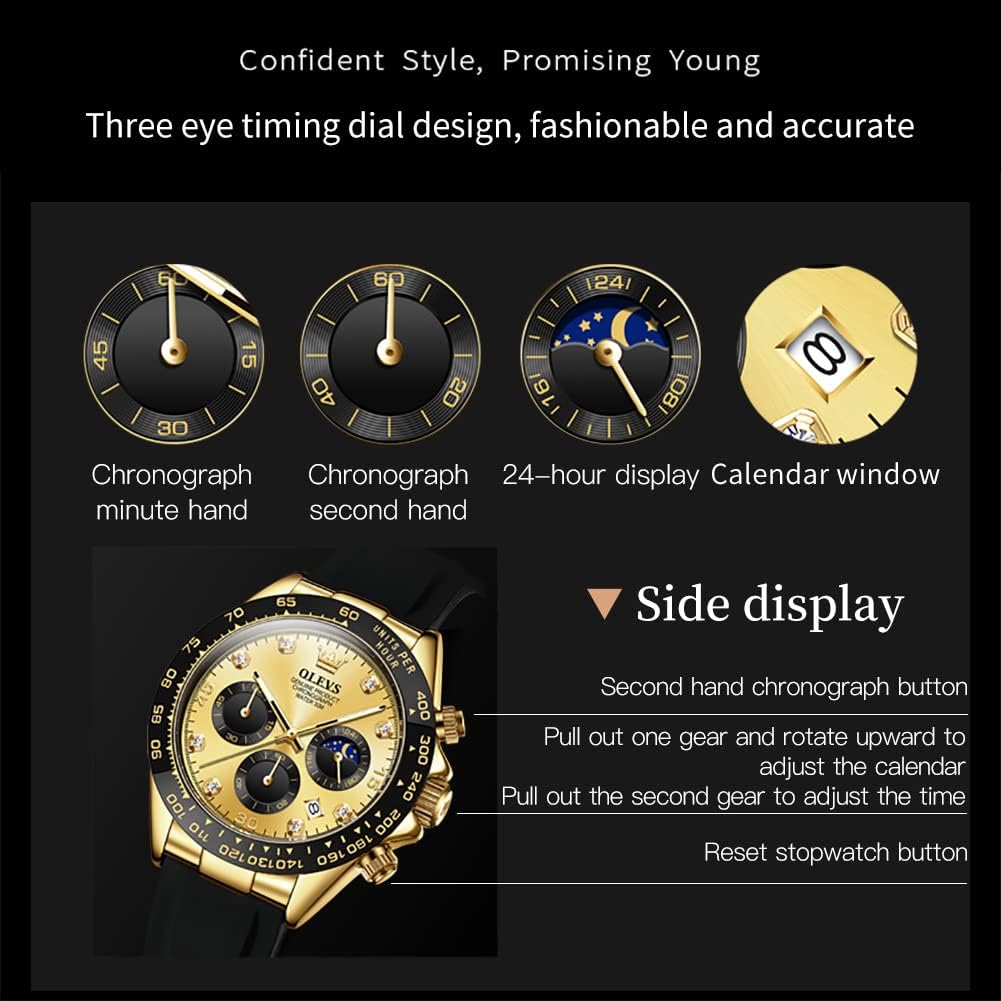
This diagram illustrates the watch's features: the chronograph minute hand (at 9 o'clock), chronograph second hand (at 6 o'clock), 24-hour display (at 3 o'clock), and the date window (at 4 o'clock). It also indicates the functions of the crown and pushers.
3. Setup
Your OLEVS watch comes with a pre-installed battery. Follow these steps to set the time and date.
3.1 Setting the Time
- Pull the crown out to position 2 (the outermost position).
- Rotate the crown to move the hour and minute hands until the correct time is displayed. Ensure the 24-hour sub-dial aligns with AM/PM if applicable.
- Push the crown back to position 0 (normal operating position) to start the watch.
3.2 Setting the Date
- Pull the crown out to position 1 (the middle position).
- Rotate the crown to adjust the date in the date window. Avoid setting the date between 9 PM and 3 AM, as this can interfere with the automatic date change mechanism.
- Push the crown back to position 0.
4. Operating
4.1 Using the Chronograph
The chronograph function allows you to measure elapsed time.
- Press the top pusher (A) to start the chronograph. The chronograph second hand will begin to move.
- Press the top pusher (A) again to stop the chronograph. The elapsed time will be displayed by the chronograph second and minute hands.
- Press the bottom pusher (B) to reset the chronograph hands to their zero positions.
4.2 Understanding the 24-Hour Display
The sub-dial at the 3 o'clock position indicates the time in a 24-hour format, synchronizing with the main hour hand. This helps distinguish between AM and PM.
5. Maintenance
5.1 Water Resistance Guidelines
This watch is rated for 30 meters (3 ATM) of water resistance. This means it is suitable for daily use, such as splashes, rain, or brief immersion in water. It is not suitable for showering, swimming, diving, or any water sports where the watch might be subjected to high water pressure or prolonged immersion.
Always ensure the crown is fully pushed in before any contact with water.

This image shows the OLEVS watch amidst water splashes, demonstrating its 30-meter water resistance suitable for everyday exposure to water.
5.2 Cleaning and Care
To maintain the appearance and longevity of your watch:
- Wipe the watch case and strap regularly with a soft, dry cloth.
- For the silicone strap, you can use a mild soap solution and rinse thoroughly, then dry completely.
- Avoid exposing the watch to extreme temperatures, strong magnetic fields, or harsh chemicals.
5.3 Battery Replacement
The watch is powered by one LR44 battery. When the watch stops or runs erratically, it may be time for a battery replacement. It is recommended to have the battery replaced by a qualified watch technician to ensure proper sealing and water resistance.
6. Troubleshooting
6.1 Watch Not Running
- Check if the crown is fully pushed in to position 0. If not, push it in.
- The battery may be depleted. Consider professional battery replacement.
6.2 Incorrect Time/Date
- Refer to the 'Setting the Time' and 'Setting the Date' sections to re-adjust.
- Ensure the crown is fully pushed in after adjustment.
6.3 Chronograph Not Resetting to Zero
- Press the bottom pusher (B) firmly to reset. If it still doesn't reset, a professional adjustment may be needed.
7. Specifications
Detailed specifications for the OLEVS Men's Quartz Watch Model 2875JD:

This image provides a summary of the watch's physical and material specifications, including dimensions, movement type, and water resistance.
| Feature | Specification |
|---|---|
| Brand | OLEVS |
| Model Number | 2875JD |
| Movement | Quartz |
| Display Type | Analog |
| Case Material | Stainless Steel |
| Case Diameter | 41.5 mm |
| Case Thickness | 11.5 mm |
| Strap Material | Silicone |
| Strap Width | 20 mm |
| Strap Length | 24 cm |
| Mirror Material | High hardness coated glass |
| Water Resistance | 30 meters (3 ATM) |
| Special Features | Chronograph, Date Display, 24-Hour Display |
| Power Source | Battery Powered (1 x LR44 included) |
| Product Weight | 74 grams |
8. Warranty and Support
Your OLEVS watch is covered by a limited warranty against manufacturing defects. For warranty claims, technical support, or service inquiries, please contact your retailer or the official OLEVS customer service. Keep your purchase receipt as proof of purchase.


