
Introduction
This manual provides detailed instructions for the installation, operation, and maintenance of your CUSP CV-1018 10-inch Linux System Car Stereo Radio. Please read this manual thoroughly before use to ensure proper functionality and safety. Keep this manual for future reference.

Image 1: CUSP CV-1018 10-inch Car Stereo Main Unit with its touch screen interface displaying various application icons.
1. Installation and Setup
1.1 Package Contents
Verify that all components are present in the package:
- CUSP CV-1018 Head Unit
- Power Cable
- A/V Cable
- 4PIN USB Cable
- Rear Camera (if included in package)
- Installation Tools (e.g., pry tool, mounting brackets)
1.2 Product Dimensions and Rear Case Connections
The head unit features a 10.1-inch display. The approximate overall dimensions are 9.92 inches (252 mm) width by 5.78 inches (146.5 mm) height. The rear case dimensions are approximately 7 inches (178 mm) width by 3.93 inches (100 mm) height and 1.9 inches (50 mm) depth. Refer to the product packaging or included diagram for precise measurements and wiring connections.
Key connections on the rear include:
- Power input
- Audio/Video input/output RCA jacks
- USB ports (including dedicated ports for wired CarPlay/Android Auto)
- Antenna input
- Rear camera input
Caution:
- Professional installation is recommended.
- Ensure the vehicle's power is disconnected before installation.
- Connect all wires securely to prevent short circuits or malfunctions.
2. Operating Instructions
2.1 Basic Functions
The unit features a 10.1-inch IPS HD capacitive touchscreen (1024x600 resolution) for primary control. Physical buttons are located on the left side for common functions such as Power, Menu, Back, Volume Up/Down, and Reset.

Image 2: The 2.5D capacitive touch screen is designed for durability and clarity, shown with icons representing resistance to scratches, heat, and water.
2.2 Wired CarPlay and Android Auto
Connect your iPhone or Android phone to the designated USB port on the head unit using a compatible USB cable to activate Wired CarPlay or Android Auto.
- CarPlay: Access navigation apps (e.g., Waze, Apple Maps), music streaming (e.g., Spotify), and Siri voice commands directly from the head unit's screen. Your iPhone will charge quickly while connected.
- Android Auto: Utilize Google Maps, YouTube Music, and Google Assistant for calls and messages. Your Android phone will charge quickly while connected.
Both CarPlay and Android Auto support running navigation concurrently with FM/AM radio or USB music playback.

Image 3: Demonstrates the wired CarPlay and Android Auto interfaces on the CUSP CV-1018, showing a connected iPhone and Android phone.
2.3 Bluetooth Functionality
Pair your mobile phone via Bluetooth for hands-free calling and audio streaming.
- Hands-Free Calls: Make and receive calls directly from the head unit. The system supports phonebook access, call history, and caller ID display.
- Bluetooth Music: Stream audio from your paired device to the car stereo. Supports A2DP profile.

Image 4: Shows the Bluetooth phone dialer and FM radio interface, along with music playback via USB.
2.4 FM/AM Radio
Access local radio stations using the built-in FM/AM tuner. Scan for stations and save your favorites.

Image 5: Depicts the radio mode interface with frequency display and preset options.
2.5 Media Playback
The unit supports playback of various media files (MKV, MP4, 3GP, AVI, etc.) from USB storage devices. It also features a built-in Digital Sound Processor (DSP) for customizable audio settings.

Image 6: Example of video playback on the CUSP CV-1018 screen, showing a movie scene.

Image 7: The built-in DSP allows for detailed audio equalization and sound adjustments across various frequency bands.
2.6 Steering Wheel Control
If your vehicle supports steering wheel controls, you can configure them to operate the head unit's functions (e.g., volume, track skip, mode selection). Refer to your vehicle's manual for compatibility and the head unit's settings for programming.
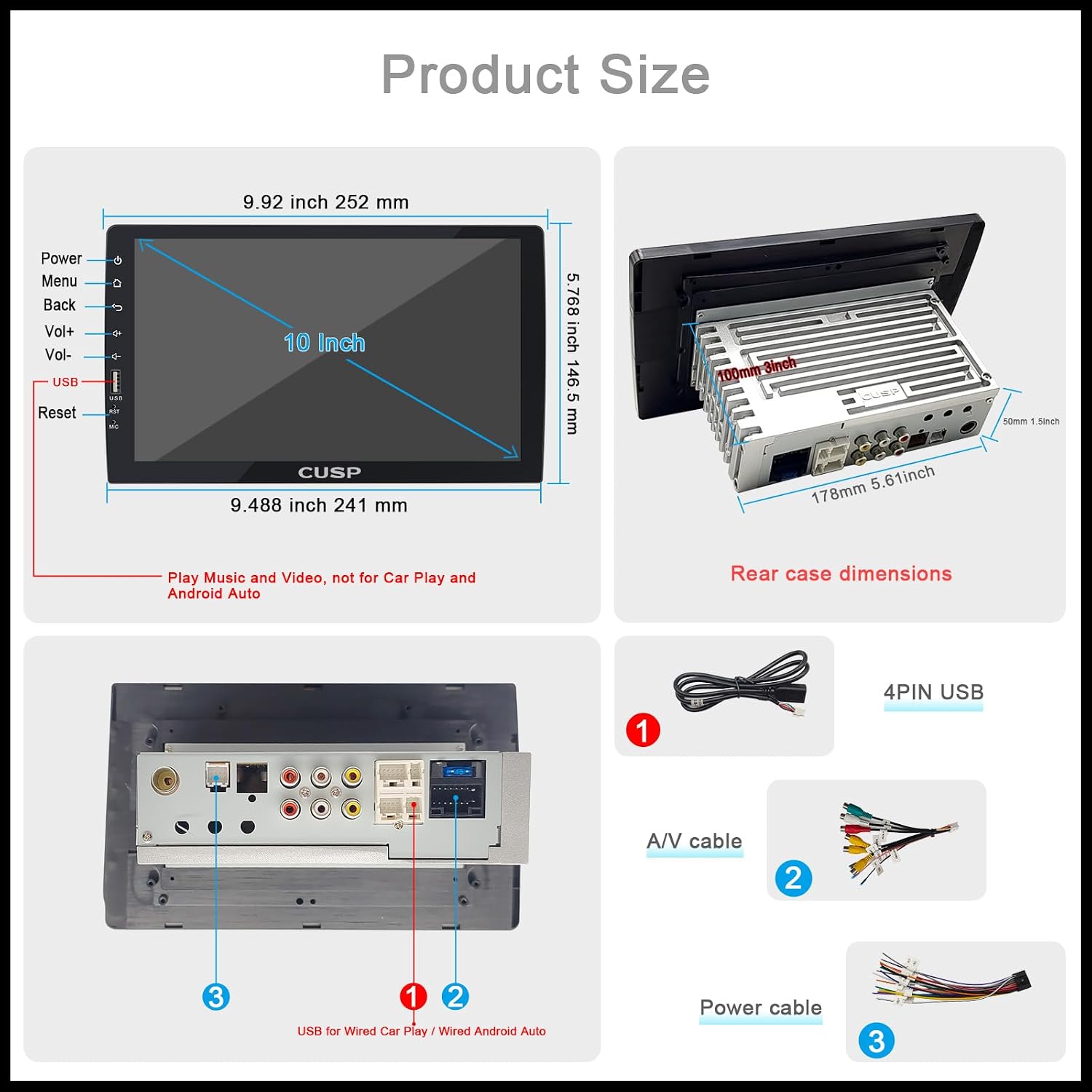
Image 8: Illustrates the steering wheel control setup screen on the CUSP CV-1018, showing how to map vehicle buttons to stereo functions.
2.7 Rear Camera Function
When a compatible rear camera is connected and the vehicle is shifted into reverse, the head unit automatically displays the rear view on the screen, enhancing safety during parking and reversing maneuvers. The display includes dynamic guidelines.

Image 9: Rear camera view displayed on the CUSP CV-1018 screen with parking guidelines, showing a clear view behind the vehicle.
3. Maintenance
3.1 Screen Cleaning
To clean the touchscreen, power off the unit and gently wipe the screen with a soft, lint-free cloth. For stubborn smudges, slightly dampen the cloth with water or a screen-safe cleaner. Avoid abrasive materials or harsh chemicals.
3.2 General Care
- Keep the unit free from dust and debris.
- Avoid exposing the unit to extreme temperatures or direct sunlight for prolonged periods.
- Ensure all connections remain secure.
4. Troubleshooting
| Problem | Possible Cause | Solution |
|---|---|---|
| No Power | Incorrect wiring; Blown fuse; Vehicle battery issue. | Check power connections; Inspect vehicle fuses; Verify battery voltage. |
| No Sound | Volume too low; Mute activated; Speaker wiring issue. | Increase volume; Deactivate mute; Check speaker connections. |
| CarPlay/Android Auto not connecting | Faulty USB cable; Phone not compatible; USB port issue. | Use a certified USB cable; Ensure phone OS is up-to-date; Try a different USB port. |
| Touchscreen unresponsive | System freeze; Software glitch. | Perform a soft reset (use the reset button); Power cycle the unit. |
5. Specifications
| Feature | Detail |
|---|---|
| Model Number | CV-1018 |
| Operating System | Linux System |
| Display Size | 10.1 Inches |
| Display Resolution | 1024 x 600 Pixels (HD IPS) |
| Connectivity | Bluetooth, USB |
| Special Features | Touchscreen, Wired CarPlay, Wired Android Auto, FM/AM Radio, Rear Camera Support, Built-in DSP |
| Audio Output Mode | Stereo |
| Mounting Type | Dashboard Mount (Double Din) |
| Item Weight | 4.25 pounds |
| Product Dimensions | 10.1 x 10.1 x 100 inches |
Note: The listed product dimension of "10.1 x 10.1 x 100 inches" may contain a typographical error. Please refer to the physical product or detailed installation guide for accurate dimensions.
6. Warranty Information
The CUSP CV-1018 Car Stereo Radio comes with a 1-year manufacturer's warranty from the date of purchase. This warranty covers defects in materials and workmanship under normal use. It does not cover damage caused by improper installation, accident, misuse, abuse, neglect, or unauthorized modification.
For warranty claims or service, please retain your proof of purchase and contact CUSP customer support.
7. Customer Support
If you encounter any issues or have questions regarding your CUSP CV-1018 Car Stereo Radio that are not addressed in this manual, please contact CUSP customer support. Refer to the product packaging or the official CUSP website for contact details.
When contacting support, please have your model number (CV-1018) and purchase information readily available.