
Introduction
Welcome to the Spade & Co Health Smartwatch 3 user manual. This guide provides comprehensive instructions for setting up, operating, and maintaining your new smartwatch. The Spade & Co Health Smartwatch 3 is designed to help you monitor your health, track fitness activities, and stay connected with features like Bluetooth calling and Alexa integration. Please read this manual thoroughly to ensure proper use and to maximize the benefits of your device.
Safety Information
- Consult your physician before starting any new exercise program or if you have pre-existing health conditions.
- This device is not a medical device and is not intended to diagnose, treat, cure, or prevent any disease.
- Keep the device and its accessories out of reach of children and pets.
- Avoid exposing the device to extreme temperatures, direct sunlight, or strong magnetic fields.
- Use only Spade & Co approved chargers and accessories.
- Do not attempt to disassemble or modify the device.
Package Contents
Ensure all items are present in the package:
- Spade & Co Health Smartwatch 3
- Charging Cable
- User Manual (this document)
- Blood Oxygen Sensor (integrated)
Product Overview
Familiarize yourself with the components of your Spade & Co Health Smartwatch 3.
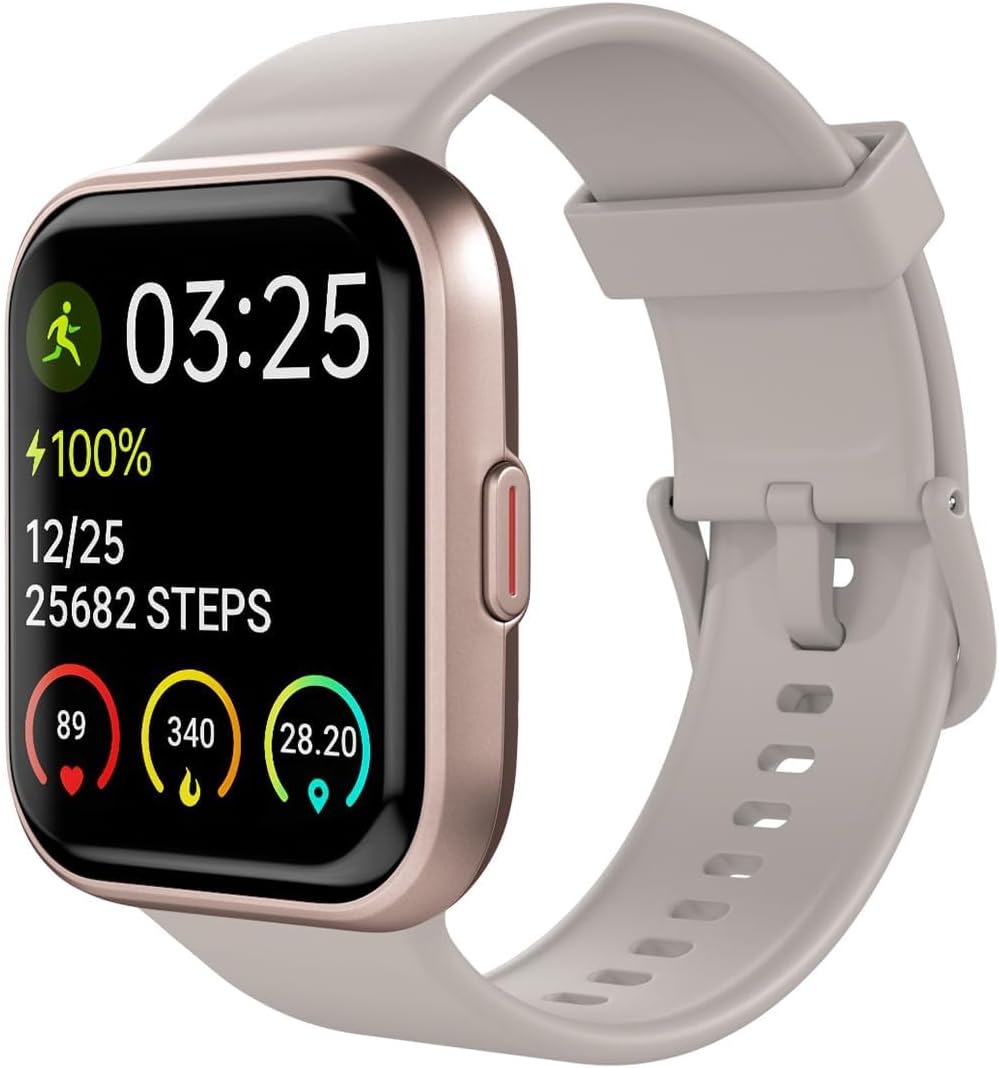
Figure 1: Front view of the Spade & Co Health Smartwatch 3, showing the display with time, battery level, step count, heart rate, calorie burn, and blood oxygen saturation. The watch features a rose gold casing and a light-colored band.
- Touchscreen Display: Navigate through menus and view information.
- Side Button: Power on/off, return to home screen, access menu.
- Heart Rate/SpO2 Sensor: Located on the back of the watch for health monitoring.
- Charging Contacts: On the back of the watch for connecting the charging cable.
Setup
1. Charging the Device
Before first use, fully charge your smartwatch. Connect the charging cable to the charging contacts on the back of the watch and plug the USB end into a power adapter (not included) or a computer's USB port. The watch display will indicate charging status.
2. Downloading the App
To unlock all features and synchronize data, download the Spade & Co companion app from the Apple App Store (for iPhone) or Google Play Store (for Android). Search for "Spade & Co Health" or refer to the QR code in the quick start guide.
3. Pairing with Your Smartphone
- Ensure Bluetooth is enabled on your smartphone.
- Open the Spade & Co app and create an account or log in.
- Follow the in-app instructions to add a new device. The app will search for your smartwatch.
- Select "Health Smartwatch 3" from the list of available devices.
- Confirm the pairing request on both your phone and the smartwatch.
Operating Instructions
Basic Navigation
- Swipe Up/Down: Scroll through notifications or quick settings.
- Swipe Left/Right: Access different widgets like heart rate, activity data, or weather.
- Tap: Select an item or open an application.
- Press Side Button: Return to the watch face or access the main menu.
Monitoring Health Metrics
The smartwatch continuously monitors various health parameters. View detailed data in the Spade & Co app.

Figure 2: The smartwatch screen showing multiple health metrics: ambient noise level, blood oxygen saturation (SpO2), 24/7 heart rate tracking, sleep stages, stress management score, and current heart rate. These features provide a comprehensive overview of your well-being.
- Heart Rate: Provides real-time heart rate monitoring.
- Blood Oxygen (SpO2): Measures blood oxygen levels.
- Sleep Monitor: Tracks sleep patterns, including sleep stages and duration.
- Stress Management: Offers insights into stress levels.
Using Fitness Tracking
Select from over 20 workout modes to track your activities accurately.

Figure 3: The smartwatch screen showing various workout modes, including running, cycling, and swimming. A person is depicted running in an outdoor setting, illustrating the device's use during physical activity.
- Navigate to the "Workout" or "Activity" section on your watch.
- Select your desired activity (e.g., running, walking, cycling).
- Start the activity. The watch will record duration, distance, calories burned, and heart rate.
- End the activity when finished. Data will sync to the app.
Bluetooth Calling
Make and receive calls directly from your wrist when connected to your smartphone.

Figure 4: The smartwatch displaying an incoming call from "Shawn," with options to answer or decline. A smartphone is shown next to the watch, also on a call screen, demonstrating the Bluetooth call feature.
- Ensure your watch is paired and Bluetooth calling is enabled in the app settings.
- To make a call, access the dialer or contacts on your watch.
- To answer an incoming call, tap the green answer icon on the watch screen.
Alexa Integration
Utilize Alexa Built-in for voice commands and information retrieval.

Figure 5: A close-up of a person's wrist wearing the smartwatch, with a speech bubble indicating a voice command: "Alexa, is it going to rain today?". The watch screen shows the Alexa listening interface, confirming the built-in Alexa functionality.
- Ensure your watch is connected to the app and Alexa is configured.
- Activate Alexa on your watch (usually by pressing and holding a button or swiping to the Alexa screen).
- Speak your command or question clearly.
Water Resistance
The Spade & Co Health Smartwatch 3 is designed to be waterproof, allowing use during swimming or in the shower.

Figure 6: The smartwatch submerged in water with droplets splashing, highlighting its waterproof design. The screen remains active, displaying time, battery, and activity data, indicating functionality even when wet.
While waterproof, avoid prolonged exposure to hot water or steam, and do not press buttons underwater to prevent water ingress.
Maintenance
Cleaning the Smartwatch
Regularly clean your smartwatch to ensure optimal performance and hygiene.
- Wipe the screen and body with a soft, lint-free cloth.
- For stubborn marks, slightly dampen the cloth with water. Avoid harsh chemicals.
- Clean the sensors on the back of the watch to ensure accurate readings.
- Rinse the watch band with fresh water after workouts or swimming, then dry thoroughly.
Battery Care
- Charge the device regularly, avoiding complete discharge for extended periods.
- Store the device in a cool, dry place if not used for a long time.
Software Updates
Periodically check the Spade & Co app for available software updates. Updates can improve performance, add new features, and fix bugs. Ensure your watch is sufficiently charged before starting an update.
Troubleshooting
If you encounter issues with your smartwatch, refer to the following common solutions:
| Problem | Solution |
|---|---|
| Device not turning on | Ensure the device is fully charged. Connect it to the charger for at least 30 minutes. |
| Cannot pair with smartphone |
|
| Inaccurate health readings |
|
| Notifications not appearing |
|
| Short battery life |
|
Specifications
| Feature | Detail |
|---|---|
| Model Number | Health Smartwatch 3 |
| Brand | Spade & Co |
| Connectivity | Bluetooth |
| Operating System | Android (compatible with iPhone & Android) |
| Special Features | Sleep Monitor, Heart Rate Monitor, Blood Oxygen Sensor, Alexa Built-in, Bluetooth Call |
| Water Resistance | Waterproof (suitable for swimming) |
| Battery Type | Lithium Polymer |
| Item Weight | 5 ounces |
| Dimensions | 5.39 x 3.31 x 1.26 inches (Package) |
Warranty and Support
Warranty Information
Spade & Co products are designed for durability and performance. For specific warranty details, please refer to the warranty card included with your product or visit the official Spade & Co website. Please note that protection plans are available for purchase separately to extend coverage beyond the standard warranty period.
- Return Policy: Typically 30 days from purchase for refunds/replacements.
- Protection Plans: 2-Year and 3-Year protection plans are available for extended coverage.
Customer Support
If you require further assistance or have questions not covered in this manual, please contact Spade & Co customer support. Contact information can typically be found on the Spade & Co official website or on your product packaging.