
Introduction
This manual provides detailed instructions for the proper setup, operation, and maintenance of your Klein Electronics Valor-USBc Remote Speaker Microphone. Designed for professional communication, this device offers robust performance and compatibility with a wide range of Push-to-Talk (PTT) applications and mobile devices.
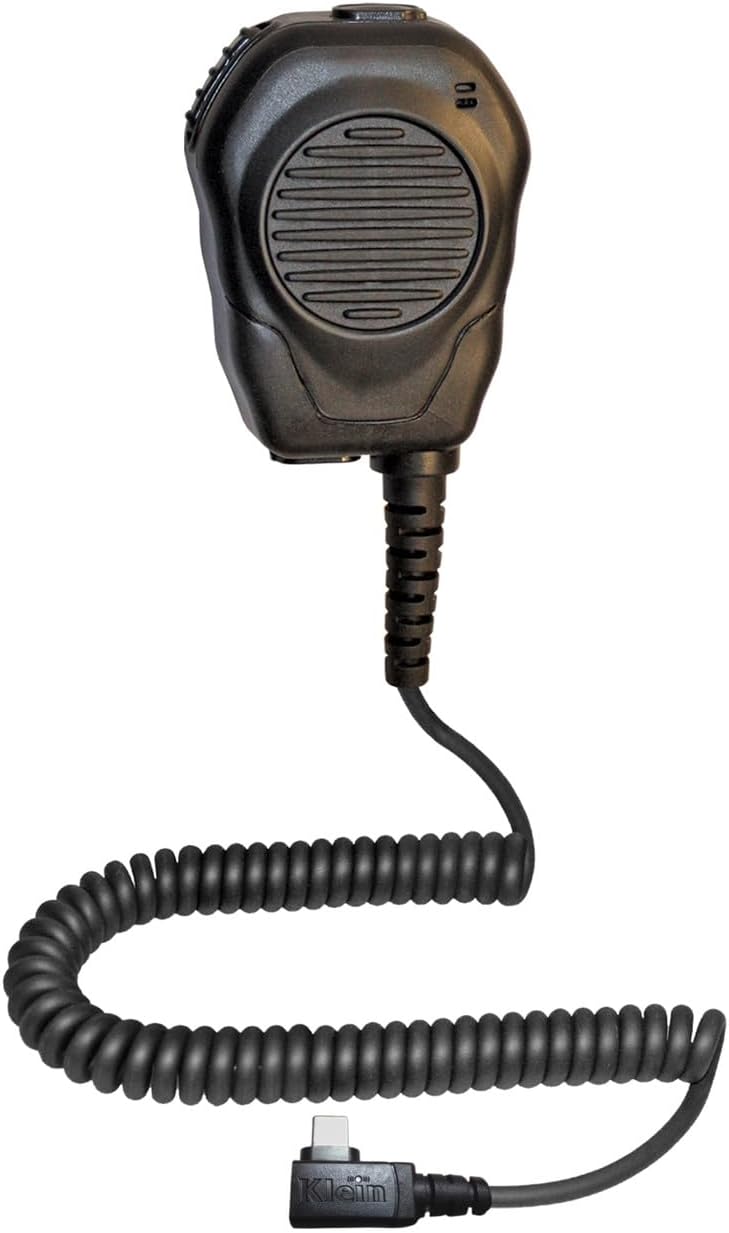
Image: The Klein Electronics Valor-USBc Remote Speaker Microphone, featuring a coiled cable and USB-C connector.
Setup
- Connecting to Your Device: Insert the USB-C connector of the Valor-USBc microphone into the USB-C port of your compatible smartphone or tablet. The device is designed with a Smart IC and does not require external battery power.
- Attaching the Clip: The Valor-USBc features a detachable clip system. The standard rugged swivel clothing clip can be attached to uniforms or MOLLE vests. Optional vehicle mounting clips (sold separately) are available for secure in-vehicle use.
- Earpiece Connection: The microphone includes two 3.5mm locking earpiece ports (one at the top, one at the bottom) for connecting a listen-only earpiece. Ensure the earpiece is securely plugged in.

Image: Close-up view of the USB-C connector, two 3.5mm audio ports with locking cams, and the swivel clip mechanism.
Video: An overview of the Valor USB-C Remote Shoulder Mic, demonstrating its features and connectivity.
Operating Instructions
The Valor-USBc microphone is designed for intuitive use with Push-to-Talk (PTT) applications.
- Front-Facing PTT Button: The large speaker grille on the front of the microphone also functions as a PTT button. Press this area to activate the PTT function within your compatible application. This is particularly useful when wearing gloves.
- Tactile Thumb PTT Button: A dedicated tactile PTT button is located on the side of the microphone, offering an alternative activation point. This button features two internal switches for enhanced reliability.
- Earpiece Usage: If a listen-only earpiece is connected to either 3.5mm port, audio will be routed through the earpiece instead of the integrated speaker.
- App Compatibility: The Valor-USBc is compatible with various PTT applications. Refer to the compatibility chart below for specific application support on Android and iOS devices.

Image: A detailed diagram labeling the microphone, front-facing PTT button and speaker, side PTT, rubber overmold, and locking earpiece ports.
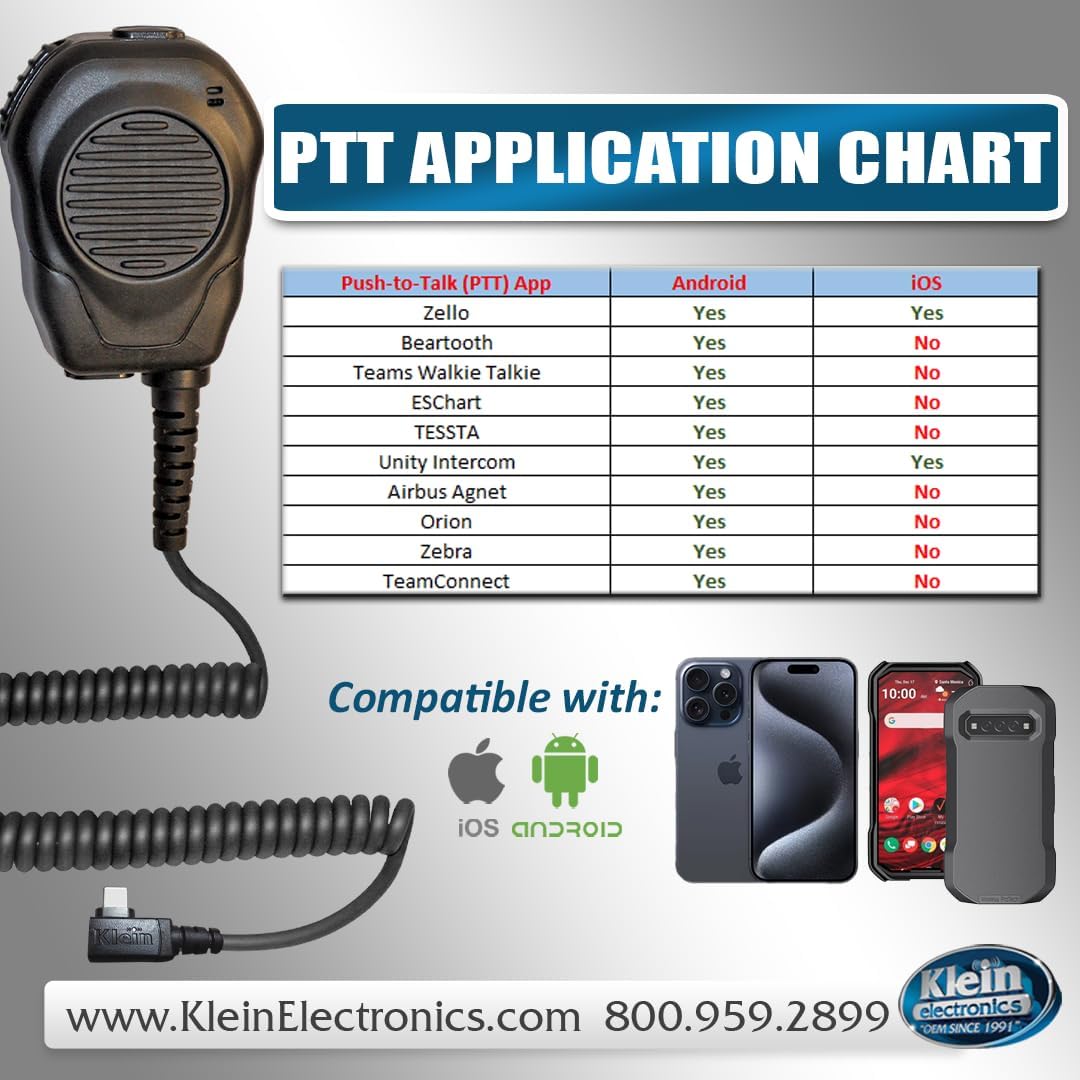
Image: A chart detailing compatibility of various Push-to-Talk applications (e.g., Zello, ESChat, TeamConnect) with Android and iOS devices when using the Valor-USBc microphone.
Maintenance
To ensure the longevity and optimal performance of your Valor-USBc microphone, follow these maintenance guidelines:
- Cleaning: Wipe the microphone's exterior with a soft, damp cloth. Avoid using harsh chemicals or abrasive cleaners.
- Cable Care: The coiled cable is reinforced with Kevlar for durability. Avoid excessive pulling or sharp bending of the cable, especially at connection points, to prevent strain.
- Storage: Store the microphone in a dry, cool place away from direct sunlight and extreme temperatures when not in use.
Troubleshooting
- No Audio/Microphone Function:
- Ensure the USB-C connector is fully inserted into your device.
- Verify that your PTT application is correctly configured to use the external microphone.
- Check your device's audio settings to ensure the external audio device is recognized.
- Intermittent Connection:
- If using a thick phone case, a USB-C extender may be required to ensure a secure connection.
- Inspect the USB-C port on your device and the microphone for any debris or damage.
- Earpiece Not Working:
- Ensure the earpiece is fully inserted into one of the 3.5mm locking ports.
- Test the earpiece with another audio source to confirm it is functional.
Specifications
| Category | Specification |
|---|---|
| Microphone Technology | Silicone with RF protection |
| Microphone Direction | Omni Directional |
| Microphone Sensitivity | -45 to -39 dB at 1kHz |
| Microphone Output Impedance | 300 Max Ω at 1kHz |
| Microphone Signal/Noise Ratio | 55-60+ dB at 1kHz |
| Speaker Impedance | 8Ω for 2-Way / 4Ω for amplified units |
| Speaker Power | NOM. 1.5W (MAX 2W) / 3W (MAX 5W) |
| Speaker Diameter | 45MM |
| Operating Temperature | -40°C to +100°C |
| Connectivity | Wired, USB Type-C |
| Compatible Devices | Android, iPhone (USB-C models) |
| Material | Rubber |
| Item Weight | 1 pounds |
| Product Dimensions (L x W x H) | 3 x 3 x 1 inches |

Image: A visual representation of the microphone and speaker specifications, including technical details for both components.
Warranty
The Klein Electronics Valor-USBc Remote Speaker Microphone comes with a 3-Year Warranty. For specific terms and conditions, please refer to the warranty information provided at the time of purchase or contact Klein Electronics customer support.
Support
For further assistance, technical support, or warranty claims, please contact Klein Electronics directly:
- Website: www.kleinelectronics.com
- Phone: 800-959-2899