
1. Introduction
The Milly Mally Optimus Plus is a versatile 4-in-1 children's bike designed to adapt to your child's developmental stages, starting from 12 months of age. It transforms between a tricycle without pedals, a tricycle with pedals, a balance bike, and includes an optional parent handle for assistance. This manual provides detailed instructions for assembly, operation, and maintenance to ensure safe and enjoyable use.
2. Safety Information
Always prioritize your child's safety. Please read and follow all safety guidelines:
- Adult Supervision: This product must always be used under direct adult supervision.
- Protective Gear: Ensure your child wears appropriate protective gear, including a helmet, knee pads, and elbow pads, especially when riding outdoors.
- Pre-Ride Check: Before each use, inspect the bike for any loose parts, damaged components, or sharp edges. Ensure all screws and bolts are securely tightened.
- Weight Limit: Do not exceed the maximum recommended weight for the product (refer to specifications).
- Steering Limiter: The integrated steering limiter helps prevent sharp turns and reduces the risk of tipping over.
- Appropriate Surfaces: Use the bike on flat, even, and dry surfaces. Avoid uneven terrain, steep slopes, stairs, or public roads.
- Away from Hazards: Keep the bike away from water, fire, and other potential hazards.
3. Product Components
Familiarize yourself with the main components of your Milly Mally Optimus Plus bike:
- Main Frame
- Front Wheel with detachable Pedals
- Rear Wheels (two, attached to foldable fork)
- Adjustable Seat
- Handlebars
- Parent Handle (adjustable, detachable)
4. Setup and Assembly
The Milly Mally Optimus Plus requires assembly. Follow these steps carefully for each configuration.
4.1. Basic Tricycle (Without Pedals)
- Attach the front wheel to the main frame. Ensure it clicks securely into place.
- Insert the handlebars into the designated slot on the front fork. Tighten the locking mechanism.
- Attach the seat post to the frame. Adjust the seat height to allow your child's feet to comfortably touch the ground.
- Ensure the rear wheels are in the tricycle position (fork extended).

Image: The Milly Mally Optimus Plus configured as a tricycle without pedals, ready for a child to push with their feet.
4.2. Tricycle with Pedals
- Starting from the basic tricycle configuration, locate the pedals.
- Attach the pedals to the front wheel's designated slots. Push firmly until they click into place.
- Alternatively, the pedals can be clipped onto the handlebar grips for storage when not in use.

Image: The Milly Mally Optimus Plus configured as a tricycle with pedals attached to the front wheel.
4.3. Tricycle with Parent Handle
- Attach the parent handle to the rear of the main frame. Ensure it is securely fastened.
- Adjust the height of the parent handle to one of the 4 available levels for comfortable pushing.

Image: The Milly Mally Optimus Plus in tricycle mode with the adjustable parent handle extended for adult control.
4.4. Balance Bike Configuration
- Remove the pedals from the front wheel if they are attached.
- Fold the rear fork inwards to bring the two rear wheels together, effectively creating a single rear wheel for balance bike mode. Ensure the locking mechanism is engaged.
- Adjust the seat height so your child can comfortably place their entire foot on the ground.

Image: A visual representation of the Milly Mally Optimus Plus transforming between its four different configurations.
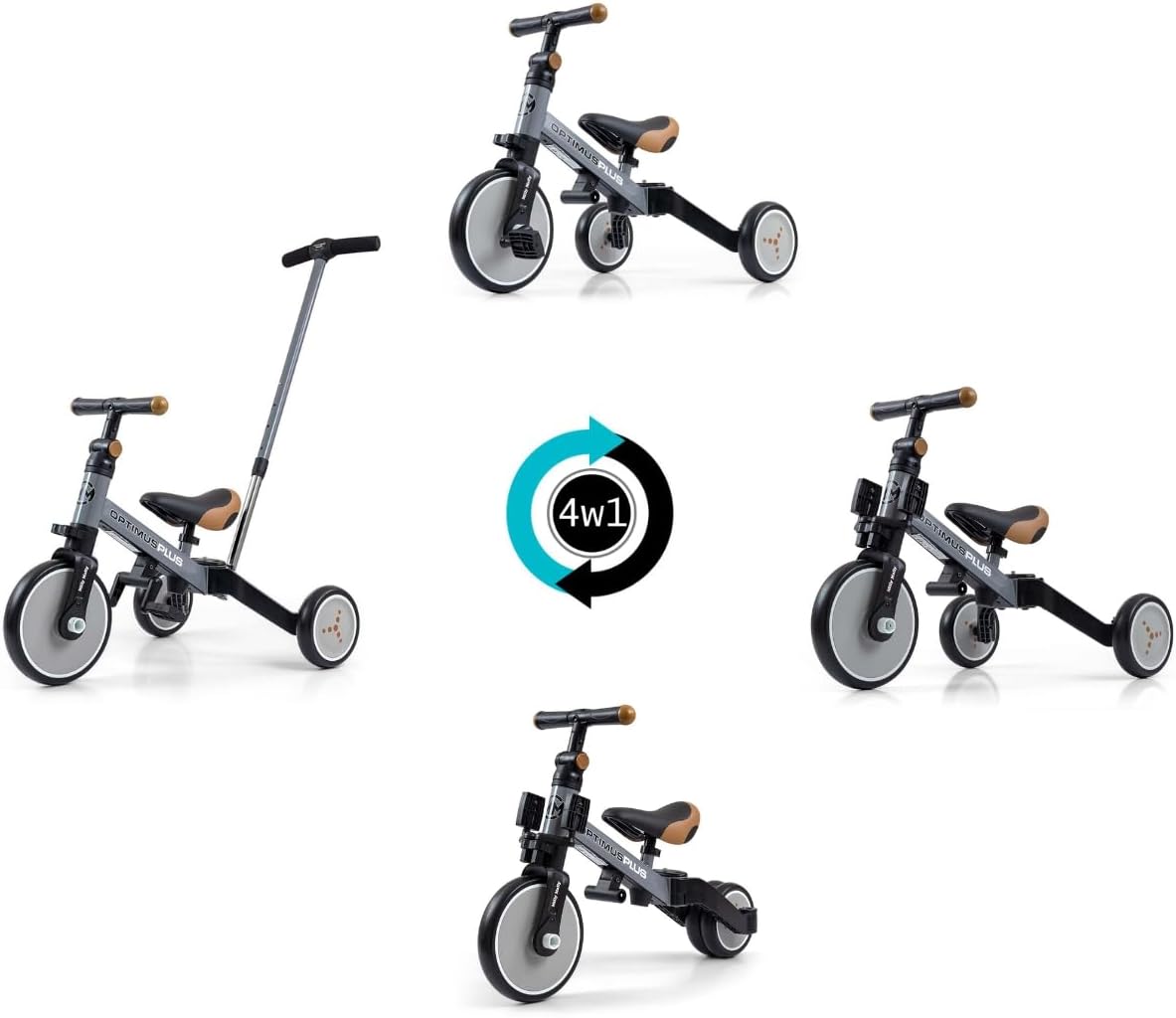
Image: A close-up view of the rear wheel assembly, highlighting the foldable fork mechanism for conversion to balance bike mode.
4.5. Adjustments
- Seat Height: Loosen the seat clamp, adjust the seat to the desired height, and securely tighten the clamp.
- Handlebar Tilt: Adjust the handlebar angle by loosening the appropriate mechanism, setting the desired tilt, and re-tightening.
- Parent Handle Height: Press the adjustment buttons on the parent handle and slide it to one of the 4 height settings.
5. Operating Instructions
Guide your child through the use of the Milly Mally Optimus Plus in its various modes:
- Tricycle (without pedals): Encourage your child to push off the ground with their feet to propel the bike forward, developing balance and coordination.
- Tricycle (with pedals): Once your child is comfortable with steering and balance, introduce the pedals. Teach them to push the pedals in a circular motion to move forward.
- Parent Handle: Use the parent handle to assist your child, especially when they are tired, learning to steer, or navigating challenging terrain. The handle provides control over the bike's direction.
- Balance Bike: In balance bike mode, your child will learn to balance by pushing off the ground with their feet. This prepares them for riding a traditional two-wheel bicycle without the need for training wheels.
- Steering Limiter: The steering limiter prevents the handlebars from turning too sharply, which helps maintain stability and prevents accidental falls.
6. Maintenance
Regular maintenance ensures the longevity and safe operation of your Milly Mally Optimus Plus bike.
- Cleaning: Clean the bike regularly with a damp cloth and mild soap. Avoid harsh chemicals or abrasive cleaners. Dry thoroughly after cleaning.
- Inspection: Periodically check all screws, bolts, and fasteners to ensure they are tight. Inspect the frame, wheels, and seat for any signs of wear, damage, or cracks.
- Tires: The foam tires require minimal maintenance but should be checked for any cuts or damage.
- Storage: Store the bike in a dry, cool place, away from direct sunlight and extreme temperatures, to prevent material degradation.
7. Troubleshooting
If you encounter any issues with your Milly Mally Optimus Plus, refer to the following common problems and solutions:
- Bike feels unstable: Ensure all assembly steps were followed correctly and all fasteners are securely tightened. Check that the rear fork is properly locked in the desired position (tricycle or balance bike).
- Difficulty steering: Verify that the handlebars are correctly installed and the steering limiter is functioning as intended. Ensure no debris is obstructing the steering mechanism.
- Pedals not turning smoothly: Check that the pedals are fully engaged in the front wheel and free from any obstructions.
- Parent handle is loose: Ensure the parent handle is fully inserted and the height adjustment mechanism is securely locked.
If the problem persists, please contact customer support.
8. Specifications
| Feature | Detail |
|---|---|
| Model Number | 5307 |
| Product Dimensions (L x W x H) | 66 x 48.5 x 51 cm |
| Item Weight | 3.8 kg |
| Recommended Age | From 12 months |
| Frame Material | Steel |
| Tire Type | Foam tires |
| Seat | Comfortable molded seat, adjustable height |
| Rear Fork | Foldable (for balance bike conversion) |
| Parent Handle | Adjustable to 4 levels, detachable |
| Pedals | Detachable, can be clipped onto handlebar grips |
| Steering | Steering limiter, handlebar tilt adjustment |
| Assembly Required | Yes |

Image: Detailed dimensions of the Milly Mally Optimus Plus in various configurations.
9. Warranty Information
For specific warranty details regarding your Milly Mally Optimus Plus 4-in-1 Children's Bike, please refer to the retailer's purchase terms or the official Milly Mally manufacturer's website. Keep your proof of purchase for any warranty claims.
10. Support
If you require further assistance, have questions about assembly, operation, or need to inquire about spare parts, please contact Milly Mally customer service through their official website or the retailer from whom you purchased the product. Provide your model number (Optimus Plus 5307) and a detailed description of your inquiry for efficient support.