
AJAZZ AK820PRO
AJAZZ AK820PRO Gaming Keyboard User Manual
Model: AK820PRO
Introduction
The AJAZZ AK820PRO is a versatile 75% layout mechanical keyboard designed for gaming and productivity. It features multiple connectivity options, a customizable TFT screen, programmable RGB backlighting, and hot-swappable switches for a personalized typing experience.

Image: Front view of the AJAZZ AK820PRO Gaming Keyboard, showcasing its compact 75% layout with grey, white, and yellow keycaps.
Product Features
- 75% Layout: Compact design retaining essential keys.
- Multi-mode Connectivity: Supports Bluetooth 5.0, 2.4GHz wireless, and wired (Type-C) connections.
- 4000mAh Rechargeable Battery: Provides extended wireless usage.
- Volume Knob: Multi-functional rotary knob for volume control and other settings.
- Hot-Swappable Switches: Allows for easy replacement of switches without soldering.
- Programmable RGB Backlight: Customizable lighting effects with 16.8 million colors.
- 0.85-inch TFT Colorful Screen: Displays battery level, connection mode, date/time, and custom animations.
- Custom Driver Software: For advanced customization of lighting, macros, and screen content.
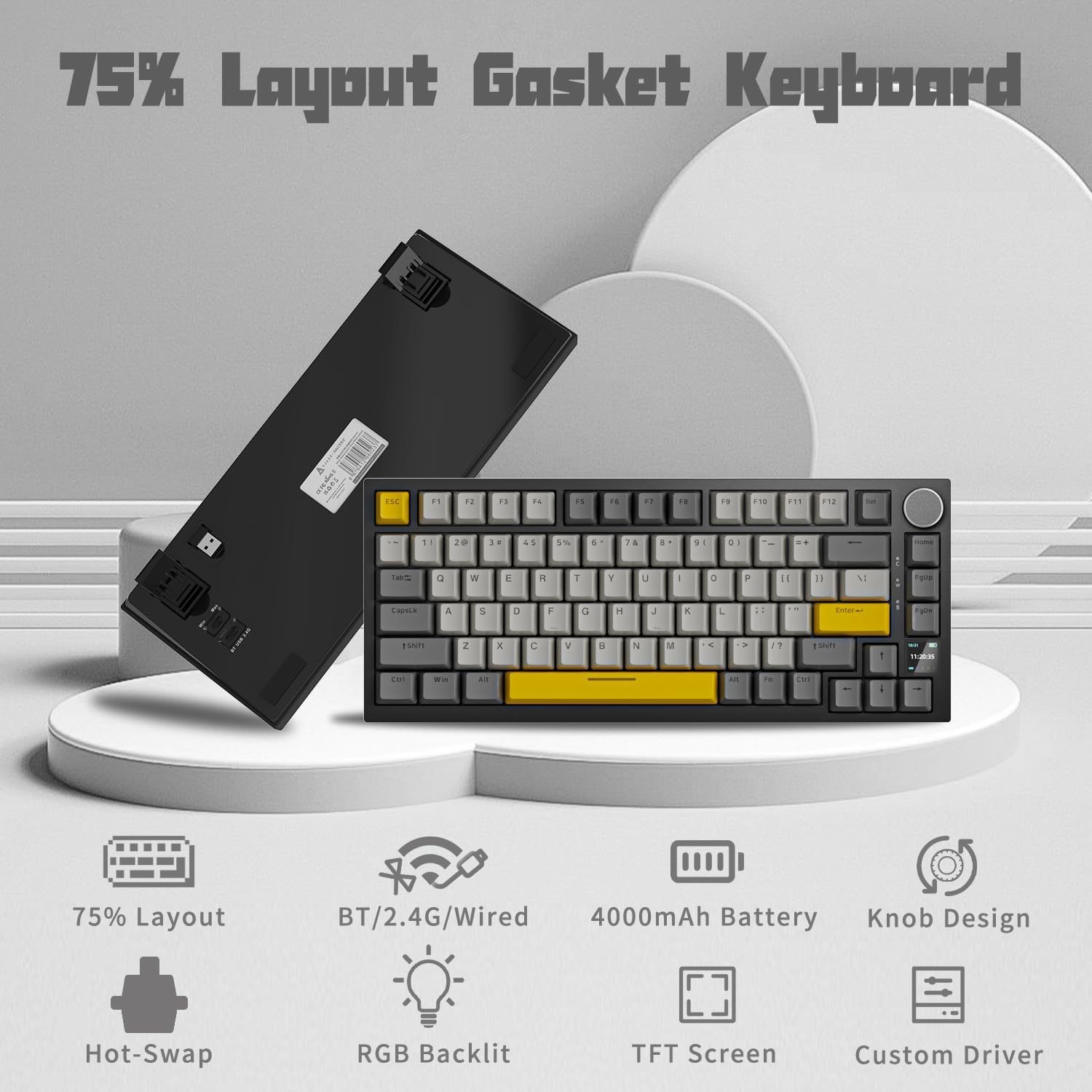
Image: Overview of the keyboard's key features, including its 75% layout, multi-mode connectivity, 4000mAh battery, knob design, hot-swap capability, RGB backlight, TFT screen, and custom driver.
Setup
Package Contents
- AJAZZ AK820PRO Gaming Keyboard
- USB Type-C Cable
- 2.4GHz USB Receiver
Connecting Your Keyboard
The AK820PRO offers three connection methods: wired, 2.4GHz wireless, and Bluetooth.
Wired Connection
- Locate the USB Type-C port on the keyboard.
- Connect one end of the provided USB Type-C cable to the keyboard.
- Connect the other end of the cable to an available USB port on your computer.
- The keyboard will be automatically recognized and ready for use.
2.4GHz Wireless Connection
- Locate the 2.4GHz USB receiver, typically stored in a compartment on the underside of the keyboard.
- Plug the 2.4GHz USB receiver into an available USB port on your computer.
- On the underside of the keyboard, switch the connection mode toggle to '2.4G'.
- The keyboard will automatically connect to the receiver. The TFT screen may display the connection status.
Bluetooth Connection
- On the underside of the keyboard, switch the connection mode toggle to 'BT'.
- The keyboard will enter pairing mode. The TFT screen may indicate Bluetooth pairing.
- On your computer or device, open Bluetooth settings and search for new devices.
- Select 'AJAZZ AK820PRO' from the list of available devices to pair.
- Once paired, the keyboard is ready for use. The keyboard supports connecting to up to three Bluetooth devices.

Image: The keyboard connected via USB-C, showcasing its 4000mAh rechargeable battery and multi-mode connectivity options: Bluetooth 5.0, Wireless 2.4Ghz, and Wired Type-C.
Adjusting Keyboard Angle
The keyboard features adjustable foot pads on its underside. Flip these out to raise the rear of the keyboard for a more ergonomic typing angle.

Image: Underside of the keyboard showing the adjustable foot pads, the 2.4GHz USB receiver storage, and the mode switches for Windows/Mac and Bluetooth/2.4G/USB.
Operating Instructions
Volume Knob Functions
The multi-functional knob located on the top right of the keyboard controls various settings:
- Rotate: Adjusts system volume (default).
- Press: Mutes/unmutes audio (default).
- Press and Hold (3 seconds): Enters the knob function menu on the TFT screen. From this menu, you can navigate options such as LED effects, colors, battery status, time & date, and language switching.

Image: Close-up of the keyboard's knob, illustrating its functions for volume control, RGB hotkey, LED effects, and language switching via the TFT screen.
TFT Colorful Screen
The 0.85-inch TFT screen provides real-time information and customization options:
- Default Display: Shows current time and date, battery level, and connection mode.
- Customization: Using the dedicated software, you can upload custom images or GIFs to display on the screen.
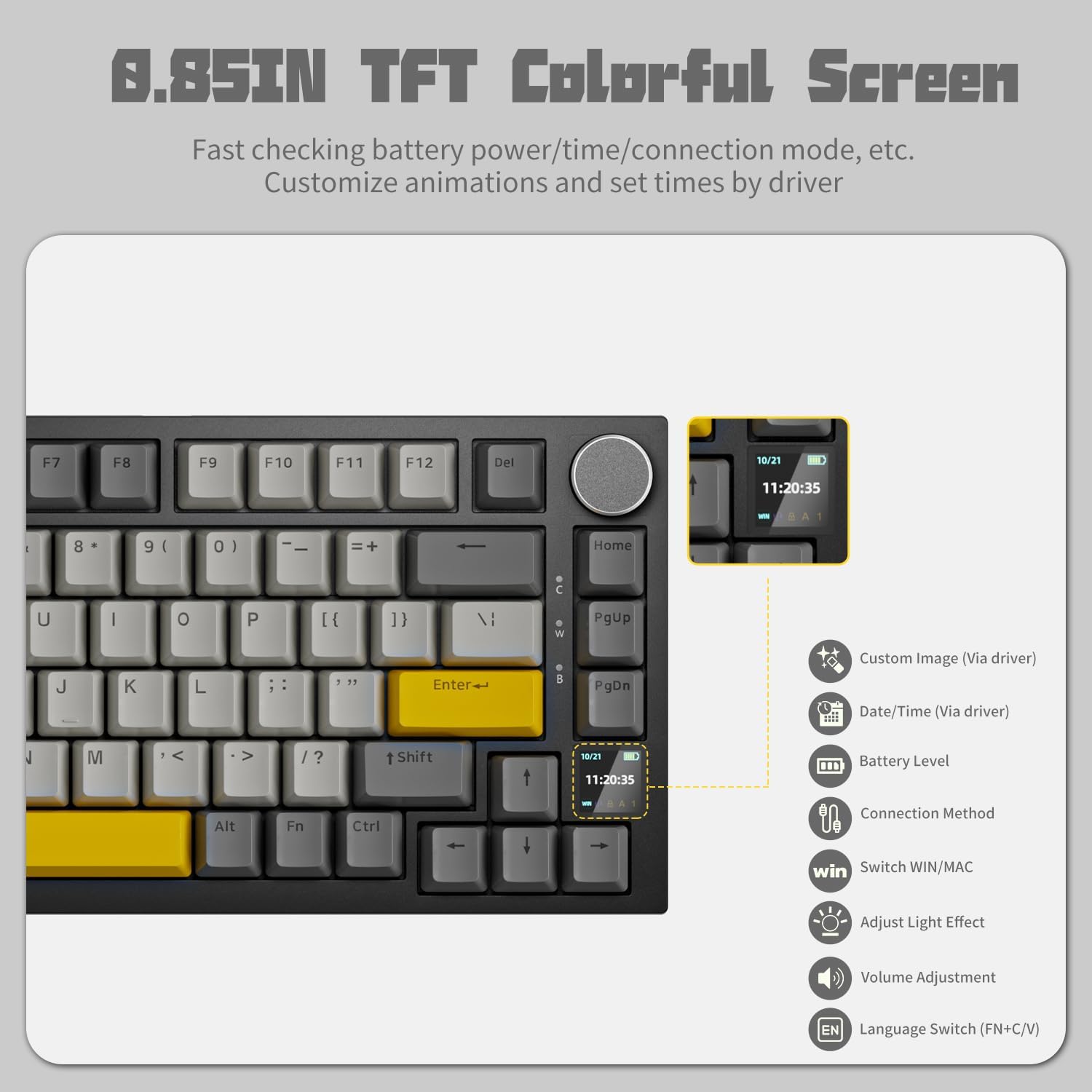
Image: The 0.85-inch TFT colorful screen displaying time and connection status, with icons indicating customizable options like custom images, date/time, battery level, connection method, Win/Mac switch, light effect adjustment, volume adjustment, and language switch.
RGB Backlighting
The keyboard features programmable RGB backlighting with various effects:
- Cycle Effects: Use Fn + \| to switch between 20 different backlight effects.
- Adjust Colors: Use Fn + Left/Right Arrow keys to cycle through colors.
- Adjust Brightness: Use Fn + Up/Down Arrow keys to adjust brightness.
- Software Customization: For advanced control and custom lighting profiles, use the AJAZZ driver software.

Image: The keyboard displaying various programmable RGB backlight effects, showing different color patterns across the keys.
Hot-Swappable Switches
The AK820PRO supports hot-swappable switches, allowing you to change mechanical switches without soldering. It is compatible with 3-pin and 5-pin switches.
- Removing Switches: Use the included switch puller tool to gently pull the switch upwards from the keyboard plate.
- Installing Switches: Align the pins of the new switch with the holes on the PCB and press down gently until it clicks into place. Ensure pins are straight to avoid bending.

Image: The keyboard highlighting its hot-swappable feature, showing a switch being removed and the underlying PCB with south-facing RGB LEDs.
Key Functions and Shortcuts
The keyboard includes various function key shortcuts:
- Fn + Win: Locks/unlocks the Windows key.
- Fn + F10: Mute audio.
- Fn + F11: Volume down.
- Fn + F12: Volume up.
- Fn + Spacebar (hold 3 seconds): Resets keyboard to factory default settings.
- Fn + PgUp: Print Screen.
Software Installation and Use
For full customization of RGB lighting, TFT screen, and macro programming, download the official AJAZZ driver software from the AJAZZ website. Ensure you download the correct version for your operating system (Windows/Mac).

Image: Screenshot of the AJAZZ software interface for customizing light effects, showing various modes, color selection, brightness, and speed controls.

Image: Screenshot of the AJAZZ software interface for customizing the LED screen, allowing users to preview and upload images or GIFs.
Official Product Video
Video: An official product video showcasing the AJAZZ AK820PRO 75% Hot Swappable Keyboard, highlighting its features and design.
Maintenance
- Cleaning Keycaps: Use a soft, damp cloth to wipe down keycaps. For deeper cleaning, remove keycaps using the included keycap puller and wash them with mild soap and water. Ensure they are completely dry before reattaching.
- Cleaning the Keyboard Body: Use a dry, soft cloth to wipe the keyboard body. Avoid using harsh chemicals or abrasive materials.
- Dust Removal: Use compressed air to remove dust and debris from between the keycaps and under the switches.
- Battery Care: To prolong battery life, avoid fully discharging the keyboard frequently. Store in a cool, dry place when not in use for extended periods.
Troubleshooting
| Problem | Possible Cause | Solution |
|---|---|---|
| Keyboard not responding (wired) | Loose cable connection, faulty USB port, driver issue. | Ensure USB-C cable is securely connected. Try a different USB port or cable. Restart your computer. |
| Keyboard not connecting (wireless) | Incorrect mode selected, low battery, pairing issue, receiver not plugged in. | Check the mode switch (2.4G/BT). Charge the keyboard. Re-pair Bluetooth or re-insert 2.4GHz receiver. Ensure receiver is fully inserted. |
| RGB lighting not working or stuck | Software conflict, incorrect settings. | Use Fn + \| to cycle effects. Adjust brightness with Fn + Up/Down. Check software settings. Perform a factory reset (Fn + Spacebar for 3 seconds). |
| TFT screen not displaying correctly | Software issue, custom GIF/image problem. | Ensure the keyboard is connected to the software. Try resetting the keyboard. Re-upload custom content if applicable. |
| Software is partially in Chinese | Language setting issue within the software. | Check the language settings within the AJAZZ driver software. If the option is available, select English. If not, ensure you downloaded the English version of the software from the official website. |
| Indicator lights are too bright | Design characteristic. | This is a known characteristic. There is no direct software control to dim these specific indicator lights. |
Specifications
| Feature | Detail |
|---|---|
| Model Number | AK820PRO |
| Product Dimensions | 17.33 x 17.32 x 0.98 inches |
| Item Weight | 1.79 pounds |
| Connectivity Technology | Bluetooth, 2.4GHz Wireless, Wired (USB Type-C) |
| Number of Keys | 82 |
| Battery | 1 A battery required (included) - 4000mAh |
| Language | English |
| First Available Date | October 15, 2023 |
Warranty and Support
For warranty information and technical support, please refer to the official AJAZZ website or contact their customer service directly. Keep your proof of purchase for any warranty claims.
Related documentsAK820PRO


Ask a question about this manual
Ask about setup, troubleshooting, compatibility, parts, safety, or missing instructions. Manuals+ will review the question and use this page’s manual context to help answer it.