
1. Product Overview
The MRCARTOOL HT822 8KW 12V Diesel Parking Heater is designed to provide efficient and reliable heating for various vehicles and spaces, including RVs, boats, trucks, and other applications. This air heater features four warm air outlets, ensuring rapid and even heat distribution. It operates with low fuel consumption and produces minimal noise, creating a comfortable and quiet environment.

Figure 1: Key features of the MRCARTOOL HT822 Diesel Parking Heater.
Key features include:
- 8KW Heating Power: Provides powerful and rapid heating.
- 12V Rated Voltage: Compatible with standard 12V vehicle electrical systems.
- 4 Warm Air Outlets: Ensures efficient and widespread heat distribution.
- Low Fuel Consumption: Designed for economical operation.
- Low Noise Operation: Equipped with a unique muffler for a quiet heating experience.
- Remote Control & LCD Panel: Offers convenient control options.
- Scheduled & Automatic Shutdown: Enhances safety and convenience.

Figure 2: Wide applicability of the MRCARTOOL HT822 Diesel Parking Heater.
2. Product Components and Dimensions
The MRCARTOOL HT822 Diesel Parking Heater comes with all necessary components for installation and operation. Familiarize yourself with the parts before proceeding with setup.
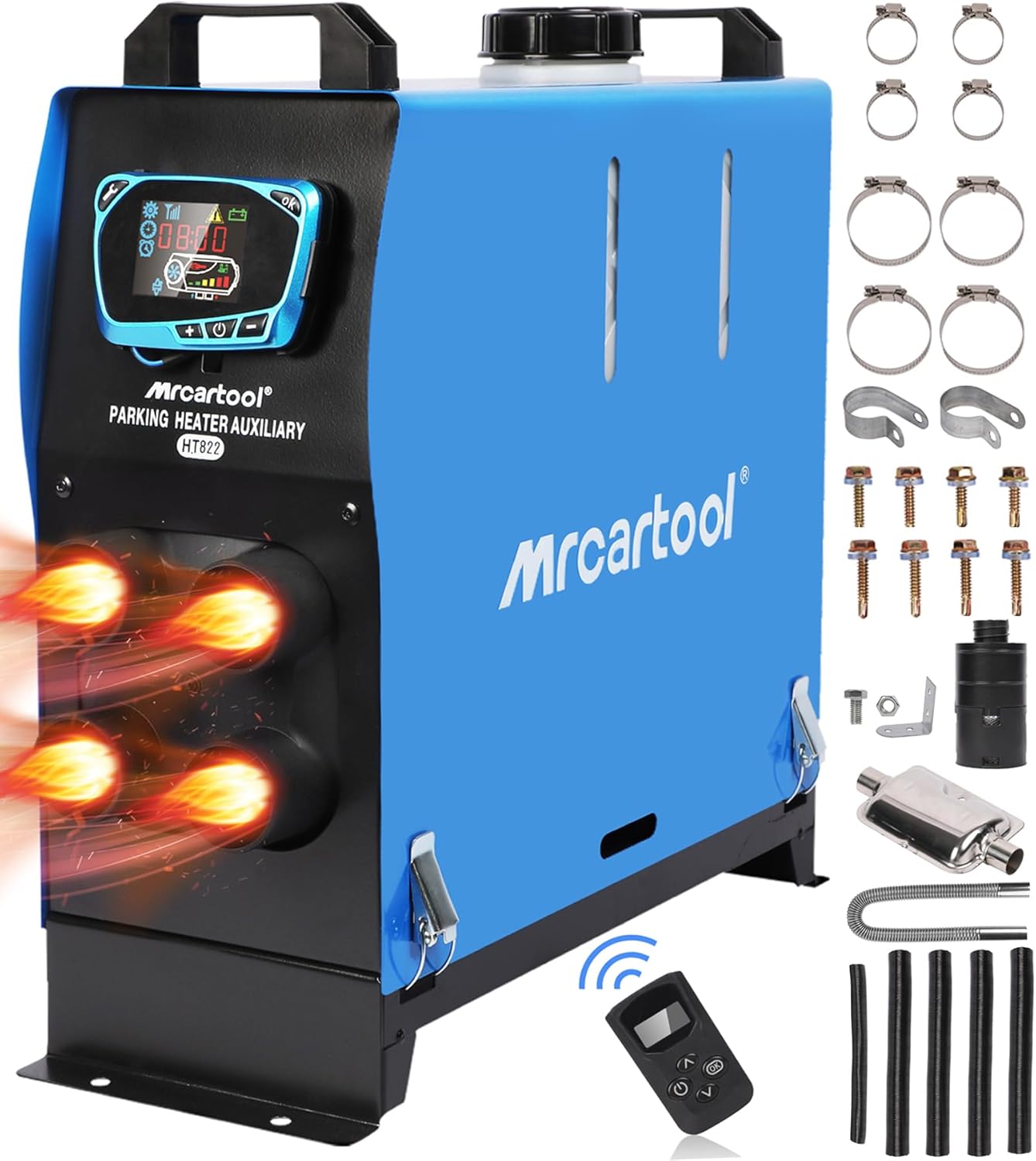
Figure 3: MRCARTOOL HT822 Diesel Parking Heater and its included accessories.
Included components typically consist of:
- Main Heater Unit
- Remote Control
- Muffler
- Fuel Filter
- Fuel Tank (integrated)
- Exhaust Pipe
- Air Intake Pipe
- Hose Clamps
- Mounting Screws and Brackets
- Power Cables
- User Manual

Figure 4: Product dimensions and detailed view of included parts.
3. Setup and Installation
Proper installation is crucial for the safe and efficient operation of your diesel parking heater. Please follow these guidelines carefully. Refer to the installation diagram for visual assistance.

Figure 5: Installation guidance diagram for the diesel heater.
3.1 Safety Precautions
- Ensure the installation area is well-ventilated.
- Disconnect the vehicle's battery before starting installation.
- Do not install the heater in areas where flammable materials are present.
- Ensure all connections are secure to prevent leaks or electrical shorts.
- The voltage must not exceed 12V.
3.2 Installation Steps
- Mounting the Heater: Securely mount the main heater unit using the provided brackets and screws. Ensure it is on a stable, flat surface.
- Fuel Connection: Connect the fuel line from the heater to the integrated 5L fuel tank. Observe the fuel level through the sight window.
- Electrical Connection: Connect the heater to a 12V power source (vehicle battery) ensuring correct polarity. Install the fuse as indicated in the diagram.
- Exhaust System: Attach the exhaust pipe and muffler. The muffler must be installed according to the sketch map, with the small hole oriented downwards to allow for condensation drainage.
- Air Intake: Connect the air intake pipe. The inlet and exhaust ports must be installed in two opposite directions to prevent exhaust gases from being drawn into the intake.
- Hot Air Outlets: Connect the four hot air pipes to the outlets and direct them to the desired heating areas.
- Final Check: Double-check all connections for tightness and proper routing. Ensure no pipes are kinked or blocked.
4. Operating Instructions
The MRCARTOOL HT822 heater can be operated using its intelligent LCD control panel or the included remote control.
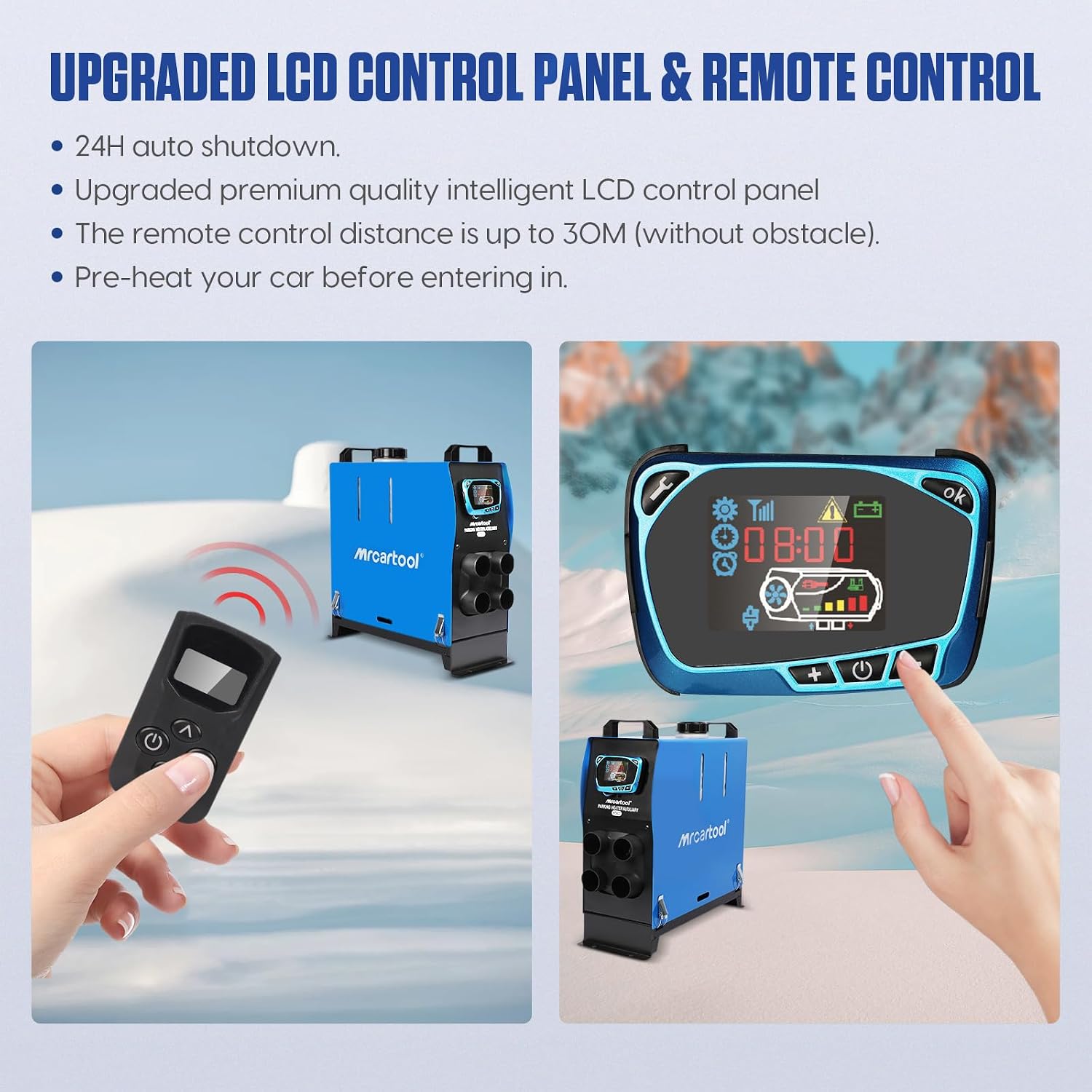
Figure 6: LCD Control Panel and Remote Control.
4.1 LCD Control Panel
- Power On/Off: Press and hold the power button to turn the heater on or off.
- Temperature Adjustment: Use the '+' and '-' buttons to set the desired temperature.
- Mode Selection: Navigate through different modes (e.g., fan speed, heating power) using the menu button.
- Scheduled Shutdown: Access the timer settings to program a specific shutdown time.
- The LCD screen displays current time, temperature, operating status, and error codes.
4.2 Remote Control
The remote control allows you to operate the heater from a distance of up to 30 meters (without obstacles). It can be used to pre-heat your vehicle before entry.
- Power On/Off: Use the dedicated power button on the remote.
- Temperature/Power Adjustment: Use the up/down buttons to adjust settings.
- Confirmation: Use the 'OK' button to confirm selections.
4.3 Automatic Shutdown Features

Figure 7: 24-hour automatic shutdown and low noise operation.
- 24-Hour Auto Shutdown: The heater features a 24-hour working timer and will automatically shut down if you forget to turn it off, enhancing safety.
- Thermostat Control: The diesel heater is controlled by a thermostat and includes multiple self-protection devices to prevent overheating and other hazardous situations.
4.4 Fuel Level and Air Outlets

Figure 8: Detail view of air outlets, LCD panel, and fuel level indicator.
- The fuel sight window clearly indicates the diesel level, allowing you to monitor fuel consumption.
- The four warm air outlets ensure efficient heating of your space.
5. Maintenance
Regular maintenance ensures the longevity and optimal performance of your MRCARTOOL HT822 Diesel Parking Heater.
- Fuel Level Check: Regularly check the fuel level through the sight window and refill as needed. Use only recommended diesel fuel.
- Cleaning: Periodically clean the exterior of the heater with a soft, damp cloth. Ensure air intake and exhaust ports are free from obstructions.
- Connection Inspection: Annually inspect all fuel lines, electrical connections, and air ducts for any signs of wear, damage, or leaks. Tighten any loose connections.
- Air Filter: If applicable, clean or replace the air filter according to the manufacturer's recommendations to ensure proper airflow.
- Storage: If storing the heater for an extended period, ensure the fuel tank is empty and the unit is clean and dry. Store in a cool, dry place.
6. Troubleshooting
This section provides solutions to common issues you might encounter with your diesel parking heater.
6.1 Common Issues and Solutions
| Problem | Possible Cause | Solution |
|---|---|---|
| Heater does not start | No power, low fuel, clogged fuel line, faulty glow plug. | Check battery connection and voltage. Ensure sufficient fuel. Inspect fuel line for blockages. Consult service for glow plug replacement. |
| Error Code E08 | Typically indicates a fan motor fault or blockage. | Check for obstructions in the air intake or exhaust. Ensure the fan spins freely. If the issue persists, contact customer support. |
| Low heat output | Clogged air filter, insufficient fuel, incorrect settings. | Clean or replace air filter. Ensure adequate fuel supply. Adjust temperature settings on LCD panel or remote. |
| Excessive smoke | Poor fuel quality, incorrect fuel-air mixture, carbon buildup. | Use high-quality diesel fuel. Perform a burn-off cycle at high temperature. If persistent, professional cleaning may be required. |
If you encounter an issue not listed here or if troubleshooting steps do not resolve the problem, please contact MRCARTOOL customer support.
7. Specifications
Detailed technical specifications for the MRCARTOOL HT822 Diesel Parking Heater.
| Specification | Value |
|---|---|
| Brand | MR CARTOOL |
| Model Number | HT822 |
| Heating Power | 8KW |
| Rated Voltage | 12V |
| Fuel Type | Diesel |
| Product Dimensions (L x W x H) | 41 x 15 x 37 cm (16.22 x 5.82 x 14.64 inches) |
| Item Weight | 8 Kilograms |
| Remote Control Range | Up to 30M (without obstacle) |
8. Warranty and Customer Support
MRCARTOOL is committed to providing high-quality products and excellent customer service.
8.1 Warranty Information
Your MRCARTOOL HT822 Diesel Parking Heater comes with a manufacturer's warranty. Please refer to the warranty card included in your product packaging for specific terms and conditions. This warranty typically covers defects in materials and workmanship under normal use.
8.2 Customer Support
MRCARTOOL offers friendly and professional 7x24H customer service to ensure your satisfaction. If you have any problems with your autonomous air heater, require technical assistance, or have questions regarding installation or operation, please do not hesitate to contact us directly.
For support, please visit the official MRCARTOOL website or use the contact information provided in your product documentation.