
JIGUUN 5000W24V
JIGUUN 5000W 24V to 220V Pure Sine Wave Inverter User Manual
Model: 5000W24V
Introduction
This manual provides essential information for the safe and efficient operation of your JIGUUN 5000W Pure Sine Wave Inverter. Please read these instructions carefully before installation and use. Keep this manual for future reference.
The JIGUUN 5000W Pure Sine Wave Inverter, shown connected to a toaster and coffee machine, demonstrating its capability to power household appliances.
Important Safety Instructions
Failure to follow these safety guidelines may result in electric shock, fire, or serious injury.
- Read All Instructions: Before operating the inverter, read all instructions and cautionary markings on the inverter, the batteries, and all appropriate sections of this manual.
- Ventilation: Ensure adequate ventilation around the inverter. Do not install in a zero-clearance compartment.
- Avoid Moisture: Do not expose the inverter to rain, snow, spray, or bilge water.
- Proper Battery Connection: Connect the inverter only to a 24V DC power source. Incorrect voltage can damage the inverter and connected devices.
- Grounding: The inverter must be properly grounded.
- Avoid Overload: Do not exceed the inverter's continuous power rating. Ensure the total wattage of connected appliances is within the inverter's capacity.
- Keep Away from Children: This device is not a toy. Keep it out of reach of children.
- Professional Installation: If you are unsure about any installation steps, consult a qualified electrician.
Package Contents
Verify that all items are present in your package:
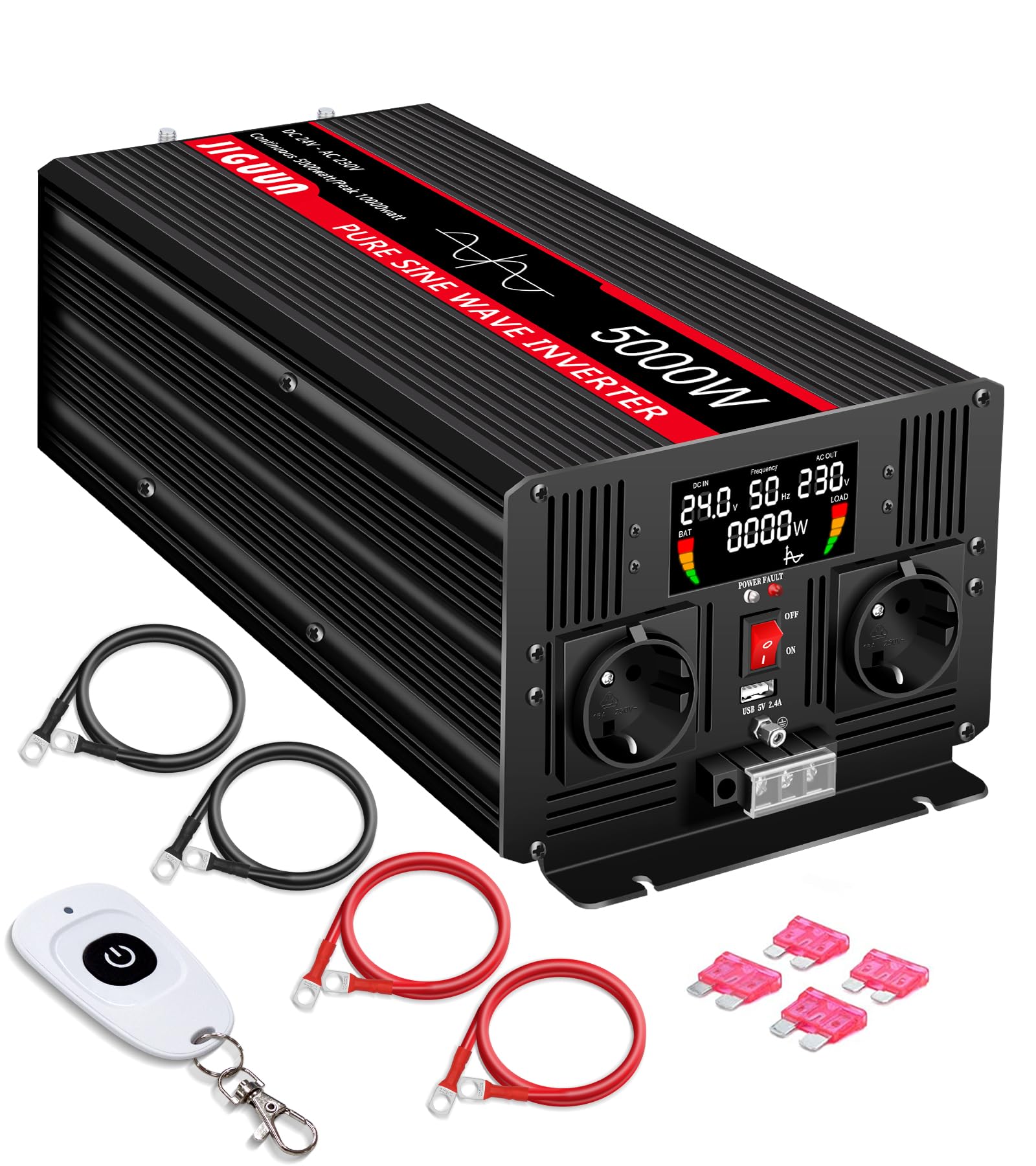
- 1 x JIGUUN 5000W 24V to 220V Pure Sine Wave Inverter
- 1 x User Manual
- 2 x Red Battery Cables
- 2 x Black Battery Cables
- 1 x Wireless Remote Control
- Spare Fuses

An illustration showing the JIGUUN 5000W Pure Sine Wave Inverter along with its included accessories: user manual, wireless remote, battery cables, and spare fuses.
Product Overview
Familiarize yourself with the components of your inverter.

Detailed view of the inverter's front and rear panels, highlighting the LCD display, power indicator, ON/OFF switch, USB 2.4A ports, AC ground terminal, AC outlets, DC positive and negative terminals, and cooling fans.
Front Panel Features
- LCD Display: Shows input/output voltage, frequency, and load power.
- Power Indicator: Illuminates to show operational status.
- ON/OFF Switch: Controls the inverter's power.
- USB 2.4A Ports: For charging USB-powered devices.
- AC Outlets (x2): Standard EU outlets for connecting AC appliances.
- AC Ground Terminal: For safety grounding.
Rear Panel Features
- DC Positive Terminal: Connects to the positive terminal of the 24V battery.
- DC Negative Terminal: Connects to the negative terminal of the 24V battery.
- Cooling Fans (x2): Automatically activate to dissipate heat when temperature exceeds 45°C.
LCD Display

The intelligent LCD display provides real-time information including battery level, load level, DC input voltage, AC output voltage, output frequency, and current load power.
The LCD display provides real-time monitoring of the inverter's status:
- Battery Level Bar
- Loads Level Bar
- DC Input Voltage (V)
- AC Output Voltage (V)
- Output Frequency (Hz)
- Load Power (W)
Wireless Remote Control

The wireless remote control allows convenient operation of the inverter from a distance, even when the inverter is installed in less accessible locations.
The included wireless remote control allows you to power the inverter ON or OFF from a distance, providing convenience especially when the inverter is installed in hard-to-reach areas.
Installation and Setup
Choosing a Location
Select a location that is:
- Dry and well-ventilated.
- Away from direct sunlight and heat sources.
- Protected from moisture, dust, and corrosive fumes.
- Securely mounted to prevent movement.
Battery Connection
Connect the inverter to a 24V DC battery bank. Ensure correct polarity.
- Connect the RED battery cable to the inverter's DC Positive (+) terminal and the battery's positive (+) terminal.
- Connect the BLACK battery cable to the inverter's DC Negative (-) terminal and the battery's negative (-) terminal.
- Ensure all connections are tight and secure. Loose connections can cause overheating and damage.

Connection diagram illustrating how the inverter receives input from a battery (potentially charged by solar panels via an MPPT controller) and provides output to various AC appliances like electric drills, refrigerators, lights, mobile phones, and computers.
AC Output Connection
Plug your 220V/230V AC appliances directly into the inverter's AC outlets. For permanent installations, use the AC hardwire terminals.

The AC hardwire terminals provide a secure connection for permanent wiring of AC loads.
Grounding
Connect the inverter's chassis ground terminal to a proper earth ground or vehicle chassis using a suitable gauge wire.
Compatible Battery Types

The inverter is compatible with various battery types, including GEL, SLA, FLD, AGM, CLA, USER-defined, and Lithium (LI) batteries.
The JIGUUN inverter is designed to be compatible with a wide range of 24V battery types, including:
- GEL batteries
- SLA (Sealed Lead Acid) batteries
- FLD (Flooded Lead Acid) batteries
- AGM (Absorbent Glass Mat) batteries
- CLA (Calcium Lead Acid) batteries
- USER-defined battery types
- LI (Lithium) batteries
Operation
Powering On/Off
- Ensure all DC and AC connections are secure.
- Press the ON/OFF switch on the inverter's front panel to turn it on. The LCD display will illuminate.
- To turn off, press the ON/OFF switch again.
Using the LCD Display
The LCD display provides real-time feedback on the inverter's performance. Monitor the input voltage to ensure your battery is adequately charged and the output power to avoid overloading.
Using the Wireless Remote
The wireless remote control can be used to power the inverter ON or OFF from a distance. Simply press the power button on the remote to toggle the inverter's state.
Connecting Appliances
Plug your 220V/230V AC appliances into the inverter's AC outlets. For USB charging, use the dedicated USB 2.4A ports. Always ensure the total power consumption of connected devices does not exceed the inverter's continuous output power of 5000W.
Protection Features
The JIGUUN inverter incorporates multiple protection mechanisms to ensure safe and reliable operation:

The inverter is equipped with comprehensive protection features including temperature control, overload, short circuit, over voltage, low voltage, and surge protection.
- Temperature Control: Integrated cooling fans activate automatically when the internal temperature exceeds 45°C to prevent overheating.
- Overload Protection: The inverter will shut down if the connected load exceeds its rated capacity.
- Short Circuit Protection: Protects against damage from short circuits in the output.
- Over Voltage Protection: Safeguards the inverter and connected devices from excessive input voltage.
- Low Voltage Protection: Shuts down the inverter to prevent deep discharge of the battery.
- Surge Protection: Protects against sudden voltage spikes.
Maintenance
Regular maintenance ensures optimal performance and longevity of your inverter.
- Cleaning: Keep the inverter clean and free from dust. Use a dry cloth to wipe the exterior. Do not use liquid cleaners.
- Ventilation: Ensure the cooling vents are not blocked. Periodically check for dust buildup in the fan area.
- Connections: Periodically check all DC and AC connections for tightness. Loose connections can cause power loss or overheating.
- Battery Health: Monitor your battery's health and charge level, especially during prolonged use or storage.
Troubleshooting
If you encounter issues, refer to the following common problems and solutions:
| Problem | Possible Cause | Solution |
|---|---|---|
| No AC output / Inverter not turning on | Low battery voltage, loose connections, blown fuse, inverter switch off. | Check battery voltage (must be 24V or higher). Tighten all DC connections. Check and replace fuses if necessary. Ensure ON/OFF switch is pressed. |
| Low voltage alarm | Battery voltage is too low. | Recharge or replace the battery. Disconnect loads to prevent deep discharge. |
| Overload alarm / Inverter shuts down | Connected load exceeds inverter's capacity. | Reduce the total wattage of connected appliances. Check appliance power ratings. |
| Over-temperature shutdown | Inverter is overheating due to poor ventilation or excessive load. | Ensure adequate ventilation around the inverter. Clear any obstructions from cooling vents. Reduce load. |
| No power from USB port | Inverter is off, or USB device is incompatible. | Ensure inverter is powered on. Try a different USB device. |
Specifications
Technical specifications for the JIGUUN 5000W Pure Sine Wave Inverter:
| Feature | Value |
|---|---|
| Brand | JIGUUN |
| Model Number | 5000W24V |
| Continuous Output Power | 5000 Watts |
| Peak Output Power | 10000 Watts |
| Input Voltage | 24 Volts DC (26 Volts DC nominal) |
| Output Voltage | 220-240 Volts AC |
| Output Waveform | Pure Sine Wave |
| Frequency | 50 Hz |
| Conversion Efficiency | >90% |
| Display Type | LCD |
| Number of AC Outlets | 2 |
| USB Ports | 1 (2.4A) |
| Dimensions (L x W x H) | 40.5 x 16.5 x 11 cm |
| Weight | 7 Kilograms |
| Recommended Uses | Vehicles, Office, Home, Camping, Caravan, Travel, Boat, Emergencies |
| Certifications | CE |
Warranty and Support
Your JIGUUN 5000W Pure Sine Wave Inverter comes with a comprehensive warranty and dedicated customer support.
Warranty Information
The product is covered by a one-year free replacement warranty from the date of purchase. This warranty covers manufacturing defects and malfunctions under normal use. Please retain your proof of purchase for warranty claims.
Customer Support
If you have any questions, require technical assistance, or need to make a warranty claim, please contact JIGUUN customer service. The JIGUUN team is committed to resolving any issues you may encounter.
For support, please refer to the contact information provided in your product packaging or visit the official JIGUUN website.
Related documents5000W24V

Ask a question about this manual
Ask about setup, troubleshooting, compatibility, parts, safety, or missing instructions. Manuals+ will review the question and use this page’s manual context to help answer it.