
SYLSTAR 2400LM LED Work Light
SYLSTAR 2400LM LED Rechargeable Magnetic Work Light Instruction Manual
Model: 2400LM LED Work Light
Product Overview
The SYLSTAR 2400LM LED Work Light is a versatile and powerful lighting solution designed for various tasks, including car repair, inspection, garage work, and emergency situations. It features a dual-function design, allowing it to be used as two independent handheld lights or connected for extended illumination. With multiple brightness modes, strong magnetic bases, and 360-degree swivel hooks, this rechargeable work light provides adaptable and reliable lighting.
Package Contents
- 2 x SYLSTAR 2400LM LED Work Lights
- 2 x Type-C Charging Cables
- User Manual
Setup and Assembly
Connecting the Lights (Dual Function)
The two work lights can be connected together via the male-female lock mechanism located at one end of each light. Align the connectors and gently push them together until they securely lock, forming a single, longer light bar for increased brightness and coverage.

Image: Two SYLSTAR work lights connected via their male-female lock, forming a single light bar. This configuration provides extended illumination, ideal for larger work areas like under a car hood.

Image: Illustration demonstrating the dual functionality of the work lights. They can be used individually as handheld lights or joined together to create a longer, more powerful light source.
Mounting Options
- Magnetic Attachment: Each light features two powerful magnets at one end. These magnets allow the light to be securely attached to any magnetic metal surface, such as the underside of a car bonnet, metal shelves, or toolboxes.
- Swivel Hooks: Concealed 360-degree swivel hooks are located at both ends of each light. These hooks can be extended and rotated to hang the light in various positions where magnetic attachment is not possible, providing flexible lighting angles.

Image: The work light demonstrating its strong magnetic bases, attaching firmly to a car's wheel well and under the hood, providing hands-free illumination.
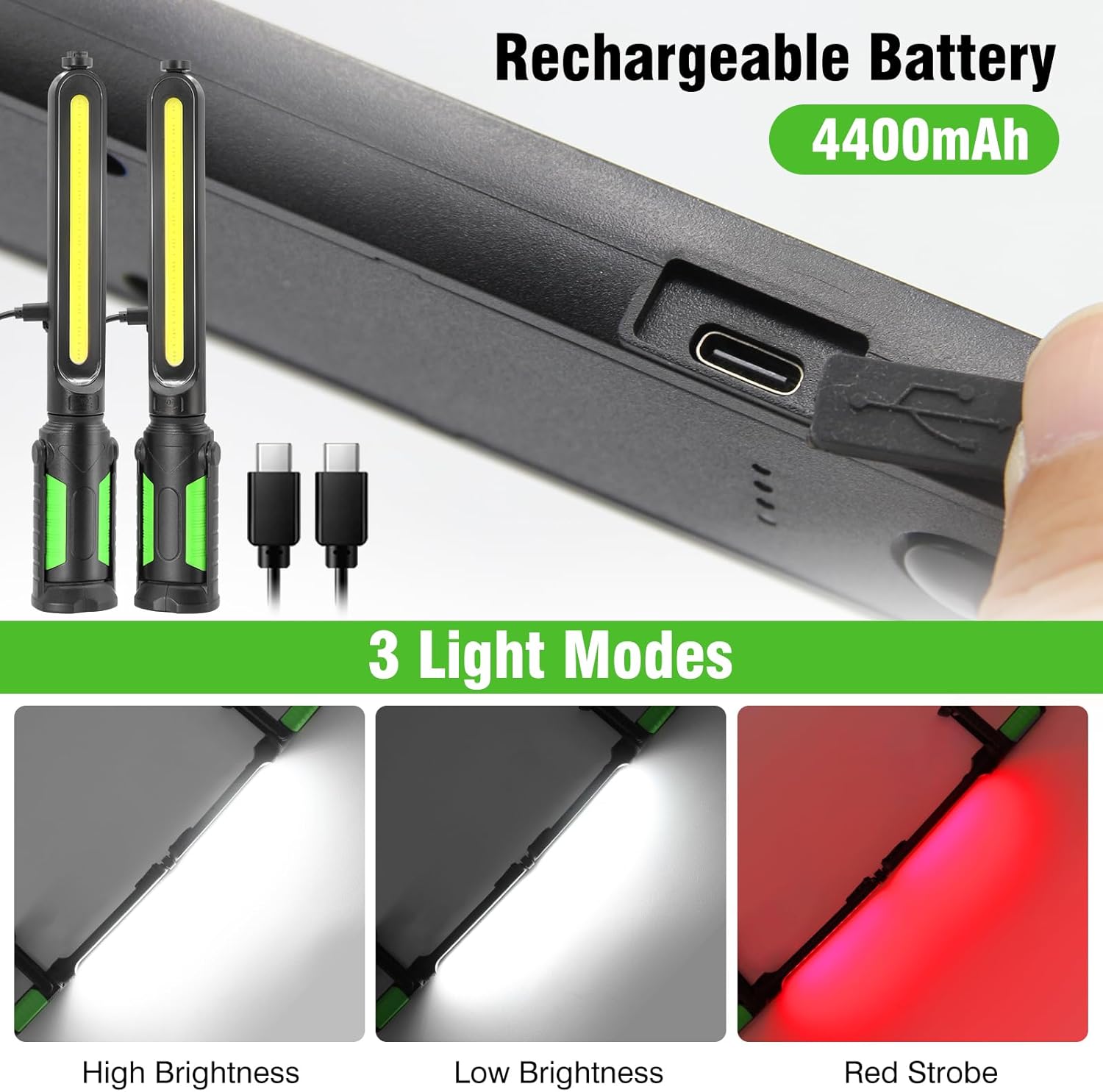
Image: The work light suspended by its 360-degree swivel hooks, illustrating its adaptability for hanging in various work environments, such as a workshop.
Operating Instructions
Powering On/Off and Mode Selection
Locate the power button on the side of the light. Press the button to cycle through the available lighting modes:
- High Brightness: Provides up to 2400 lumens for maximum illumination.
- Low Brightness: Offers reduced brightness for general tasks and extended battery life.
- Red Light Flash: An emergency signaling mode.
Press the button again after the red light flash mode to turn the light off.

Image: Visual representation of the three distinct lighting modes: high brightness for intense illumination, low brightness for energy efficiency, and a red strobe for emergency signaling.
Adjusting the Light Angle
The light features a 350-degree swivel body, allowing you to adjust the angle of the light bar to direct illumination precisely where needed. The base also offers a 300-degree adjustment for further positioning flexibility.

Image: The work light showcasing its flexible design, allowing for multi-angle adjustments of both the base (300°) and the lamp (350°) to optimize lighting direction.
Charging the Battery
The SYLSTAR Work Light is equipped with a built-in 4400mAh rechargeable battery. To charge the device:
- Locate the Type-C charging port, typically covered by a protective flap.
- Open the flap and insert the provided Type-C charging cable into the port.
- Connect the other end of the USB cable to a compatible USB power source (e.g., wall adapter, power bank, computer USB port).
- The 4 power indicators on the light will illuminate to show the charging status and remaining battery level. All four indicators lit means a full charge.
A full charge allows for approximately 4 hours of continuous use in high-brightness mode and 4.5 hours in low-brightness mode.
Image: The work light connected to a charging cable via its Type-C port. The blue indicator lights show the current battery charge level, allowing users to monitor power status.
Durability and Protection
The work light features an ultra-thin design and is fully protected with hard rubber, enhancing its durability against drops and impacts. It boasts an IP54 protection level, making it dustproof and resistant to water splashes, suitable for use in various challenging environments.

Image: The work light in use near a car tire with water splashing, illustrating its IP54 dustproof and splash-resistant design, ensuring reliable operation in various conditions.
Product Videos
SYLSTAR Work Light for Mechanic Overview
Video: This video provides a comprehensive overview of the SYLSTAR Work Light, demonstrating its dual functionality, magnetic and hook mounting options, 350-degree swivel, and various lighting modes, including the red emergency flash. It shows the light in action under a car hood and in a workshop setting.
Specifications
| Brand | SYLSTAR |
| Model | 2400LM LED Work Light |
| Light Source Type | LED |
| Brightness | 2400 Lumens (Maximum) |
| Battery Capacity | 4400mAh (Built-in, 2 Lithium Ion batteries) |
| Charging Port | Type-C |
| Operating Modes | High Brightness, Low Brightness, Red Light Flash |
| Mounting Type | Magnetic, 360° Swivel Hooks |
| Material | Metal, Hard Rubber |
| Protection Level | IP54 (Dustproof, Splash-resistant) |
| Product Dimensions | Approximately 13"L x 13"W x 13"H (when connected, individual lights are shorter) |
| Item Weight | 0.57 Kilograms (1.26 pounds) |
Maintenance
- Cleaning: Wipe the surface of the light with a soft, damp cloth. Do not use abrasive cleaners or solvents.
- Storage: Store the light in a cool, dry place away from direct sunlight when not in use for extended periods.
- Battery Care: To prolong battery life, avoid fully discharging the battery frequently. Recharge the light regularly, even if not in constant use.
Troubleshooting
| Problem | Possible Cause | Solution |
|---|---|---|
| Light does not turn on. | Battery is discharged. | Charge the battery using the provided Type-C cable. |
| Light is dim. | Low battery or set to low brightness mode. | Charge the battery. Press the power button to cycle to high brightness mode. |
| Lights do not connect securely. | Connectors are misaligned or obstructed. | Ensure connectors are clean and properly aligned before pushing together. |
| Magnetic attachment is weak. | Surface is not magnetic or has a thick coating. | Ensure the surface is ferrous metal and clean. Use hooks if magnetic attachment is not feasible. |
Warranty and Support
For warranty information, technical support, or any product-related inquiries, please refer to the contact details provided on the product packaging or visit the official SYLSTAR website. Keep your purchase receipt for warranty claims.
Ask a question about this manual
Ask about setup, troubleshooting, compatibility, parts, safety, or missing instructions. Manuals+ will review the question and use this page’s manual context to help answer it.